SigningHub API Guide
Download OpenAPI specification:Download
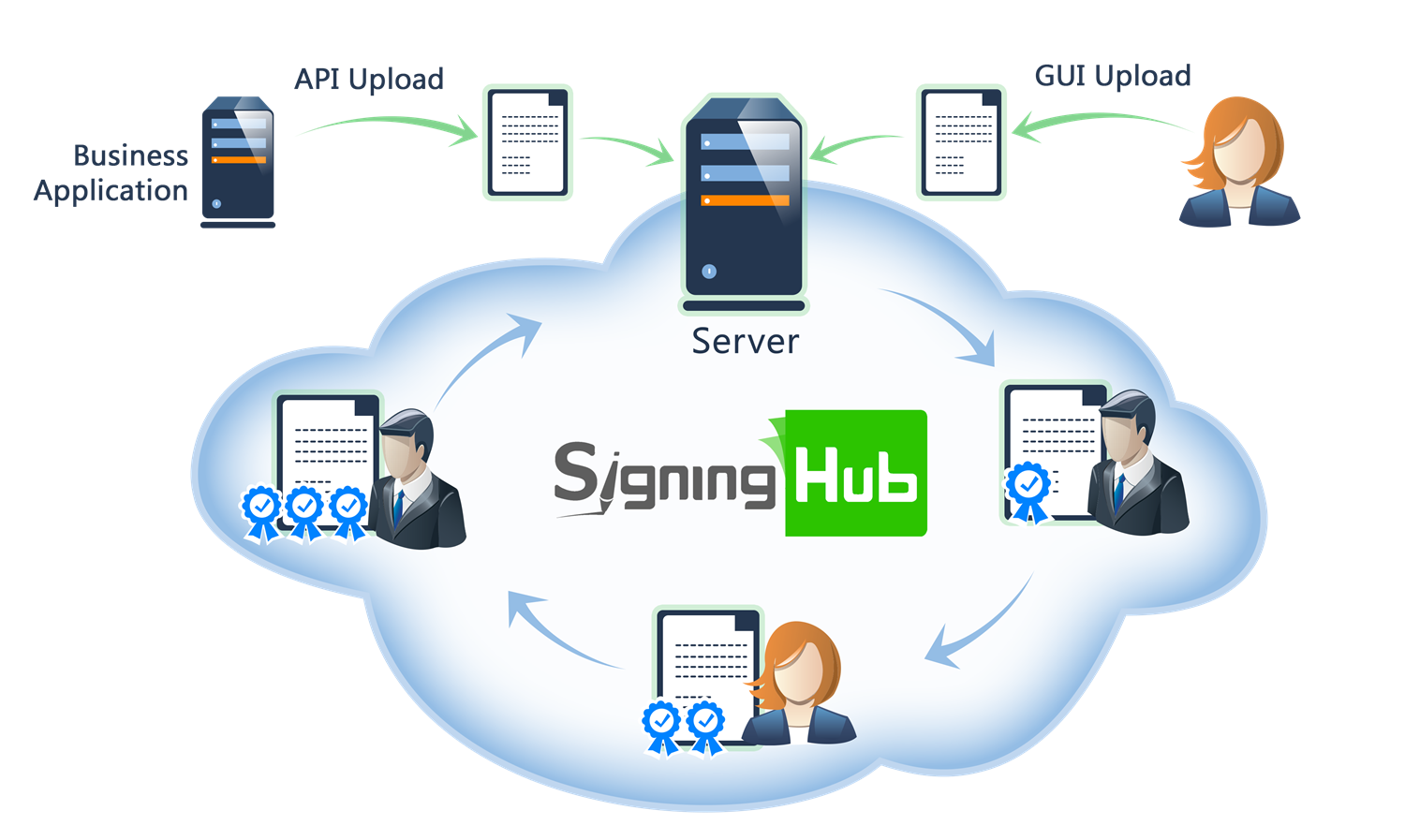
Browse through the API content by selecting the relevant pages from the left panel. To quickly find specific web service information, enter search criteria in the search box on top left.
 .
.More about SigningHub
To know more about SigningHub, explore the following links:
- Go to SigningHub Knowledge Base to view all the relevant information of SigningHub.
-
Visit the Ascertia Community Portal to find answers to contact SigningHub support staff through the
Live Chat provision
.
Our
support staff may be occupied with other priority tasks so live chat is offered on
an "as available" basis.
This guide is intended for developers who will integrate SigningHub into their respective web applications using the RESTful web services, and user interface offered by SigningHub. It is assumed that the reader has a basic knowledge of REST, Java, C#, HTML, JavaScript, HTTP and TLS/SSL. There is no Software Developers Kit (SDK) for the integration, instead the integration uses HTML Forms and JSON so that integration is simple from any language including .Net, Java, PHP etc.
| Main Tags | Most Popular Pages |
|---|---|
|
➤
Welcome
➤ Prerequisites ➤ Access Tokens ➤ Quick Integration ➤ Updates ➤ SignalR ➤ APIs Developer Guide ➤ Appendix |
➤
Authentication
➤ Account Management ➤ Add Package ➤ Upload Document ➤ Get Workflow Details ➤ Sign Document |
-
Create an Enterprise Admin account
– the business application has to connect to this account and makes JSON requests to control the signing users/recipients. The SigningHub cloud service can be used for testing and you can create a free Enterprise Admin. Once you have created the account, contact Ascertia support (support@ascertia.com) and provide the name of your enterprise to have the standard restrictions removed from your account, to allow you to fully test the web services integration option. This restriction is for number of signatures, workflows, and templates. .
-
Create an API Key
– set an Application Name, Call-back URL and generate an API Key in SigningHub, using the Enterprise Settings menu > Integrations screen. Note the Application Name and API Key. See details, how to configure an API key.
- Create workflow templates (Optional) – the workflow template defines the location of each signature field and the user that is expected to sign the document. It also defines other document and workflow control options including PDF permissions, the ability to download or print document for example. Templates may increase efficiency, especially when a standard contract or agreement is used many times. SigningHub also supports dynamic creation of signature fields for use cases where documents are created and uploaded in real time where templates may not be appropriate. .
Supported Tokens
This section provides information of supported tokens by SigningHub.
- Client Credentials Token - The Client Credentials grant type is used by clients to obtain an access token outside of the context of a user. This is typically used by clients to access resources about themselves rather than to access a user's resources. The business application should use client credentials token to authenticate themselves and to manage an enterprise or use scope token API to perform actions on behalf of the user. Click here for more details
- User Credentials Token - The Password grant type is a way to exchange a user's credentials for an access token. This is typically used to access users' resources like upload, share, etc. Enterprise Actions should be allowed in the user's role to manage them. Click here for more details
- Scope Token - The business application uses scope API to create a token that then allows the business application to perform actions on behalf of the users. This will require a business application to be authenticated first. Click here for more details
Below is the list of APIs that provides information of which api is allowed to be used by token.
- ✅ shows that API is supported
- (-) shows that API is not supported
This section provides a quick "Do this and it works" guide for developers to understand how they can integrate SigningHub features within their business applications.
Overview
SigningHub exposes an external communication channel that allows external business applications to authenticate themselves, send requests and receive responses. This integration can be done with an on-premise instance (or private cloud instance) or the public cloud service running here www.signinghub.com.
The business application uses a secure HTTPS session to pass the document and its workflow control data to SigningHub. Using this approach, SigningHub can quickly and easily integrate with business applications to provide users with document review and digital signature approval functionality.
There is no Software Development Kit (SDK) for the integration, instead, SigningHub provides REST APIs that simplify the integration and can be used with any language including .Net, Java, PHP, etc.
Integration Scenarios
There are two ways to integrate SigningHub within a business application:
- Tight Integration - The business application uses SigningHub to provide document review and digital signature functionality. Users interact with the business web application and when they get to the point where a document requires approval SigningHub is invoked to display it within an iframe. The user is unaware that SigningHub functionality is used. The user can review the entire document and sign in their defined location. Tight integration is suitable for ECM, CRM, and ERP web applications or portals where a known user already interacts in a defined way. The user login information can be used by the business application to create and connect the user to their respective SigningHub account.
-
Loose Integration - The business application sends a document to SigningHub together with control information. SigningHub creates and manages the workflow and emails each user in turn prompting them to log in, review and sign the document. Users log in and see the document within the SigningHub view and sign screen. They can review the entire document and sign in their defined location. This mode is most suitable for integration with a back-office application that has no exposed public-interface
This Quick Guide summarises how to use tight integration. The SigningHub software includes an example tight integration demo website built in .NET to help developers with web application/portal integration.
- SmartForm Integration – This integration enables seamless in-app signing experiences by embedding SmartForms directly into your web application using the SigningHub API. Users can view, fill, and sign forms without login or registration, while your system handles all notifications, routing, and status tracking. Structured fields and predefined workflows are supported, and the signing interface is securely loaded via iframe, keeping the entire process within your application.
Tight Integration
The following diagram summarizes the process for tight integration:
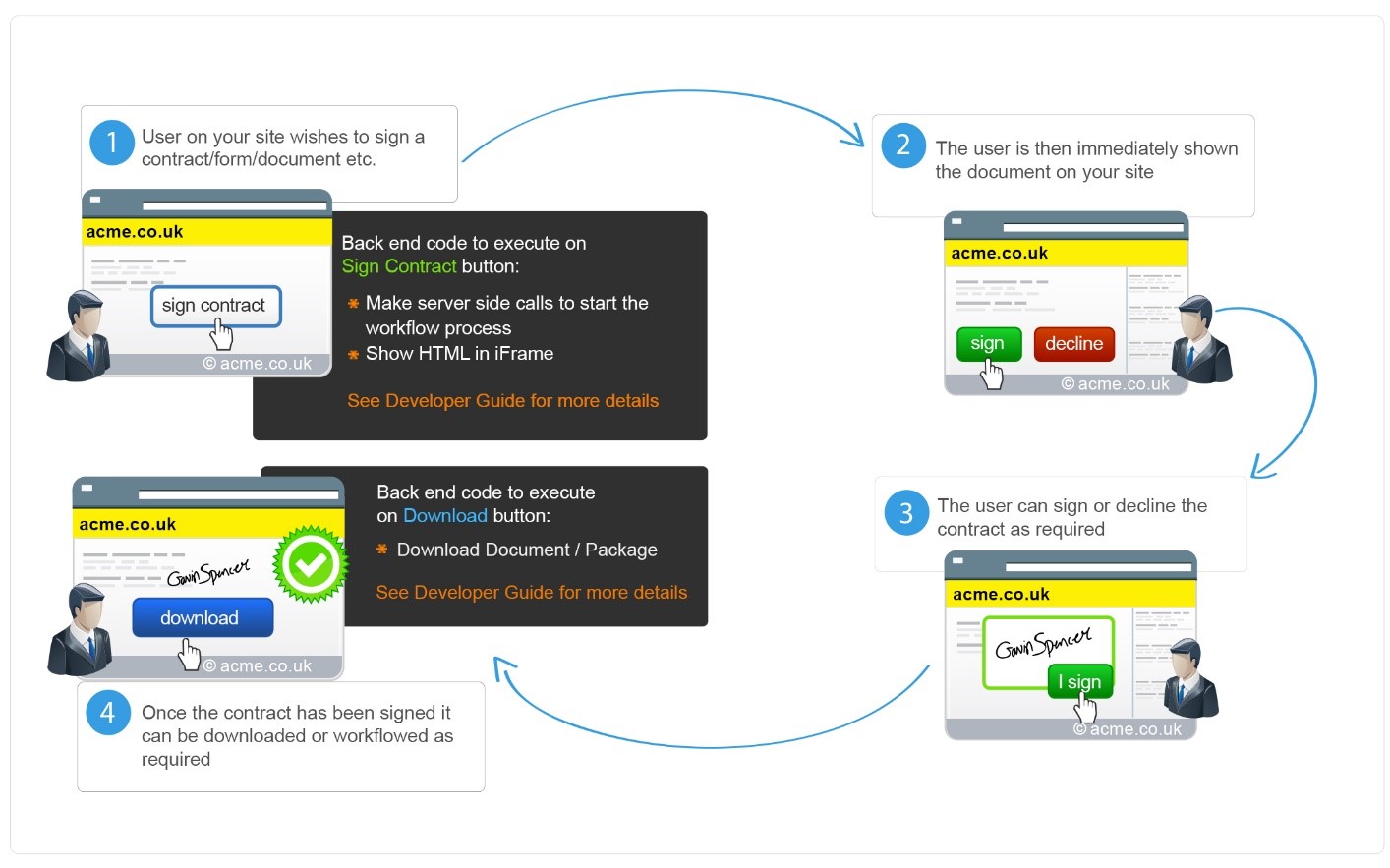
In this mode of integration, users interact with the business web application. At some point, there is a need to view and sign a document. For ease of use, the user does not need to register or login in order to view and sign the document. In tight integration, the web application uses iframe technology to embed the SigningHub view and sign page within an existing webpage.
The user’s signing field is highlighted for them, and clicking on such enables them to create their digital signature. All of these web service interactions are performed in a way that ensures the user has a seamless experience fully consistent with the existing business application.
When using tight integration, users do not login directly to the SigningHub and no email is generated by SigningHub. It is the business application’s responsibility to manage the workflow and keep the user informed.
The process is:
- (Manual Step) - an Enterprise Account must be created
- (Manual Step) - an Enterprise Client ID, Client Secret and Call back URL must be configured
- (Manual Optional Step) - the Enterprise Admin creates a workflow template
- (Manual Optional Step) - the Enterprise Admin uploads a document to Enterprise Library which will be later sent to your user to sign
- (Coding) - the business application gets a client credential access token which is then used to get scope token
- (Optional coding) - the business application registers a new Enterprise User
- (Coding) - the business application gets a scope token using client credentials access token which is used for subsequent API calls
- (Coding) - the business application uploads a new package to the Enterprise User (used as Scope) account
- (Coding) - the business application applies a template or dynamically adds fields to the document
- (Coding) - the business application starts the document workflow
- (Coding) - the document is shown to the Enterprise User (used as Scope) within an iframe
- (Manual) - the enterprise user review and signs the document within an iframe
- (Optional coding) - the business application downloads the package/document
These steps are explained in more detail here:
- Step 1 - Create an Enterprise Admin Account (Manual) - the business application has to register for an enteprise account. The SigningHub cloud service www.signinghub.com can be used for testing and you can create a free Enterprise Admin account by clicking the FREE TRIAL button.
- Step 2 - Generate the API Key (Manual) - Click here for instructions
- Step 3 - Create a Workflow Template (Manual, Optional) - Click here for instructions. If template can't be used and you want to dynamically add fields then skip this step
- Step 4 - Add a Document to the Library (Manual, optional) - If a standard document or contract is used you can avoid uploading the document programmatically for every use case. All you need is to maintain your document in your enterprise library and use the ID of the document as a reference in your application. Click here for more information about managing documents in an enterprise library
- Step 5 - Get client credential token via the API (Coding) - this call authenticates the business application access to SigningHub. This requires the Enterprise Client Secret and Client Id that in return sends the access token. For authentication, the business application needs to send an HTTP POST request to SigningHub. The following is an example request/response:
Header Parameters
application/x-www-form-urlencoded
application/json
REQUEST BODY SCHEMA
"client_credentials"
Define the OAuth 2.0 grant type.
non-empty
Application Name that is configured in your Enterprise Account when configuring the integration options.
non-empty
API Key that that is generated in your Enterprise Account when configuring the integration options.
Request Body
grant_type=client_credentials&
client_id= CLIENT_ID&
client_secret= CLIENT_SECRET&
Sample Response
- Step 6 - Register an Enterprise User via the API (Coding, Optional) - this represents the user account that will be used to upload the document and will be shared to sign the signature field. An account for the signer must exist, if it does not then to create a signer, the business application needs to send the following example request only once. To learn more about each parameter used consult the developer manuals here.
Header Parameters
application/json
application/json
Bearer {access_token}
Access token obtained after a successful authentication. This service requires the access token to be obtained using the client credentials.
REQUEST BODY SCHEMA
The email address of the user account to be registered.
The name of the user to be registered.
Job title of user.
Company name of user.
Mobile number of user.
The password of the user account. This is optional if you want your users to authenticate externally e.g. via SAML, Salesforce, Office 365 etc. rather than using a SigningHub ID (email/password). If password is provided, application expects the security question and answer as mandatory fields.
Security question used to reset password if user forgets his password. This is mandatory if you wish to allow the user to sign without manually, via an email link, completing the registration process. If security question is provided, application expects password and security answer as mandatory fields.
Security answer used to reset the password if user forgets his password. This is mandatory if you wish to allow the user to sign without manually, via an email link, completing the registration process. If security answer is provided, application expects password and security question as mandatory fields.
The enterprise role to be assigned to this user - these are managed within the Enterprise account.
This defines whether enterprise user would get an email notification about the account creation. Default value is 'false'.
Request Body
Sample Response
- Step 7 - Authenticate Enterprise User (Coding) - this authenticates access to SigningHub and requires the Enterprise User email address and client credentials access token. An OAuth 2.0 access token is returned. For authentication, the business application needs to send an HTTP POST request to SigningHub. The received access token is then used to upload, prepare and share the document. Following is an example request/response:
Header Parameters
application/json
application/json
Bearer {access_token}
This service requires the access token to be obtained using the client credentials.
REQUEST BODY SCHEMA
non-empty
Email of a registered enterprise user
Request Body
Sample Response
- Step 8 - Add Package (Coding) - This service API is used to add/create a document package to hold one or more documents. This package can then be used to add documents and recipients in order to start a new workflow.
Header Parameters
application/json
application/json
Bearer {access_token_scope}
Access token returned in Scope API call
REQUEST BODY SCHEMA
non-empty
The name of the package.
ONLY_OTHERS
Enum: "ME_AND_OTHERS" "ONLY_OTHERS" "ONLY_ME"
Inbox
The name of the folder. It will be used to upload package in any folder of the user, either its a custom folder or a shared folder.
Request Body
Sample Response
-
Step 8.1 - Add Document or dynamically add fields (Coding) - Business applications can use this service API to add a document from the user’s library to a package. The
package_idis provided in the URL which should be the same as found in the previous call. The document ID must be provided asdocument_idin the resource URL to identify the library document to be copied.
Path Parameters
The ID of the package to which the document is being added.
The ID of the document that will be fetched from libary and added to the package
Header Parameters
application/json
application/json
Bearer {access_token_scope}
Access token returned in Scope API call
In the case where the business application creates the document dynamically then you can upload the document using the Upload Document API call explained here , as opposed to using a document from your respective library
Sample Response
-
Step 9 - Apply Template or dynamically add fields (Coding) - Business applications can use this service API to apply a workflow template to a document. The document ID on which template has to be applied is provided in the resource URL. In this call the
package_idshould be same as used in step 9 and thedocument_idis the one the user got in the response of step 8.
Path Parameters
The ID of the package.
The ID of the document on which the template will be applied.
Header Parameters
application/json
application/json
Bearer {access_token_user}
Access token returned in Scope API call
REQUEST BODY SCHEMA
Name of template to be applied on the document.
false
True, if template has to be applied on all the documents in the package.
In the case where the template contains a placeholder or a user that you wish to change then you can use the Update Workflow User API call as explained here.
Alternatively if due to the dynamic nature of the document you cannot apply a template and want to add different fields, e.g. text field, checkbox, initials, signature fields etc., then you can add them dynamically by providing the X, Y, Width, Height coordinates, package ID, document ID, page number and assign to a user. Click here to learn more.
Request Body
Sample Response
- Step 10 - Share Package (Coding) - Business applications can use this service API to share a document with the designated signatories and start a new workflow. The document should already have been prepared by optinally applying a template and optionally updating the users and actions defined in template. The package ID to be shared is provided in the resource URL. In this call the package_id should be same as used in step 8.
Path Parameters
The ID of the package that has to be shared.
Header Parameters
application/json
application/json
Bearer {access_token_scope}
Access token returned in Scope API call
Sample Response
- Step 11 - Generate Integration URL for Encrypted Data - Business applications can use this service API to generate an encrypted URL to access a document and to perform signing operation on that document. The returned URL in response will be an encrypted URL which contains all the information which was provided in request body. See sample request below.
Header Parameters
application/json
application/json
Bearer {access_token_scope}
REQUEST BODY SCHEMA
The ID of the package that has been shared in step 10.
The ID of the Document that has been shared.
""
Language code in which application is required be shown to end user. if no value is provided then system defined language will be used.
""
user_email is required when a Guest user has to process the document.
""
URL, where user will be redirected after completing the required actions. if no value is provided then system will follow what's been configured in Enterprise Settings > Integration.
"false"
True, will hide the panels in the IFrame mode. if no value is provided then it will follow what's been set in Integration options.
"false"
True, will lock the panels in the IFrame mode. if no value is provided then it will follow what's been set in Integration options.
"false"
False, if you do not want to have a user automatically redirected to the call-back URL. After the user has performed their task, they will stay on the document viewer screen and will not be redirected unless they press the "Close" button.
""
Indicating response should be encoded or plan.Possible values are ENCODED, PLAIN
The user custom certificate Id.
Section wise integration, if not provided Default value : VIEWER
Possible values are

|
Note: If the section is VIEWER or WORKFLOW, SigningHub will redirect you to the Viewer; otherwise, it will navigate to the specified SigningHub section. If the section is DASHBOARD_DOCUMENTS_WORKFLOW, SigningHub will open the Dashboard and the user can move between the Dashboard, Documents and Viewer screens |
Possible values are
|
|
Specifies the step. If omitted, the default value is
When
These default values are applied only when |
Request Body
Sample Response
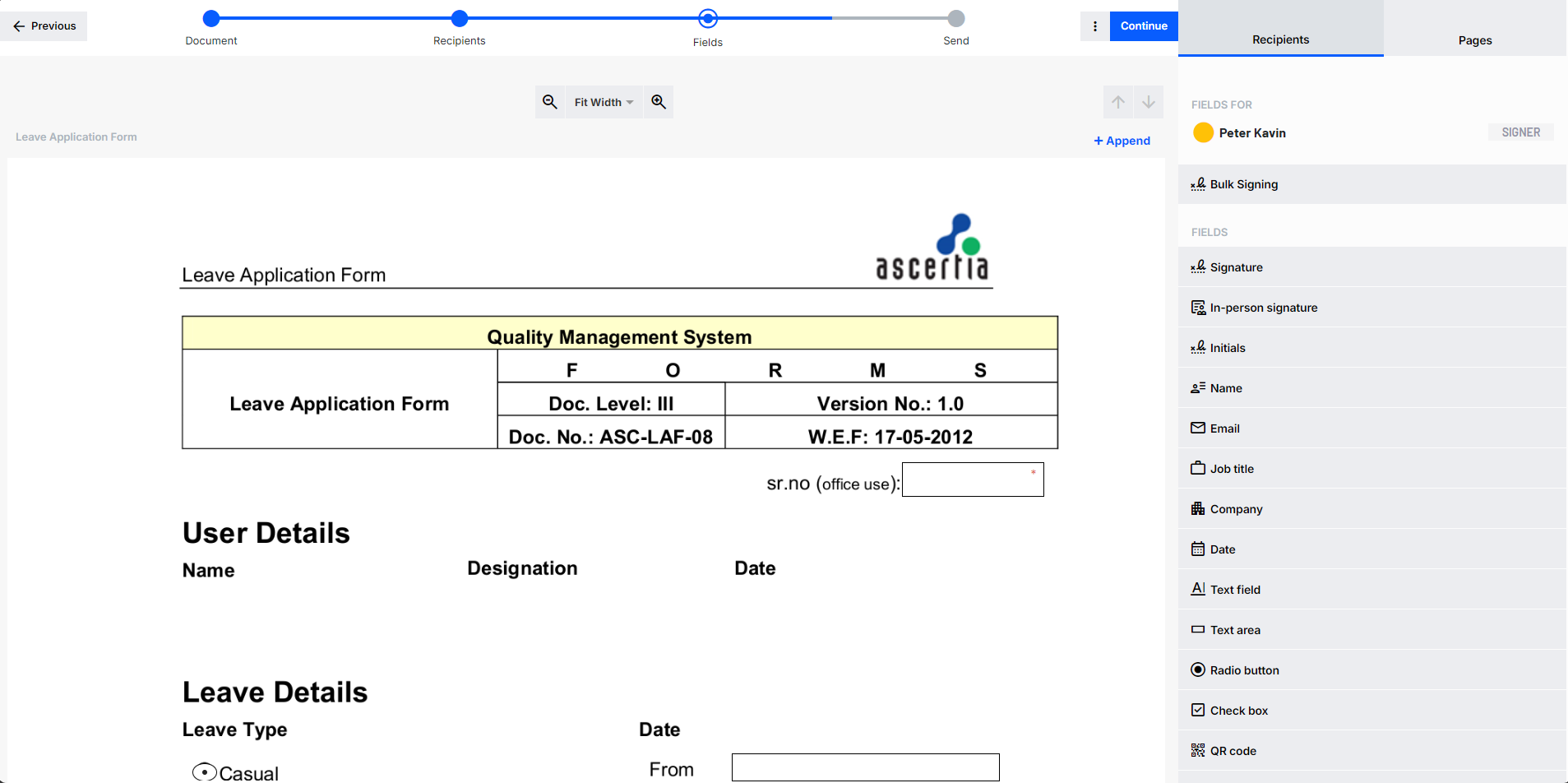
- Step 12 - Review Document in Iframe (Coding) - Client web applications create an iframe with the source of the iframe that is being returned in step 11 as follows:

Iframe view in browser
-
Step 13 - Handle Call-back (Coding) - Once the user has signed, declined or reviewed and approved the document within the SigningHub document viewer, the user can close the document and return to the web application. When the user closes the document, SigningHub immediately returns control to the web application using the configured URL for that specific integration. This is the 'call-back' parameter, configured under the Application Integration settings.
Control is returned to the web application as soon as the user navigates away from the document viewer window. For cases such as signature operations this occurs when the user completes the signing process and clicks on 'Finish' button. Browser navigation (back button) is another way of navigating away from the document viewer and will also result in control passing back to the web application, and invoke the call-back URL.
When control returns to the web application, SigningHub appends the following parameters to the call-back URL to inform the web application of the action status. Response type can be encoded or plain depending on the value response_type sent in the request
Respose Details
| Response Type | Description |
|---|---|
| ENCODED | [callback_url]?lang=en_USpackage_id%3D1017545%26action%3Dnone |
| Plain | [callback_url]?lang=en_US&package_id=1017545&action=signed |
Parameters Details
| Name | Description |
|---|---|
| package_id | The ID of the package that was shown to the user. |
| action |
Provides information about the action the user performed on the document. The possible values are:
|
- Step 13.1 - Check Workflow Status (Coding) - Once the document has been shared and the workflow is in progress, the document owner may want to see the current status of the workflow. The status of workflow at any time can be checked by using the Get Workflow Details API. Click here for details.
- Step 15 - Download Package/Document (Coding)

SmartForm Integration
The following diagram summarizes the process for Smart Form integration:
In this integration model, users interact solely with the business web application, which triggers the signing process at a specific point—such as after completing a form, application, or survey. The SmartForm document, along with control metadata, is sent to SigningHub. This metadata defines structured fields like checkboxes, dropdowns, text areas, and rating scales, which are embedded directly into the document.
To ensure a smooth user experience, no registration or login is required. The business application embeds the SigningHub signing interface directly into its web page using iframe technology. The required signing fields are clearly highlighted, allowing users to fill out the form and apply their digital signature in a guided and intuitive manner.
All web service interactions are handled behind the scenes, ensuring the experience remains fully integrated within the business application. Users never interact with SigningHub directly, and no emails are triggered by SigningHub. It is the sole responsibility of the business application to manage the workflow, notify users, and ensure completion of the signing process.
The process is:
- (Manual Step) Create an Enterprise Account
- (Manual Step) Generate Enterprise Client ID and Client Secret
- (Manual Step) - Obtain an access token using the enterprise API credentials
- (Manual Step) - Create a SmartForm
- (Coding) - Retrieve the SmartForm integration URL using the SmartForm ID
These steps are explained in more detail below:
- Step 1 – Create an Enterprise Account (Manual) - The business application must register for an Enterprise account. For testing purposes, you can use the SigningHub cloud service at www.signinghub.com and create a free account by clicking the FREE TRIAL button.
- Step 2 – Generate API Credentials (Manual) - Follow the steps here to generate the Client ID and Client Secret from the SigningHub Web interface.
- Step 3 – Obtain Access Token (Coding) - Use your enterprise credentials (Client ID and Secret) to request an access token from SigningHub’s authentication endpoint.
- Step 4 – Create a SmartForm (Manual) - Design and publish your SmartForm via the SigningHub Web interface, defining required fields and workflow routing.
- Step 5 – Retrieve SmartForm Integration URL (Coding) - Make an authenticated HTTP GET request to SigningHub using the SmartForm ID and access token. This returns the SmartForm integration URL, which the business application can embed via iframe. Example request/response:
Path Parameters
The ID of the smart form.
Header Parameters
application/json
application/json
Bearer {access_token}
Access token returned in Authenticate API call
Sample Response
10.0 | Following are the APIs that have been affected by the changes:
- New APIs
-
Updates in existing APIs
-
Document Package
- Upload Document
- Upload Document Base64
- Get Document Image
- Get Document Image (Base64)
- Upload Attachment
- Get Attachments
- Delete Attachment
- Download Attachment
- Download Attachment (base64)
- Close Document Package
- Download Package
- Download Package (Base64)
- Get Package Verification
- Open Document Package
- Download Document
- Download Document (Base64)
- Get Document Details
- Get Document Verification
- Get Packages
- Bulk Delete Document Package
- Bulk Move Packages to Custom/Shared Space folder
-
Document Workflow
- Update Electronic Seal to Workflow
- Update Workflow User Permissions
- Update Workflow User Authentication (Document Opening)
- Update Placeholder
- Update Workflow User
- Update Workflow Group
- Get Workflow History Details
- Get Certificate Saved In Workflow History
- Complete Workflow in the Middle (Terminate Workflow)
- Get Process Evidence Report
- Authenticate via OTP
- Document Preparation
-
Document Processing
- Approve Document
- Decline Document
- Finish Processing
- Bulk Sign Packages
- Bulk Signing Status
- Submit Document
- Sign Document
- Bulk Action Pre Validation
- Get Document Hash
- Embed Signature
- Sign Document via RSSP Directly
- Fill Form Fields
- Fill Initials
- Bulk OTP Signing Authentication
- Bulk Signing Pre Validation
- Enterprise Management
- Account Management
- General
- Workflow Management
-
Document Package
New APIs
| Document Package |
Get Document Thumbnails (Base64) |
|---|---|
| Document Workflow | |
| Enterprise Management |
Reset Enterprise User Two Factor Authentication Import Enterprise Users Template Download Import Enterprise Invitations Template |
| Account Management | |
| Document Preparation | |
| Document Processing | |
| Authentications | |
| Personal Settings | |
| Template |
Bulk Delete Document Field (Template) Update DropDown Field (Template) Replicate Initial Fields (Template) |
Updates in existing APIs
Document Package
Below are the APIs that are affected by the change.
Upload Document
| 8.6.8 (Upload Document) | 10.0 (Upload Document) |
|---|---|
| From 10.0, SigningHub has introduced the multiple response parameters to provide detailed information about the uploaded document. | |
Upload Document Base64
| 8.6.8 (Upload Document Base64) | 10.0 (Upload Document Base64) |
|---|---|
| From 10.0, SigningHub has introduced the multiple response parameters to provide detailed information about the uploaded document. | |
Get Document Image
| 8.6.8 (Get Document Image) | 10.0 (Get Document Image) |
|---|---|
| From 10.0, SigningHub has introduced the x-formatted and x-folder-id header parameters to support xml formatted view and shared space folder access. | |
|
New header parameters added
|
|
Get Document Image (Base64)
| 8.6.8 (Get Document Image (Base64)) | 10.0 (Get Document Image (Base64)) |
|---|---|
| From 10.0, SigningHub has introduced the x-formatted and x-folder-id header parameters to support xml formatted view and shared space folder access. | |
|
New header parameters added
|
|
Upload Attachment
| From 10.0, SigningHub has introduced the x-folder-id header parameters to support shared space folder access. | |
|
New parameter added
|
|
Get Attachments
| From 10.0, SigningHub has introduced the x-folder-id header parameters to support shared space folder access. | |
|
New parameter added
|
|
Delete Attachment
| From 10.0, SigningHub has introduced the x-folder-id header parameters to support shared space folder access. | |
|
New parameter added
|
|
Download Attachment
| From 10.0, SigningHub has introduced the x-folder-id header parameters to support shared space folder access. | |
|
New parameter added
|
|
Download Attachment (base64)
| From 10.0, SigningHub has introduced the x-folder-id header parameters to support shared space folder access. | |
|
New parameter added
|
|
Close Document Package
| From 10.0, SigningHub has introduced the x-folder-id header parameters to support shared space folder access. | |
|
New parameter added
|
|
Download Package
| From 10.0, SigningHub has introduced the x-folder-id header parameter to support shared space folder access as well as the document-ids query parameter for downloading the documents within the package. | |
|
New parameters added
|
|
Download Package (Base64)
| From 10.0, SigningHub has introduced the x-folder-id header parameters to support shared space folder access well as the document-ids query parameter for downloading the documents within the package. | |
|
New parameter added
|
|
Get Package Verification
| From 10.0, SigningHub has introduced the x-folder-id header parameters to support shared space folder access. | |
|
New parameter added
|
|
Open Document Package
| From 10.0, SigningHub has introduced the x-folder-id header parameters to support shared space folder access. | |
|
New parameter added
|
|
Download Document
| From 10.0, SigningHub has introduced the x-folder-id header parameters to support shared space folder access. | |
|
New parameter added
|
|
Download Document (Base64)
| From 10.0, SigningHub has introduced the x-folder-id header parameters to support shared space folder access. | |
|
New parameter added
|
|
Get Document Details
| From 10.0, SigningHub has introduced the x-folder-id header parameters to support shared space folder access. | |
|
New parameter added
|
|
Get Document Verification
| From 10.0, SigningHub has introduced the x-folder-id header parameters to support shared space folder access. | |
|
New parameter added
|
|
Get Packages
| From 10.0, SigningHub has introduced the package-name, package-id, recipient-from, recipient-to , document-id, expiry, modified-from, modified-to, size-from, size-to , certified-documents, form-fields, attachments, document-type, document-statuses, and owned-by query parameters to support advanced search. | |
|
New parameter added
|
|
Bulk Delete Document Package
| From 10.0, SigningHub has introduced the document-status, package-name, recipient-from, recipient-to , document-id, expiry, modified-from, modified-to, size-from, size-to , certified-documents, form-fields, attachments, document-type, document-statuses, and owned-by request body parameters to support advanced search. | |
|
New parameters added
|
|
Bulk Move Packages to Custom/Shared Space folder
| From 10.0, SigningHub has introduced the document-status, package-name, recipient-from, recipient-to , document-id, expiry, modified-from, modified-to, size-from, size-to , certified-documents, form-fields, attachments, document-type, document-statuses, and owned-by request body parameters to support advanced search. | |
|
New parameters added
|
|
Document Workflow
Below are the APIs that are affected by the change.
Update Electronic Seal to Workflow
| From 10.0, SigningHub has introduced the x-folder-id header parameters to support shared space folder access. | |
|
New parameter added
|
|
Update Workflow User Permissions
| From 10.0, SigningHub has introduced the x-folder-id header parameters to support shared space folder access. | |
|
New parameter added
|
|
Update Workflow User Authentication (Document Opening)
| From 10.0, SigningHub has introduced the x-folder-id header parameters to support shared space folder access. | |
|
New parameter added
|
|
Update Placeholder
| From 10.0, SigningHub has introduced the x-folder-id header parameters to support shared space folder access. | |
|
New parameter added
|
|
Update Workflow User
| From 10.0, SigningHub has introduced the x-folder-id header parameters to support shared space folder access. | |
|
New parameter added
|
|
Update Workflow Group
| From 10.0, SigningHub has introduced the x-folder-id header parameters to support shared space folder access. | |
|
New parameter added
|
|
Get Workflow History Details
| From 10.0, SigningHub has introduced the x-folder-id header parameters to support shared space folder access. | |
|
New parameter added
|
|
Get Certificate Saved In Workflow History
| From 10.0, SigningHub has introduced the x-folder-id header parameters to support shared space folder access. | |
|
New parameter added
|
|
Complete Workflow in the Middle (Terminate Workflow)
| From 10.0, SigningHub has introduced the x-folder-id header parameters to support shared space folder access. | |
|
New parameter added
|
|
Get Process Evidence Report
| From 10.0, SigningHub has introduced the x-folder-id header parameters to support shared space folder access. | |
|
New parameter added
|
|
Authenticate via OTP
| From 10.0, SigningHub has introduced the x-folder-id header parameters to support shared space folder access. | |
|
New parameter added
|
|
Document Preparation
Below are the APIs that are affected by the change.
Update In-person Field
| From 10.0, SigningHub has introduced the x-folder-id header parameters to support shared space folder access. | |
|
New parameter added
|
|
Update Digital Signature Field
| From 10.0, SigningHub has introduced the x-folder-id header parameters to support shared space folder access. | |
|
New parameter added
|
|
Update CheckBox Field
| From 10.0, SigningHub has introduced the x-folder-id header parameters to support shared space folder access. | |
|
New parameter added
|
|
Get Document Fields
| From 10.0, SigningHub has introduced the tooltip, border_color, and field_rotation in the response body to provide the information for form fields. | |
|
New parameters added
|
|
Document Processing
Below are the APIs that are affected by the change.
Approve Document
| From 10.0, SigningHub has introduced the x-folder-id header parameters to support shared space folder access. | |
|
New parameter added
|
|
Decline Document
| From 10.0, SigningHub has introduced the x-folder-id header parameters to support shared space folder access. | |
|
New parameter added
|
|
Finish Processing
| From 10.0, SigningHub has introduced the x-folder-id header parameters to support shared space folder access. | |
|
New parameter added
|
|
Bulk Sign Packages
| From 10.0, SigningHub has introduced the x-folder-id, and x-mobile header parameters to support shared space folder access and originator(Web/Mobile) support. Additionally, a new URL parameter, bulk_action added to facilitate bulk sharing of packages, and the hand_signature_method request parameter to set the hand signature mode. | |
|
New parameter added
|
|
Bulk Signing Status
| From 10.0, SigningHub has introduced the URL parameter bulk_action is added to support share package feature in bulk. | |
|
New parameter added
|
|
Submit Document
| From 10.0, SigningHub has introduced the x-folder-id header parameters to support shared space folder access. | |
|
New parameter added
|
|
Sign Document
| From 10.0, SigningHub has introduced the x-folder-id, and x-mobile header parameters to support shared space folder access and originator(Web/Mobile). Along this new request parameter hand_signature_method is to set the hand signature mode. | |
|
New parameter added
|
|
Bulk Action Pre Validation
| From 10.0, SigningHub has introduced the x-folder-id header parameters to support shared space folder access. Along this new URL parameter bulk_action is added to support share package feature in bulk. | |
|
New parameter added
|
|
Get Document Hash
| From 10.0, SigningHub has introduced the x-folder-id header parameters to support shared space folder access, as well as hand_signature_method request parameter to set the hand signature mode. | |
|
New parameter added
|
|
Embed Signature
| From 10.0, SigningHub has introduced the x-folder-id header parameters to support shared space folder access. | |
|
New parameter added
|
|
Sign Document via RSSP Directly
| From 10.0, SigningHub has introduced the x-folder-id header parameters to support shared space folder access as well as the hand_signature_method request parameter to set the hand signature mode. | |
|
New parameter added
|
|
Fill Form Fields
| From 10.0, SigningHub has introduced the x-folder-id header parameters to support shared space folder access. | |
|
New parameter added
|
|
Fill Initials
| From 10.0, SigningHub has introduced the x-folder-id header parameters to support shared space folder access. | |
|
New parameter added
|
|
Bulk OTP Signing Authentication
| 8.6.8 (Bulk OTP Signing Authentication) | 10.0 (Bulk OTP Signing Authentication) |
|---|---|
| From 10.0, SigningHub has introduced the x-folder-id header parameter and packageId request parameter to support document signing authentication and shared space folder access. | |
|
New parameters added
|
|
Bulk Signing Pre Validation
| 8.6.8 (Bulk Signing Pre Validation) | 10.0 (Bulk Signing Pre Validation) |
|---|---|
| From 10.0, SigningHub has introduced the x-otp and x-password header parameters to support document access authentication. Additionally, a new response parameter signing_authentication, indicates the type of one-time authentication enabled, such as OTP or TOTP. | |
|
New parameters added
|
|
Enterprise Management
Below are the APIs that are affected by the change.
Get Enterprise Users
| 8.6.8 (Get Enterprise Users) | 10.0 (Get Enterprise Users) |
|---|---|
| From 10.0, SigningHub has introduced the two_factor_authentication to provide two factor authentication is enabled or not, certificate_dn to provide certificate dn with signing certificate. | |
|
New parameter added
|
|
Register Enterprise User
| 8.6.8 (Register Enterprise User) | 10.0 (Register Enterprise User) |
|---|---|
| From 10.0, SigningHub has introduced the created_on in response body. | |
|
New parameter added
|
|
Get Role Users
| 8.6.8 (Get Role Users) | 10.0 (Get Role Users) |
|---|---|
| From 10.0, SigningHub has introduced the created_on and status in response body to provide more detail of user. | |
|
New parameter added
|
|
Get Enterprise Package Timeline
| 8.6.8 (Get Enterprise Package Timeline) | 10.0 (Get Enterprise Package Timeline) |
|---|---|
| From 10.0, SigningHub has update the timeline_details property of the response. | |
Get Enterprise Logs
| 8.6.8 (Get Enterprise Logs) | 10.0 (Get Enterprise Logs) |
|---|---|
| From 10.0, SigningHub has added the new QUERY PARAMETERS -> module option's ADVANCED_REPORTS to support search of Advanced Reports. | |
Get Enterprise Integrations
| 8.6.8 (Get Enterprise Integrations) | 10.0 (Get Enterprise Integrations) |
|---|---|
| From 10.0, SigningHub has added the new response parameter client_secret and external_users_count. | |
|
New parameter added
|
|
Get Enterprise Branding
| 8.6.8 (Get Enterprise Branding) | 10.0 (Get Enterprise Branding) |
|---|---|
| From 10.0, SigningHub has added the new response parameters level_14 and level_15 to provide information about sidebar menus and the color of error validation text. | |
|
New parameter added
|
|
Reset Enterprise Branding
| 8.6.8 (Reset Enterprise Branding) | 10.0 (Reset Enterprise Branding) |
|---|---|
| From 10.0, SigningHub has added the new response parameters level_14 and level_15 to provide information about sidebar menus and the color of error validation text. | |
|
New parameter added
|
|
Update Enterprise Branding
| 8.6.8 (Update Enterprise Branding) | 10.0 (Update Enterprise Branding) |
|---|---|
| From 10.0, SigningHub has added the new request parameters level_14 and level_15 to provide information about sidebar menus and the color of error validation text. | |
|
New parameter added
|
|
Account Management
Below are the APIs that are affected by the change.
Get Notifications
| 8.6.8 (Get Notifications) | 10.0 (Get Notifications) |
|---|---|
| From 10.0, SigningHub has introduced the type query param to filter notifications. | |
|
New query parameters added
|
|
Register User Account
| 8.6.8 (Register User (Free Trial)) | 10.0 (Register User Account) |
|---|---|
| From version 10.0, SigningHub's process depends on the service plan. For online plans, a billing response is mandatory. | |
|
New parameters added
|
|
Documents Statistics
| From 10.0, SigningHub has introduced the x-folder-id header parameters to support shared space folder access. | |
|
New parameter added
|
|
Get Enterprise Branding and Authentication Profile
| 8.6.8 (Get Enterprise Branding and Authentication Profile) | 10.0 (Get Enterprise Branding and Authentication Profile) |
|---|---|
| From 10.0, SigningHub has added the new response parameters level_14 and level_15 to provide information about sidebar menus and the color of error validation text. | |
|
New parameter added
|
|
General
Below are the APIs that are affected by the change.
Get SigningHub Admin Branding
| 8.6.8 (Get SigningHub Admin Branding) | 10.0 (Get SigningHub Admin Branding) |
|---|---|
| From 10.0, SigningHub has added the new response parameters level_14 and level_15 to provide information about sidebar menus and the color of error validation text. | |
|
New parameter added
|
|
10.0.1 | Following are the APIs that have been affected by the changes:
New APIs
| Personal Settings |
|---|
Updates in existing APIs
Document Workflow
Below are the APIs that are affected by the change.
Generate Integration URL for Encrypted Data
| 10.0 (Generate Integration URL for Encrypted Data) | 10.0.1 (Generate Integration URL for Encrypted Data) |
|---|---|
| From 10.0.1, SigningHub has introduced the section header parameters to support section wise access. | |
|
New parameter added
|
|
Personal Settings
Below are the APIs that are affected by the change.
Get Signature Settings
| 10.0 (Get Signature Settings) | 10.0.1 (Get Signature Settings) |
|---|---|
| From 10.0.1, SigningHub has introduced the environment in the response body to provide the environment of EID Easy signing server. | |
|
New parameter added
|
|
Get Templates
| 10.0 (Get Templates) | 10.0.1 (Get Templates) |
|---|---|
| From 10.0.1, SigningHub has introduced the smart_form in the response parameter to provide information about Smart forms | |
|
New parameter added
|
|
Account Management
Below are the APIs that are affected by the change.
Get Account
| From 10.0.1, SigningHub has introduced a new feature in the service_plan > features > SMART_FORM if allowed in the service plan | |
|
New data added
|
|
Get User Role
| From 10.0.1, SigningHub has introduced a new response parameter smart-form under user settings | |
|
New parameter added
|
|
Document Package
Below are the APIs that are affected by the change.
Get Packages
| From 10.0.1, SigningHub has introduced a new query parameter smart-form to search by name | |
|
New parameter added
|
|
Export Packages
| From 10.0.1, SigningHub has introduced a new query parameter smart-form to search by name | |
|
New parameter added
|
|
Enterprise Management
Below are the APIs that are affected by the change.
Get Role by ID
| From 10.0.1, SigningHub has introduced a new response parameter smart-form under user settings | |
|
New parameter added
|
|
Add Role
| From 10.0.1, SigningHub has introduced a new request parameter smart-form under user settings | |
|
New parameter added
|
|
Clone Role
| From 10.0.1, SigningHub has introduced a new response parameter smart-form under user settings | |
|
New parameter added
|
|
Update Role
| From 10.0.1, SigningHub has introduced a new request parameter smart-form under user settings | |
|
New parameter added
|
|
SigningHub Admin APIs
Below are the APIs that are affected by the change.
Add Service Plan
| From 10.0.1, SigningHub has introduced a new parameter to add ALLOW_SMART_FORM in the features | |
|
New parameter added
|
|
Update Service Plan
| From 10.0.1, SigningHub has introduced a new parameter to add ALLOW_SMART_FORM in the features | |
|
New parameter added
|
|
Get Service Plan by ID
| From 10.0.1, SigningHub has introduced a new response parameter to provide Smart form feature information | |
|
New parameter added
|
|
Authentication
Below are the APIs that are affected by the change.
Single Sign On Authentication
| 10.0 (Single Sign On Authentication) | 10.0.1 (Single Sign On Authentication) |
|---|---|
| From 10.0.1, SigningHub has changed error Status Code for guest user from 401 to 404. | |
|
Status Code
|
Status Code
|
10.0.2 | Following are the APIs that have been affected by the changes:
New APIs
| User Provisioning Via SCIM |
|---|
Updates in existing APIs
General
Below are the APIs that are affected by the change.
System Settings
| From 10.0.2, SigningHub returns trusted device authentication response data for configuration and display. | |
|
Response
|
|
General
Below are the APIs that are affected by the change.
Password Authentication
| From 10.0.2, SigningHub returns the "x-device"="required" if the administrator/enterprise setting are requiring to trust the device, and the user must have to provide the device information in the request header. | |
|
If the administrator/enterprise setting is requiring the device information then this header is returned. |
Response Header
|
|
If the administrator/enterprise setting are requiring the device information then use the below-format with your own device information Example: JSON Serialize of { DeviceId = "DeviceId", Name = "Chrome", Version = "120.0.0.0", Type = "Browser", Vendor = "Google", Model = "Desktop", OS = "Windows", OSVersion = "10.0.19045", Cpu = "x64", UserAgent = "Mozilla/5.0 (Windows NT 10.0; Win64; x64) AppleWebKit/537.36 (KHTML, like Gecko) Chrome/120.0.0.0 Safari/537.36" } then Base64 |
Request Header
|
Single Sign On Authentication
| From 10.0.2, SigningHub returns the "x-device"="required" if the administrator/enterprise setting are requiring to trust the device, and the user must have to provide the device information in the request header. | |
|
If the administrator/enterprise setting is requiring the device information then this header is returned. |
Response Header
|
|
If the administrator/enterprise setting are requiring the device information then use the below-format with your own device informations Example: JSON Serialize of { DeviceId = "DeviceId", Name = "Chrome", Version = "120.0.0.0", Type = "Browser", Vendor = "Google", Model = "Desktop", OS = "Windows", OSVersion = "10.0.19045", Cpu = "x64", UserAgent = "Mozilla/5.0 (Windows NT 10.0; Win64; x64) AppleWebKit/537.36 (KHTML, like Gecko) Chrome/120.0.0.0 Safari/537.36" } then Base64 |
Request Header
|
Client Credentials Authentication
| From 10.0.2, SigningHub has introduced new request header x-scim to support SCIM protocol. | |
|
New Request Header Parameter
|
|
Account Management
Below are the APIs that are affected by the change.
Configure Two-Factor Authentication
| From 10.0.2, SigningHub returns two-factor authentication response data for configuration and display. | |
|
Response
|
|
Get Notifications
| 10.0.1 (Get Notifications) | 10.0.2 (Get Notifications) |
|---|---|
| From 10.0.2, SigningHub has introduced the new response parameter information_details which provide information details list. | |
|
New response parameter added
|
|
Get Account
| 10.0.1 (Get Account) | 10.0.2 (Get Account) |
|---|---|
| From 10.0.2, SigningHub has introduced the new response parameter service_plan > deprecated which provide the service plan deprecated information and display_plan_upgrade_banner to display banner in the application. | |
|
New response parameter added
|
|
Get User Role
| 10.0.1 (Get User Role) | 10.0.2 (Get User Role) |
|---|---|
| From 10.0.2, SigningHub has introduced the new response parameter user_setting > require_document_access_authentication_apply_to, require_document_sign_authentication_apply_to which provide service plan start and end date. SigningHub has also introduced the new response parameter user_setting.readonly_user_fields which provide information for restricted user fields. | |
|
New response parameter added
|
|
Enterprise Management
Below are the APIs that are affected by the change.
Get Role by ID
| 10-0-1 (Get Role by ID) | 10-0-2 (Get Role by ID) |
|---|---|
| From 10-0-2, SigningHub has introduced the new response parameter document_settings > owner_settings > access_authentication_all_recipient > apply_to, document_settings > owner_settings > signing_authentication_all_recipient > apply_to and post_processing_all_recipient to provide the recipient authentication information and the post_processing_all_recipient information at document_settings > owner_settings object which provide information for post processing. SigningHub has also introduced the new response parameter document_settings.miscellaneous_settings.readonly_user_fields which provide information for restricted user fields. | |
|
New response parameter added
|
|
Add Role
| 10-0-1 (Add Role) | 10-0-2 (Add Role) |
|---|---|
| From 10-0-2, SigningHub has introduced the new response parameter document_settings > owner_settings > access_authentication_all_recipient > apply_to, document_settings > owner_settings > signing_authentication_all_recipient > apply_to and post_processing_all_recipient to provide the recipient authentication information and the post_processing_all_recipient information at document_settings > owner_settings object which provide information for post processing. SigningHub has also introduced the new response parameter document_settings.miscellaneous_settings.readonly_user_fields which provide information for restricted user fields. | |
|
New response parameter added
|
|
Clone Role
| 10-0-1 (Clone Role) | 10-0-2 (Clone Role) |
|---|---|
| From 10-0-2, SigningHub has introduced the new response parameter document_settings > owner_settings > access_authentication_all_recipient > apply_to, document_settings > owner_settings > signing_authentication_all_recipient > apply_to and post_processing_all_recipient to provide the recipient authentication information and the post_processing_all_recipient information at document_settings > owner_settings object which provide information for post processing. SigningHub has also introduced the new response parameter document_settings.miscellaneous_settings.readonly_user_fields which provide information for restricted user fields. | |
|
New response parameter added
|
|
Update Role
| 10-0-1 (Update Role) | 10-0-2 (Update Role) |
|---|---|
| From 10-0-2, SigningHub has introduced the new request parameter document_settings > owner_settings > access_authentication_all_recipient > apply_to, document_settings > owner_settings > signing_authentication_all_recipient > apply_to and post_processing_all_recipient to provide the recipient authentication information and the post_processing_all_recipient information at document_settings > owner_settings object which provide information for post processing. SigningHub has also introduced the new request parameter document_settings.miscellaneous_settings.readonly_user_fields which set configurations for restricted user fields. | |
|
New request parameter added
|
|
Get Enterprise Default Settings
| 10-0-1 (Get Enterprise Default Settings) | 10-0-2 (Get Enterprise Default Settings) |
|---|---|
| From 10-0-2, SigningHub has introduced the new response parameter post_processing and login > "trusted_device_authentication": { "enabled" : true} object which provide information for post processing and the trusted device information. | |
|
New response parameter added
|
|
Update Enterprise Default Settings
| 10-0-1 (Update Enterprise Default Settings) | 10-0-2 (Update Enterprise Default Settings) |
|---|---|
| From 10-0-2, SigningHub has introduced the new request parameter post_processing and login > "trusted_device_authentication": { "enabled" : true} object which provide information for post processing and the trusted device information. | |
|
New request parameter added
|
|
Get Auto Provision Settings
| From 10.0.2, SigningHub added new response parameter scim to provide the SCIM configurations. | |
|
Response
|
|
Update Auto Provision Settings
| From 10.0.2, SigningHub added new request parameter scim to enable/disable the SCIM configurations. | |
|
Request
|
|
SigningHub Admin APIs
Below are the APIs that are affected by the change.
Get Service Plans
| From 10-0-2, SigningHub has introduced the new response parameter deprecated object which provide information for deprecation status to display. | |
|
Response
|
|
Get Service Plan by ID
| From 10-0-2, SigningHub has introduced the new response parameter deprecated object which provide information for deprecation status to display. | |
|
Response
|
|
Update Service Plan
| From 10-0-2, SigningHub has introduced the new request parameter deprecated object to update the deprecation status. | |
|
Request
|
|
Clone Service Plan
| From 10-0-2, SigningHub has introduced the new request parameter deprecated object to update the Deprecated status. | |
|
Request
|
|
10.0.3 | Following are the APIs that have been affected by the changes:
New APIs
| Account Management |
|---|
Updates in existing APIs
General
Below are the APIs that are affected by the change.
About SigningHub
| 10.0.2 (About SigningHub) | 10.0.3 (About SigningHub) |
|---|---|
| From 10.0.3, "About SigningHub" API will be accessible via Client Credentials token. | |
Enterprise Management
Below are the APIs that are affected by the change.
Get Enterprise Branding
| 10.0.2 (Get Enterprise Branding) | 10.0.3 (Get Enterprise Branding) |
|---|---|
| From 10.0.3, SigningHub has added the new response parameters background_image and slider_items to provide information about background image and slider items. | |
|
New parameter added
|
|
Update Enterprise Branding
| 10.0.2 (Update Enterprise Branding) | 10.0.3 (Update Enterprise Branding) |
|---|---|
| From 10.0.3, SigningHub has added the new request parameters background_image and slider_items to provide information about background image and slider items. | |
|
New parameter added
|
|
| From 10.0.3, SigningHub has added the new response parameters id, content, order and web to provide information about slider items. | |
|
New parameter added
|
|
Reset Enterprise Branding
| 10.0.2 (Reset Enterprise Branding) | 10.0.3 (Reset Enterprise Branding) |
|---|---|
| From 10.0.3, SigningHub has added the new response parameters background_image and slider_items to provide information about background image and slider items. | |
|
New parameter added
|
|
Document Preparation
Below are the APIs that are affected by the change.
Add Textbox Field
| 10.0.2 (Add Textbox Field) | 10.0.3 (Add Textbox Field) |
|---|---|
| From 10.0.3, SigningHub has added the new request parameter field_locale to support Arabic for Date field. | |
|
New parameter added
|
|
Update Textbox Field
| 10.0.2 (Update Textbox Field) | 10.0.3 (Update Textbox Field) |
|---|---|
| From 10.0.3, SigningHub has added the new request parameter field_locale to support Arabic for Date field. | |
|
New parameter added
|
|
Get Document Fields
| 10.0.2 (Get Document Fields) | 10.0.3 (Get Document Fields) |
|---|---|
| From 10.0.3, SigningHub has added the new response parameters field_locale to support Arabic for Date field. | |
|
New parameter added
|
|
10.0.4 | Following are the APIs that have been affected by the changes:
- New APIs
-
Updates in existing APIs
-
Enterprise Management
- Export Enterprise Users
- Export Enterprise Invitations
- Get Role by ID
- Add Role
- Clone Role
- Update Role
- Get Enterprise User Consumed Statistics
- Update Enterprise User Consumed Statistics
- Get Enterprise Notification Settings
- Update Enterprise Notifications Settings
- Get Enterprise Default Settings
- Update Enterprise Default Settings
- Get Workflow User Permissions of Enterprise Package
- Update Workflow User Permissions of Enterprise Package
- Get Enterprise Branding
- Update Enterprise Branding
- Reset Enterprise Branding
- Get Enterprise Logs
- Account Management
- Personal Settings
- Document Workflow
- Document Processing
- Template
- General
- SigningHub Admin APIs
- Document Preparation
-
Enterprise Management
New APIs
| Enterprise Management | |
|---|---|
| Artificial Intelligence | |
| Template |
Artificial Intelligence (AI) Execute Feature (Template) Artificial Intelligence (AI) Features (Template) |
| Document Processing |
Get Document Attachment Image (Base64) |
| Document Preparation | |
| Personal Settings | |
| Passkey Authentication |
Updates in existing APIs
Authentication
Below are the APIs that are affected by the change.
Single Sign On Authentication
| 10.0.3 (Single Sign On Authentication) | 10.0.4 (Single Sign On Authentication) |
|---|---|
| From 10.0.4, SigningHub has added a new authentication mechanism Pass Key to provide login option using pass key. | |
|
New mechanism added
|
|
Document Package
Below are the APIs that are affected by the change.
Sign Document Package
| 10.0.3 (Sign Document Package) | 10.0.4 (Sign Document Package) |
|---|---|
| From 10.0.4, SigningHub has added a new authentication mechanism Pass Key to provide signing option using pass key. | |
|
New mechanism added
|
|
Bulk Document Sign
| 10.0.3 (Bulk Document Sign) | 10.0.4 (Bulk Document Sign) |
|---|---|
| From 10.0.4, SigningHub has added a new authentication mechanism Pass Key to provide bulk signing option using pass key. | |
|
New mechanism added
|
|
Merge All Documents
| 10.0.3 (Merge All Documents) | 10.0.4 (Merge All Documents) |
|---|---|
| From 10.0.4, SigningHub has added a new response parameter document_id to provide the source document ID into which the documents are merged. . | |
|
New response parameter added
|
|
Reports
Below are the APIs that are affected by the change.
Signature Statistics
| 10.0.3 (Signature Statistics) | 10.0.4 (Signature Statistics) |
|---|---|
| From 10.0.4, SigningHub has added a new option parameter in request signing-server to provide signing profile id against which data is required. | |
|
New parameter added
|
|
Export Signature Statistics
| 10.0.3 (Export Signature Statistics) | 10.0.4 (Export Signature Statistics) |
|---|---|
| From 10.0.4, SigningHub has added a new option parameter in request signing-server to provide signing profile id against which data is required. | |
|
New parameter added
|
|
Enterprise Management
Below are the APIs that are affected by the change.
Export Enterprise Users
| 10.0.3 (Export Enterprise Users) | 10.0.4 (Export Enterprise Users) |
|---|---|
| From 10.0.4, SigningHub has added the new request parameters ids as nullable to export registered users specific to the provided IDs. | |
|
New parameter added
|
|
Export Enterprise Invitations
| 10.0.3 (Export Enterprise Invitations) | 10.0.4 (Export Enterprise Invitations) |
|---|---|
| From 10.0.4, SigningHub has added the new request parameters ids as nullable to export invitation users specific to the provided IDs. | |
|
New parameter added
|
|
Get Role by ID
| From 10.0.4, SigningHub has introduced a new response parameter artificial_intelligence under document_settings | |
|
New parameter added
|
|
| From 10.0.4, SigningHub has introduced a new response parameters stamps under document and signing sections | |
|
New response parameters added
|
|
Add Role
| From 10.0.4, SigningHub has introduced a new response parameter artificial_intelligence under document_settings | |
|
New parameter added
|
|
| From 10.0.4, SigningHub has introduced a new response parameter stamps under the documents and signing section | |
|
New response parameters added
|
|
Clone Role
| From 10.0.4, SigningHub has introduced a new response parameter artificial_intelligence under document_settings | |
|
New parameter added
|
|
| From 10.0.4, SigningHub has introduced a new response parameter stamps under the documents and signing section | |
|
New response parameters added
|
|
Update Role
| From 10.0.4, SigningHub has introduced a new request parameter artificial_intelligence under document_settings | |
|
New parameter added
|
|
| From 10.0.4, SigningHub has introduced a new request parameters Stamps under the documents and signing section | |
|
New request parameters added
|
|
Get Enterprise User Consumed Statistics
| From 10.0.4, SigningHub has introduced a new request parameter artificial_intelligence | |
|
New parameter added
|
|
Update Enterprise User Consumed Statistics
| From 10.0.4, SigningHub has introduced a new request parameter artificial_intelligence | |
|
New parameter added
|
|
Get Enterprise Notification Settings
| From 10.0.4, SigningHub has introduced a new request parameter artificial_intelligence_tokens_limit_reached under notification_setting | |
|
New parameter added
|
|
Update Enterprise Notifications Settings
| From 10.0.4, SigningHub has introduced a new request parameter artificial_intelligence_tokens_limit_reached under notification_setting | |
|
New parameter added
|
|
Get Enterprise Default Settings
| From 10.0.4, SigningHub has introduced two new response parameters allow_artificial_intelligence and allow_attachment_preview under recipient_permissions | |
|
New parameter added
|
|
|
New parameter added
|
|
Update Enterprise Default Settings
| From 10.0.4, SigningHub has introduced two new request parameters allow_artificial_intelligence and allow_attachment_preview under recipient_permissions | |
|
New parameter added
|
|
|
New parameter added
|
|
Get Workflow User Permissions of Enterprise Package
| From 10.0.4, SigningHub has introduced two new response parameters artificial_intelligence and attachment_preview | |
|
New parameter added
|
|
|
New parameter added
|
|
Update Workflow User Permissions of Enterprise Package
| From 10.0.4, SigningHub has introduced two new request parameters artificial_intelligence and attachment_preview under permissions | |
|
New parameter added
|
|
|
New parameter added
|
|
Get Enterprise Branding
| 10.0.3 (Get Enterprise Branding) | 10.0.4 (Get Enterprise Branding) |
|---|---|
| From 10.0.4, SigningHub has added the new response parameter status which indicates whether the slider is active or inactive. | |
|
New parameter added
|
|
Update Enterprise Branding
| 10.0.3 (Update Enterprise Branding) | 10.0.4 (Update Enterprise Branding) |
|---|---|
| From 10.0.4, SigningHub has added the new request and response parameter status which indicates whether the slider is active or inactive. | |
|
New parameter added
|
|
Reset Enterprise Branding
| 10.0.3 (Reset Enterprise Branding) | 10.0.4 (Reset Enterprise Branding) |
|---|---|
| From 10.0.4, SigningHub has added the new response parameter status which indicates whether the slider is active or inactive. | |
|
New parameter added
|
|
Get Enterprise Logs
| 10.0.3 (Get Enterprise Logs) | 10.0.4 (Get Enterprise Logs) |
|---|---|
| From 10.0.4, SigningHub has added the new QUERY PARAMETERS -> module option's STAMPS to support search of Stamps. | |
Document Processing
Below are the APIs that are affected by the change.
Bulk Signing Pre Validation
| 10.0.3 (Bulk Signing Pre Validation) | 10.0.4 (Bulk Signing Pre Validation) |
|---|---|
| From 10.0.4, SigningHub has added the new request object search_criteria to provide the advanced search criteria for the API. Also provided new response parameter for stamp existence. | |
|
New object added
|
|
|
New property added
|
|
Bulk Sign Packages
| 10.0.3 (Bulk Sign Packages) | 10.0.4 (Bulk Sign Packages) |
|---|---|
| From 10.0.4, SigningHub has added the new request parameter stamp to provide the stamp information. | |
|
New property added
|
|
Pre Bulk Local Signing
| 10.0.3 (Pre Bulk Local Signing) | 10.0.4 (Pre Bulk Local Signing) |
|---|---|
| From 10.0.4, SigningHub has added the new request parameter stamp to provide the stamp information. | |
|
New property added
|
|
Pre Bulk CSC Signing
| 10.0.3 (Pre Bulk CSC Signing) | 10.0.4 (Pre Bulk CSC Signing) |
|---|---|
| From 10.0.4, SigningHub has added the new request parameter stamp to provide the stamp information. | |
|
New property added
|
|
Account Management
Below are the APIs that are affected by the change.
Get Account
| From 10.0.4, SigningHub has introduced a new parameter in the service_plan > artificial_intelligence and service_plan > constraints > artificial_intelligence_tokens | |
|
New data added
|
|
| From 10.0.4, SigningHub has introduced a new feature Stamps feature enables enterprise and personal users to create, manage, and apply digital stamps to documents during signing workflows. | |
|
New feature added
|
|
Get User Role
| From 10.0.4, SigningHub has introduced a new response parameter allow_artificial_intelligence under user_setting | |
|
New parameter added
|
|
| From 10.0.4, SigningHub has introduced a new response parameters Stamps feature enables enterprise and personal users to create and manage stamps | |
|
New response parameters added
|
|
Account Usage Statistics
| From 10.0.4, SigningHub has introduced a new response parameter artificial_intelligence | |
|
New parameter added
|
|
Get Enterprise Branding and Authentication Profile
| 10.0.3 (Get Enterprise Branding and Authentication Profile) | 10.0.4 (Get Enterprise Branding and Authentication Profile) |
|---|---|
| From 10.0.4, SigningHub has added the new response parameter status which indicates whether the slider is active or inactive. | |
|
New parameter added
|
|
Personal Settings
Below are the APIs that are affected by the change.
Get Notification Settings
| From 10.0.4, SigningHub has introduced a new response parameter in the artificial_intelligence_tokens_limit_reached | |
|
New data added
|
|
Update Notifications Settings
| From 10.0.4, SigningHub has introduced a new request parameter artificial_intelligence_tokens_limit_reached under notification_setting | |
|
New parameter added
|
|
Get Active Sessions
| From 10.0.4, SigningHub has introduced a new url parameter pageNo and recordsPerPage to support paggination, client_name, active in the response parameter | |
|
New data added
|
|
|
New data added
|
|
Document Workflow
Below are the APIs that are affected by the change.
Get Workflow User Permissions
| From 10.0.4, SigningHub has introduced two new response parameters in the artificial_intelligence and attachment_preview | |
|
New data added
|
|
|
New data added
|
|
Update Workflow User Permissions
| From 10.0.4, SigningHub has introduced two new request parameters artificial_intelligence and attachment_preview under permissions | |
|
New parameter added
|
|
|
New parameter added
|
|
Get Workflow Details
| From 10.0.4, SigningHub has introduced two new response parameters artificial_intelligence and attachment_preview under users > permission | |
|
New parameter added
|
|
|
New parameter added
|
|
Add Users to Workflow
| From 10.0.4, SigningHub has introduced two new response parameters artificial_intelligence and attachment_preview under permission | |
|
New parameter added
|
|
|
New parameter added
|
|
Add Groups to Workflow
| From 10.0.4, SigningHub has introduced two new response parameters artificial_intelligence and attachment_preview under permission | |
|
New parameter added
|
|
|
New parameter added
|
|
Add Placeholder to Workflow
| From 10.0.4, SigningHub has introduced two new response parameters artificial_intelligence and attachment_preview under permission | |
|
New parameter added
|
|
|
New parameter added
|
|
Replicate Workflow
| From 10.0.4, SigningHub has introduced two new response parameters artificial_intelligence and attachment_preview under users > permission | |
|
New parameter added
|
|
|
New parameter added
|
|
Generate Integration URL for Encrypted Data
| From 10.0.4, SigningHub has introduced a new feature Stamps feature enable to manage, and apply digital stamps to documents during signing workflows. | |
|
New sections added
|
|
Template
Below are the APIs that are affected by the change.
Get Workflow User Permission (Template)
| From 10.0.4, SigningHub has introduced two new response parameters artificial_intelligence and attachment_preview under permissions | |
|
New data added
|
|
|
New data added
|
|
Update Workflow User Permission (Template)
| From 10.0.4, SigningHub has introduced two new request parameters artificial_intelligence and attachment_preview under permissions | |
|
New parameter added
|
|
|
New data added
|
|
Get Workflow Details (Template)
| From 10.0.4, SigningHub has introduced two new response parameters artificial_intelligence and attachment_preview under users > permission | |
|
New parameter added
|
|
|
New parameter added
|
|
Add Users to Workflow (Template)
| From 10.0.4, SigningHub has introduced two new response parameters artificial_intelligence and attachment_preview under users > permission | |
|
New parameter added
|
|
|
New parameter added
|
|
Add Placeholder to Workflow (Template)
| From 10.0.4, SigningHub has introduced two new response parameters artificial_intelligence and attachment_preview under users > permission | |
|
New parameter added
|
|
|
New parameter added
|
|
Add Groups to Workflow (Template)
| From 10.0.4, SigningHub has introduced two new response parameters artificial_intelligence and attachment_preview under users > permission | |
|
New parameter added
|
|
|
New parameter added
|
|
Get Personal/Enterprise Template Details
| From 10.0.4, SigningHub has introduced two new response parameters artificial_intelligence and attachment_preview under users > permission | |
|
New parameter added
|
|
|
New parameter added
|
|
Add TextBox Field (Template)
| 10.0.3 (Add TextBox Field (Template)) | 10.0.4 (Add TextBox Field (Template)) |
|---|---|
| From 10.0.4, SigningHub has added the new request parameter field_locale and new Arabic font support ADOBE_ARABIC for Date and Number field, and response parameters field_locale and font for Date and Number field. | |
|
New parameters added
New response parameters added
|
|
Update TextBox Field (Template)
| 10.0.3 (Update TextBox Field (Template)) | 10.0.4 (Update TextBox Field (Template)) |
|---|---|
| From 10.0.4, SigningHub has added the new request parameter field_locale and new Arabic font support ADOBE_ARABIC for Date and Number field. | |
|
New parameters added
|
|
Get Document Fields (Template)
| 10.0.3 (Get Document Fields (Template)) | 10.0.4 (Get Document Fields (Template)) |
|---|---|
| From 10.0.4, SigningHub has added the new request parameter field_locale and new Arabic font support ADOBE_ARABIC for Date and Number field. | |
|
New parameters added
|
|
| From 10.0.4, SigningHub has introduced a new feature Stamps feature enable to manage, and apply digital stamps to documents during signing workflows. | |
|
New feature added
|
|
Get SigningHub Admin Branding
| From 10.0.4, SigningHub has introduced a new response parameter status which indicates whether the slider is active or inactive. | |
|
New parameter added
|
|
Document Preparation
Below are the APIs that are affected by the change.
Add Textbox Field
| 10.0.3 (Add Textbox Field) | 10.0.4 (Add Textbox Field) |
|---|---|
| From 10.0.4, SigningHub has added the new Arabic font support ADOBE_ARABIC for the Arabic Date and Number field, and response parameters field_locale and font for Date and Number field. | |
|
New parameter added
New response parameters added
|
|
Update Textbox Field
| 10.0.3 (Update Textbox Field) | 10.0.4 (Update Textbox Field) |
|---|---|
| From 10.0.4, SigningHub has added the new Arabic font support ADOBE_ARABIC for the Arabic Date and Number field. | |
|
New parameter added
|
|
Get Document Fields
| 10.0.3 (Get Document Fields) | 10.0.4 (Get Document Fields) |
|---|---|
| From 10.0.4, SigningHub has added the new Arabic font support ADOBE_ARABIC for the Arabic Date and Number field. | |
|
New parameter added
|
|
AutoPlace Fields
| 10.0.3 (AutoPlace Fields) | 10.0.4 (AutoPlace Fields) |
|---|---|
| From 10.0.4, SigningHub has added the new request parameter field_locale and new Arabic font support ADOBE_ARABIC for Date and Number field, and response parameters field_locale and font for Date and Number field. Also, added new field_type STAMP added | |
|
New parameter added
New response parameters added
New feature added
|
|
Get Service Plans
| From 10.0.4, SigningHub has introduced a new feature Stamps feature enables enterprise and personal users to create, manage, and apply digital stamps to documents during signing workflows. | |
|
New feature added
|
|
Get Service Plan by ID
| From 10.0.4, SigningHub has introduced a new feature Stamps feature enables enterprise and personal users to create, manage, and apply digital stamps to documents during signing workflows. | |
|
New feature added
|
|
Add Service Plan
| From 10.0.4, SigningHub has introduced a new feature Stamps feature enables enterprise and personal users to create, manage, and apply digital stamps to documents during signing workflows. | |
|
New feature added
|
|
Update Service Plan
| From 10.0.4, SigningHub has introduced a new feature Stamps feature enables enterprise and personal users to create, manage, and apply digital stamps to documents during signing workflows. | |
|
New feature added
|
|
Clone Service Plan
| From 10.0.4, SigningHub has introduced a new feature Stamps feature enables enterprise and personal users to create, manage, and apply digital stamps to documents during signing workflows. | |
|
New feature added
|
|
10.0.5 | Following are the APIs that have been affected by the changes:
- New APIs
-
Updates in existing APIs
- Authentication
- Account Management
- Personal Settings
- SigningHub Admin APIs
-
Enterprise Management
- Get Role by ID
- Add Role
- Clone Role
- Update Role
- Get Enterprise Notification Settings
- Update Enterprise Notifications Settings
- Get Enterprise User Consumed Statistics
- Update Enterprise User Consumed Statistics
- Get Enterprise Integrations
- Get Enterprise Integration by ID
- Add Enterprise Integration
- Update Enterprise Integration
-
Document Workflow
- Generate Integration URL for Encrypted Data
- Integration Decrypt
- Get Workflow User Authentication (Document Opening)
- Update Workflow User Authentication (Document Opening)
- Get Workflow User Authentication (Document Opening) of Enterprise Package
- Update Workflow User Authentication (Document Opening) of Enterprise Package
- Get Workflow Details
- Replicate Workflow
-
Document Package
- Upload Document Base64
- Upload Document
- Multipart Document Upload
- Get Attachments
- Upload Attachment
- Delete Attachment
- Download Attachment
- Download Attachment (base64)
- Download Document
- Download Document (Base64)
- Get Document Details
- Get Document Image
- Get Document Image (Base64)
- Get Document Thumbnail
- Get Document Thumbnail (Base64)
- Close Document Package
- Open Document Package
- Print Document
- Download Package
- Download Package (Base64)
- Merge Document
- On Page Comments
-
Template
- Get Workflow User Authentication (Document Opening) (Template)
- Update Workflow User Authentication (Document Opening) (Template)
- Get Workflow Details (Template)
- Add Digital Signature Field (Template)
- Update Digital Signature Field (Template)
- Add In-person Field (Template)
- Update In-person Field (Template)
- Replicate In-person Fields (Template)
- Get Document Fields (Template)
- Document Preparation
-
Document Processing
- Get Document Attachment Image
- Get Document Attachment Image (Base64)
- Get Document Attachment Metadata
- Gatekeeper Approve Document
- Approve Document
- Submit Document
- Fill Form Fields
- Save Package Form Fields
- Sign Document
- Pre Local Signing
- Pre EID Easy Signing
- Get Document Hash
- Embed Signature
- Sign Document via RSSP Directly
- Bulk Sign Packages
- Bulk Action Pre Validation
- Pre-Bulk CSC Signing
- Pre-Bulk Local Signing
- Artificial Intelligence
New APIs
Updates in existing APIs
Authentication
Below are the APIs that are affected by the change.
Authentication
| 10.0.4 (Authentication) | 10.0.5 (Authentication) |
|---|---|
| From 10.0.5, SigningHub introduced new optional parameters enterpriseId and subject_token to enable token exchange when switching enterprises. The subject_token is used when SSL authentication is enabled, and in this case the grant type token-exchange is required. Additionally, the x-password header parameter was added to validate SSL authentication via password. | |
|
New parameters added:
New header parameter added:
|
|
SSO
| 10.0.4 (SSO) | 10.0.5 (SSO) |
|---|---|
| From 10.0.5, SigningHub introduced a new optional request header parameter, x-enterprise-id to allow access to a specific enterprise when multiple enterprises are available. | |
|
New request header parameter added
|
|
SSL Authentication
| 10.0.4 (SSL Authentication) | 10.0.5 (SSL Authentication) |
|---|---|
| From 10.0.5, SigningHub introduced a new response header parameter subject_token which is obtained by providing a TLS .pfx file. | |
|
New response parameter added
|
|
SSL Authentication
| 10.0.4 (Kerberos Authentication) | 10.0.5 (Kerberos Authentication) |
|---|---|
| From 10.0.5, SigningHub introduced a new response parameter subject_token which contains the active directory user email and profile information. | |
|
New response parameter added
|
|
Pre Login Check
| 10.0.4 (Pre Login Check) | 10.0.5 (Pre Login Check) |
|---|---|
| From 10.0.5, SigningHub introduced a new optional request header parameter, x-enterprise-id to allow access to a specific enterprise when multiple enterprises are available. | |
|
New request header parameter added
|
|
Account Management
Below are the APIs that are affected by the change.
Reset Password
| 10.0.4 (Reset Password) | 10.0.5 (Reset Password) |
|---|---|
| From 10.0.5, SigningHub introduced a new optional request header parameter, x-enterprise-id to allow access to a specific enterprise when multiple enterprises are available. | |
|
New request header parameter added
|
|
Set New Password
| 10.0.4 (Set New Password) | 10.0.5 (Set New Password) |
|---|---|
| From 10.0.5, SigningHub introduced a new optional request header parameter, x-enterprise-id to allow access to a specific enterprise when multiple enterprises are available. | |
|
New request header parameter added
|
|
Send Forgot Password Request
| 10.0.4 (Send Forgot Password Request) | 10.0.5 (Send Forgot Password Request) |
|---|---|
| From 10.0.5, SigningHub introduced a new optional request header parameter, x-enterprise-id to allow access to a specific enterprise when multiple enterprises are available. | |
|
New request header parameter added
|
|
Get Account
| 10.0.4 (Get Account) | 10.0.5 (Get Account) |
|---|---|
| From 10.0.5, SigningHub introduced a new response body parameter, default to indicate whether an enterprise is the default. More over SigningHub has added support of ARTIFICIAL_INTELLIGENCE under features list and enterprise.ai_client are added. Both will be provided if ARTIFICIAL_INTELLIGENCE is allowed in the license. | |
|
New response body parameter added
|
|
From 10.0.5, SigningHub has added support of Identity Verification. For this we introduce following responses:
|
|
|
New response body parameter added
|
|
Get User Role
| From 10.0.5, SigningHub has introduced a new responses parameter identity_verification_policies, identity_verification_policies_rights under enterprise_setting and enterprise_identity_verification_policies under user_setting | |
|
New parameter added
|
|
Account Usage Statistics
| From 10.0.5, SigningHub has introduced a new response parameter identity_verification | |
|
New parameter added
|
|
Personal Settings
Below are the APIs that are affected by the change.
Remove Account
| 10.0.4 (Remove Account) | 10.0.5 (Remove Account) |
|---|---|
| From 10.0.5, SigningHub introduced a new optional response header parameter, x-multi-enterprise-user to indicate whether a user belongs to multiple enterprises. | |
|
New response header parameter added
|
|
Get Profile
| 10.0.4 (Get Profile) | 10.0.5 (Get Profile) |
|---|---|
| From 10.0.5, SigningHub introduced a new response body parameter, defualt to indicate whether an enterprise is the default. | |
|
New response body parameter added
|
|
Get Signature Settings
| 10.0.4 (Get Signature Settings) | 10.0.5 (Get Signature Settings) |
|---|---|
| From 10.0.5, SigningHub introduced new response body parameters, draw_image and draw_image_url to provide information related to the draw signature image. | |
|
New response body parameters added
|
|
Update Signature Settings
| 10.0.4 (Update Signature Settings) | 10.0.5 (Update Signature Settings) |
|---|---|
| From 10.0.5, SigningHub introduced new request body parameters, draw_image to provide information related to the draw signature image. | |
|
New request body parameters added
|
|
Update Hand Signature (Browser)
| 10.0.4 (Update Hand Signature (Browser)) | 10.0.5 (Update Hand Signature (Browser)) |
|---|---|
| From 10.0.5, SigningHub introduced a new request body parameter, draw_image to provide information related to the draw signature image. | |
|
New request body parameter added
|
|
Update Initial Appearance
| 10.0.4 (Update Initial Appearance) | 10.0.5 (Update Initial Appearance) |
|---|---|
| From 10.0.5, SigningHub introduced a new request body parameter, draw_image to provide information related to the draw signature image. | |
|
New request body parameter added
|
|
Update Signature Appearance Mobile
| 10.0.4 (Update Signature Appearance Mobile) | 10.0.5 (Update Signature Appearance Mobile) |
|---|---|
| From 10.0.5, SigningHub introduced a new request body parameter, draw_image to provide information related to the draw signature image. | |
|
New request body parameter added
|
|
Get Service Plans
| 10.0.4 (Get Service Plans) | 10.0.5 (Get Service Plans) |
|---|---|
| From 10.0.5, SigningHub has added support of ARTIFICIAL_INTELLIGENCE under features and artificial_intelligence is removed. | |
|
New parameter added
|
|
|
Breaking Change | Parameter removed
|
|
| From 10.0.5, SigningHub has added support of remove_ras_key_pair under signature settings for service plans configurations. | |
|
New parameter added
|
|
| From 10.0.5, SigningHub has added support of remove_ras_user_on_delete_user under signature settings for service plans configurations. | |
|
New parameter added
|
|
| From 10.0.5, SigningHub has added support of IDENTITY_VERIFICATION. | |
|
New parameter added
|
|
Get Service Plan by ID
| 10.0.4 (Get Service Plan By Id) | 10.0.5 (Get Service Plan By Id) |
|---|---|
| From 10.0.5, SigningHub has added support of ARTIFICIAL_INTELLIGENCE under features and artificial_intelligence is removed. | |
|
New parameter added
|
|
|
Breaking Change | Parameter removed
|
|
| From 10.0.5, SigningHub has added support of remove_ras_key_pair under signature settings for service plans configurations. | |
|
New parameter added
|
|
| From 10.0.5, SigningHub has added support of remove_ras_user_on_delete_user under signature settings for service plans configurations. | |
|
New parameter added
|
|
| From 10.0.5, SigningHub has added support of IDENTITY_VERIFICATION. | |
|
New parameter added
|
|
Add Service Plan
| 10.0.4 (Add Service Plan) | 10.0.5 (Add Service Plan) |
|---|---|
| From 10.0.5, SigningHub has added support of ARTIFICIAL_INTELLIGENCE under features and artificial_intelligence is removed. | |
|
New parameter added
|
|
|
Breaking Change | Parameter removed
|
|
| From 10.0.5, SigningHub has added support of remove_ras_key_pair under signature settings for service plans configurations. | |
|
New parameter added
|
|
| From 10.0.5, SigningHub has added support of remove_ras_user_on_delete_user under signature settings for service plans configurations. | |
|
New parameter added
|
|
| From 10.0.5, SigningHub has added support of IDENTITY_VERIFICATION. | |
|
New parameter added
|
|
Update Service Plan
| 10.0.4 (Update Service Plan) | 10.0.5 (Update Service Plan) |
|---|---|
| From 10.0.5, SigningHub has added support of ARTIFICIAL_INTELLIGENCE under features and artificial_intelligence is removed. | |
|
New parameter added
|
|
|
Breaking Change | Parameter removed
|
|
| From 10.0.5, SigningHub has added support of remove_ras_key_pair under signature settings for service plans configurations. | |
|
New parameter added
|
|
| From 10.0.5, SigningHub has added support of remove_ras_user_on_delete_user under signature settings for service plans configurations. | |
|
New parameter added
|
|
| From 10.0.5, SigningHub has added support of IDENTITY_VERIFICATION. | |
|
New parameter added
|
|
Clone Service Plan
| 10.0.4 (Clone Service Plan) | 10.0.5 (Clone Service Plan) |
|---|---|
| From 10.0.5, SigningHub has added support of ARTIFICIAL_INTELLIGENCE under features and artificial_intelligence is removed. | |
|
New parameter added
|
|
|
Breaking Change | Parameter removed
|
|
| From 10.0.5, SigningHub has added support of remove_ras_key_pair under signature settings for service plans configurations. | |
|
New parameter added
|
|
| From 10.0.5, SigningHub has added support of remove_ras_user_on_delete_user under signature settings for service plans configurations. | |
|
New parameter added
|
|
| From 10.0.5, SigningHub has added support of IDENTITY_VERIFICATION. | |
|
New parameter added
|
|
Enterprise Management
Below are the APIs that are affected by the change.
Get Role by ID
| From 10.0.5, SigningHub has introduced a new response parameters ai_management under enterprise_settings. It will be provided if AI client is configured against the enterprise, feature is allowed in service plan, AI is allowed in the license. | |
|
New response parameters added
|
|
| From 10.0.5, SigningHub has introduced a new response parameters identity_verification_policies under enterprise_settings. Also, identity_verification_policies under document_settings that provide allowed policies. | |
|
New response parameters added
|
|
Add Role
| From 10.0.5, SigningHub has introduced a new response parameters ai_management under enterprise_settings. It will be provided if AI client is configured against the enterprise, feature is allowed in service plan, AI is allowed in the license. | |
|
New response parameters added
|
|
| From 10.0.5, SigningHub has introduced a new response parameters identity_verification_policies under enterprise_settings. Also, identity_verification_policies under document_settings that provide allowed policies. | |
|
New response parameters added
|
|
Clone Role
| From 10.0.5, SigningHub has introduced a new response parameters ai_management under enterprise_settings. It will be provided if AI client is configured against the enterprise, feature is allowed in service plan, AI is allowed in the license. | |
|
New response parameters added
|
|
| From 10.0.5, SigningHub has introduced a new response parameters identity_verification_policies under enterprise_settings. Also, identity_verification_policies under document_settings that provide allowed policies. | |
|
New response parameters added
|
|
Update Role
| From 10.0.5, SigningHub has introduced a new request parameters ai_management under enterprise_settings. It will be effective if AI client is configured against the enterprise, feature is allowed in service plan, AI is allowed in the license. | |
|
New request parameters added
|
|
Get Enterprise Integrations
| From 10.0.5, SigningHub has introduced a new response parameter lock_panels to provider information about lock panel. | |
|
New response parameters added
|
|
Get Enterprise Integration by ID
| From 10.0.5, SigningHub has introduced a new response parameter lock_panels scope_token_allowed to provider information about lock panel and the scope token allowed. | |
|
New response parameters added
|
|
Add Enterprise Integration
| From 10.0.5, SigningHub has introduced a new request parameter lock_panels scope_token_allowed to provider information about lock panel and the scope token allowed. | |
|
New response parameters added
|
|
Update Enterprise Integration
| From 10.0.5, SigningHub has introduced a new request parameter lock_panels scope_token_allowed to provider information about lock panel and the scope token allowed. | |
|
New response parameters added
|
|
| From 10.0.5, SigningHub has introduced a new request parameters identity_verification_policies under enterprise_settings. Also, identity_verification_policies under document_settings that provide allowed policies. | |
|
New request parameters added
|
|
Get Enterprise Notification Settings
| From 10.0.5, SigningHub has introduced a new response parameter identity_verifications_limit_reached under notification_setting | |
|
New parameter added
|
|
Update Enterprise Notifications Settings
| From 10.0.5, SigningHub has introduced a new request parameter identity_verifications_limit_reached under notification_setting | |
|
New parameter added
|
|
Get Enterprise User Consumed Statistics
| From 10.0.5, SigningHub has introduced a new response parameter identity_verifications | |
|
New parameter added
|
|
Update Enterprise User Consumed Statistics
| From 10.0.5, SigningHub has introduced a new request parameter identity_verifications | |
|
New parameter added
|
|
Document Workflow
Below are the APIs that are affected by the change.
Generate Integration URL for Encrypted Data
| From 10.0.5, SigningHub has introduced a new parameter ENTERPRISE_ARTIFICIAL_INTELLIGENCE_TOOLS, ENTERPRISE_ARTIFICIAL_INTELLIGENCE_CLIENT and lock_panels. It will be effective if AI client is configured against the enterprise, feature is allowed in service plan, AI is allowed in the license. and the lock panels to lock panel. | |
|
New parameter added
|
|
Integration Decrypt
| From 10.0.5, SigningHub has introduced a new parameter ENTERPRISE_ARTIFICIAL_INTELLIGENCE_TOOLS, ENTERPRISE_ARTIFICIAL_INTELLIGENCE_CLIENT and lock_panels. It will be effective if AI client is configured against the enterprise, feature is allowed in service plan, AI is allowed in the license.and the lock panels to lock panel. | |
|
New parameter added
|
|
Get Workflow User Authentication (Document Opening)
| From 10.0.5, SigningHub has introduced a new parameter identity_verification under authentication and authentication_signing. | |
|
New parameter added
|
|
Update Workflow User Authentication (Document Opening)
| From 10.0.5, SigningHub has introduced a new parameter identity_verification under authentication and authentication_signing. | |
|
New parameter added
|
|
Get Workflow User Authentication (Document Opening) of Enterprise Package
| From 10.0.5, SigningHub has introduced a new parameter identity_verification under authentication and authentication_signing. | |
|
New parameter added
|
|
Update Workflow User Authentication (Document Opening) of Enterprise Package
| From 10.0.5, SigningHub has introduced a new parameter identity_verification under authentication and authentication_signing. | |
|
New parameter added
|
|
Get Workflow Details
| From 10.0.5, SigningHub has introduced two new response parameters identity_verification under users > permission inside authentication and authentication_signing | |
|
New parameter added
|
|
Replicate Workflow
| From 10.0.5, SigningHub has introduced two new response parameters identity_verification under users > permission inside authentication and authentication_signing | |
|
New parameter added
|
|
Document Package
Below are the APIs that are affected by the change.
Upload Document Base64
| From 10.0.5, SigningHub has updated the response parameter certify for XML and DOCX documents. | |
|
updated parameter
|
|
Upload Document
| From 10.0.5, SigningHub has updated the response parameter certify for XML and DOCX documents. | |
|
updated parameter
|
|
Multipart Document Upload
| From 10.0.5, SigningHub has updated the response parameter certify for XML and DOCX documents. | |
|
updated parameter
|
|
Get Attachments
| From 10.0.5, SigningHub has introduced the x-identity-verification header parameters to support identity verification. | |
|
New header parameter added
|
|
Upload Attachment
| From 10.0.5, SigningHub has introduced the x-identity-verification header parameters to support identity verification. | |
|
New header parameter added
|
|
Delete Attachment
| From 10.0.5, SigningHub has introduced the x-identity-verification header parameters to support identity verification. | |
|
New header parameter added
|
|
Download Attachment
| From 10.0.5, SigningHub has introduced the x-identity-verification header parameters to support identity verification. | |
|
New header parameter added
|
|
Download Attachment (base64)
| From 10.0.5, SigningHub has introduced the x-identity-verification header parameters to support identity verification. | |
|
New header parameter added
|
|
Download Document
| From 10.0.5, SigningHub has introduced the x-identity-verification header parameters to support identity verification. | |
|
New header parameter added
|
|
Download Document (Base64)
| From 10.0.5, SigningHub has introduced the x-identity-verification header parameters to support identity verification. | |
|
New header parameter added
|
|
Get Document Details
| From 10.0.5, SigningHub has introduced the x-identity-verification header parameters to support identity verification. | |
|
New header parameter added
|
|
Get Document Image
| From 10.0.5, SigningHub has introduced the x-identity-verification header parameters to support identity verification. | |
|
New header parameter added
|
|
Get Document Image (Base64)
| From 10.0.5, SigningHub has introduced the x-identity-verification header parameters to support identity verification. | |
|
New header parameter added
|
|
Get Document Thumbnail
| From 10.0.5, SigningHub has introduced the x-identity-verification header parameters to support identity verification. | |
|
New header parameter added
|
|
Get Document Thumbnail (Base64)
| From 10.0.5, SigningHub has introduced the x-identity-verification header parameters to support identity verification. | |
|
New header parameter added
|
|
Close Document Package
| From 10.0.5, SigningHub has introduced the x-identity-verification header parameters to support identity verification. | |
|
New header parameter added
|
|
Open Document Package
| From 10.0.5, SigningHub has introduced the x-identity-verification header parameters to support identity verification. | |
|
New header parameter added
|
|
Print Document
| From 10.0.5, SigningHub has introduced the x-identity-verification header parameters to support identity verification. | |
|
New header parameter added
|
|
Download Package
| From 10.0.5, SigningHub has introduced the x-identity-verification header parameters to support identity verification. | |
|
New header parameter added
|
|
Download-Package-Base64-10-0-5
| From 10.0.5, SigningHub has introduced the x-identity-verification header parameters to support identity verification. | |
|
New header parameter added
|
|
Merge Document
| From 10.0.5, SigningHub has introduced the x-identity-verification header parameters to support identity verification. | |
|
New header parameter added
|
|
On Page Comments
| From 10.0.5, SigningHub has introduced the x-identity-verification header parameters to support identity verification. | |
|
New header parameter added
|
|
Template
Below are the APIs that are affected by the change.
Get Workflow User Authentication (Document Opening) (Template)
| From 10.0.5, SigningHub has introduced new response parameters identity_verification under authentication and authentication_signing. | |
|
New parameter added
|
|
Update Workflow User Authentication (Document Opening) (Template)
| From 10.0.5, SigningHub has introduced a new parameter identity_verification under authentication and authentication_signing. | |
|
New parameter added
|
|
Get Workflow Details (Template)
| From 10.0.5, SigningHub has introduced two new response parameters identity_verification under users > permission inside authentication and authentication_signing | |
|
New parameter added
|
|
Add Digital Signature Field (Template)
| From 10.0.5, SigningHub has introduced new request parameter identity_verification under authentication_signing. | |
|
New parameter added
|
|
Update Digital Signature Field (Template)
| From 10.0.5, SigningHub has introduced new request parameter identity_verification under authentication_signing. | |
|
New parameter added
|
|
Add In-person Field (Template)
| From 10.0.5, SigningHub has introduced new request parameter identity_verification under authentication_signing. | |
|
New parameter added
|
|
Update In-person Field (Template)
| From 10.0.5, SigningHub has introduced new request parameter identity_verification under authentication_signing. | |
|
New parameter added
|
|
Replicate In-person Field (Template)
| From 10.0.5, SigningHub has introduced new response parameter identity_verification under authentication_signing. | |
|
New parameter added
|
|
Get Document Fields (Template)
| From 10.0.5, SigningHub has introduced new response parameter identity_verification under signature, electronic_signature and in_person_signature. | |
|
New parameter added
|
|
Document Preparation
Below are the APIs that are affected by the change.
Add Digital Signature Field
| From 10.0.5, SigningHub has introduced new request parameter identity_verification under authentication_signing. | |
|
New parameter added
|
|
Update Digital Signature Field
| From 10.0.5, SigningHub has introduced new request parameter identity_verification under authentication_signing. | |
|
New parameter added
|
|
Add In-person Field
| From 10.0.5, SigningHub has introduced new request parameter identity_verification under authentication_signing. | |
|
New parameter added
|
|
Update In-person Field
| From 10.0.5, SigningHub has introduced new request parameter identity_verification under authentication_signing. | |
|
New parameter added
|
|
Replicate In-person Fields
| From 10.0.5, SigningHub has introduced new response parameter identity_verification under authentication_signing. | |
|
New parameter added
|
|
Get Document Fields
| From 10.0.5, SigningHub has introduced new response parameter identity_verification under signature, electronic_signature and in_person_signature. | |
|
New parameter added
|
|
Document Processing
Below are the APIs that are affected by the change.
Get Document Attachment Image
| From 10.0.5, SigningHub has introduced the x-identity-verification header parameters to support identity verification. | |
|
New header parameter added
|
|
Get Document Attachment Image (Base64)
| From 10.0.5, SigningHub has introduced the x-identity-verification header parameters to support identity verification. | |
|
New header parameter added
|
|
Get Document Attachment Metadata
| From 10.0.5, SigningHub has introduced the x-identity-verification header parameters to support identity verification. | |
|
New header parameter added
|
|
Gatekeeper Approve Document
| From 10.0.5, SigningHub has introduced the x-identity-verification header parameters to support identity verification. | |
|
New header parameter added
|
|
Approve Document
| From 10.0.5, SigningHub has introduced the x-identity-verification header parameters to support identity verification. | |
|
New header parameter added
|
|
Submit Document
| From 10.0.5, SigningHub has introduced the x-identity-verification header parameters to support identity verification. | |
|
New header parameter added
|
|
Fill Form Fields
| From 10.0.5, SigningHub has introduced the x-identity-verification header parameters to support identity verification. | |
|
New header parameter added
|
|
Save Package Form Fields
| From 10.0.5, SigningHub has introduced the x-identity-verification header parameters to support identity verification. | |
|
New header parameter added
|
|
Sign Document
| From 10.0.5, SigningHub has introduced the x-identity-verification header parameter to support identity verification. | |
|
New header parameter added
|
|
Pre Local Signing
| From 10.0.5, SigningHub has introduced the x-identity-verification header parameter to support identity verification. | |
|
New header parameter added
|
|
Pre EID Easy Signing
| From 10.0.5, SigningHub has introduced the x-identity-verification header parameter to support identity verification. | |
|
New header parameter added
|
|
Get Document Hash
| From 10.0.5, SigningHub has introduced the x-identity-verification header parameter to support identity verification. | |
|
New header parameter added
|
|
Embed Signature
| From 10.0.5, SigningHub has introduced the x-identity-verification header parameter to support identity verification. | |
|
New header parameter added
|
|
Sign Document via RSSP Directly
| From 10.0.5, SigningHub has introduced the x-identity-verification header parameter to support identity verification. | |
|
New header parameter added
|
|
Bulk Sign Packages
| From 10.0.5, SigningHub has introduced the x-identity-verification and x-open-identity-verification header parameters to support identity verification. | |
|
New header parameter added
|
|
Bulk Action Pre Validation
| From 10.0.5, SigningHub has introduced the x-identity-verification header parameters to support identity verification. | |
|
New header parameter added
|
|
Pre-Bulk CSC Signing
| From 10.0.5, SigningHub has introduced the x-identity-verification and x-open-identity-verification header parameters to support identity verification. | |
|
New header parameter added
|
|
Pre-Bulk Local Signing
| From 10.0.5, SigningHub has introduced the x-identity-verification and x-open-identity-verification header parameters to support identity verification. | |
|
New header parameter added
|
|
Artificial Intelligence
Below are the APIs that are affected by the change.
Artificial Intelligence (AI) Execute Feature
| From 10.0.5, SigningHub has introduced the x-identity-verification header parameters to support identity verification. | |
|
New header parameter added
|
|
Artificial Intelligence (AI) Features
| From 10.0.5, SigningHub has introduced the x-identity-verification header parameters to support identity verification. | |
|
New header parameter added
|
|
10.0.6 | Following are the APIs that have been affected by the changes:
New APIs
| Authentication | |
|---|---|
| Enterprise Management |
Download Import Enterprise Library Template |
| Template | |
| Document Workflow |
Updates in existing APIs
Account Management
Below are the APIs that are affected by the change.
Get Account
| 10.0.5 (Get Account) | 10.0.6 (Get Account) |
|---|---|
From 10.0.6, SigningHub has introduced a new response body parameter enterprise.warning_conformance that indicates whether non-PDF/A documents should surface a warning. The value is true when Warn about non PDF/A documents is enabled in enterprise advanced settings.
|
|
|
New response body parameter added
|
|
Send Forgot Password Request
| 10.0.5 (Send Forgot Password Request) | 10.0.6 (Send Forgot Password Request) |
|---|---|
| From version 10.0.6, SigningHub provides an option to configure a custom URL for password reset. A “Forgot/Reset Password URL” field has been added in SigningHub Admin under Password Settings. When configured, it is used as the base URL for the password reset process. | |
Get User Role
| From 10.0.6, SigningHub has introduced a new response parameter enterprise_roles under user_setting. It will provide allowed enterprise roles. | |
|
New response parameters added
|
|
Enterprise Management
Below are the APIs that are affected by the change.
Get Enterprise Default Settings
| 10.0.5 (Get Enterprise Default Settings) | 10.0.6 (Get Enterprise Default Settings) |
|---|---|
| From 10.0.6, SigningHub has introduced a new response object document_compliance with a warning flag, used to opt the enterprise into the non-PDF/A document warning. | |
|
New response parameter added
|
|
Update Enterprise Default Settings
| 10.0.5 (Update Enterprise Default Settings) | 10.0.6 (Update Enterprise Default Settings) |
|---|---|
| From 10.0.6, SigningHub has introduced a new optional request object document_compliance with a warning flag to enable or disable the non-PDF/A document warning at the enterprise level. | |
|
New request parameter added
|
|
Reset Enterprise User Password
| 10.0.5 (Reset Enterprise User Password) | 10.0.6 (Reset Enterprise User Password) |
|---|---|
| From version 10.0.6, SigningHub provides an option to configure a custom URL for password reset. A “Forgot/Reset Password URL” field has been added in SigningHub Admin under Password Settings. When configured, it is used as the base URL for the password reset process. | |
Get Roles
| From 10.0.6, SigningHub has introduced a new query parameter id. It will be used to filter roles by ids. | |
|
New query parameter added
|
|
Get Role by ID
| From 10.0.6, SigningHub has introduced a new response parameter enterprise_roles_settings. It will provide allowed enterprise roles. | |
|
New response parameters added
|
|
Add Role
| From 10.0.6, SigningHub has introduced a new response parameter enterprise_roles_settings. It will provide allowed enterprise roles. | |
|
New response parameters added
|
|
Clone Role
| From 10.0.6, SigningHub has introduced a new response parameter enterprise_roles_settings. It will provide allowed enterprise roles. | |
|
New response parameters added
|
|
Update Role
| From 10.0.6, SigningHub has introduced a new request parameter enterprise_roles_settings. It will provide allowed enterprise roles. | |
|
New request parameters added
|
|
Get Enterprise Branding and Authentication Profile
| 10.0.5 (Get Enterprise Branding and Authentication Profile) | 10.0.6 (Get Enterprise Branding and Authentication Profile) |
|---|---|
| From version 10.0.6, SigningHub supports multilingual branding content through the new translated_content response parameter, which contains a list of localizations and their respective content. For backward compatibility, the existing content parameter remains unchanged and continues to return the default branding content. From version 10.0.6 onward, all translated branding content is returned through the translated_content parameter. | |
|
New response parameter added
|
|
Get Enterprise Branding
| 10.0.5 (Get Enterprise Branding) | 10.0.6 (Get Enterprise Branding) |
|---|---|
| From version 10.0.6, SigningHub supports multilingual branding content through the new translated_content response parameter, which contains a list of localizations and their respective content. For backward compatibility, the existing content parameter remains unchanged and continues to return the default branding content. From version 10.0.6 onward, all translated branding content is returned through the translated_content parameter. | |
|
New response parameter added
|
|
Update Enterprise Branding
| 10.0.5 (Update Enterprise Branding) | 10.0.6 (Update Enterprise Branding) |
|---|---|
| From version 10.0.6, SigningHub supports multilingual branding content through the new translated_content parameter, which contains a list of localizations and their respective content. The existing content parameter is no longer used for updating branding content. From version 10.0.6 onward, translated branding content must be provided through the translated_content parameter, and the response returns the configured localized content. | |
|
New request parameter added
New response parameter added
|
|
Reset Enterprise Branding
| 10.0.5 (Reset Enterprise Branding) | 10.0.6 (Reset Enterprise Branding) |
|---|---|
| From version 10.0.6, SigningHub supports multilingual branding content through the new translated_content parameter, which contains a list of localizations and their respective content. The existing content parameter is no longer used for updating branding content. From version 10.0.6 onward, translated branding content must be provided through the translated_content parameter, and the response returns the configured localized content. | |
|
New response parameter added
|
|
Get SigningHub Admin Branding
| 10.0.5 (Get SigningHub Admin Branding) | 10.0.6 (Get SigningHub Admin Branding) |
|---|---|
| From version 10.0.6, SigningHub supports multilingual branding content through the new translated_content response parameter, which contains a list of localizations and their respective content. For backward compatibility, the existing content parameter remains unchanged and continues to return the default branding content. From version 10.0.6 onward, all translated branding content is returned through the translated_content parameter. | |
|
New response parameter added
|
|
General
Below are the APIs that are affected by the change.
System Settings
| 10.0.5 (System Settings) | 10.0.6 (System Settings) |
|---|---|
| From version 10.0.6, SigningHub provides an option to show or hide the “Can’t access your account?” option on the login screen. | |
|
New response parameter added
|
|
| 10.0.5 (System Settings) | 10.0.6 (System Settings) |
|---|---|
| From version 10.0.6, SigningHub introduces support for the Authentication Flow. It supports two modes: POPUP and REDIRECT. Selecting REDIRECT redirects the user to the authentication page, while selecting POPUP opens the authentication page in a popup window. | |
|
New response parameter added
|
|
Template
Below are the APIs that are affected by the change.
Save Workflow as Template
| 10.0.5 (Save Workflow as Template) | 10.0.6 (Save Workflow as Template) |
|---|---|
| From 10.0.6, SigningHub introduced new optional parameters scopes to enable save workflow as enterprise template. It supports only two values i.e. Personal and Enterprise. | |
|
New parameters added:
|
|
Authentication
Below are the APIs that are affected by the change.
Authentication
| 10.0.5 (Authentication) | 10.0.6 (Authentication) |
|---|---|
| From 10.0.6, SigningHub introduced new response header parameter x-session-id that contains the current authenticated user session ID. | |
|
New response header parameter added:
|
|
SSO
| 10.0.5 (SSO) | 10.0.6 (SSO) |
|---|---|
| From 10.0.6, SigningHub introduced new response header parameter x-session-id that contains the current authenticated user session ID. | |
|
New response header parameter added:
|
|
Logout/Device De-registration
| 10.0.5 (Logout/Device De-registration) | 10.0.6 (Logout/Device De-registration) |
|---|---|
| From 10.0.6, SigningHub introduced new optional request header parameter x-session-id that contains the current authenticated user's session ID. If the Authorization header is provided, the user will be authenticated using the access token. If the Authorization header is not provided, the session ID can be used instead. | |
|
New request header parameter added:
|
|
Personal Settings
Below are the APIs that are affected by the change.
Change Password
| 10.0.5 (Change Password) | 10.0.6 (Change Password) |
|---|---|
| From 10.0.6, SigningHub introduced new response header parameter x-session-id that contains the current authenticated user session ID. | |
|
New response header parameter added:
|
|
Service Plan
Below are the APIs that are affected by the change.
Add Service Plan
| 10.0.5 (Add Service Plan) | 10.0.6 (Add Service Plan) |
|---|---|
| From version 10.0.6, auto_delete_document attributes have been moved under basic inside auto_delete_document and a new object advanced for advnaced document deletion has been introduced, alongside, in which different policies can be configured. | |
"auto_delete_document": { "enabled": true, "duration": 0, "notify": { "enabled": true, "duration": 0 }, "email_document": { "enabled": true, "workflow_evidence_report": true } } |
"auto_delete_document": { "basic": { "enabled": true, "duration": 0, "notify": { "enabled": true, "duration": 0 }, "email_document": { "enabled": true, "workflow_evidence_report": true } }, "advanced": { "enabled": true, "policies": "string" } } |
Update Service Plan
| 10.0.5 (Update Service Plan) | 10.0.6 (Update Service Plan) |
|---|---|
| From version 10.0.6, auto_delete_document attributes have been moved under basic inside auto_delete_document and a new object advanced for advnaced document deletion has been introduced, alongside, in which different policies can be configured. | |
"auto_delete_document": { "enabled": true, "duration": 0, "notify": { "enabled": true, "duration": 0 }, "email_document": { "enabled": true, "workflow_evidence_report": true } } |
"auto_delete_document": { "basic": { "enabled": true, "duration": 0, "notify": { "enabled": true, "duration": 0 }, "email_document": { "enabled": true, "workflow_evidence_report": true } }, "advanced": { "enabled": true, "policies": "string" } } |
Get All Service Plans
| 10.0.5 (Get All Service Plans) | 10.0.6 (Get All Service Plans) |
|---|---|
| From version 10.0.6, auto_delete_document attributes have been moved under basic inside auto_delete_document and a new object advanced for advnaced document deletion has been introduced, alongside, representing the configured policies. | |
"auto_delete_document": { "enabled": true, "duration": 0, "notify": { "enabled": true, "duration": 0 }, "email_document": { "enabled": true, "workflow_evidence_report": true } } |
"auto_delete_document": { "basic": { "enabled": true, "duration": 0, "notify": { "enabled": true, "duration": 0 }, "email_document": { "enabled": true, "workflow_evidence_report": true } }, "advanced": { "enabled": true, "policies": "string" } } |
Get Service Plan by Id
| 10.0.5 (Get Service Plan by Id) | 10.0.6 (Get Service Plan by Id) |
|---|---|
| From version 10.0.6, auto_delete_document attributes have been moved under basic inside auto_delete_document and a new object advanced for advnaced document deletion has been introduced, alongside, representing the configured policies. | |
"auto_delete_document": { "enabled": true, "duration": 0, "notify": { "enabled": true, "duration": 0 }, "email_document": { "enabled": true, "workflow_evidence_report": true } } |
"auto_delete_document": { "basic": { "enabled": true, "duration": 0, "notify": { "enabled": true, "duration": 0 }, "email_document": { "enabled": true, "workflow_evidence_report": true } }, "advanced": { "enabled": true, "policies": "string" } } |
Clone Service Plan
| 10.0.5 (Clone Service Plan) | 10.0.6 (Clone Service Plan) |
|---|---|
| From version 10.0.6, auto_delete_document attributes have been moved under basic inside auto_delete_document and a new object advanced for advnaced document deletion has been introduced, alongside, representing the configured policies. | |
"auto_delete_document": { "enabled": true, "duration": 0, "notify": { "enabled": true, "duration": 0 }, "email_document": { "enabled": true, "workflow_evidence_report": true } } |
"auto_delete_document": { "basic": { "enabled": true, "duration": 0, "notify": { "enabled": true, "duration": 0 }, "email_document": { "enabled": true, "workflow_evidence_report": true } }, "advanced": { "enabled": true, "policies": "string" } } |
Workflow Management
Below are the APIs that are affected by the change.
Update Workflow User
| 10.0.5 (Update Workflow User) | 10.0.6 (Update Workflow User) |
|---|---|
| From version 10.0.6, user_national_idis used to update the National ID of a guest user when National ID is allowed. | |
"user_national_id": "string" |
|
Update Workflow User of Enterprise Package
| 10.0.5 (Update Workflow User of Enterprise Package) | 10.0.6 (Update Workflow User of Enterprise Package) |
|---|---|
| From version 10.0.6, user_national_idis used to update the National ID of a guest user when National ID is allowed. | |
"user_national_id": "string" |
|
10.0.7 | Following are the APIs that have been affected by the changes:
- New APIs
-
Updates in existing APIs
- Cloud Signature Consortium (CSC) Signing
- Comments Management
- Comment Field
- Integration
-
Enterprise Management
- Get Role by ID
- Add Role
- Clone Role
- Update Role
- Get Enterprise Users
- Get Enterprise User
- Update Enterprise User
- Register Enterprise User
- Bulk Register Enterprise User
- Get Enterprise Logs
- Download Import Enterprise User Template
- Get Enterprise Default Settings
- Update Enterprise Default Settings
- Get Enterprise Advanced Settings
- Update Enterprise Advanced Settings
- Get Enterprise Integrations
- Get Enterprise Integration by Id
- Add Enterprise Integration
- Update Enterprise Integration
- Account Management
- Personal Settings
- Service Plan
- PassKey Authentication
- General
- Document Processing
- Document Preparation
New APIs
| Enterprise Management |
Reset Enterprise Email To Default Update Enterprise Capricorn DSC |
|---|---|
| Personal Settings | |
| Account Management | |
| Document Processing | |
| Cloud Signature Consortium (CSC) Signing |
Updates in existing APIs
Cloud Signature Consortium (CSC) Signing
Below are the APIs that are affected by the change.
Revoke OAuth2 Access Token
| 10.0.6 (Revoke OAuth2 Access Token) | 10.0.7 (Revoke OAuth2 Access Token) |
|---|---|
| From 10.0.6, SigningHub has added the new request parameter to support CSCv2 oauth2_issuer_url for dedicated endpoint provided by OAuth2Issuer Meta. | |
|
New request parameter added
|
|
Get Access Token | SAD
| 10.0.6 (Get Access Token | SAD) | 10.0.7 (Get Access Token | SAD) |
|---|---|
| From 10.0.6, SigningHub has added the new request parameters to support CSCv2 credentialInfos for dedicated endpoint provided by OAuth2Issuer Meta and code_verifier for OAuth2 PKCE. | |
|
New request parameter added
|
|
Get Filtered Credential List
| 10.0.6 (Get Filtered Credential List) | 10.0.7 (Get Filtered Credential List) |
|---|---|
| From 10.0.6, SigningHub has added the new request parameters to support CSCv2 credential_infos for getting credentials info along with credential ids, cert_info for getting certificate info, auth_info for getting auth info and certificates for specifying which certificates to return. | |
|
New request parameter added
|
|
| From 10.0.6, SigningHub has added the new response parameter to support CSCv2 credentialInfos for getting credential infos along with ids. | |
|
New response parameter added
|
|
Get RSSP Info
| 10.0.6 (Get RSSP Info) | 10.0.7 (Get RSSP Info) |
|---|---|
| From 10.0.6, SigningHub has added the new response parameter to support CSC v2 oauth2Issuer and oauth2Servers for getting url to get meta info from the OAuth2 server. Along with supportsRar parameter also added to support RAR for Credential authorization (oauth2/authorize) | |
|
New response parameter added
|
|
Get Credentials Info
| 10.0.6 (Get Credentials Info) | 10.0.7 (Get Credentials-Info) |
|---|---|
| From 10.0.6, SigningHub has added the new response parameter to support CSCv2 auth for getting auth info from server. | |
|
New response parameter added
|
|
RSSP Credentials Authorization
| 10.0.6 (RSSP Credentials Authorization) | 10.0.7 (RSSP Credentials Authorization) |
|---|---|
| From 10.0.6, SigningHub has added the new request parameters to support CSCv2 auth_data for performing authentication and hash_algorithm_oid to provide OID of the hash algorithm | |
|
New response parameter added
|
|
Get Sign Hash from RSSP
| 10.0.6 (Get Sign Hash from RSSP) | 10.0.7 (Get Sign Hash from RSSP) |
|---|---|
| From 10.0.6, SigningHub has added the new request parameter to support CSCv2 operation_mode to determine Async|Sync mode for signing and response_uri for getting notified about operation completion. | |
|
New response parameter added
|
|
Comments Management
Below are the APIs that are affected by the change.
Add Workflow Comments
| 10.0.6 (Add Workflow Comments) | 10.0.7 (Add Workflow Comments) |
|---|---|
| From 10.0.7, SigningHub has introduced the x-otp, x-identity-verification and x-password header parameters to support document access authentication. x-otp will be used for both otp and totp. | |
|
New header parameters added
|
|
Get Workflow Comments
| 10.0.6 (Get Workflow Comments) | 10.0.7 (Get Workflow Comments) |
|---|---|
| From 10.0.7, SigningHub has introduced the x-otp, x-identity-verification and x-password header parameters to support document access authentication. x-otp will be used for both otp and totp. | |
|
New header parameters added
|
|
Mark as Read Workflow Comments
| 10.0.6 (Mark as Read Workflow Comments) | 10.0.7 (Mark as Read Workflow Comments) |
|---|---|
| From 10.0.7, SigningHub has introduced the x-otp, x-identity-verification and x-password header parameters to support document access authentication. x-otp will be used for both otp and totp. | |
|
New header parameters added
|
|
Document Processing
Below are the APIs that are affected by the change.
Decline Document
| 10.0.6 (Decline Document) | 10.0.7 (Decline Document) |
|---|---|
| From 10.0.7, SigningHub has introduced the x-otp, x-identity-verification and x-password header parameters to support document access authentication. x-otp will be used for both otp and totp. | |
|
New header parameters added
|
|
Gatekeeper Decline Document
| 10.0.6 (Gatekeeper Decline Document) | 10.0.7 (Gatekeeper Decline Document) |
|---|---|
| From 10.0.7, SigningHub has introduced the x-otp, x-identity-verification and x-password header parameters to support document access authentication. x-otp will be used for both otp and totp. | |
|
New header parameters added
|
|
Document Preparation
Get Document Fields
| 10.0.6 (Get Document Fields) | 10.0.7 (Get Document Fields) |
|---|---|
| From 10.0.7, SigningHub has introduced the x-otp, x-identity-verification and x-password header parameters to support document access authentication. x-otp will be used for both otp and totp. | |
|
New header parameters added
|
|
Comment Field
Below are the APIs that are affected by the change.
Add Comment Field
| 10.0.6 (Add Comment Field) | 10.0.7 (Add Comment Field) |
|---|---|
| From 10.0.7, SigningHub has introduced the x-otp, x-identity-verification and x-password header parameters to support document access authentication. x-otp will be used for both otp and totp. | |
|
New header parameters added
|
|
Get Field Comments
| 10.0.6 (Get Field Comments) | 10.0.7 (Get Field Comments) |
|---|---|
| From 10.0.7, SigningHub has introduced the x-otp, x-identity-verification and x-password header parameters to support document access authentication. x-otp will be used for both otp and totp. | |
|
New header parameters added
|
|
Reply to a Comment
| 10.0.6 (Reply to a Comment) | 10.0.7 (Reply to a Comment) |
|---|---|
| From 10.0.7, SigningHub has introduced the x-otp, x-identity-verification and x-password header parameters to support document access authentication. x-otp will be used for both otp and totp. | |
|
New header parameters added
|
|
Mark Comments as read
| 10.0.6 (Mark Comments as read) | 10.0.7 (Mark Comments as read) |
|---|---|
| From 10.0.7, SigningHub has introduced the x-otp, x-identity-verification and x-password header parameters to support document access authentication. x-otp will be used for both otp and totp. | |
|
New header parameters added
|
|
Get Comment Fields
| 10.0.6 (Get Comment Fields) | 10.0.7 (Get Comment Fields) |
|---|---|
| From 10.0.7, SigningHub has introduced the x-otp, x-identity-verification and x-password header parameters to support document access authentication. x-otp will be used for both otp and totp. | |
|
New header parameters added
|
|
Integration
Below are the APIs that are affected by the change.
Generate Integration URL for Encrypted Data
| 10.0.6 (Generate Integration URL for Encrypted Data) | 10.0.7 (Generate Integration URL for Encrypted Data) |
|---|---|
From 10.0.7, SigningHub has introduced the default_step
parameter to show current workflow step in integration.
If omitted, the default value is null.
When Status is DRAFT:
Section is
WORKFLOW or VIEWER and Status is
DRAFT. In all other cases, the value is processed exactly as
provided.
|
|
|
New parameters added
|
|
Integration Decrypt
| 10.0.6 (Integration Decrypt) | 10.0.7 (Integration Decrypt) |
|---|---|
From 10.0.7, SigningHub has introduced the default_step
response parameter to show current workflow step in integration.
If omitted, the default value is null.
When Status is DRAFT:
Section is
WORKFLOW or VIEWER and Status is
DRAFT. In all other cases, the value is processed exactly as
provided.
|
|
|
New response parameters added
|
|
Enterprise Management
Below are the APIs that are affected by the change.
Get Role by ID
| 10.0.6 (Get Role by ID) | 10.0.7 (Get Role by ID) |
|---|---|
| From 10.0.7, SigningHub has introduced a new response parameters capricorn_dsc under enterprise_settings. It will be provided if Capricorn DSC is configured in service plan for any level of assurance. | |
|
New response parameters added
|
|
| From 10.0.7, SigningHub has introduced a new response parameters capricorn_dsc under document_settings that provide allowed Capricorn DSCs. | |
|
New response parameters added
|
|
| From 10.0.7, SigningHub supports CAPRICORN_SERVER under signature_settings > signing_servers. The available signing methods are provided under capacity, with each signing method represented as a separate object and its display name provided in the name property. Also providing primary and secondary objects for authentication. | |
|
New response parameters added
|
|
Add Role
| 10.0.6 (Add Role) | 10.0.7 (Add Role) |
|---|---|
| From 10.0.7, SigningHub has introduced a new response parameters capricorn_dsc under enterprise_settings. It will be provided if Capricorn DSC is configured in service plan for any level of assurance. | |
|
New response parameters added
|
|
| From 10.0.7, SigningHub has introduced a new response parameters capricorn_dsc under document_settings that provide allowed Capricorn DSCs. | |
|
New response parameters added
|
|
| From 10.0.7, SigningHub supports CAPRICORN_SERVER under signature_settings > signing_servers. The available signing methods are provided under capacity, with each signing method represented as a separate object and its display name provided in the name property. Also providing primary and secondary objects for authentication. | |
|
New response parameters added
|
|
Clone Role
| 10.0.6 (Clone Role) | 10.0.7 (Clone Role) |
|---|---|
| From 10.0.7, SigningHub has introduced a new response parameters capricorn_dsc under enterprise_settings. It will be provided if Capricorn DSC is configured in service plan for any level of assurance. | |
|
New response parameters added
|
|
| From 10.0.7, SigningHub has introduced a new response parameter, national_id_read_only. When this parameter is enabled in the Advanced Settings, users cannot modify their National ID. The default value is false. | |
|
New response parameter added
|
|
| From 10.0.7, SigningHub has introduced a new response parameters capricorn_dsc under document_settings that provide allowed Capricorn DSCs. | |
|
New response parameters added
|
|
| From 10.0.7, SigningHub supports CAPRICORN_SERVER under signature_settings > signing_servers. The available signing methods are provided under capacity, with each signing method represented as a separate object and its display name provided in the name property. Also providing primary and secondary objects for authentication. | |
|
New response parameters added
|
|
Update Role
| 10.0.6 (Update Role) | 10.0.7 (Update Role) |
|---|---|
| From 10.0.7, SigningHub has introduced a new request parameters capricorn_dsc under enterprise_settings. It will be provided if Capricorn DSC is configured in service plan for any level of assurance. | |
|
New request parameters added
|
|
| From 10.0.7, SigningHub has introduced a new request parameters capricorn_dsc under document_settings that provide allowed Capricorn DSCs. | |
|
New request parameters added
|
|
| From 10.0.7, SigningHub supports CAPRICORN_SERVER under signature_settings > signing_servers. The available signing methods are provided under capacity, with each signing method represented as a separate object and its display name provided in the name property. Also providing primary and secondary objects for authentication. | |
|
New request parameters added
|
|
Get Enterprise Users
| 10.0.6 (Get Enterprise Users) | 10.0.7 (Get Enterprise Users) |
|---|---|
| From 10.0.7, SigningHub has introduced a new response parameters capricorn. | |
|
New response parameters added
|
|
Get Enterprise User
| 10.0.6 (Get Enterprise User) | 10.0.7 (Get Enterprise User) |
|---|---|
| From 10.0.7, SigningHub has introduced a new response parameters capricorn. | |
|
New response parameters added
|
|
Update Enterprise User
| 10.0.6 (Update Enterprise User) | 10.0.7 (Update Enterprise User) |
|---|---|
| From 10.0.7, SigningHub has introduced a new request parameters capricorn. | |
|
New request parameters added
|
|
Register Enterprise User
| 10.0.6 (Register Enterprise User) | 10.0.7 (Register Enterprise User) |
|---|---|
| From 10.0.7, SigningHub has introduced a new request parameters capricorn. | |
|
New request parameters added
|
|
Bulk Register Enterprise User
| 10.0.6 (Bulk Register Enterprise User) | 10.0.7 (Bulk Register Enterprise User) |
|---|---|
| From 10.0.7, SigningHub has introduced a new response parameters capricorn under success. | |
|
New response parameters added
|
|
Get Enterprise Logs
| 10.0.6 (Get Enterprise Logs) | 10.0.7 (Get Enterprise Logs) |
|---|---|
| From 10.0.7, SigningHub introduced new module query parameter CAPRICORN_DSCS for filtering logs of Capricorn DSCs | |
|
New query parameter added in module
|
|
Download Import Enterprise User Template
| 10.0.6 (Download Import Enterprise User Template) | 10.0.7 (Download Import Enterprise User Template) |
|---|---|
| From 10.0.7, SigningHub introduced new column in CSV file named EKYC_ID for providing EKYC Id. | |
|
New column added
|
|
Get Enterprise Default Settings
| 10.0.6 (Get Enterprise Default Settings) | 10.0.7 (Get Enterprise Default Settings) |
|---|---|
| From 10.0.7, SigningHub has introduced a new request parameter, national_id_read_only. When this parameter is enabled in the Advanced Settings, users cannot modify their National ID, and the field is displayed as read-only. The default value is false, which allows users to edit their National ID. | |
|
New response parameter added
|
|
Update Enterprise Default Settings
| 10.0.6 (Update Enterprise Default Settings) | 10.0.7 (Update Enterprise Default Settings) |
|---|---|
| From 10.0.7, SigningHub has introduced a new request parameter, national_id_read_only. When this parameter is enabled in the Advanced Settings, users cannot modify their National ID, and the field is displayed as read-only. The default value is false, which allows users to edit their National ID. | |
|
New request parameter added
|
|
Get Enterprise Advanced Settings
| 10.0.6 (Get Enterprise Advanced Settings) | 10.0.7 (Get Enterprise Advanced Settings) |
|---|---|
| From 10.0.7, SigningHub has introduced the callback_security response parameter to support OAuth authentication. callback_security will be used for setting OAuth profile for obtaining access token. | |
|
New response parameters added
|
|
Update Enterprise Advanced Settings
| 10.0.6 (Update Enterprise Advanced Settings) | 10.0.7 (Update Enterprise Advanced Settings) |
|---|---|
| From 10.0.7, SigningHub has introduced the callback_security request parameter to support OAuth authentication. callback_security will be used for setting OAuth profile for obtaining access token. | |
|
New request parameter added
|
|
Get Enterprise Integrations
| 10.0.6 (Get Enterprise Integrations) | 10.0.7 (Get Enterprise Integrations) |
|---|---|
| From 10.0.7, SigningHub has introduced the callback_security response parameter to support OAuth authentication. callback_security will be used for setting OAuth profile for obtaining access token. | |
|
New response parameter added
|
|
Get Enterprise Integration by ID
| 10.0.6 (Get Enterprise Integration by ID) | 10.0.7 (Get Enterprise Integration by ID) |
|---|---|
| From 10.0.7, SigningHub has introduced the callback_security response parameter to support OAuth authentication. callback_security will be used for setting OAuth profile for obtaining access token. | |
|
New response parameter added
|
|
Add Enterprise Integration
| 10.0.6 (Add Enterprise Integration) | 10.0.7 (Add Enterprise Integration) |
|---|---|
| From 10.0.7, SigningHub has introduced the callback_security request parameter to support OAuth authentication. callback_security will be used for setting OAuth profile for obtaining access token. | |
|
New request parameter added
|
|
Update Enterprise Integration
| 10.0.6 (Update Enterprise Integration) | 10.0.7 (Update Enterprise Integration) |
|---|---|
| From 10.0.7, SigningHub has introduced the callback_security request parameter to support OAuth authentication. callback_security will be used for setting OAuth profile for obtaining access token. | |
|
New request parameter added
|
|
Account Management
Below are the APIs that are affected by the change.
Get Account
| 10.0.6 (Get Account) | 10.0.7 (Get Account) |
|---|---|
| From 10.0.7, SigningHub has introduced a new response parameters capricorn_dsc. It will provide EKYC ID. | |
|
New response body parameter added
|
|
| From 10.0.7, SigningHub supports CAPRICORN_SERVER under service_plan > signature_settings > signing_servers. The available signing methods are provided under capacity, with each signing method represented as a separate object and its display name provided in the name property. | |
|
New response parameters added
|
|
| From 10.0.7, SigningHub has introduced a new response parameter, national_id_read_only. When this parameter is enabled in the Advanced Settings, users cannot modify their National ID. The default value is false. | |
|
New response parameter added
|
|
Get User Role
| 10.0.6 (Get User Role) | 10.0.7 (Get User Role) |
|---|---|
| From 10.0.7, SigningHub has introduced new response parameters capricorn_dsc, capricorn_dsc_rights under enterprise_setting | |
|
New parameter added
|
|
| From 10.0.7, SigningHub has introduced a new response parameter capricorn_dsc under user_setting | |
|
New parameter added
|
|
| From 10.0.7, SigningHub supports CAPRICORN_SERVER under access_control > signature > signing_servers. The available signing methods are provided under capacity array, with each signing method represented as a separate object and its display name provided in the name property. Additionally, primary and secondary objects are provided for authentication. Also, the old object of capacities is deprecated and will be removed in future. | |
|
New response parameters added
|
|
Account Management
Below are the APIs that are affected by the change.
Reset Password | Breaking Change
| 10.0.6 (Reset Password) | 10.0.7 (Reset Password) |
|---|---|
| From 10.0.7, SigningHub has added the required parameter q to enforce the more secure rest password. and user_email is no more needed | |
|
New Parameter
|
|
|
Removed Parameter
|
|
Personal Settings
Below are the APIs that are affected by the change.
Get General Profile Information
| 10.0.6 (Get General Profile Information) | 10.0.7 (Get General Profile Information) |
|---|---|
| From 10.0.7, SigningHub has introduced a new response parameter capricorn under general. | |
|
New response parameters added
|
|
Update General Profile Information
| 10.0.6 (Update General Profile Information) | 10.0.7 (Update General Profile Information) |
|---|---|
| From 10.0.7, SigningHub has introduced a new request parameter capricorn. | |
|
New request parameters added
|
|
Get Signature Settings
| 10.0.6 (Get Signature Settings) | 10.0.7 (Get Signature Settings) |
|---|---|
| From 10.0.7, SigningHub supports CAPRICORN_SERVER under signature > signing_servers. The available signing methods are provided under capacity array, with each signing method represented as a separate object and its display name provided in the name property. Additionally, primary and secondary objects are provided for authentication. Also, the old object of capacities is deprecated and will be removed in future. | |
|
New response parameters added
|
|
Start Smart Form Signing
| 10.0.6 (Start Smart Form Signing) | 10.0.7 (Start Smart Form Signing) |
|---|---|
| From 10.0.7, SigningHub has introduced the x-verification-token header parameter to support captcha verification. | |
|
New parameters added
|
|
Service Plan
Below are the APIs that are affected by the change.
Get Service Plans
| 10.0.6 (Get Service Plans) | 10.0.7 (Get Service Plans) |
|---|---|
| From 10.0.7 onward, SigningHub supports CAPRICORN_SERVER under signing_servers. The available signing methods are returned in the capacities array, with each signing method represented as a separate object and its display name provided in the name property. | |
|
New signing methods added
|
|
Add Service Plan
| 10.0.6 (Add Service Plan) | 10.0.7 (Add Service Plan) |
|---|---|
| From 10.0.7 onward, SigningHub supports CAPRICORN_SERVER under signing_servers. The available signing methods are now provided in the capacities array, with each signing method represented as a separate object and its display name provided in the name property. | |
|
New signing methods added
|
|
Get Service Plan By Id
| 10.0.6 (Get Service Plan By Id) | 10.0.7 (Get Service Plan By Id) |
|---|---|
| From 10.0.7 onward, SigningHub supports CAPRICORN_SERVER under signing_servers. The available signing methods are returned in the capacities array, with each signing method represented as a separate object and its display name provided in the name property. | |
|
New signing methods added
|
|
Update Service Plan
| 10.0.6 (Update Service Plan) | 10.0.7 (Update Service Plan) |
|---|---|
| From 10.0.7 onward, SigningHub supports CAPRICORN_SERVER under signing_servers. The available signing methods are now provided in the capacities array, with each signing method represented as a separate object and its display name provided in the name property. | |
|
New signing methods added
|
|
Clone Service Plan
| 10.0.6 (Clone Service Plan) | 10.0.7 (Clone Service Plan) |
|---|---|
| From 10.0.7 onward, SigningHub supports CAPRICORN_SERVER under signing_servers. The available signing methods are returned in the capacities array, with each signing method represented as a separate object and its display name provided in the name property. | |
|
New signing methods added
|
|
PassKey Authentication
Below are the APIs that are affected by the change.
Login Passkey Challenge
| 10.0.6 (Login Passkey Challenge) | 10.0.7 (Login Passkey Challenge) |
|---|---|
| From 10.0.7, SigningHub has introduced the x-verification-token header parameter to support captcha verification. | |
|
New parameters added
|
|
System Settings
| 10.0.6 (System Settings) | 10.0.7 (System Settings) |
|---|---|
| From 10.0.7, SigningHub has introduced a new response parameter allow_viewing_national_id. It control the visibility of National ID during workflow preparation to allow viewing other participant details. The default value is false. | |
|
New response parameter added
|
|
10.0.8 | Following are the APIs that have been affected by the changes:
New APIs
Updates in existing APIs
Enterprise Management
Below are the APIs that are affected by the change.
Get Enterprise Electronic Seals
| 10.0.7 (Get Enterprise Electronic Seals) | 10.0.8 (Get Enterprise Electronic Seals) |
|---|---|
|
From 10.0.8, SigningHub has Remove basic_information → role. Now Enterprise owner will be able to configure ALL | ANY | None electronic seals for enterprise roles.
The id query parameter has been added to filter results by IDs. The sort-by | RoleName parameter has been removed, as enterprise role management is no longer handled through this API. |
|
|
Removed response parameter
|
|
|
New query parameter
|
|
Get Enterprise Electronic Seal
| 10.0.7 (Get Enterprise Electronic Seal) | 10.0.8 (Get Enterprise Electronic Seal) |
|---|---|
| From 10.0.8, SigningHub has Remove basic_information → role. Now Enterprise owner will be able to configure ALL | ANY | None electronic seals for enterprise roles. | |
|
Removed response parameter
|
|
Update Enterprise Electronic Seal
| 10.0.7 (Update Enterprise Electronic Seal) | 10.0.8 (Update Enterprise Electronic Seal) |
|---|---|
| From 10.0.8, SigningHub has Remove basic_information → role. Now Enterprise owner will be able to configure ALL | ANY | None electronic seals for enterprise roles. | |
|
Removed request parameter
|
|
Add Enterprise Electronic Seal
| 10.0.7 (Add Enterprise Electronic Seal) | 10.0.8 (Add Enterprise Electronic Seal) |
|---|---|
| From 10.0.8, SigningHub has Remove basic_information → role. Now Enterprise owner will be able to configure ALL | ANY | None electronic seals for enterprise roles. | |
|
Removed request parameter
|
|
Get Role by ID
| 10.0.7 (Get Role by ID) | 10.0.8 (Get Role by ID) |
|---|---|
|
From 10.0.8, SigningHub has introduced a new response parameter electronic_seals under document_settings.
Enterprise owners can now configure ALL, ANY, or None electronic seals for enterprise roles.
A new response parameter prevent_owner_change_continue_on_decline has also been introduced under document_settings -> owner_settings -> upload_share -> settings. When enabled, document owners assigned to the role cannot change the Continue workflow on decline option of their workflows. |
|
|
New response parameters added
|
|
Add Role
| 10.0.7 (Add Role) | 10.0.8 (Add Role) |
|---|---|
|
From 10.0.8, SigningHub has introduced a new response parameter electronic_seals under document_settings.
Enterprise owners can now configure ALL, ANY, or None electronic seals for enterprise roles.
A new response parameter prevent_owner_change_continue_on_decline has also been introduced under document_settings -> owner_settings -> upload_share -> settings. When enabled, document owners assigned to the role cannot change the Continue workflow on decline option of their workflows. |
|
|
New response parameters added
|
|
Clone Role
| 10.0.7 (Clone Role) | 10.0.8 (Clone Role) |
|---|---|
|
From 10.0.8, SigningHub has introduced a new response parameter electronic_seals under document_settings.
Enterprise owners can now configure ALL, ANY, or None electronic seals for enterprise roles.
A new response parameter prevent_owner_change_continue_on_decline has also been introduced under document_settings -> owner_settings -> upload_share -> settings. When enabled, document owners assigned to the role cannot change the Continue workflow on decline option of their workflows. |
|
|
New response parameters added
|
|
Update Role
| 10.0.7 (Update Role) | 10.0.8 (Update Role) |
|---|---|
|
From 10.0.8, SigningHub has introduced a new request parameter electronic_seals under document_settings.
Enterprise owners can now configure ALL, ANY, or None electronic seals for enterprise roles.
A new request parameter prevent_owner_change_continue_on_decline has also been introduced under document_settings -> owner_settings -> upload_share -> settings. When enabled, document owners assigned to the role cannot change the Continue workflow on decline option of their workflows. |
|
|
New request parameters added
|
|
Get Enterprise Default Settings
| 10.0.7 (Get Enterprise Default Settings) | 10.0.8 (Get Enterprise Default Settings) |
|---|---|
| From 10.0.8, SigningHub has introduced a new response object continue_on_decline under documents, which indicates whether Continue workflow on decline is enabled by default for the workflows of the enterprise. | |
|
New response parameter added
|
|
Update Enterprise Default Settings
| 10.0.7 (Update Enterprise Default Settings) | 10.0.8 (Update Enterprise Default Settings) |
|---|---|
| From 10.0.8, SigningHub has introduced a new optional request object continue_on_decline under documents to enable or disable Continue workflow on decline by default for the workflows of the enterprise. If it is not provided, the setting is saved as disabled. | |
|
New request parameter added
|
|
Complete Enterprise Package in the Middle (Terminate Workflow)
| 10.0.7 (Terminate Workflow) | 10.0.8 (Terminate Workflow) |
|---|---|
| From 10.0.8, SigningHub has Updated the Terminate Workflow API endpoint to support both complete and decline statuses. | |
|
|
|
Account Management
Below are the APIs that are affected by the change.
Get User Role
| 10.0.7 (Get User Role) | 10.0.8 (Get User Role) |
|---|---|
|
From 10.0.8, SigningHub has introduced new response parameters enterprise_electronic_seals and prevent_owner_change_continue_on_decline under user_setting.
When prevent_owner_change_continue_on_decline is true, the user's role does not allow the document owner to change the Continue workflow on decline option of their workflows. |
|
|
New response parameter added
|
|
Get Enterprise Info
| 10.0.7 (Get Enterprise Info) | 10.0.8 (Get Enterprise Info) |
|---|---|
| From 10.0.8, SigningHub has introduced new response parameters branding | |
|
New response parameter added
|
|
Workflow Management
Below are the APIs that are affected by the change.
Get Workflow Details
| 10.0.7 (Get Workflow Details) | 10.0.8 (Get Workflow Details) |
|---|---|
|
From 10.0.8, SigningHub has introduced new response parameters folder_shared and created_by.
When folder_shared is true, the created_by will contain the name and email of the user who created the package in the shared folder. When folder_shared is false, the created_by will be null. |
|
|
New response parameter added
|
|
Document Package Hub
DocumentPackageHub is an ASP.NET Core SignalR hub that provides real-time communication capabilities for managing document packages. It enables clients to subscribe to and unsubscribe from package-specific groups, allowing for targeted real-time document redirection in case document is deleted by admin. The hub implements a group-based subscription model where clients connect with authentication tokens and subscribe to specific document package groups. All hub methods are protected by the JWT token.
Public Methods
ASYNC AUTHORIZED SubscribePackageGroup
Subscribes a client connection to a specific package group after performing comprehensive validation. The method validates authentication, user authorization, user existence, and folder item status before adding the client to the group.
Parameters
| Parameter | Type | Description |
|---|---|---|
packageId |
long |
The unique identifier of the document package. Used to create the group name in format Package:{packageId}
|
folderId |
long |
Optional. The folder ID of selected folder in which document resides. This is used for Archive and Shared Space cases. Defaults to 0 if not provided. |
Error Handling
If any validation fails, the method returns silently and logs a debug message. The client remains connected but is not added to the group.
ASYNC AUTHORIZED UnsubscribePackageGroup
Removes a client connection from a specific package group. This method is fault-tolerant and handles exceptions gracefully without throwing errors.
Parameters
| Parameter | Type | Description |
|---|---|---|
packageId |
long |
The unique identifier of the document package to unsubscribe from. |
Behavior
- Removes the client connection from the package group
- Logs successful removal at debug level
- Catches any exceptions and logs them without re-throwing
Security
Authentication Requirements
[Authorize] attribute. - Client must provide valid JWT access token via SignalR connection
- Token must include
user_idclaim -
Token must include
roleclaim matching one of:TokenUserClaimRole.USERTokenUserClaimRole.CLIENT_SCOPE
Integration Examples
Client Connection (Angular)
import * as signalR from "@microsoft/signalr";const connection = new signalR.HubConnectionBuilder() .withUrl("/documentPackageHub", { accessTokenFactory: () => getAccessToken() }) .withAutomaticReconnect() .build();await connection.start();
Subscribe to Package
// Subscribe to package 12345 in folder 67890await connection.invoke( "SubscribePackageGroup", 12345, // packageId 67890 // folderId);
Listen for Updates
// Register event handler for updatesconnection.on( "PackageUpdated", (data) => { console.log("Package updated:", data); });
Unsubscribe from Package
await connection.invoke( "UnsubscribePackageGroup", 12345);
Group Naming Convention
Package:{packageId}When broadcasting messages to package groups from other services, use this format to ensure messages reach the correct subscribers. For example, to notify all clients subscribed to package 12345, broadcast to group
Package:12345. Troubleshooting
Client Not Joining Group
Symptom: Client calls SubscribePackageGroup but does not receive package updates.
Cause: One of the validation steps failed silently.
Solution: Check debug logs for specific failure reason:
- Verify user is properly authenticated with valid JWT token
- Check that token contains
user_idclaim with positive integer value - Confirm user exists in the system
- Verify folder item exists and has PENDING status
- Review debug logs for specific validation failure message
Connection Disconnects Immediately
Cause: Authentication token is invalid or expired.
Solution: Implement token refresh logic on the client side. Use SignalR's automatic reconnect feature with a token refresh strategy.
Messages Not Received After Subscription
Cause: Server may not be broadcasting to the correct group name.
Solution: Verify server-side code broadcasts to the correct group name format: Package:{packageId}
The APIs Developer Guide provides the information required to integrate with and use the SigningHub APIs effectively. It includes guidance on authentication, authorization, request and response formats, error handling, best practices, and common integration workflows to help developers build secure and reliable applications using SigningHub services.
-
Authentication Authentication APIs provide secure user and application authentication mechanisms, including credential-based login, SSO, federation, token management, and authentication profile retrieval. These endpoints enable identity verification, session management, and access control across supported authentication providers.›
-
PassKey Authentication This section entails the web services for the Pass Key i.e. Create, Update, Delete Pass Key etc.›
-
Document Package This section entails the web services for the Document Package related operations i.e. Add, Delete, Download, and Share.›
-
Document Workflow This section entails the web services for the Document Workflow related operations i.e. Get Details, Add/Update Users, and Permissions.›
-
Document Preparation This section entails the web services for the Document Preparation i.e. Add/Update/Delete Fields.›
-
Document Processing This section entails the web services for the Document Processing i.e. Sign Document, Recall Document, Bulk Sign, and Finish Workflow.›
-
Artificial Intelligence (AI) This section entails the web services for the Artificial Intelligence i.e. Get AI features and execute the relevant features.›
-
Cloud Signature Consortium (CSC) Signing This section entails the web services for the Cloud Signature Consortium (CSC) Signing.›
-
Enterprise Management This section contains APIs for SigningHub Enterprise account management. These endpoints allow Enterprise Administrators to manage users, groups, and enterprise-level settings within their organization. Enterprise Management is the standard administration model for SigningHub and is required for API usage.›
-
Account Management This section entails the web services for the Account Management i.e. Register User, Set or Reset Password, Get Role etc.›
-
User Provisioning Via SCIM This section entails the web services for the SCIM 2.0 User Provisioning i.e. Create User, Update User, Delete User by ID, Get User by ID and Filter Users. For Details : RFC 7644›
-
Folders Management This section entails the web services for the Personal / Shared Folder Management.›
-
Personal Settings This section entails the web services for managing the settings of personal users i.e. Groups, Contact, Templates etc.›
-
Template This section entails the web services for the Template i.e. Add/Update/Delete Template.›
-
QR Code Document This section provides APIs for administering Qr Code Document.›
-
General This section entails the web services for managing the general operations i.e. About, System Settings, and Branding.›
-
SigningHub Admin APIs This section provides APIs for administering enterprise accounts within SigningHub. These APIs operate at the highest administrative level and enable the creation and management of enterprises, including the provisioning of Enterprise Administrators and enterprise-level configurations. Access to these endpoints is restricted to SigningHub System Administrators who have been granted appropriate administrative privileges and issued a client TLS certificate for secure Admin Console access.›
Country List
The key/value pairs for country references that SigningHub recognizes. These are used in various API calls.
"Aland Islands": "Aland Islands",
"Albania": "Albania",
"Algeria": "Algeria",
"American Samoa": "American Samoa",
"Andorra": "Andorra",
"Angola": "Angola",
"Anguilla": "Anguilla",
"Antarctica": "Antarctica",
"Antigua and Barbuda": "Antigua and Barbuda",
"Argentina": "Argentina",
"Armenia": "Armenia",
"Aruba": "Aruba",
"Australia": "Australia",
"Austria": "Austria",
"Azerbaijan": "Azerbaijan",
"Bahamas": "Bahamas",
"Bahrain": "Bahrain",
"Bangladesh": "Bangladesh",
"Barbados": "Barbados",
"Belarus": "Belarus",
"Belgium": "Belgium",
"Belize": "Belize",
"Benin": "Benin",
"Bermuda": "Bermuda",
"Bouvet Island": "Bouvet Island",
"Bhutan": "Bhutan",
"Bolivia": "Bolivia",
"Bosnia and Herzegovina": "Bosnia and Herzegovina",
"Botswana": "Botswana",
"Brazil": "Brazil",
"British Indian Ocean Territory": "British Indian Ocean Territory",
"British Virgin Islands": "British Virgin Islands",
"Brunei": "Brunei",
"Bulgaria": "Bulgaria",
"Burkina Faso": "Burkina Faso",
"Burundi": "Burundi",
"Cambodia": "Cambodia",
"Cameroon": "Cameroon",
"Canada": "Canada",
"Cape Verde": "Cape Verde",
"Cayman Islands": "Cayman Islands",
"Central African Republic": "Central African Republic",
"Chad": "Chad",
"Chile": "Chile",
"China": "China",
"Christmas Island": "Christmas Island",
"Cocos-Keeling-Islands": "Cocos-Keeling-Islands",
"Colombia": "Colombia",
"Comoros": "Comoros",
"Congo": "Congo",
"Cook Islands": "Cook Islands",
"Costa Rica": "Costa Rica",
"Croatia": "Croatia",
"Cuba": "Cuba",
"Cyprus": "Cyprus",
"Czech Republic": "Czech Republic",
"Denmark": "Denmark",
"Democratic Republic of Congo": "Democratic Republic of Congo",
"Djibouti": "Djibouti",
"Dominica": "Dominica",
"Dominican Republic": "Dominican Republic",
"East Timor": "East Timor",
"Ecuador": "Ecuador",
"Egypt": "Egypt",
"El Salvador": "El Salvador",
"Equatorial Guinea": "Equatorial Guinea",
"Eritrea": "Eritrea",
"Estonia": "Estonia",
"Ethiopia": "Ethiopia",
"Falkland Islands": "Falkland Islands",
"Faroe Islands": "Faroe Islands",
"Federated States of Micronesia": "Federated States of Micronesia",
"Fiji": "Fiji",
"Finland": "Finland",
"France": "France",
"French Guiana": "French Guiana",
"French Polynesia": "French Polynesia",
"French Southern and Antarctic Lands": "French Southern and Antarctic Lands",
"Gabon": "Gabon",
"Gambia": "Gambia",
"Georgia": "Georgia",
"Germany": "Germany",
"Ghana": "Ghana",
"Gibraltar": "Gibraltar",
"Greece": "Greece",
"Greenland": "Greenland",
"Grenada": "Grenada",
"Guadeloupe": "Guadeloupe",
"Guam": "Guam",
"Guatemala": "Guatemala",
"Guernsey": "Guernsey",
"Guinea": "Guinea",
"Guinea-Bissau": "Guinea-Bissau",
"Guyana": "Guyana",
"HeardIs land and Mcdonald Islands": "HeardIs land and Mcdonald Islands",
"Haiti": "Haiti",
"Honduras": "Honduras",
"Hong Kong": "Hong Kong",
"Hungary": "Hungary",
"Iceland": "Iceland",
"India": "India",
"Indonesia": "Indonesia",
"Iran": "Iran",
"Iraq": "Iraq",
"Ireland": "Ireland",
"Isle of Man": "Isle of Man",
"Israel": "Israel",
"Italy": "Italy",
"CôtedIvoire": "CôtedIvoire",
"Jamaica": "Jamaica",
"Japan": "Japan",
"Jersey": "Jersey",
"Jordan": "Jordan",
"Kazakhstan": "Kazakhstan",
"Kenya": "Kenya",
"Kiribati": "Kiribati",
"Kuwait": "Kuwait",
"Kyrgyzstan": "Kyrgyzstan",
"Laos": "Laos",
"Latvia": "Latvia",
"Lebanon": "Lebanon",
"Lesotho": "Lesotho",
"Liberia": "Liberia",
"Libya": "Libya",
"Liechtenstein": "Liechtenstein",
"Lithuania": "Lithuania",
"Luxembourg": "Luxembourg",
"Macau": "Macau",
"Macedonia": "Macedonia",
"Madagascar": "Madagascar",
"Malawi": "Malawi",
"Malaysia": "Malaysia",
"Maldives": "Maldives",
"Mali": "Mali",
"Malta": "Malta",
"Marshall Islands": "Marshall Islands",
"Mauritania": "Mauritania",
"Mauritius": "Mauritius",
"Mayotte": "Mayotte",
"Mexico": "Mexico",
"Micronesia": "Micronesia",
"Moldova": "Moldova",
"Monaco": "Monaco",
"Mongolia": "Mongolia",
"Montenegro": "Montenegro",
"Morocco": "Morocco",
"Montserrat": "Montserrat",
"Mozambique": "Mozambique",
"Myanmar": "Myanmar",
"Namibia": "Namibia",
"Nauru": "Nauru",
"Nepal": "Nepal",
"Netherlands": "Netherlands",
"Netherlands Antilles": "Netherlands Antilles",
"New Caledonia": "New Caledonia",
"New Zealand": "New Zealand",
"Nicaragua": "Nicaragua",
"Niger": "Niger",
"Nigeria": "Nigeria",
"Niue": "Niue",
"Norfolk Island": "Norfolk Island",
"Northern Mariana Islands": "Northern Mariana Islands",
"North Korea": "North Korea",
"Norway": "Norway",
"Oman": "Oman",
"Pakistan": "Pakistan",
"Palau": "Palau",
"Panama": "Panama",
"Papua New Guinea": "Papua New Guinea",
"Paraguay": "Paraguay",
"Peru": "Peru",
"Philippines": "Philippines",
"Pitcairn Islands": "Pitcairn Islands",
"Palestinian Occupied Territories": "Palestinian Occupied Territories",
"Poland": "Poland",
"Portugal": "Portugal",
"Puerto Rico": "Puerto Rico",
"Qatar": "Qatar",
"Reunion": "Reunion",
"Romania": "Romania",
"Russia": "Russia",
"Rwanda": "Rwanda",
"Saint Barthélemy": "Saint Barthélemy",
"Saint Kitts and Nevis": "Saint Kitts and Nevis",
"Saint Lucia": "Saint Lucia",
"Saint Vincent and the Grenadines": "Saint Vincent and the Grenadines",
"Samoa": "Samoa",
"San Marino": "San Marino",
"São Tomé and Príncipe": "São Tomé and Príncipe",
"Saudi Arabia": "Saudi Arabia",
"Senegal": "Senegal",
"Serbia": "Serbia",
"Serbiaand Montenegro": "Serbiaand Montenegro",
"Seychelles": "Seychelles",
"Sierra Leone": "Sierra Leone",
"Singapore": "Singapore",
"Slovakia": "Slovakia",
"Slovenia": "Slovenia",
"Solomon Islands": "Solomon Islands",
"Somalia": "Somalia",
"South Africa": "South Africa",
"South Korea": "South Korea",
"Spain": "Spain",
"Sri Lanka": "Sri Lanka",
"Saint Helena Ascension and Tristanda Cunha": "Saint Helena Ascension and Tristanda Cunha",
"Saint Pierre and Miquelon": "Saint Pierre and Miquelon",
"Sudan": "Sudan",
"Suriname": "Suriname",
"Svalbard and Jan Mayen": "Svalbard and Jan Mayen",
"Swaziland": "Swaziland",
"Sweden": "Sweden",
"Switzerland": "Switzerland",
"Syria": "Syria",
"Taiwan": "Taiwan",
"Tajikistan": "Tajikistan",
"Tanzania": "Tanzania",
"Thailand": "Thailand",
"Togo": "Togo",
"Tokelau": "Tokelau",
"Tonga": "Tonga",
"Tunisia": "Tunisia",
"Trinidad and Tobago": "Trinidad and Tobago",
"Turkey": "Turkey",
"Turkmenistan": "Turkmenistan",
"Turks And Caicos Islands": "Turks And Caicos Islands",
"Tuvalu": "Tuvalu",
"United Arab Emirates": "United Arab Emirates",
"Uganda": "Uganda",
"United Kingdom": "United Kingdom",
"Ukraine": "Ukraine",
"Uruguay": "Uruguay",
"United States": "United States",
"US Virgin Islands": "US Virgin Islands",
"Uzbekistan": "Uzbekistan",
"Vanuatu": "Vanuatu",
"Vatican City State": "Vatican City State",
"Venezuela": "Venezuela",
"Vietnam": "Vietnam",
"Wallis and Futuna": "Wallis and Futuna",
"Western Sahara": "Western Sahara",
"Yemen": "Yemen",
"Zambia": "Zambia",
"Zimbabwe": "Zimbabwe"
Timezone List
The key/value pairs for time zones that SigningHub recognizes. These are used in various API calls.
{"Dateline Standard Time": "(UTC-12:00) International Date Line West ",
"Samoa Standard Time": "(UTC-11:00) Midway Island, Samoa",
"Hawaiian Standard Time": "(UTC-10:00) Hawaii",
"Alaskan Standard Time": "(UTC-09:00) Alaska",
"Pacific Standard Time": "(UTC-08:00) Pacific Time (US & Canada)",
"Pacific Standard Time (Mexico)": "(UTC-08:00) Tijuana, Baja California",
"US Mountain Standard Time": "(UTC-07:00) Arizona",
"Mountain Standard Time (Mexico)": "(UTC-07:00) Chihuahua, La Paz, Mazatlan",
"Mountain Standard Time": "(UTC-07:00) Mountain Time (US & Canada)",
"Central America Standard Time": "(UTC-06:00) Central America",
"Central Standard Time": "(UTC-06:00) Central Time (US & Canada)",
"Central Standard Time (Mexico)": "(UTC-06:00) Guadalajara, Mexico City, Monterrey",
"Canada Central Standard Time": "(UTC-06:00) Saskatchewan",
"SA Pacific Standard Time": "(UTC-05:00) Bogota, Lima, Quito",
"Eastern Standard Time": "(UTC-05:00) Eastern Time (US & Canada)",
"US Eastern Standard Time": "(UTC-05:00) Indiana (East)",
"Venezuela Standard Time": "(UTC-04:00) Caracas",
"Paraguay Standard Time": "(UTC-04:00) Asuncion",
"Atlantic Standard Time": "(UTC-04:00) Atlantic Time (Canada)",
"SA Western Standard Time": "(UTC-04:00) Georgetown, La Paz, San Juan",
"Central Brazilian Standard Time": "(UTC-04:00) Manaus",
"Pacific SA Standard Time": "(UTC-04:00) Santiago",
"Newfoundland Standard Time": "(UTC-03:30) Newfoundland",
"E. South America Standard Time": "(UTC-03:00) Brasilia",
"Argentina Standard Time": "(UTC-03:00) Buenos Aires",
"SA Eastern Standard Time": "(UTC-03:00) Cayenne",
"Greenland Standard Time": "(UTC-03:00) Greenland",
"Montevideo Standard Time": "(UTC-03:00) Montevideo",
"Mid-Atlantic Standard Time": "(UTC-02:00) Mid-Atlantic",
"Azores Standard Time": "(UTC-01:00) Azores",
"Cabo Verde Standard Time": "(UTC-01:00) Cape Verde Is.",
"Morocco Standard Time": "(UTC) Casablanca",
"Coordinated Universal Time": "(UTC) Coordinated Universal Time",
"GMT Standard Time": "(UTC) Dublin, Edinburgh, Lisbon, London, Saint Helier, St. Peter Port",
"W. Europe Standard Time": "(UTC+01:00) Amsterdam, Berlin, Bern, Rome, Stockholm, Vienna",
"Central Europe Standard Time": "(UTC+01:00) Belgrade, Bratislava, Budapest, Ljubljana, Prague",
"Romance Standard Time": "(UTC+01:00) Brussels, Copenhagen, Madrid, Paris",
"Central European Standard Time": "(UTC+01:00) Sarajevo, Skopje, Warsaw, Zagreb",
"W. Central Africa Standard Time": "(UTC+01:00) West Central Africa",
"Jordan Standard Time": "(UTC+02:00) Amman",
"GTB Standard Time": "(UTC+02:00) Athens, Bucharest, Istanbul",
"Middle East Standard Time": "(UTC+02:00) Beirut",
"Egypt Standard Time": "(UTC+02:00) Cairo",
"South Africa Standard Time": "(UTC+02:00) Harare, Pretoria",
"FLE Standard Time": "(UTC+02:00) Helsinki, Kyiv, Riga, Sofia, Tallinn, Vilnius",
"Jerusalem Standard Time": "(UTC+02:00) Jerusalem",
"E. Europe Standard Time": "(UTC+02:00) Minsk",
"Namibia Standard Time": "(UTC+02:00) Windhoek",
"Arabic Standard Time": "(UTC+03:00) Baghdad",
"Arab Standard Time": "(UTC+03:00) Kuwait, Riyadh",
"Russia TZ 2 Standard Time": "(UTC+03:00) Moscow, St. Petersburg, Volgograd",
"E. Africa Standard Time": "(UTC+03:00) Nairobi",
"Russia TZ 3 Standard Time": "(UTC+04:00) Izhevsk, Samara",
"Georgian Standard Time": "(UTC+04:00) Tbilisi",
"Iran Standard Time": "(UTC+03:30) Tehran",
"Arabian Standard Time": "(UTC+04:00) Abu Dhabi, Muscat",
"Azerbaijan Standard Time": "(UTC+04:00) Baku",
"Mauritius Standard Time": "(UTC+04:00) Port Louis",
"Caucasus Standard Time": "(UTC+04:00) Yerevan",
"Afghanistan Standard Time": "(UTC+04:30) Kabul",
"Russia TZ 4 Standard Time": "(UTC+05:00) Ekaterinburg",
"Pakistan Standard Time": "(UTC+05:00) Islamabad, Karachi",
"West Asia Standard Time": "(UTC+05:00) Tashkent",
"India Standard Time": "(UTC+05:30) Chennai, Kolkata, Mumbai, New Delhi",
"Sri Lanka Standard Time": "(UTC+05:30) Sri Jayawardenepura",
"Nepal Standard Time": "(UTC+05:45) Kathmandu",
"Novosibirsk Standard Time": "(UTC+06:00) Almaty, Novosibirsk",
"Central Asia Standard Time": "(UTC+06:00) Astana, Dhaka",
"Myanmar Standard Time": "(UTC+06:30) Yangon (Rangoon)",
"SE Asia Standard Time": "(UTC+07:00) Bangkok, Hanoi, Jakarta",
"Russia TZ 6 Standard Time": "(UTC+07:00) Krasnoyarsk",
"China Standard Time": "(UTC+08:00) Beijing, Chongqing, Hong Kong, Urumqi",
"Russia TZ 7 Standard Time": "(UTC+08:00) Irkutsk, Ulaan Bataar",
"Malay Peninsula Standard Time": "(UTC+08:00) Kuala Lumpur, Singapore",
"W. Australia Standard Time": "(UTC+08:00) Perth",
"Taipei Standard Time": "(UTC+08:00) Taipei",
"Tokyo Standard Time": "(UTC+09:00) Osaka, Sapporo, Tokyo",
"Korea Standard Time": "(UTC+09:00) Seoul",
"Russia TZ 8 Standard Time": "(UTC+09:00) Yakutsk",
"Cen. Australia Standard Time": "(UTC+09:30) Adelaide",
"AUS Central Standard Time": "(UTC+09:30) Darwin",
"E. Australia Standard Time": "(UTC+10:00) Brisbane",
"AUS Eastern Standard Time": "(UTC+10:00) Canberra, Melbourne, Sydney",
"West Pacific Standard Time": "(UTC+10:00) Guam, Port Moresby",
"Tasmania Standard Time": "(UTC+10:00) Hobart",
"Russia TZ 9 Standard Time": "(UTC+10:00) Vladivostok",
"Central Pacific Standard Time": "(UTC+11:00) Magadan, Solomon Is., New Caledonia",
"New Zealand Standard Time": "(UTC+12:00) Auckland, Wellington",
"Fiji Standard Time": "(UTC+12:00) Fiji, Marshall Is.",
"Kamchatka Standard Time": "(UTC+12:00) Petropavlovsk-Kamchatsky",
"Tonga Standard Time": "(UTC+13:00) Nuku'alofa",
"Bahia Standard Time": "(UTC-03:00) Salvador",
"Syria Standard Time": "(UTC+02:00) Damascus",
"Magadan Standard Time": "(UTC+12:00) Magadan",
"Ulaanbaatar Standard Time": "(UTC+08:00) Ulaanbaatar",
"Bangladesh Standard Time": "(UTC+06:00) Dhaka"
}
Supported Languages
The key/value pairs for country codes that SigningHub recognizes
. These are used in various API calls and for setting the language preference when using tight integration iframe functionality.
"en-US" : "English",
"nl-NL" : "Nederlands",
"es-ES" : "Español (ES)",
"es-LA" : "Español (LA)",
"fr-FR" : "Français",
"de-DE" : "Deutsch",
"ar-AE" : "العربية",
"tr-TR" : "Türkçe",
"lv-LV" : "Latviski",
"nb-NO" : "Norsk",
"el-GR" : "ελληνικά",
"hi-IN" : "हिंदी",
"id-ID" : "Bahasa Indonesia",
"ja-JP" : "日本語",
"pt-Pt" : "Português (PT)",
"pt-BR" : "Português (Brasil)",
"ro-RO" : "Română",
"ru-RU" : "Pусский",
"sr-CR" : "Srpski",
"th-TH" : "ภาษาไทย",
"vi-VN" : "Tiếng Việt",
"it-IT" : "Italian",
"fi-FI" : "Finnish",
"et-ET" : "Estonian",
"pl-PL" : "Polish",
"sv-SE" : "Swedish",
"da-DK" : "Danish",
"ar-DZ" : "Algeria",
"hu-HU" : "Hungarian",
"ka-KA" : "Georgian",
"zh-CN" : "简体中文",
"zh-TW" : "繁体中文",
"ko-KR" : "한국"