SigningHub API Guide
Download OpenAPI specification:Download
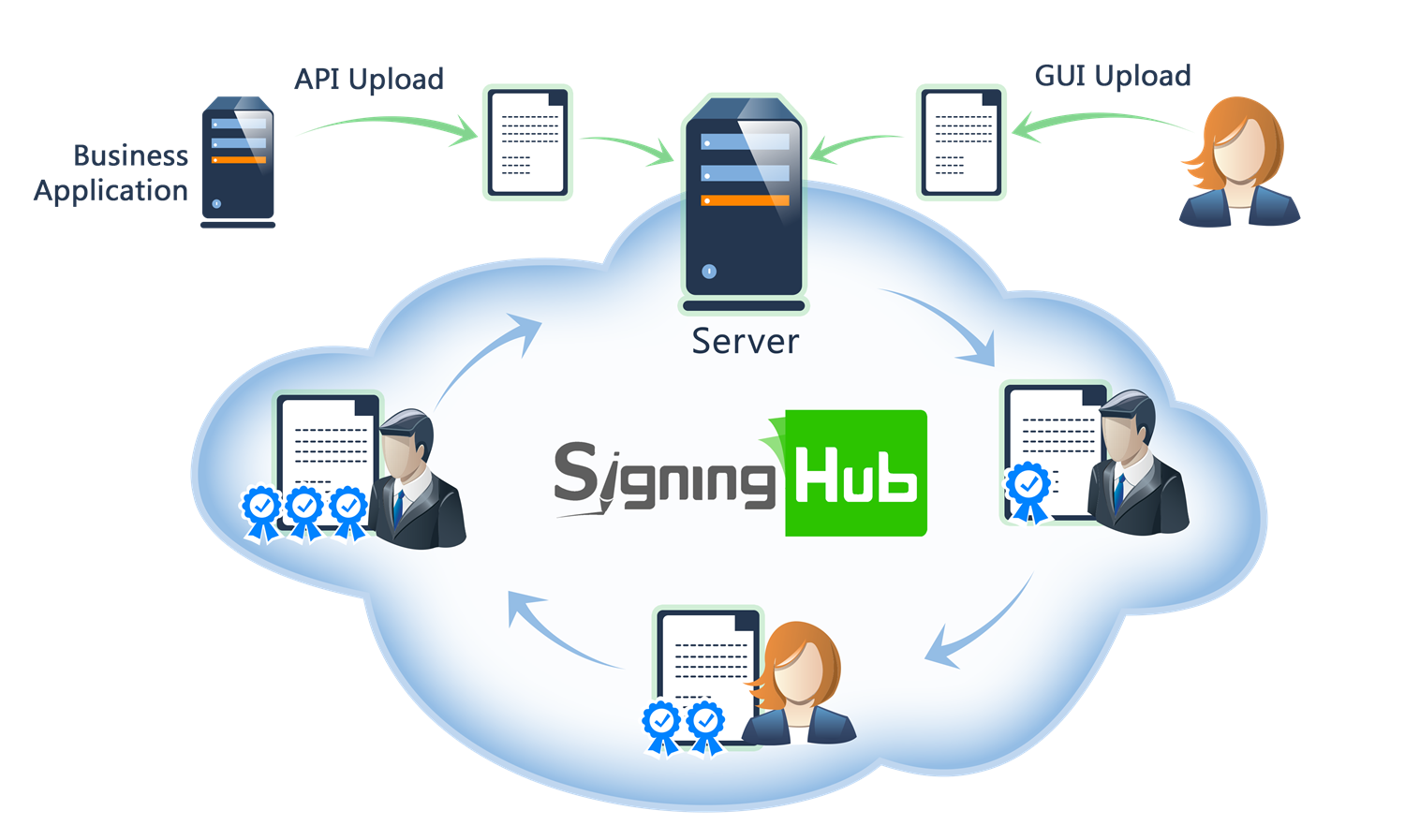
Browse through the API content by selecting the relevant pages from the left panel. To quickly find specific web service information, enter search criteria in the search box on top left.
 .
.More about SigningHub
To know more about SigningHub, explore the following links:
- Go to SigningHub Knowledge Base to view all the relevant information of SigningHub.
-
Visit the Ascertia Community Portal to find answers to contact SigningHub support staff through the
Live Chat provision
.
Our
support staff may be occupied with other priority tasks so live chat is offered on
an "as available" basis.
This guide is intended for developers who will integrate SigningHub into their respective web applications using the RESTful web services, and user interface offered by SigningHub. It is assumed that the reader has a basic knowledge of REST, Java, C#, HTML, JavaScript, HTTP and TLS/SSL. There is no Software Developers Kit (SDK) for the integration, instead the integration uses HTML Forms and JSON so that integration is simple from any language including .Net, Java, PHP etc.
| Main Tags | Most Popular Pages |
|---|---|
|
➤
Welcome
➤ Prerequisites ➤ Access Tokens ➤ Quick Integration ➤ Updates ➤ SignalR ➤ APIs Developer Guide ➤ Appendix |
➤
Authentication
➤ Account Management ➤ Add Package ➤ Upload Document ➤ Get Workflow Details ➤ Sign Document |
The Enterprise level allows enterprise administrators to manage a group or set of users. This is the most common use case scenario of SigningHub, and is a mandatory requirement for using the APIs.
This set of APIs allows an Enterprise Administrator to administer users under their control.
APIs for managing enterprise profile information, configuration, and general organizational settings.
Get Enterprise Owners
Business applications can use this service API to obtain the list of enterprise owners within their enterprise. The Enterprise Profile role must be enabled in the enterprise settings.
header Parameters
| Authorization required | string Default: Bearer {access_token} The OAuth access token obtained as a result of successful authentication via the "password" grant type. |
| Content-Type required | string Default: application/json |
| Accept required | string Default: application/json |
Responses
Response samples
- 200
- 401
- 403
- 500
{- "name": "string",
- "email": "string",
- "mobile_number": "string"
}Update Enterprise Profile
Business applications can use this service API to update the enterprise profile information of the current enterprise user. This means the enterprise administrator or the enterprise user if the "scope" variable was used in the authentication request.
header Parameters
| Authorization required | string Default: Bearer {access_token} The access token obtained as a result of successful authentication via "Password" or "Scope". If "Scope Authentication" was used, then this service will be performed for the user on behalf of the business application. |
| Content-Type required | string Default: application/json |
| Accept required | string Default: application/json |
Request Body schema:
| name required | string [ 1 .. 255 ] characters Name of the enterprise whose information requires updating. |
| url required | string non-empty The url for enterprise e.g enterprise name. |
| owner required | string <email> non-empty Owner of the enterprise whose information requires updating. This is a mandatory field and must match with any enterprise user emailAddress for whom the access granted as owner of the enterprise. |
| support_email | string or null <= 255 characters Support contact email for enterprise |
Responses
Request samples
- Payload
{- "name": "string",
- "url": "string",
- "owner": "user@example.com",
- "support_email": "string"
}Response samples
- 400
- 403
- 404
- 422
- 500
{- "Message": "string"
}Get Enterprise Info
Business applications can use this service API to get the account enterprise information of a logged in user.
header Parameters
| Authorization required | string Default: Bearer {access_token} The access token obtained as a result of successful authentication via "Password" or "Scope". If "Scope Authentication" was used, then this service will be performed for the user on behalf of the business application. |
| Content-Type required | string Default: application/json |
| Accept required | string Default: application/json |
| x-base64 | string Example: true |
Responses
Response samples
- 200
- 401
- 500
{- "id": 0,
- "name": "string",
- "url": "string",
- "support_email": "string",
- "owner": {
- "name": "string",
- "email": "string",
- "mobile_number": "string"
}, - "branding": {
- "logo": "string",
- "logo_url": "string",
- "favicon": "string",
- "favicon_url": "string",
- "colors": {
- "level_1": "string",
- "level_2": "string",
- "level_3": "string",
- "level_4": "string",
- "level_5": "string",
- "level_6": "string",
- "level_7": "string",
- "level_8": "string",
- "level_9": "string",
- "level_10": "string",
- "level_11": "string",
- "level_12": "string",
- "level_13": "string",
- "level_14": "string",
- "level_15": "string"
}
}
}APIs for creating, updating, deleting, and managing enterprise user groups and group memberships.
Update Enterprise Group
Business applications can use this service API to update group information of Enterprise Groups. An enterprise Admin or the enterprise user who has permissions to manage enterprise groups in this role, can update groups. Update Enterprise Group should also be allowed with the scope token.
path Parameters
| id required | integer <int32> ID of the enterprise group. |
header Parameters
| Authorization required | string Default: Bearer {access_token} The access token obtained as a result of successful authentication via "Password" or "Scope". If "Scope Authentication" was used, then this service will be performed for the user on behalf of the business application. |
| Content-Type required | string Default: application/json |
| Accept required | string Default: application/json |
Request Body schema:
| name required | string [ 1 .. 255 ] characters Group Name |
| description | string or null Group Description |
required | Array of objects (Models.GroupMembers) |
Responses
Request samples
- Payload
{- "name": "string",
- "description": "string",
- "members": [
- {
- "user_email": "string",
- "user_name": "string"
}
]
}Response samples
- 400
- 401
- 403
- 404
- 422
- 500
{- "Message": "string"
}Delete Enterprise Group
Business applications can use this service API to delete enterprise group of its users. An enterprise Admin or the enterprise user who has permissions to manage enterprise groups in this role, can delete enterprise groups of its user. The role dictates things such as allowed delete groups available to the user. Delete Enterprise Group should also be allowed with the scope token.
path Parameters
| id required | integer <int32> ID of the enterprise group. |
header Parameters
| Authorization required | string Default: Bearer {access_token} The access token obtained as a result of successful authentication via "Password" or "Scope". If "Scope Authentication" was used, then this service will be performed for the user on behalf of the business application. |
| Content-Type required | string Default: application/json |
| Accept required | string Default: application/json |
Responses
Response samples
- 401
- 403
- 404
- 500
{- "Message": "string"
}Get Enterprise Group by ID
Business applications can use this service API to get enterprise group of its users. An enterprise Admin or the enterprise user who has permissions to manage enterprise groups in this role, can get enterprise groups of its user. Get Enterprise Group should also be allowed with the scope token.
path Parameters
| id required | integer <int32> ID of the enterprise group. |
header Parameters
| Authorization required | string Default: Bearer {access_token} The access token obtained as a result of successful authentication via "Password" or "Scope". If "Scope Authentication" was used, then this service will be performed for the user on behalf of the business application. |
| Content-Type required | string Default: application/json |
| Accept required | string Default: application/json |
Responses
Response samples
- 200
- 403
- 404
- 500
{- "id": 0,
- "name": "string",
- "description": "string",
- "created_on": "string",
- "members": [
- {
- "user_email": "string",
- "user_name": "string"
}
]
}Add Enterprise Group
Business applications can use this service API to add a group for Enterprise Users. An enterprise Admin or the enterprise user who has permissions to manage enterprise groups in this role, can add new groups. Add Enterprise Group should also be allowed with the scope token.
header Parameters
| Authorization required | string Default: Bearer {access_token} The access token obtained as a result of successful authentication via "Password" or "Scope". If "Scope Authentication" was used, then this service will be performed for the user on behalf of the business application. |
| Content-Type required | string Default: application/json |
| Accept required | string Default: application/json |
Request Body schema:
| name required | string [ 1 .. 255 ] characters Group Name |
| description | string or null Group Description |
required | Array of objects (Models.GroupMembers) |
Responses
Request samples
- Payload
{- "name": "string",
- "description": "string",
- "members": [
- {
- "user_email": "string",
- "user_name": "string"
}
]
}Response samples
- 201
- 400
- 401
- 403
- 422
- 500
{- "id": 0,
- "name": "string"
}Bulk Delete Enterprise Group
Business applications can use this service API to bulk delete enterprise groups of its users. An enterprise Admin or an enterprise user who has permission to manage enterprise groups in this role, can bulk delete enterprise groups of its user. The role dictates whether it is allowed to delete groups available to the user. Bulk delete Enterprise groups should also be allowed with the scope token.
header Parameters
| Authorization required | string Default: Bearer {access_token} The access token obtained as a result of successful authentication via "Password" or "Scope". If "Scope Authentication" was used, then this service will be performed for the user on behalf of the business application. |
| Content-Type required | string Default: application/json |
| Accept required | string Default: application/json |
Request Body schema:
IDs of the enterprise group.
Responses
Request samples
- Payload
[- 0
]Response samples
- 200
- 401
- 403
- 500
[- {
- "id": 0,
- "error_message": "string"
}
]Get Enterprise Groups
Business applications can use this service API to retrieve enterprise groups for the current user.
It is possible to search based upon the criterion supplied under the "x-search-text" header.
The response contains both the group name and the members thereof.Group member details returned are email address and user name.
path Parameters
| recordPerPage required | integer <int32> Total number of records to be retrieved in a page. |
| pageNo required | integer <int32> Page number to be retrieved. |
query Parameters
| sort-by | string (Enumerations.GroupSortBy) Enum: "CREATEDON" "NAME" "DESCRIPTION" Sort the result by possible values are mentioned above. |
| asc | boolean Default: false Order the result set by ascending or descending. |
header Parameters
| x-search-text | string |
| Authorization required | string Default: Bearer {access_token} The access token obtained as a result of successful authentication via "Password" or "Scope". If "Scope Authentication" was used, then this service will be performed for the user on behalf of the business application. |
| Content-Type required | string Default: application/json |
| Accept required | string Default: application/json |
| x-search-text | string Example: U2FsZXM= Search text if required. This is optional and without it the entire list is returned. |
| x-total-records | string Example: 10 The total number of records found with the provided search criteria. |
Responses
Response samples
- 200
- 403
- 500
[- {
- "id": 0,
- "group_name": "string",
- "created_on": "string",
- "description": "string",
- "enterprise": true,
- "group_members": [
- {
- "user_email": "string",
- "user_name": "string"
}
]
}
]Get Roles
Business applications can use this service API to get roles for enterprise. An admin who has permissions to manage Roles in his role, can get Role users. The role dictates things such as allowed Read role users available to the enterprise.
path Parameters
| pageNo required | integer <int32> Page number to be retrieved. |
| recordPerPage required | integer <int32> Total number of records to be retrieved in a page. |
query Parameters
| sort-by | string (Enumerations.RoleSortedBy) Enum: "CREATEDON" "NAME" "DESCRIPTION" "DEFAULT" "USERCOUNT" Sort the result by possible values are mentioned above. |
| asc | boolean Default: false Sort order. |
| id | Array of integers <int32> [ items <int32 > ] Search by role ids. |
header Parameters
| Authorization required | string Default: Bearer {access_token} The access token obtained as a result of successful authentication via "Password" or "Scope". If "Scope Authentication" was used, then this service will be performed for the user on behalf of the business application. |
| Content-Type required | string Default: application/json |
| Accept required | string Default: application/json |
| x-search-text | string Example: U2FsZXM= Search text if required. This is optional and without it the entire list is returned. |
| x-total-records | string Example: 10 The total number of records found with the provided search criteria. |
Responses
Response samples
- 200
- 400
- 401
- 403
- 500
[- {
- "id": 0,
- "name": "string",
- "description": "string",
- "default": true,
- "created_on": "string",
- "user_count": 0
}
]Get Role Users
Business applications can use this service API to get roles for enterprise. An admin who has permissions to manage Roles/Users/Integrations/Advanced/Electronic Seal in his role, can get Roles. The role dictates things such as allowed Read roles available to the enterprise.
path Parameters
| id required | integer <int32> Role id. |
| pageNo required | integer <int32> Page number to be retrieved. |
| recordPerPage required | integer <int32> Total number of records to be retrieved in a page. |
query Parameters
| sort-by | string (Enumerations.RoleUserSortedBy) Enum: "NAME" "EMAILADDRESS" |
| asc | boolean Default: false |
header Parameters
| Authorization required | string Default: Bearer {access_token} The access token obtained as a result of successful authentication via "Password" or "Scope". If "Scope Authentication" was used, then this service will be performed for the user on behalf of the business application. |
| Content-Type required | string Default: application/json |
| Accept required | string Default: application/json |
| x-total-records | string Example: 10 The total number of records found with the provided search criteria. |
Responses
Response samples
- 200
- 400
- 401
- 403
- 500
[- {
- "user_name": "string",
- "user_email": "string",
- "created_on": "string",
- "status": "string"
}
]Get Role by ID
Business applications can use this service API to get role for enterprise. An admin who has permissions to manage Role in his role, can get role. The role dictates things such as allowed Read role available to the enterprise.
path Parameters
| id required | integer <int32> Role id |
header Parameters
| Authorization required | string Default: Bearer {access_token} The access token obtained as a result of successful authentication via "Password" or "Scope". If "Scope Authentication" was used, then this service will be performed for the user on behalf of the business application. |
| Content-Type required | string Default: application/json |
| Accept required | string Default: application/json |
Responses
Response samples
- 200
- 401
- 403
- 404
- 500
{- "id": 0,
- "name": "string",
- "description": "string",
- "default": true,
- "created_on": "string",
- "user_settings": {
- "signature_settings": {
- "enabled": true,
- "permissions": {
- "read": {
- "enabled": true,
- "editable": true
}, - "add": {
- "enabled": true,
- "editable": true
}, - "update": {
- "enabled": true,
- "editable": true
}, - "delete": {
- "enabled": true,
- "editable": true
}
}
}, - "groups": {
- "enabled": true,
- "permissions": {
- "read": {
- "enabled": true,
- "editable": true
}, - "add": {
- "enabled": true,
- "editable": true
}, - "update": {
- "enabled": true,
- "editable": true
}, - "delete": {
- "enabled": true,
- "editable": true
}
}
}, - "templates": {
- "enabled": true,
- "permissions": {
- "read": {
- "enabled": true,
- "editable": true
}, - "add": {
- "enabled": true,
- "editable": true
}, - "update": {
- "enabled": true,
- "editable": true
}, - "delete": {
- "enabled": true,
- "editable": true
}
}
}, - "library": {
- "enabled": true,
- "permissions": {
- "read": {
- "enabled": true,
- "editable": true
}, - "add": {
- "enabled": true,
- "editable": true
}, - "update": {
- "enabled": true,
- "editable": true
}, - "delete": {
- "enabled": true,
- "editable": true
}
}
}, - "notification_settings": {
- "enabled": true,
- "permissions": {
- "read": {
- "enabled": true,
- "editable": true
}, - "add": {
- "enabled": true,
- "editable": true
}, - "update": {
- "enabled": true,
- "editable": true
}, - "delete": {
- "enabled": true,
- "editable": true
}
}
}, - "legal_notices": {
- "enabled": true,
- "permissions": {
- "read": {
- "enabled": true,
- "editable": true
}, - "add": {
- "enabled": true,
- "editable": true
}, - "update": {
- "enabled": true,
- "editable": true
}, - "delete": {
- "enabled": true,
- "editable": true
}
}
}, - "delegate_settings": {
- "enabled": true,
- "permissions": {
- "read": {
- "enabled": true,
- "editable": true
}, - "add": {
- "enabled": true,
- "editable": true
}, - "update": {
- "enabled": true,
- "editable": true
}, - "delete": {
- "enabled": true,
- "editable": true
}
}
}, - "advanced": {
- "enabled": true,
- "permissions": {
- "read": {
- "enabled": true,
- "editable": true
}, - "add": {
- "enabled": true,
- "editable": true
}, - "update": {
- "enabled": true,
- "editable": true
}, - "delete": {
- "enabled": true,
- "editable": true
}
}
}, - "smart_form": {
- "enabled": true,
- "permissions": {
- "read": {
- "enabled": true,
- "editable": true
}, - "add": {
- "enabled": true,
- "editable": true
}, - "update": {
- "enabled": true,
- "editable": true
}, - "delete": {
- "enabled": true,
- "editable": true
}
}
}, - "stamps": {
- "enabled": true,
- "permissions": {
- "read": {
- "enabled": true,
- "editable": true
}, - "add": {
- "enabled": true,
- "editable": true
}, - "update": {
- "enabled": true,
- "editable": true
}, - "delete": {
- "enabled": true,
- "editable": true
}
}
}, - "cloud_drives": {
- "enabled": true,
- "permissions": {
- "read": {
- "enabled": true,
- "editable": true
}, - "add": {
- "enabled": true,
- "editable": true
}, - "update": {
- "enabled": true,
- "editable": true
}, - "delete": {
- "enabled": true,
- "editable": true
}
}, - "googledrive": {
- "enabled": true,
- "permissions": {
- "read": {
- "enabled": true,
- "editable": true
}, - "add": {
- "enabled": true,
- "editable": true
}, - "update": {
- "enabled": true,
- "editable": true
}, - "delete": {
- "enabled": true,
- "editable": true
}
}
}, - "onedrive": {
- "enabled": true,
- "permissions": {
- "read": {
- "enabled": true,
- "editable": true
}, - "add": {
- "enabled": true,
- "editable": true
}, - "update": {
- "enabled": true,
- "editable": true
}, - "delete": {
- "enabled": true,
- "editable": true
}
}
}, - "dropbox": {
- "enabled": true,
- "permissions": {
- "read": {
- "enabled": true,
- "editable": true
}, - "add": {
- "enabled": true,
- "editable": true
}, - "update": {
- "enabled": true,
- "editable": true
}, - "delete": {
- "enabled": true,
- "editable": true
}
}
}
}
}, - "enterprise_settings": {
- "profile": {
- "enabled": true,
- "permissions": {
- "read": {
- "enabled": true,
- "editable": true
}, - "add": {
- "enabled": true,
- "editable": true
}, - "update": {
- "enabled": true,
- "editable": true
}, - "delete": {
- "enabled": true,
- "editable": true
}
}
}, - "users": {
- "enabled": true,
- "permissions": {
- "read": {
- "enabled": true,
- "editable": true
}, - "add": {
- "enabled": true,
- "editable": true
}, - "update": {
- "enabled": true,
- "editable": true
}, - "delete": {
- "enabled": true,
- "editable": true
}
}
}, - "roles": {
- "enabled": true,
- "permissions": {
- "read": {
- "enabled": true,
- "editable": true
}, - "add": {
- "enabled": true,
- "editable": true
}, - "update": {
- "enabled": true,
- "editable": true
}, - "delete": {
- "enabled": true,
- "editable": true
}
}
}, - "groups": {
- "enabled": true,
- "permissions": {
- "read": {
- "enabled": true,
- "editable": true
}, - "add": {
- "enabled": true,
- "editable": true
}, - "update": {
- "enabled": true,
- "editable": true
}, - "delete": {
- "enabled": true,
- "editable": true
}
}
}, - "templates": {
- "enabled": true,
- "permissions": {
- "read": {
- "enabled": true,
- "editable": true
}, - "add": {
- "enabled": true,
- "editable": true
}, - "update": {
- "enabled": true,
- "editable": true
}, - "delete": {
- "enabled": true,
- "editable": true
}
}
}, - "library": {
- "enabled": true,
- "permissions": {
- "read": {
- "enabled": true,
- "editable": true
}, - "add": {
- "enabled": true,
- "editable": true
}, - "update": {
- "enabled": true,
- "editable": true
}, - "delete": {
- "enabled": true,
- "editable": true
}
}
}, - "notification_settings": {
- "enabled": true,
- "permissions": {
- "read": {
- "enabled": true,
- "editable": true
}, - "add": {
- "enabled": true,
- "editable": true
}, - "update": {
- "enabled": true,
- "editable": true
}, - "delete": {
- "enabled": true,
- "editable": true
}
}
}, - "billing": {
- "enabled": true,
- "permissions": {
- "read": {
- "enabled": true,
- "editable": true
}, - "add": {
- "enabled": true,
- "editable": true
}, - "update": {
- "enabled": true,
- "editable": true
}, - "delete": {
- "enabled": true,
- "editable": true
}
}
}, - "integrations": {
- "enabled": true,
- "permissions": {
- "read": {
- "enabled": true,
- "editable": true
}, - "add": {
- "enabled": true,
- "editable": true
}, - "update": {
- "enabled": true,
- "editable": true
}, - "delete": {
- "enabled": true,
- "editable": true
}
}
}, - "branding": {
- "enabled": true,
- "permissions": {
- "read": {
- "enabled": true,
- "editable": true
}, - "add": {
- "enabled": true,
- "editable": true
}, - "update": {
- "enabled": true,
- "editable": true
}, - "delete": {
- "enabled": true,
- "editable": true
}
}
}, - "reports": {
- "enabled": true,
- "permissions": {
- "read": {
- "enabled": true,
- "editable": true
}, - "add": {
- "enabled": true,
- "editable": true
}, - "update": {
- "enabled": true,
- "editable": true
}, - "delete": {
- "enabled": true,
- "editable": true
}
}
}, - "documents": {
- "enabled": true,
- "permissions": {
- "read": {
- "enabled": true,
- "editable": true
}, - "add": {
- "enabled": true,
- "editable": true
}, - "update": {
- "enabled": true,
- "editable": true
}, - "delete": {
- "enabled": true,
- "editable": true
}
}
}, - "logs": {
- "enabled": true,
- "permissions": {
- "read": {
- "enabled": true,
- "editable": true
}, - "add": {
- "enabled": true,
- "editable": true
}, - "update": {
- "enabled": true,
- "editable": true
}, - "delete": {
- "enabled": true,
- "editable": true
}
}
}, - "advanced_settings": {
- "enabled": true,
- "permissions": {
- "read": {
- "enabled": true,
- "editable": true
}, - "add": {
- "enabled": true,
- "editable": true
}, - "update": {
- "enabled": true,
- "editable": true
}, - "delete": {
- "enabled": true,
- "editable": true
}
}
}, - "advanced_reports_settings": {
- "enabled": true,
- "permissions": {
- "read": {
- "enabled": true,
- "editable": true
}, - "add": {
- "enabled": true,
- "editable": true
}, - "update": {
- "enabled": true,
- "editable": true
}, - "delete": {
- "enabled": true,
- "editable": true
}
}
}, - "electronic_seals": {
- "enabled": true,
- "permissions": {
- "read": {
- "enabled": true,
- "editable": true
}, - "add": {
- "enabled": true,
- "editable": true
}, - "update": {
- "enabled": true,
- "editable": true
}, - "delete": {
- "enabled": true,
- "editable": true
}
}
}, - "stamps": {
- "enabled": true,
- "permissions": {
- "read": {
- "enabled": true,
- "editable": true
}, - "add": {
- "enabled": true,
- "editable": true
}, - "update": {
- "enabled": true,
- "editable": true
}, - "delete": {
- "enabled": true,
- "editable": true
}
}
}, - "identity_verification_policies": {
- "enabled": true,
- "permissions": {
- "read": {
- "enabled": true,
- "editable": true
}, - "add": {
- "enabled": true,
- "editable": true
}, - "update": {
- "enabled": true,
- "editable": true
}, - "delete": {
- "enabled": true,
- "editable": true
}
}
}, - "ai_management": {
- "enabled": true,
- "permissions": {
- "read": {
- "enabled": true,
- "editable": true
}, - "add": {
- "enabled": true,
- "editable": true
}, - "update": {
- "enabled": true,
- "editable": true
}, - "delete": {
- "enabled": true,
- "editable": true
}
}
}, - "capricorn_dsc": {
- "enabled": true,
- "permissions": {
- "read": {
- "enabled": true,
- "editable": true
}, - "add": {
- "enabled": true,
- "editable": true
}, - "update": {
- "enabled": true,
- "editable": true
}, - "delete": {
- "enabled": true,
- "editable": true
}
}
}
}, - "document_settings": {
- "owner_settings": {
- "upload_share": {
- "enabled": true,
- "settings": {
- "start_existing_workflow": true,
- "replicate_workflow": true,
- "enterprise_only": true,
- "workflow_mode": "string",
- "workflow_type": "string",
- "prevent_owner_change_continue_on_decline": true
}
}, - "manage_recipient": {
- "enabled": true,
- "apply_to": "string"
}, - "print_document": {
- "enabled": true,
- "apply_to": "string"
}, - "download_document": {
- "enabled": true,
- "apply_to": "string"
}, - "attachment_merging": {
- "enabled": true,
- "apply_to": "string"
}, - "recall_document": {
- "enabled": true,
- "apply_to": "string"
}, - "workflow_details": {
- "enabled": true,
- "apply_to": "string"
}, - "save_template": {
- "enabled": true,
- "apply_to": "string"
}, - "invisible_signature": {
- "enabled": true,
- "apply_to": "string"
}, - "access_authentication_all_recipient": {
- "enabled": true,
- "apply_to": "string"
}, - "signing_authentication_all_recipient": {
- "enabled": true,
- "apply_to": "string"
}, - "post_processing_all_recipient": {
- "enabled": true,
- "apply_to": "string"
}
}, - "field_settings": {
- "signature": {
- "enabled": true,
- "level_of_assurance": {
- "selected": [
- "string"
], - "default": [
- "string"
]
}
}, - "inperson": {
- "enabled": true,
- "level_of_assurance": {
- "selected": [
- "string"
], - "default": [
- "string"
]
}
}, - "initial": {
- "enabled": true,
- "apply_to": "string"
}, - "stamp": {
- "enabled": true,
- "apply_to": "string"
}, - "form_fields": {
- "name": {
- "enabled": true,
- "apply_to": "string"
}, - "email": {
- "enabled": true,
- "apply_to": "string"
}, - "job_title": {
- "enabled": true,
- "apply_to": "string"
}, - "company": {
- "enabled": true,
- "apply_to": "string"
}, - "date": {
- "enabled": true,
- "apply_to": "string"
}, - "textbox": {
- "enabled": true,
- "apply_to": "string"
}, - "text_area": {
- "enabled": true,
- "apply_to": "string"
}, - "radio": {
- "enabled": true,
- "apply_to": "string"
}, - "checkbox": {
- "enabled": true,
- "apply_to": "string"
}, - "qrcode": {
- "enabled": true,
- "apply_to": "string"
}, - "add_text": {
- "enabled": true,
- "apply_to": "string"
}, - "attachment": {
- "enabled": true,
- "apply_to": "string"
}
}
}, - "certify_options": {
- "selected": [
- "string"
], - "default": "string"
}, - "templates": {
- "allowed": "string",
- "selected": [
- {
- "id": 0,
- "name": "string"
}
]
}, - "electronic_seals": {
- "allowed": "string",
- "selected": [
- {
- "id": 0,
- "name": "string"
}
]
}, - "library": {
- "allowed": "string",
- "selected": [
- {
- "id": 0,
- "name": "string"
}
]
}, - "stamps": {
- "allowed": "string",
- "selected": [
- {
- "id": 0,
- "name": "string"
}
]
}, - "identity_verification_policies": {
- "allowed": "string",
- "selected": [
- {
- "id": 0,
- "name": "string"
}
]
}, - "recipient_settings": {
- "auto_finish": true,
- "auto_close_viewer": true
}, - "miscellaneous_settings": {
- "comments": {
- "enabled": true,
- "apply_to": "string"
}, - "delete_documents": {
- "enabled": true,
- "apply_to": "string"
}, - "bulk_signing": {
- "enabled": true,
- "apply_to": "string"
}, - "action_behalf_enterprise_user": {
- "enabled": true,
- "apply_to": "string"
}, - "delegated_signing_registerd_users": {
- "enabled": true,
- "apply_to": "string"
}, - "shared_spaces": {
- "enabled": true,
- "apply_to": "string"
}, - "sign_documents": {
- "enabled": true,
- "apply_to": "string"
}, - "personal_contacts_groups": {
- "enabled": true,
- "apply_to": "string"
}, - "readonly_user_fields": {
- "job_title": true,
- "company": true
}
}, - "artificial_intelligence": {
- "enabled": true
}, - "capricorn_dsc": {
- "allowed": "string",
- "selected": [
- {
- "id": 0,
- "name": "string"
}
]
}
}, - "signature_settings": {
- "signing_servers": [
- {
- "info": {
- "id": 0,
- "name": "string",
- "order": 0,
- "provider": "string",
- "key_location": "string",
- "level_of_assurance": "string",
- "appearance_design_name": "string",
- "appearance_logo": "string",
- "auth_type": "string"
}, - "capacity": {
- "electronic_seal": {
- "enabled": true,
- "selected": [
- {
- "id": 0,
- "name": "string",
- "key_protection": "string",
- "level_of_assurance": "string"
}
], - "authentications": {
- "primary": {
- "id": 0,
- "name": "string"
}, - "secondary": {
- "id": 0,
- "name": "string"
}
}
}, - "advanced_electronic_seal": {
- "enabled": true,
- "selected": [
- {
- "id": 0,
- "name": "string",
- "key_protection": "string",
- "level_of_assurance": "string"
}
], - "authentications": {
- "primary": {
- "id": 0,
- "name": "string"
}, - "secondary": {
- "id": 0,
- "name": "string"
}
}
}, - "qualified_electronic_seal": {
- "enabled": true,
- "selected": [
- {
- "id": 0,
- "name": "string",
- "key_protection": "string",
- "level_of_assurance": "string"
}
], - "authentications": {
- "primary": {
- "id": 0,
- "name": "string"
}, - "secondary": {
- "id": 0,
- "name": "string"
}
}
}, - "advanced_electronic_signature": {
- "enabled": true,
- "selected": [
- {
- "id": 0,
- "name": "string",
- "key_protection": "string",
- "level_of_assurance": "string"
}
], - "authentications": {
- "primary": {
- "id": 0,
- "name": "string"
}, - "secondary": {
- "id": 0,
- "name": "string"
}
}
}, - "high_trust_advanced": {
- "enabled": true,
- "selected": [
- {
- "id": 0,
- "name": "string",
- "key_protection": "string",
- "level_of_assurance": "string"
}
], - "authentications": {
- "primary": {
- "id": 0,
- "name": "string"
}, - "secondary": {
- "id": 0,
- "name": "string"
}
}
}, - "qualified_electronic_signature": {
- "enabled": true,
- "selected": [
- {
- "id": 0,
- "name": "string",
- "key_protection": "string",
- "level_of_assurance": "string"
}
], - "authentications": {
- "primary": {
- "id": 0,
- "name": "string"
}, - "secondary": {
- "id": 0,
- "name": "string"
}
}
}, - "default_capacity": {
- "id": 0,
- "name": "string",
- "key_protection": "string",
- "level_of_assurance": "string"
}
}, - "authentications": {
- "no_password": {
- "primary": {
- "web": {
- "selected": {
- "id": 0,
- "name": "string"
}
}, - "mobile": {
- "selected": {
- "id": 0,
- "name": "string"
}
}
}, - "secondary": {
- "web": {
- "selected": {
- "name": "string"
}
}, - "mobile": {
- "selected": {
- "name": "string"
}
}
}
}, - "system_password": {
- "primary": {
- "web": {
- "selected": {
- "id": 0,
- "name": "string"
}
}, - "mobile": {
- "selected": {
- "id": 0,
- "name": "string"
}
}
}, - "secondary": {
- "web": {
- "selected": {
- "name": "string"
}
}, - "mobile": {
- "selected": {
- "name": "string"
}
}
}
}, - "user_password": {
- "primary": "string",
- "secondary": {
- "selected": {
- "name": "string"
}
}
}, - "remote_authorization": {
- "primary": "string",
- "secondary": "string"
}
}
}
], - "metadata": {
- "signing_reason": {
- "enabled": true,
- "type": {
- "selection": "string",
- "value": "string",
- "custom": true
}
}, - "signing_location": {
- "enabled": true,
- "location": "string"
}, - "contact_information": true
}, - "signing_dialog_visible": true
}, - "appearance_settings": {
- "signature": {
- "web": {
- "methods": {
- "text": {
- "enabled": true,
- "disable_text_field": true
}, - "draw": {
- "enabled": true,
- "apply_to": "string"
}, - "upload": {
- "enabled": true,
- "apply_to": "string"
}, - "signature_pad": {
- "enabled": true,
- "apply_to": "string"
}
}, - "default_method": "string"
}, - "mobile": {
- "methods": {
- "text": {
- "enabled": true,
- "disable_text_field": true
}, - "draw": {
- "enabled": true,
- "apply_to": "string"
}, - "upload": {
- "enabled": true,
- "apply_to": "string"
}, - "signature_pad": {
- "enabled": true,
- "apply_to": "string"
}
}, - "default_method": "string"
}
}, - "initial": {
- "methods": {
- "text": {
- "enabled": true,
- "disable_text_field": true
}, - "draw": {
- "enabled": true,
- "apply_to": "string"
}, - "upload": {
- "enabled": true,
- "apply_to": "string"
}, - "signature_pad": {
- "enabled": true,
- "apply_to": "string"
}
}, - "default_method": "string"
}, - "appearance_design": {
- "selected": [
- {
- "design_name": "string",
- "design_preview": "string",
- "design_preview_url": "string"
}
], - "default": {
- "design_name": "string",
- "design_preview": "string",
- "design_preview_url": "string"
}
}, - "manage_signature_logo": {
- "enabled": true,
- "apply_to": "string"
}, - "simple_electronic_signature_appearance_design": {
- "enabled": true,
- "apply_to": "string"
}, - "font": {
- "default": {
- "name": "string"
}
}
}, - "authentication_settings": {
- "primary": {
- "default": {
- "id": 0,
- "name": "string"
}
}, - "secondary": {
- "default": {
- "name": "string"
}
}, - "allow_public_authentications": true
}, - "enterprise_roles_settings": {
- "enterprise_roles": {
- "allowed": "string",
- "selected": [
- {
- "id": 0,
- "name": "string"
}
]
}
}
}Delete Role
Business applications can use this service API to delete a role for Enterprise. An admin who has permissions to manage role in his role, can delete role. The role dictates things such as allowed role available to the enterprise.
path Parameters
| id required | integer <int32> The id of role |
header Parameters
| Authorization required | string Default: Bearer {access_token} The access token obtained as a result of successful authentication via "Password" or "Scope". If "Scope Authentication" was used, then this service will be performed for the user on behalf of the business application. |
| Content-Type required | string Default: application/json |
| Accept required | string Default: application/json |
Responses
Response samples
- 400
- 401
- 403
- 404
- 500
{- "Message": "string"
}Update Role
Business applications can use this service API to update a role for Enterprise.An admin who has permissions to manage role in his role, can update new role. The role dictates things such as allowed Update role available to the enterprise.
path Parameters
| id required | integer <int32> The id of role |
header Parameters
| Authorization required | string Default: Bearer {access_token} The access token obtained as a result of successful authentication via "Password" or "Scope". If "Scope Authentication" was used, then this service will be performed for the user on behalf of the business application. |
| Content-Type required | string Default: application/json |
| Accept required | string Default: application/json |
Request Body schema:
| name required | string [ 1 .. 255 ] characters Name |
| description | string or null Description |
| default | boolean Default |
required | object (Models.RoleUserSettingRequest) RoleUserSettingRequest |
required | object (Models.RoleEnterpriseSettingRequest) RoleEnterpriseSettingRequest |
required | object (Models.RoleDocumentSettingRequest) RoleDocumentSettingRequest |
object (Models.RoleSignatureSettingRequest) RoleSignatureSettingRequest | |
object (Models.RoleSignatureAppearanceSettingRequest) RoleSignatureAppearanceSettingRequest | |
required | object (Models.RoleAuthenticationSettingRequest) RoleAuthenticationSettingRequest |
object (Models.RoleEnterpriseRolesSettingRequest) |
Responses
Request samples
- Payload
{- "name": "string",
- "description": "string",
- "default": true,
- "user_settings": {
- "signature_settings": {
- "enabled": true,
- "permissions": {
- "read": {
- "enabled": true
}, - "add": {
- "enabled": true
}, - "update": {
- "enabled": true
}, - "delete": {
- "enabled": true
}
}
}, - "groups": {
- "enabled": true,
- "permissions": {
- "read": {
- "enabled": true
}, - "add": {
- "enabled": true
}, - "update": {
- "enabled": true
}, - "delete": {
- "enabled": true
}
}
}, - "templates": {
- "enabled": true,
- "permissions": {
- "read": {
- "enabled": true
}, - "add": {
- "enabled": true
}, - "update": {
- "enabled": true
}, - "delete": {
- "enabled": true
}
}
}, - "library": {
- "enabled": true,
- "permissions": {
- "read": {
- "enabled": true
}, - "add": {
- "enabled": true
}, - "update": {
- "enabled": true
}, - "delete": {
- "enabled": true
}
}
}, - "notification_settings": {
- "enabled": true,
- "permissions": {
- "read": {
- "enabled": true
}, - "add": {
- "enabled": true
}, - "update": {
- "enabled": true
}, - "delete": {
- "enabled": true
}
}
}, - "legal_notices": {
- "enabled": true,
- "permissions": {
- "read": {
- "enabled": true
}, - "add": {
- "enabled": true
}, - "update": {
- "enabled": true
}, - "delete": {
- "enabled": true
}
}
}, - "delegate_settings": {
- "enabled": true,
- "permissions": {
- "read": {
- "enabled": true
}, - "add": {
- "enabled": true
}, - "update": {
- "enabled": true
}, - "delete": {
- "enabled": true
}
}
}, - "advanced": {
- "enabled": true,
- "permissions": {
- "read": {
- "enabled": true
}, - "add": {
- "enabled": true
}, - "update": {
- "enabled": true
}, - "delete": {
- "enabled": true
}
}
}, - "stamps": {
- "enabled": true,
- "permissions": {
- "read": {
- "enabled": true
}, - "add": {
- "enabled": true
}, - "update": {
- "enabled": true
}, - "delete": {
- "enabled": true
}
}
}, - "smart_form": {
- "enabled": true,
- "permissions": {
- "read": {
- "enabled": true
}, - "add": {
- "enabled": true
}, - "update": {
- "enabled": true
}, - "delete": {
- "enabled": true
}
}
}, - "cloud_drives": {
- "enabled": true,
- "permissions": {
- "read": {
- "enabled": true
}, - "add": {
- "enabled": true
}, - "update": {
- "enabled": true
}, - "delete": {
- "enabled": true
}
}, - "googledrive": {
- "enabled": true,
- "permissions": {
- "read": {
- "enabled": true
}, - "add": {
- "enabled": true
}, - "update": {
- "enabled": true
}, - "delete": {
- "enabled": true
}
}
}, - "onedrive": {
- "enabled": true,
- "permissions": {
- "read": {
- "enabled": true
}, - "add": {
- "enabled": true
}, - "update": {
- "enabled": true
}, - "delete": {
- "enabled": true
}
}
}, - "dropbox": {
- "enabled": true,
- "permissions": {
- "read": {
- "enabled": true
}, - "add": {
- "enabled": true
}, - "update": {
- "enabled": true
}, - "delete": {
- "enabled": true
}
}
}
}
}, - "enterprise_settings": {
- "profile": {
- "enabled": true,
- "permissions": {
- "read": {
- "enabled": true
}, - "add": {
- "enabled": true
}, - "update": {
- "enabled": true
}, - "delete": {
- "enabled": true
}
}
}, - "users": {
- "enabled": true,
- "permissions": {
- "read": {
- "enabled": true
}, - "add": {
- "enabled": true
}, - "update": {
- "enabled": true
}, - "delete": {
- "enabled": true
}
}
}, - "roles": {
- "enabled": true,
- "permissions": {
- "read": {
- "enabled": true
}, - "add": {
- "enabled": true
}, - "update": {
- "enabled": true
}, - "delete": {
- "enabled": true
}
}
}, - "groups": {
- "enabled": true,
- "permissions": {
- "read": {
- "enabled": true
}, - "add": {
- "enabled": true
}, - "update": {
- "enabled": true
}, - "delete": {
- "enabled": true
}
}
}, - "templates": {
- "enabled": true,
- "permissions": {
- "read": {
- "enabled": true
}, - "add": {
- "enabled": true
}, - "update": {
- "enabled": true
}, - "delete": {
- "enabled": true
}
}
}, - "library": {
- "enabled": true,
- "permissions": {
- "read": {
- "enabled": true
}, - "add": {
- "enabled": true
}, - "update": {
- "enabled": true
}, - "delete": {
- "enabled": true
}
}
}, - "notification_settings": {
- "enabled": true,
- "permissions": {
- "read": {
- "enabled": true
}, - "add": {
- "enabled": true
}, - "update": {
- "enabled": true
}, - "delete": {
- "enabled": true
}
}
}, - "billing": {
- "enabled": true,
- "permissions": {
- "read": {
- "enabled": true
}, - "add": {
- "enabled": true
}, - "update": {
- "enabled": true
}, - "delete": {
- "enabled": true
}
}
}, - "integrations": {
- "enabled": true,
- "permissions": {
- "read": {
- "enabled": true
}, - "add": {
- "enabled": true
}, - "update": {
- "enabled": true
}, - "delete": {
- "enabled": true
}
}
}, - "branding": {
- "enabled": true,
- "permissions": {
- "read": {
- "enabled": true
}, - "add": {
- "enabled": true
}, - "update": {
- "enabled": true
}, - "delete": {
- "enabled": true
}
}
}, - "reports": {
- "enabled": true,
- "permissions": {
- "read": {
- "enabled": true
}, - "add": {
- "enabled": true
}, - "update": {
- "enabled": true
}, - "delete": {
- "enabled": true
}
}
}, - "documents": {
- "enabled": true,
- "permissions": {
- "read": {
- "enabled": true
}, - "add": {
- "enabled": true
}, - "update": {
- "enabled": true
}, - "delete": {
- "enabled": true
}
}
}, - "logs": {
- "enabled": true,
- "permissions": {
- "read": {
- "enabled": true
}, - "add": {
- "enabled": true
}, - "update": {
- "enabled": true
}, - "delete": {
- "enabled": true
}
}
}, - "advanced_settings": {
- "enabled": true,
- "permissions": {
- "read": {
- "enabled": true
}, - "add": {
- "enabled": true
}, - "update": {
- "enabled": true
}, - "delete": {
- "enabled": true
}
}
}, - "advanced_reports_settings": {
- "enabled": true,
- "permissions": {
- "read": {
- "enabled": true
}, - "add": {
- "enabled": true
}, - "update": {
- "enabled": true
}, - "delete": {
- "enabled": true
}
}
}, - "electronic_seals": {
- "enabled": true,
- "permissions": {
- "read": {
- "enabled": true
}, - "add": {
- "enabled": true
}, - "update": {
- "enabled": true
}, - "delete": {
- "enabled": true
}
}
}, - "stamps": {
- "enabled": true,
- "permissions": {
- "read": {
- "enabled": true
}, - "add": {
- "enabled": true
}, - "update": {
- "enabled": true
}, - "delete": {
- "enabled": true
}
}
}, - "identity_verification_policies": {
- "enabled": true,
- "permissions": {
- "read": {
- "enabled": true
}, - "add": {
- "enabled": true
}, - "update": {
- "enabled": true
}, - "delete": {
- "enabled": true
}
}
}, - "ai_management": {
- "enabled": true,
- "permissions": {
- "read": {
- "enabled": true
}, - "add": {
- "enabled": true
}, - "update": {
- "enabled": true
}, - "delete": {
- "enabled": true
}
}
}, - "capricorn_dsc": {
- "enabled": true,
- "permissions": {
- "read": {
- "enabled": true
}, - "add": {
- "enabled": true
}, - "update": {
- "enabled": true
}, - "delete": {
- "enabled": true
}
}
}
}, - "document_settings": {
- "owner_settings": {
- "upload_share": {
- "enabled": true,
- "settings": {
- "start_existing_workflow": true,
- "replicate_workflow": true,
- "enterprise_only": true,
- "workflow_mode": "string",
- "workflow_type": "string",
- "prevent_owner_change_continue_on_decline": true
}
}, - "manage_recipient": {
- "enabled": true,
- "apply_to": "string"
}, - "print_document": {
- "enabled": true,
- "apply_to": "string"
}, - "download_document": {
- "enabled": true,
- "apply_to": "string"
}, - "attachment_merging": {
- "enabled": true,
- "apply_to": "string"
}, - "recall_document": {
- "enabled": true,
- "apply_to": "string"
}, - "workflow_details": {
- "enabled": true,
- "apply_to": "string"
}, - "save_template": {
- "enabled": true,
- "apply_to": "string"
}, - "invisible_signature": {
- "enabled": true,
- "apply_to": "string"
}, - "access_authentication_all_recipient": {
- "enabled": true,
- "apply_to": "ALL"
}, - "signing_authentication_all_recipient": {
- "enabled": true,
- "apply_to": "ALL"
}, - "post_processing_all_recipient": {
- "enabled": true,
- "apply_to": "string"
}
}, - "field_settings": {
- "signature": {
- "enabled": true,
- "level_of_assurance": {
- "selected": [
- "string"
], - "default": [
- "string"
]
}
}, - "inperson": {
- "enabled": true,
- "level_of_assurance": {
- "selected": [
- "string"
], - "default": [
- "string"
]
}
}, - "initial": {
- "enabled": true,
- "apply_to": "string"
}, - "stamp": {
- "enabled": true,
- "apply_to": "string"
}, - "form_fields": {
- "name": {
- "enabled": true,
- "apply_to": "string"
}, - "email": {
- "enabled": true,
- "apply_to": "string"
}, - "job_title": {
- "enabled": true,
- "apply_to": "string"
}, - "company": {
- "enabled": true,
- "apply_to": "string"
}, - "date": {
- "enabled": true,
- "apply_to": "string"
}, - "textbox": {
- "enabled": true,
- "apply_to": "string"
}, - "text_area": {
- "enabled": true,
- "apply_to": "string"
}, - "radio": {
- "enabled": true,
- "apply_to": "string"
}, - "checkbox": {
- "enabled": true,
- "apply_to": "string"
}, - "qrcode": {
- "enabled": true,
- "apply_to": "string"
}, - "add_text": {
- "enabled": true,
- "apply_to": "string"
}, - "attachment": {
- "enabled": true,
- "apply_to": "string"
}
}
}, - "certify_options": {
- "selected": [
- "string"
], - "default": "string"
}, - "templates": {
- "allowed": "string",
- "selected": [
- {
- "id": 0,
- "name": "string"
}
]
}, - "electronic_seals": {
- "allowed": "string",
- "selected": [
- {
- "id": 0,
- "name": "string"
}
]
}, - "library": {
- "allowed": "string",
- "selected": [
- {
- "id": 0,
- "name": "string"
}
]
}, - "stamps": {
- "allowed": "string",
- "selected": [
- {
- "id": 0,
- "name": "string"
}
]
}, - "identity_verification_policies": {
- "allowed": "string",
- "selected": [
- {
- "id": 0,
- "name": "string"
}
]
}, - "recipient_settings": {
- "auto_finish": true,
- "auto_close_viewer": true
}, - "miscellaneous_settings": {
- "comments": {
- "enabled": true,
- "apply_to": "string"
}, - "delete_documents": {
- "enabled": true,
- "apply_to": "string"
}, - "bulk_signing": {
- "enabled": true,
- "apply_to": "string"
}, - "action_behalf_enterprise_user": {
- "enabled": true,
- "apply_to": "string"
}, - "delegated_signing_registerd_users": {
- "enabled": true,
- "apply_to": "string"
}, - "shared_spaces": {
- "enabled": true,
- "apply_to": "string"
}, - "sign_documents": {
- "enabled": true,
- "apply_to": "string"
}, - "personal_contacts_groups": {
- "enabled": true,
- "apply_to": "string"
}, - "readonly_user_fields": {
- "job_title": true,
- "company": true
}
}, - "artificial_intelligence": {
- "enabled": true
}, - "capricorn_dsc": {
- "allowed": "string",
- "selected": [
- {
- "id": 0,
- "name": "string"
}
]
}
}, - "signature_settings": {
- "signing_servers": [
- {
- "info": {
- "name": "string",
- "order": 1,
- "key_location": "string",
- "appearance_design_name": "string",
- "appearance_logo": "string"
}, - "capacity": {
- "electronic_seal": {
- "enabled": true,
- "selected": [
- {
- "name": "string"
}
], - "authentications": {
- "primary": {
- "name": "string"
}, - "secondary": {
- "name": "string"
}
}
}, - "advanced_electronic_seal": {
- "enabled": true,
- "selected": [
- {
- "name": "string"
}
], - "authentications": {
- "primary": {
- "name": "string"
}, - "secondary": {
- "name": "string"
}
}
}, - "qualified_electronic_seal": {
- "enabled": true,
- "selected": [
- {
- "name": "string"
}
], - "authentications": {
- "primary": {
- "name": "string"
}, - "secondary": {
- "name": "string"
}
}
}, - "advanced_electronic_signature": {
- "enabled": true,
- "selected": [
- {
- "name": "string"
}
], - "authentications": {
- "primary": {
- "name": "string"
}, - "secondary": {
- "name": "string"
}
}
}, - "high_trust_advanced": {
- "enabled": true,
- "selected": [
- {
- "name": "string"
}
], - "authentications": {
- "primary": {
- "name": "string"
}, - "secondary": {
- "name": "string"
}
}
}, - "qualified_electronic_signature": {
- "enabled": true,
- "selected": [
- {
- "name": "string"
}
], - "authentications": {
- "primary": {
- "name": "string"
}, - "secondary": {
- "name": "string"
}
}
}, - "default_capacity": {
- "name": "string"
}
}, - "authentications": {
- "no_password": {
- "primary": {
- "web": {
- "selected": {
- "name": "string"
}
}, - "mobile": {
- "selected": {
- "name": "string"
}
}
}, - "secondary": {
- "web": {
- "selected": {
- "name": "string"
}
}, - "mobile": {
- "selected": {
- "name": "string"
}
}
}
}, - "system_password": {
- "primary": {
- "web": {
- "selected": {
- "name": "string"
}
}, - "mobile": {
- "selected": {
- "name": "string"
}
}
}, - "secondary": {
- "web": {
- "selected": {
- "name": "string"
}
}, - "mobile": {
- "selected": {
- "name": "string"
}
}
}
}, - "user_password": {
- "secondary": {
- "selected": {
- "name": "string"
}
}
}
}
}
], - "metadata": {
- "signing_reason": {
- "enabled": true,
- "type": {
- "selection": "string",
- "value": "string",
- "custom": true
}
}, - "signing_location": {
- "enabled": true,
- "location": "string"
}, - "contact_information": true
}, - "signing_dialog_visible": true
}, - "appearance_settings": {
- "signature": {
- "web": {
- "methods": {
- "text": {
- "enabled": true,
- "disable_text_field": true
}, - "draw": {
- "enabled": true,
- "apply_to": "string"
}, - "upload": {
- "enabled": true,
- "apply_to": "string"
}, - "signature_pad": {
- "enabled": true,
- "apply_to": "string"
}
}, - "default_method": "string"
}, - "mobile": {
- "methods": {
- "text": {
- "enabled": true,
- "disable_text_field": true
}, - "draw": {
- "enabled": true,
- "apply_to": "string"
}, - "upload": {
- "enabled": true,
- "apply_to": "string"
}, - "signature_pad": {
- "enabled": true,
- "apply_to": "string"
}
}, - "default_method": "string"
}
}, - "initial": {
- "methods": {
- "text": {
- "enabled": true,
- "disable_text_field": true
}, - "draw": {
- "enabled": true,
- "apply_to": "string"
}, - "upload": {
- "enabled": true,
- "apply_to": "string"
}, - "signature_pad": {
- "enabled": true,
- "apply_to": "string"
}
}, - "default_method": "string"
}, - "appearance_design": {
- "selected": [
- {
- "design_name": "string"
}
], - "default": {
- "design_name": "string"
}
}, - "manage_signature_logo": {
- "enabled": true,
- "apply_to": "string"
}, - "simple_electronic_signature_appearance_design": {
- "enabled": true,
- "apply_to": "string"
}, - "font": {
- "default": {
- "name": "string"
}
}
}, - "authentication_settings": {
- "primary": {
- "default": {
- "name": "string"
}
}, - "secondary": {
- "default": {
- "name": "string"
}
}, - "allow_public_authentications": true
}, - "enterprise_roles_settings": {
- "enterprise_roles": {
- "allowed": "string",
- "selected": [
- {
- "id": 0,
- "name": "string"
}
]
}
}
}Response samples
- 400
- 401
- 403
- 404
- 422
- 500
{- "Message": "string"
}Add Role
Business applications can use this service API to add a role for Enterprise. An admin who has permissions to manage role in his role, can add new role. The role dictates things such as allowed Add role available to the enterprise.
header Parameters
| Authorization required | string Default: Bearer {access_token} The access token obtained as a result of successful authentication via "Password" or "Scope". If "Scope Authentication" was used, then this service will be performed for the user on behalf of the business application. |
| Content-Type required | string Default: application/json |
| Accept required | string Default: application/json |
Request Body schema:
| name required | string [ 1 .. 255 ] characters Name |
| description | string or null Description |
| default | boolean Default |
Responses
Request samples
- Payload
{- "name": "string",
- "description": "string",
- "default": true
}Response samples
- 201
- 401
- 403
- 422
- 500
{- "id": 0,
- "name": "string",
- "description": "string",
- "default": true,
- "created_on": "string",
- "user_settings": {
- "signature_settings": {
- "enabled": true,
- "permissions": {
- "read": {
- "enabled": true,
- "editable": true
}, - "add": {
- "enabled": true,
- "editable": true
}, - "update": {
- "enabled": true,
- "editable": true
}, - "delete": {
- "enabled": true,
- "editable": true
}
}
}, - "groups": {
- "enabled": true,
- "permissions": {
- "read": {
- "enabled": true,
- "editable": true
}, - "add": {
- "enabled": true,
- "editable": true
}, - "update": {
- "enabled": true,
- "editable": true
}, - "delete": {
- "enabled": true,
- "editable": true
}
}
}, - "templates": {
- "enabled": true,
- "permissions": {
- "read": {
- "enabled": true,
- "editable": true
}, - "add": {
- "enabled": true,
- "editable": true
}, - "update": {
- "enabled": true,
- "editable": true
}, - "delete": {
- "enabled": true,
- "editable": true
}
}
}, - "library": {
- "enabled": true,
- "permissions": {
- "read": {
- "enabled": true,
- "editable": true
}, - "add": {
- "enabled": true,
- "editable": true
}, - "update": {
- "enabled": true,
- "editable": true
}, - "delete": {
- "enabled": true,
- "editable": true
}
}
}, - "notification_settings": {
- "enabled": true,
- "permissions": {
- "read": {
- "enabled": true,
- "editable": true
}, - "add": {
- "enabled": true,
- "editable": true
}, - "update": {
- "enabled": true,
- "editable": true
}, - "delete": {
- "enabled": true,
- "editable": true
}
}
}, - "legal_notices": {
- "enabled": true,
- "permissions": {
- "read": {
- "enabled": true,
- "editable": true
}, - "add": {
- "enabled": true,
- "editable": true
}, - "update": {
- "enabled": true,
- "editable": true
}, - "delete": {
- "enabled": true,
- "editable": true
}
}
}, - "delegate_settings": {
- "enabled": true,
- "permissions": {
- "read": {
- "enabled": true,
- "editable": true
}, - "add": {
- "enabled": true,
- "editable": true
}, - "update": {
- "enabled": true,
- "editable": true
}, - "delete": {
- "enabled": true,
- "editable": true
}
}
}, - "advanced": {
- "enabled": true,
- "permissions": {
- "read": {
- "enabled": true,
- "editable": true
}, - "add": {
- "enabled": true,
- "editable": true
}, - "update": {
- "enabled": true,
- "editable": true
}, - "delete": {
- "enabled": true,
- "editable": true
}
}
}, - "smart_form": {
- "enabled": true,
- "permissions": {
- "read": {
- "enabled": true,
- "editable": true
}, - "add": {
- "enabled": true,
- "editable": true
}, - "update": {
- "enabled": true,
- "editable": true
}, - "delete": {
- "enabled": true,
- "editable": true
}
}
}, - "stamps": {
- "enabled": true,
- "permissions": {
- "read": {
- "enabled": true,
- "editable": true
}, - "add": {
- "enabled": true,
- "editable": true
}, - "update": {
- "enabled": true,
- "editable": true
}, - "delete": {
- "enabled": true,
- "editable": true
}
}
}, - "cloud_drives": {
- "enabled": true,
- "permissions": {
- "read": {
- "enabled": true,
- "editable": true
}, - "add": {
- "enabled": true,
- "editable": true
}, - "update": {
- "enabled": true,
- "editable": true
}, - "delete": {
- "enabled": true,
- "editable": true
}
}, - "googledrive": {
- "enabled": true,
- "permissions": {
- "read": {
- "enabled": true,
- "editable": true
}, - "add": {
- "enabled": true,
- "editable": true
}, - "update": {
- "enabled": true,
- "editable": true
}, - "delete": {
- "enabled": true,
- "editable": true
}
}
}, - "onedrive": {
- "enabled": true,
- "permissions": {
- "read": {
- "enabled": true,
- "editable": true
}, - "add": {
- "enabled": true,
- "editable": true
}, - "update": {
- "enabled": true,
- "editable": true
}, - "delete": {
- "enabled": true,
- "editable": true
}
}
}, - "dropbox": {
- "enabled": true,
- "permissions": {
- "read": {
- "enabled": true,
- "editable": true
}, - "add": {
- "enabled": true,
- "editable": true
}, - "update": {
- "enabled": true,
- "editable": true
}, - "delete": {
- "enabled": true,
- "editable": true
}
}
}
}
}, - "enterprise_settings": {
- "profile": {
- "enabled": true,
- "permissions": {
- "read": {
- "enabled": true,
- "editable": true
}, - "add": {
- "enabled": true,
- "editable": true
}, - "update": {
- "enabled": true,
- "editable": true
}, - "delete": {
- "enabled": true,
- "editable": true
}
}
}, - "users": {
- "enabled": true,
- "permissions": {
- "read": {
- "enabled": true,
- "editable": true
}, - "add": {
- "enabled": true,
- "editable": true
}, - "update": {
- "enabled": true,
- "editable": true
}, - "delete": {
- "enabled": true,
- "editable": true
}
}
}, - "roles": {
- "enabled": true,
- "permissions": {
- "read": {
- "enabled": true,
- "editable": true
}, - "add": {
- "enabled": true,
- "editable": true
}, - "update": {
- "enabled": true,
- "editable": true
}, - "delete": {
- "enabled": true,
- "editable": true
}
}
}, - "groups": {
- "enabled": true,
- "permissions": {
- "read": {
- "enabled": true,
- "editable": true
}, - "add": {
- "enabled": true,
- "editable": true
}, - "update": {
- "enabled": true,
- "editable": true
}, - "delete": {
- "enabled": true,
- "editable": true
}
}
}, - "templates": {
- "enabled": true,
- "permissions": {
- "read": {
- "enabled": true,
- "editable": true
}, - "add": {
- "enabled": true,
- "editable": true
}, - "update": {
- "enabled": true,
- "editable": true
}, - "delete": {
- "enabled": true,
- "editable": true
}
}
}, - "library": {
- "enabled": true,
- "permissions": {
- "read": {
- "enabled": true,
- "editable": true
}, - "add": {
- "enabled": true,
- "editable": true
}, - "update": {
- "enabled": true,
- "editable": true
}, - "delete": {
- "enabled": true,
- "editable": true
}
}
}, - "notification_settings": {
- "enabled": true,
- "permissions": {
- "read": {
- "enabled": true,
- "editable": true
}, - "add": {
- "enabled": true,
- "editable": true
}, - "update": {
- "enabled": true,
- "editable": true
}, - "delete": {
- "enabled": true,
- "editable": true
}
}
}, - "billing": {
- "enabled": true,
- "permissions": {
- "read": {
- "enabled": true,
- "editable": true
}, - "add": {
- "enabled": true,
- "editable": true
}, - "update": {
- "enabled": true,
- "editable": true
}, - "delete": {
- "enabled": true,
- "editable": true
}
}
}, - "integrations": {
- "enabled": true,
- "permissions": {
- "read": {
- "enabled": true,
- "editable": true
}, - "add": {
- "enabled": true,
- "editable": true
}, - "update": {
- "enabled": true,
- "editable": true
}, - "delete": {
- "enabled": true,
- "editable": true
}
}
}, - "branding": {
- "enabled": true,
- "permissions": {
- "read": {
- "enabled": true,
- "editable": true
}, - "add": {
- "enabled": true,
- "editable": true
}, - "update": {
- "enabled": true,
- "editable": true
}, - "delete": {
- "enabled": true,
- "editable": true
}
}
}, - "reports": {
- "enabled": true,
- "permissions": {
- "read": {
- "enabled": true,
- "editable": true
}, - "add": {
- "enabled": true,
- "editable": true
}, - "update": {
- "enabled": true,
- "editable": true
}, - "delete": {
- "enabled": true,
- "editable": true
}
}
}, - "documents": {
- "enabled": true,
- "permissions": {
- "read": {
- "enabled": true,
- "editable": true
}, - "add": {
- "enabled": true,
- "editable": true
}, - "update": {
- "enabled": true,
- "editable": true
}, - "delete": {
- "enabled": true,
- "editable": true
}
}
}, - "logs": {
- "enabled": true,
- "permissions": {
- "read": {
- "enabled": true,
- "editable": true
}, - "add": {
- "enabled": true,
- "editable": true
}, - "update": {
- "enabled": true,
- "editable": true
}, - "delete": {
- "enabled": true,
- "editable": true
}
}
}, - "advanced_settings": {
- "enabled": true,
- "permissions": {
- "read": {
- "enabled": true,
- "editable": true
}, - "add": {
- "enabled": true,
- "editable": true
}, - "update": {
- "enabled": true,
- "editable": true
}, - "delete": {
- "enabled": true,
- "editable": true
}
}
}, - "advanced_reports_settings": {
- "enabled": true,
- "permissions": {
- "read": {
- "enabled": true,
- "editable": true
}, - "add": {
- "enabled": true,
- "editable": true
}, - "update": {
- "enabled": true,
- "editable": true
}, - "delete": {
- "enabled": true,
- "editable": true
}
}
}, - "electronic_seals": {
- "enabled": true,
- "permissions": {
- "read": {
- "enabled": true,
- "editable": true
}, - "add": {
- "enabled": true,
- "editable": true
}, - "update": {
- "enabled": true,
- "editable": true
}, - "delete": {
- "enabled": true,
- "editable": true
}
}
}, - "stamps": {
- "enabled": true,
- "permissions": {
- "read": {
- "enabled": true,
- "editable": true
}, - "add": {
- "enabled": true,
- "editable": true
}, - "update": {
- "enabled": true,
- "editable": true
}, - "delete": {
- "enabled": true,
- "editable": true
}
}
}, - "identity_verification_policies": {
- "enabled": true,
- "permissions": {
- "read": {
- "enabled": true,
- "editable": true
}, - "add": {
- "enabled": true,
- "editable": true
}, - "update": {
- "enabled": true,
- "editable": true
}, - "delete": {
- "enabled": true,
- "editable": true
}
}
}, - "ai_management": {
- "enabled": true,
- "permissions": {
- "read": {
- "enabled": true,
- "editable": true
}, - "add": {
- "enabled": true,
- "editable": true
}, - "update": {
- "enabled": true,
- "editable": true
}, - "delete": {
- "enabled": true,
- "editable": true
}
}
}, - "capricorn_dsc": {
- "enabled": true,
- "permissions": {
- "read": {
- "enabled": true,
- "editable": true
}, - "add": {
- "enabled": true,
- "editable": true
}, - "update": {
- "enabled": true,
- "editable": true
}, - "delete": {
- "enabled": true,
- "editable": true
}
}
}
}, - "document_settings": {
- "owner_settings": {
- "upload_share": {
- "enabled": true,
- "settings": {
- "start_existing_workflow": true,
- "replicate_workflow": true,
- "enterprise_only": true,
- "workflow_mode": "string",
- "workflow_type": "string",
- "prevent_owner_change_continue_on_decline": true
}
}, - "manage_recipient": {
- "enabled": true,
- "apply_to": "string"
}, - "print_document": {
- "enabled": true,
- "apply_to": "string"
}, - "download_document": {
- "enabled": true,
- "apply_to": "string"
}, - "attachment_merging": {
- "enabled": true,
- "apply_to": "string"
}, - "recall_document": {
- "enabled": true,
- "apply_to": "string"
}, - "workflow_details": {
- "enabled": true,
- "apply_to": "string"
}, - "save_template": {
- "enabled": true,
- "apply_to": "string"
}, - "invisible_signature": {
- "enabled": true,
- "apply_to": "string"
}, - "access_authentication_all_recipient": {
- "enabled": true,
- "apply_to": "string"
}, - "signing_authentication_all_recipient": {
- "enabled": true,
- "apply_to": "string"
}, - "post_processing_all_recipient": {
- "enabled": true,
- "apply_to": "string"
}
}, - "field_settings": {
- "signature": {
- "enabled": true,
- "level_of_assurance": {
- "selected": [
- "string"
], - "default": [
- "string"
]
}
}, - "inperson": {
- "enabled": true,
- "level_of_assurance": {
- "selected": [
- "string"
], - "default": [
- "string"
]
}
}, - "initial": {
- "enabled": true,
- "apply_to": "string"
}, - "stamp": {
- "enabled": true,
- "apply_to": "string"
}, - "form_fields": {
- "name": {
- "enabled": true,
- "apply_to": "string"
}, - "email": {
- "enabled": true,
- "apply_to": "string"
}, - "job_title": {
- "enabled": true,
- "apply_to": "string"
}, - "company": {
- "enabled": true,
- "apply_to": "string"
}, - "date": {
- "enabled": true,
- "apply_to": "string"
}, - "textbox": {
- "enabled": true,
- "apply_to": "string"
}, - "text_area": {
- "enabled": true,
- "apply_to": "string"
}, - "radio": {
- "enabled": true,
- "apply_to": "string"
}, - "checkbox": {
- "enabled": true,
- "apply_to": "string"
}, - "qrcode": {
- "enabled": true,
- "apply_to": "string"
}, - "add_text": {
- "enabled": true,
- "apply_to": "string"
}, - "attachment": {
- "enabled": true,
- "apply_to": "string"
}
}
}, - "certify_options": {
- "selected": [
- "string"
], - "default": "string"
}, - "templates": {
- "allowed": "string",
- "selected": [
- {
- "id": 0,
- "name": "string"
}
]
}, - "electronic_seals": {
- "allowed": "string",
- "selected": [
- {
- "id": 0,
- "name": "string"
}
]
}, - "library": {
- "allowed": "string",
- "selected": [
- {
- "id": 0,
- "name": "string"
}
]
}, - "stamps": {
- "allowed": "string",
- "selected": [
- {
- "id": 0,
- "name": "string"
}
]
}, - "identity_verification_policies": {
- "allowed": "string",
- "selected": [
- {
- "id": 0,
- "name": "string"
}
]
}, - "recipient_settings": {
- "auto_finish": true,
- "auto_close_viewer": true
}, - "miscellaneous_settings": {
- "comments": {
- "enabled": true,
- "apply_to": "string"
}, - "delete_documents": {
- "enabled": true,
- "apply_to": "string"
}, - "bulk_signing": {
- "enabled": true,
- "apply_to": "string"
}, - "action_behalf_enterprise_user": {
- "enabled": true,
- "apply_to": "string"
}, - "delegated_signing_registerd_users": {
- "enabled": true,
- "apply_to": "string"
}, - "shared_spaces": {
- "enabled": true,
- "apply_to": "string"
}, - "sign_documents": {
- "enabled": true,
- "apply_to": "string"
}, - "personal_contacts_groups": {
- "enabled": true,
- "apply_to": "string"
}, - "readonly_user_fields": {
- "job_title": true,
- "company": true
}
}, - "artificial_intelligence": {
- "enabled": true
}, - "capricorn_dsc": {
- "allowed": "string",
- "selected": [
- {
- "id": 0,
- "name": "string"
}
]
}
}, - "signature_settings": {
- "signing_servers": [
- {
- "info": {
- "id": 0,
- "name": "string",
- "order": 0,
- "provider": "string",
- "key_location": "string",
- "level_of_assurance": "string",
- "appearance_design_name": "string",
- "appearance_logo": "string",
- "auth_type": "string"
}, - "capacity": {
- "electronic_seal": {
- "enabled": true,
- "selected": [
- {
- "id": 0,
- "name": "string",
- "key_protection": "string",
- "level_of_assurance": "string"
}
], - "authentications": {
- "primary": {
- "id": 0,
- "name": "string"
}, - "secondary": {
- "id": 0,
- "name": "string"
}
}
}, - "advanced_electronic_seal": {
- "enabled": true,
- "selected": [
- {
- "id": 0,
- "name": "string",
- "key_protection": "string",
- "level_of_assurance": "string"
}
], - "authentications": {
- "primary": {
- "id": 0,
- "name": "string"
}, - "secondary": {
- "id": 0,
- "name": "string"
}
}
}, - "qualified_electronic_seal": {
- "enabled": true,
- "selected": [
- {
- "id": 0,
- "name": "string",
- "key_protection": "string",
- "level_of_assurance": "string"
}
], - "authentications": {
- "primary": {
- "id": 0,
- "name": "string"
}, - "secondary": {
- "id": 0,
- "name": "string"
}
}
}, - "advanced_electronic_signature": {
- "enabled": true,
- "selected": [
- {
- "id": 0,
- "name": "string",
- "key_protection": "string",
- "level_of_assurance": "string"
}
], - "authentications": {
- "primary": {
- "id": 0,
- "name": "string"
}, - "secondary": {
- "id": 0,
- "name": "string"
}
}
}, - "high_trust_advanced": {
- "enabled": true,
- "selected": [
- {
- "id": 0,
- "name": "string",
- "key_protection": "string",
- "level_of_assurance": "string"
}
], - "authentications": {
- "primary": {
- "id": 0,
- "name": "string"
}, - "secondary": {
- "id": 0,
- "name": "string"
}
}
}, - "qualified_electronic_signature": {
- "enabled": true,
- "selected": [
- {
- "id": 0,
- "name": "string",
- "key_protection": "string",
- "level_of_assurance": "string"
}
], - "authentications": {
- "primary": {
- "id": 0,
- "name": "string"
}, - "secondary": {
- "id": 0,
- "name": "string"
}
}
}, - "default_capacity": {
- "id": 0,
- "name": "string",
- "key_protection": "string",
- "level_of_assurance": "string"
}
}, - "authentications": {
- "no_password": {
- "primary": {
- "web": {
- "selected": {
- "id": 0,
- "name": "string"
}
}, - "mobile": {
- "selected": {
- "id": 0,
- "name": "string"
}
}
}, - "secondary": {
- "web": {
- "selected": {
- "name": "string"
}
}, - "mobile": {
- "selected": {
- "name": "string"
}
}
}
}, - "system_password": {
- "primary": {
- "web": {
- "selected": {
- "id": 0,
- "name": "string"
}
}, - "mobile": {
- "selected": {
- "id": 0,
- "name": "string"
}
}
}, - "secondary": {
- "web": {
- "selected": {
- "name": "string"
}
}, - "mobile": {
- "selected": {
- "name": "string"
}
}
}
}, - "user_password": {
- "primary": "string",
- "secondary": {
- "selected": {
- "name": "string"
}
}
}, - "remote_authorization": {
- "primary": "string",
- "secondary": "string"
}
}
}
], - "metadata": {
- "signing_reason": {
- "enabled": true,
- "type": {
- "selection": "string",
- "value": "string",
- "custom": true
}
}, - "signing_location": {
- "enabled": true,
- "location": "string"
}, - "contact_information": true
}, - "signing_dialog_visible": true
}, - "appearance_settings": {
- "signature": {
- "web": {
- "methods": {
- "text": {
- "enabled": true,
- "disable_text_field": true
}, - "draw": {
- "enabled": true,
- "apply_to": "string"
}, - "upload": {
- "enabled": true,
- "apply_to": "string"
}, - "signature_pad": {
- "enabled": true,
- "apply_to": "string"
}
}, - "default_method": "string"
}, - "mobile": {
- "methods": {
- "text": {
- "enabled": true,
- "disable_text_field": true
}, - "draw": {
- "enabled": true,
- "apply_to": "string"
}, - "upload": {
- "enabled": true,
- "apply_to": "string"
}, - "signature_pad": {
- "enabled": true,
- "apply_to": "string"
}
}, - "default_method": "string"
}
}, - "initial": {
- "methods": {
- "text": {
- "enabled": true,
- "disable_text_field": true
}, - "draw": {
- "enabled": true,
- "apply_to": "string"
}, - "upload": {
- "enabled": true,
- "apply_to": "string"
}, - "signature_pad": {
- "enabled": true,
- "apply_to": "string"
}
}, - "default_method": "string"
}, - "appearance_design": {
- "selected": [
- {
- "design_name": "string",
- "design_preview": "string",
- "design_preview_url": "string"
}
], - "default": {
- "design_name": "string",
- "design_preview": "string",
- "design_preview_url": "string"
}
}, - "manage_signature_logo": {
- "enabled": true,
- "apply_to": "string"
}, - "simple_electronic_signature_appearance_design": {
- "enabled": true,
- "apply_to": "string"
}, - "font": {
- "default": {
- "name": "string"
}
}
}, - "authentication_settings": {
- "primary": {
- "default": {
- "id": 0,
- "name": "string"
}
}, - "secondary": {
- "default": {
- "name": "string"
}
}, - "allow_public_authentications": true
}, - "enterprise_roles_settings": {
- "enterprise_roles": {
- "allowed": "string",
- "selected": [
- {
- "id": 0,
- "name": "string"
}
]
}
}
}Clone Role
Business applications can use this service API to clone a role for Enterprise.An admin who has permissions to manage role in his role, can clone role. The role dictates things such as allowed Add role available to the enterprise.
path Parameters
| id required | integer <int32> The id of role that need to be clone |
header Parameters
| Authorization required | string Default: Bearer {access_token} The access token obtained as a result of successful authentication via "Password" or "Scope". If "Scope Authentication" was used, then this service will be performed for the user on behalf of the business application. |
| Content-Type required | string Default: application/json |
| Accept required | string Default: application/json |
Request Body schema:
| name required | string [ 1 .. 255 ] characters Name |
| description | string or null Description |
| default | boolean Default |
Responses
Request samples
- Payload
{- "name": "string",
- "description": "string",
- "default": true
}Response samples
- 201
- 401
- 403
- 404
- 422
- 500
{- "id": 0,
- "name": "string",
- "description": "string",
- "default": true,
- "created_on": "string",
- "user_settings": {
- "signature_settings": {
- "enabled": true,
- "permissions": {
- "read": {
- "enabled": true,
- "editable": true
}, - "add": {
- "enabled": true,
- "editable": true
}, - "update": {
- "enabled": true,
- "editable": true
}, - "delete": {
- "enabled": true,
- "editable": true
}
}
}, - "groups": {
- "enabled": true,
- "permissions": {
- "read": {
- "enabled": true,
- "editable": true
}, - "add": {
- "enabled": true,
- "editable": true
}, - "update": {
- "enabled": true,
- "editable": true
}, - "delete": {
- "enabled": true,
- "editable": true
}
}
}, - "templates": {
- "enabled": true,
- "permissions": {
- "read": {
- "enabled": true,
- "editable": true
}, - "add": {
- "enabled": true,
- "editable": true
}, - "update": {
- "enabled": true,
- "editable": true
}, - "delete": {
- "enabled": true,
- "editable": true
}
}
}, - "library": {
- "enabled": true,
- "permissions": {
- "read": {
- "enabled": true,
- "editable": true
}, - "add": {
- "enabled": true,
- "editable": true
}, - "update": {
- "enabled": true,
- "editable": true
}, - "delete": {
- "enabled": true,
- "editable": true
}
}
}, - "notification_settings": {
- "enabled": true,
- "permissions": {
- "read": {
- "enabled": true,
- "editable": true
}, - "add": {
- "enabled": true,
- "editable": true
}, - "update": {
- "enabled": true,
- "editable": true
}, - "delete": {
- "enabled": true,
- "editable": true
}
}
}, - "legal_notices": {
- "enabled": true,
- "permissions": {
- "read": {
- "enabled": true,
- "editable": true
}, - "add": {
- "enabled": true,
- "editable": true
}, - "update": {
- "enabled": true,
- "editable": true
}, - "delete": {
- "enabled": true,
- "editable": true
}
}
}, - "delegate_settings": {
- "enabled": true,
- "permissions": {
- "read": {
- "enabled": true,
- "editable": true
}, - "add": {
- "enabled": true,
- "editable": true
}, - "update": {
- "enabled": true,
- "editable": true
}, - "delete": {
- "enabled": true,
- "editable": true
}
}
}, - "advanced": {
- "enabled": true,
- "permissions": {
- "read": {
- "enabled": true,
- "editable": true
}, - "add": {
- "enabled": true,
- "editable": true
}, - "update": {
- "enabled": true,
- "editable": true
}, - "delete": {
- "enabled": true,
- "editable": true
}
}
}, - "smart_form": {
- "enabled": true,
- "permissions": {
- "read": {
- "enabled": true,
- "editable": true
}, - "add": {
- "enabled": true,
- "editable": true
}, - "update": {
- "enabled": true,
- "editable": true
}, - "delete": {
- "enabled": true,
- "editable": true
}
}
}, - "stamps": {
- "enabled": true,
- "permissions": {
- "read": {
- "enabled": true,
- "editable": true
}, - "add": {
- "enabled": true,
- "editable": true
}, - "update": {
- "enabled": true,
- "editable": true
}, - "delete": {
- "enabled": true,
- "editable": true
}
}
}, - "cloud_drives": {
- "enabled": true,
- "permissions": {
- "read": {
- "enabled": true,
- "editable": true
}, - "add": {
- "enabled": true,
- "editable": true
}, - "update": {
- "enabled": true,
- "editable": true
}, - "delete": {
- "enabled": true,
- "editable": true
}
}, - "googledrive": {
- "enabled": true,
- "permissions": {
- "read": {
- "enabled": true,
- "editable": true
}, - "add": {
- "enabled": true,
- "editable": true
}, - "update": {
- "enabled": true,
- "editable": true
}, - "delete": {
- "enabled": true,
- "editable": true
}
}
}, - "onedrive": {
- "enabled": true,
- "permissions": {
- "read": {
- "enabled": true,
- "editable": true
}, - "add": {
- "enabled": true,
- "editable": true
}, - "update": {
- "enabled": true,
- "editable": true
}, - "delete": {
- "enabled": true,
- "editable": true
}
}
}, - "dropbox": {
- "enabled": true,
- "permissions": {
- "read": {
- "enabled": true,
- "editable": true
}, - "add": {
- "enabled": true,
- "editable": true
}, - "update": {
- "enabled": true,
- "editable": true
}, - "delete": {
- "enabled": true,
- "editable": true
}
}
}
}
}, - "enterprise_settings": {
- "profile": {
- "enabled": true,
- "permissions": {
- "read": {
- "enabled": true,
- "editable": true
}, - "add": {
- "enabled": true,
- "editable": true
}, - "update": {
- "enabled": true,
- "editable": true
}, - "delete": {
- "enabled": true,
- "editable": true
}
}
}, - "users": {
- "enabled": true,
- "permissions": {
- "read": {
- "enabled": true,
- "editable": true
}, - "add": {
- "enabled": true,
- "editable": true
}, - "update": {
- "enabled": true,
- "editable": true
}, - "delete": {
- "enabled": true,
- "editable": true
}
}
}, - "roles": {
- "enabled": true,
- "permissions": {
- "read": {
- "enabled": true,
- "editable": true
}, - "add": {
- "enabled": true,
- "editable": true
}, - "update": {
- "enabled": true,
- "editable": true
}, - "delete": {
- "enabled": true,
- "editable": true
}
}
}, - "groups": {
- "enabled": true,
- "permissions": {
- "read": {
- "enabled": true,
- "editable": true
}, - "add": {
- "enabled": true,
- "editable": true
}, - "update": {
- "enabled": true,
- "editable": true
}, - "delete": {
- "enabled": true,
- "editable": true
}
}
}, - "templates": {
- "enabled": true,
- "permissions": {
- "read": {
- "enabled": true,
- "editable": true
}, - "add": {
- "enabled": true,
- "editable": true
}, - "update": {
- "enabled": true,
- "editable": true
}, - "delete": {
- "enabled": true,
- "editable": true
}
}
}, - "library": {
- "enabled": true,
- "permissions": {
- "read": {
- "enabled": true,
- "editable": true
}, - "add": {
- "enabled": true,
- "editable": true
}, - "update": {
- "enabled": true,
- "editable": true
}, - "delete": {
- "enabled": true,
- "editable": true
}
}
}, - "notification_settings": {
- "enabled": true,
- "permissions": {
- "read": {
- "enabled": true,
- "editable": true
}, - "add": {
- "enabled": true,
- "editable": true
}, - "update": {
- "enabled": true,
- "editable": true
}, - "delete": {
- "enabled": true,
- "editable": true
}
}
}, - "billing": {
- "enabled": true,
- "permissions": {
- "read": {
- "enabled": true,
- "editable": true
}, - "add": {
- "enabled": true,
- "editable": true
}, - "update": {
- "enabled": true,
- "editable": true
}, - "delete": {
- "enabled": true,
- "editable": true
}
}
}, - "integrations": {
- "enabled": true,
- "permissions": {
- "read": {
- "enabled": true,
- "editable": true
}, - "add": {
- "enabled": true,
- "editable": true
}, - "update": {
- "enabled": true,
- "editable": true
}, - "delete": {
- "enabled": true,
- "editable": true
}
}
}, - "branding": {
- "enabled": true,
- "permissions": {
- "read": {
- "enabled": true,
- "editable": true
}, - "add": {
- "enabled": true,
- "editable": true
}, - "update": {
- "enabled": true,
- "editable": true
}, - "delete": {
- "enabled": true,
- "editable": true
}
}
}, - "reports": {
- "enabled": true,
- "permissions": {
- "read": {
- "enabled": true,
- "editable": true
}, - "add": {
- "enabled": true,
- "editable": true
}, - "update": {
- "enabled": true,
- "editable": true
}, - "delete": {
- "enabled": true,
- "editable": true
}
}
}, - "documents": {
- "enabled": true,
- "permissions": {
- "read": {
- "enabled": true,
- "editable": true
}, - "add": {
- "enabled": true,
- "editable": true
}, - "update": {
- "enabled": true,
- "editable": true
}, - "delete": {
- "enabled": true,
- "editable": true
}
}
}, - "logs": {
- "enabled": true,
- "permissions": {
- "read": {
- "enabled": true,
- "editable": true
}, - "add": {
- "enabled": true,
- "editable": true
}, - "update": {
- "enabled": true,
- "editable": true
}, - "delete": {
- "enabled": true,
- "editable": true
}
}
}, - "advanced_settings": {
- "enabled": true,
- "permissions": {
- "read": {
- "enabled": true,
- "editable": true
}, - "add": {
- "enabled": true,
- "editable": true
}, - "update": {
- "enabled": true,
- "editable": true
}, - "delete": {
- "enabled": true,
- "editable": true
}
}
}, - "advanced_reports_settings": {
- "enabled": true,
- "permissions": {
- "read": {
- "enabled": true,
- "editable": true
}, - "add": {
- "enabled": true,
- "editable": true
}, - "update": {
- "enabled": true,
- "editable": true
}, - "delete": {
- "enabled": true,
- "editable": true
}
}
}, - "electronic_seals": {
- "enabled": true,
- "permissions": {
- "read": {
- "enabled": true,
- "editable": true
}, - "add": {
- "enabled": true,
- "editable": true
}, - "update": {
- "enabled": true,
- "editable": true
}, - "delete": {
- "enabled": true,
- "editable": true
}
}
}, - "stamps": {
- "enabled": true,
- "permissions": {
- "read": {
- "enabled": true,
- "editable": true
}, - "add": {
- "enabled": true,
- "editable": true
}, - "update": {
- "enabled": true,
- "editable": true
}, - "delete": {
- "enabled": true,
- "editable": true
}
}
}, - "identity_verification_policies": {
- "enabled": true,
- "permissions": {
- "read": {
- "enabled": true,
- "editable": true
}, - "add": {
- "enabled": true,
- "editable": true
}, - "update": {
- "enabled": true,
- "editable": true
}, - "delete": {
- "enabled": true,
- "editable": true
}
}
}, - "ai_management": {
- "enabled": true,
- "permissions": {
- "read": {
- "enabled": true,
- "editable": true
}, - "add": {
- "enabled": true,
- "editable": true
}, - "update": {
- "enabled": true,
- "editable": true
}, - "delete": {
- "enabled": true,
- "editable": true
}
}
}, - "capricorn_dsc": {
- "enabled": true,
- "permissions": {
- "read": {
- "enabled": true,
- "editable": true
}, - "add": {
- "enabled": true,
- "editable": true
}, - "update": {
- "enabled": true,
- "editable": true
}, - "delete": {
- "enabled": true,
- "editable": true
}
}
}
}, - "document_settings": {
- "owner_settings": {
- "upload_share": {
- "enabled": true,
- "settings": {
- "start_existing_workflow": true,
- "replicate_workflow": true,
- "enterprise_only": true,
- "workflow_mode": "string",
- "workflow_type": "string",
- "prevent_owner_change_continue_on_decline": true
}
}, - "manage_recipient": {
- "enabled": true,
- "apply_to": "string"
}, - "print_document": {
- "enabled": true,
- "apply_to": "string"
}, - "download_document": {
- "enabled": true,
- "apply_to": "string"
}, - "attachment_merging": {
- "enabled": true,
- "apply_to": "string"
}, - "recall_document": {
- "enabled": true,
- "apply_to": "string"
}, - "workflow_details": {
- "enabled": true,
- "apply_to": "string"
}, - "save_template": {
- "enabled": true,
- "apply_to": "string"
}, - "invisible_signature": {
- "enabled": true,
- "apply_to": "string"
}, - "access_authentication_all_recipient": {
- "enabled": true,
- "apply_to": "string"
}, - "signing_authentication_all_recipient": {
- "enabled": true,
- "apply_to": "string"
}, - "post_processing_all_recipient": {
- "enabled": true,
- "apply_to": "string"
}
}, - "field_settings": {
- "signature": {
- "enabled": true,
- "level_of_assurance": {
- "selected": [
- "string"
], - "default": [
- "string"
]
}
}, - "inperson": {
- "enabled": true,
- "level_of_assurance": {
- "selected": [
- "string"
], - "default": [
- "string"
]
}
}, - "initial": {
- "enabled": true,
- "apply_to": "string"
}, - "stamp": {
- "enabled": true,
- "apply_to": "string"
}, - "form_fields": {
- "name": {
- "enabled": true,
- "apply_to": "string"
}, - "email": {
- "enabled": true,
- "apply_to": "string"
}, - "job_title": {
- "enabled": true,
- "apply_to": "string"
}, - "company": {
- "enabled": true,
- "apply_to": "string"
}, - "date": {
- "enabled": true,
- "apply_to": "string"
}, - "textbox": {
- "enabled": true,
- "apply_to": "string"
}, - "text_area": {
- "enabled": true,
- "apply_to": "string"
}, - "radio": {
- "enabled": true,
- "apply_to": "string"
}, - "checkbox": {
- "enabled": true,
- "apply_to": "string"
}, - "qrcode": {
- "enabled": true,
- "apply_to": "string"
}, - "add_text": {
- "enabled": true,
- "apply_to": "string"
}, - "attachment": {
- "enabled": true,
- "apply_to": "string"
}
}
}, - "certify_options": {
- "selected": [
- "string"
], - "default": "string"
}, - "templates": {
- "allowed": "string",
- "selected": [
- {
- "id": 0,
- "name": "string"
}
]
}, - "electronic_seals": {
- "allowed": "string",
- "selected": [
- {
- "id": 0,
- "name": "string"
}
]
}, - "library": {
- "allowed": "string",
- "selected": [
- {
- "id": 0,
- "name": "string"
}
]
}, - "stamps": {
- "allowed": "string",
- "selected": [
- {
- "id": 0,
- "name": "string"
}
]
}, - "identity_verification_policies": {
- "allowed": "string",
- "selected": [
- {
- "id": 0,
- "name": "string"
}
]
}, - "recipient_settings": {
- "auto_finish": true,
- "auto_close_viewer": true
}, - "miscellaneous_settings": {
- "comments": {
- "enabled": true,
- "apply_to": "string"
}, - "delete_documents": {
- "enabled": true,
- "apply_to": "string"
}, - "bulk_signing": {
- "enabled": true,
- "apply_to": "string"
}, - "action_behalf_enterprise_user": {
- "enabled": true,
- "apply_to": "string"
}, - "delegated_signing_registerd_users": {
- "enabled": true,
- "apply_to": "string"
}, - "shared_spaces": {
- "enabled": true,
- "apply_to": "string"
}, - "sign_documents": {
- "enabled": true,
- "apply_to": "string"
}, - "personal_contacts_groups": {
- "enabled": true,
- "apply_to": "string"
}, - "readonly_user_fields": {
- "job_title": true,
- "company": true
}
}, - "artificial_intelligence": {
- "enabled": true
}, - "capricorn_dsc": {
- "allowed": "string",
- "selected": [
- {
- "id": 0,
- "name": "string"
}
]
}
}, - "signature_settings": {
- "signing_servers": [
- {
- "info": {
- "id": 0,
- "name": "string",
- "order": 0,
- "provider": "string",
- "key_location": "string",
- "level_of_assurance": "string",
- "appearance_design_name": "string",
- "appearance_logo": "string",
- "auth_type": "string"
}, - "capacity": {
- "electronic_seal": {
- "enabled": true,
- "selected": [
- {
- "id": 0,
- "name": "string",
- "key_protection": "string",
- "level_of_assurance": "string"
}
], - "authentications": {
- "primary": {
- "id": 0,
- "name": "string"
}, - "secondary": {
- "id": 0,
- "name": "string"
}
}
}, - "advanced_electronic_seal": {
- "enabled": true,
- "selected": [
- {
- "id": 0,
- "name": "string",
- "key_protection": "string",
- "level_of_assurance": "string"
}
], - "authentications": {
- "primary": {
- "id": 0,
- "name": "string"
}, - "secondary": {
- "id": 0,
- "name": "string"
}
}
}, - "qualified_electronic_seal": {
- "enabled": true,
- "selected": [
- {
- "id": 0,
- "name": "string",
- "key_protection": "string",
- "level_of_assurance": "string"
}
], - "authentications": {
- "primary": {
- "id": 0,
- "name": "string"
}, - "secondary": {
- "id": 0,
- "name": "string"
}
}
}, - "advanced_electronic_signature": {
- "enabled": true,
- "selected": [
- {
- "id": 0,
- "name": "string",
- "key_protection": "string",
- "level_of_assurance": "string"
}
], - "authentications": {
- "primary": {
- "id": 0,
- "name": "string"
}, - "secondary": {
- "id": 0,
- "name": "string"
}
}
}, - "high_trust_advanced": {
- "enabled": true,
- "selected": [
- {
- "id": 0,
- "name": "string",
- "key_protection": "string",
- "level_of_assurance": "string"
}
], - "authentications": {
- "primary": {
- "id": 0,
- "name": "string"
}, - "secondary": {
- "id": 0,
- "name": "string"
}
}
}, - "qualified_electronic_signature": {
- "enabled": true,
- "selected": [
- {
- "id": 0,
- "name": "string",
- "key_protection": "string",
- "level_of_assurance": "string"
}
], - "authentications": {
- "primary": {
- "id": 0,
- "name": "string"
}, - "secondary": {
- "id": 0,
- "name": "string"
}
}
}, - "default_capacity": {
- "id": 0,
- "name": "string",
- "key_protection": "string",
- "level_of_assurance": "string"
}
}, - "authentications": {
- "no_password": {
- "primary": {
- "web": {
- "selected": {
- "id": 0,
- "name": "string"
}
}, - "mobile": {
- "selected": {
- "id": 0,
- "name": "string"
}
}
}, - "secondary": {
- "web": {
- "selected": {
- "name": "string"
}
}, - "mobile": {
- "selected": {
- "name": "string"
}
}
}
}, - "system_password": {
- "primary": {
- "web": {
- "selected": {
- "id": 0,
- "name": "string"
}
}, - "mobile": {
- "selected": {
- "id": 0,
- "name": "string"
}
}
}, - "secondary": {
- "web": {
- "selected": {
- "name": "string"
}
}, - "mobile": {
- "selected": {
- "name": "string"
}
}
}
}, - "user_password": {
- "primary": "string",
- "secondary": {
- "selected": {
- "name": "string"
}
}
}, - "remote_authorization": {
- "primary": "string",
- "secondary": "string"
}
}
}
], - "metadata": {
- "signing_reason": {
- "enabled": true,
- "type": {
- "selection": "string",
- "value": "string",
- "custom": true
}
}, - "signing_location": {
- "enabled": true,
- "location": "string"
}, - "contact_information": true
}, - "signing_dialog_visible": true
}, - "appearance_settings": {
- "signature": {
- "web": {
- "methods": {
- "text": {
- "enabled": true,
- "disable_text_field": true
}, - "draw": {
- "enabled": true,
- "apply_to": "string"
}, - "upload": {
- "enabled": true,
- "apply_to": "string"
}, - "signature_pad": {
- "enabled": true,
- "apply_to": "string"
}
}, - "default_method": "string"
}, - "mobile": {
- "methods": {
- "text": {
- "enabled": true,
- "disable_text_field": true
}, - "draw": {
- "enabled": true,
- "apply_to": "string"
}, - "upload": {
- "enabled": true,
- "apply_to": "string"
}, - "signature_pad": {
- "enabled": true,
- "apply_to": "string"
}
}, - "default_method": "string"
}
}, - "initial": {
- "methods": {
- "text": {
- "enabled": true,
- "disable_text_field": true
}, - "draw": {
- "enabled": true,
- "apply_to": "string"
}, - "upload": {
- "enabled": true,
- "apply_to": "string"
}, - "signature_pad": {
- "enabled": true,
- "apply_to": "string"
}
}, - "default_method": "string"
}, - "appearance_design": {
- "selected": [
- {
- "design_name": "string",
- "design_preview": "string",
- "design_preview_url": "string"
}
], - "default": {
- "design_name": "string",
- "design_preview": "string",
- "design_preview_url": "string"
}
}, - "manage_signature_logo": {
- "enabled": true,
- "apply_to": "string"
}, - "simple_electronic_signature_appearance_design": {
- "enabled": true,
- "apply_to": "string"
}, - "font": {
- "default": {
- "name": "string"
}
}
}, - "authentication_settings": {
- "primary": {
- "default": {
- "id": 0,
- "name": "string"
}
}, - "secondary": {
- "default": {
- "name": "string"
}
}, - "allow_public_authentications": true
}, - "enterprise_roles_settings": {
- "enterprise_roles": {
- "allowed": "string",
- "selected": [
- {
- "id": 0,
- "name": "string"
}
]
}
}
}Bulk Delete Role
Business applications can use this service API to delete a role for Enterprise. An admin who has permissions to manage role in his role, can delete role. The role dictates things such as allowed role available to the enterprise.
header Parameters
| Authorization required | string Default: Bearer {access_token} The access token obtained as a result of successful authentication via "Password" or "Scope". If "Scope Authentication" was used, then this service will be performed for the user on behalf of the business application. |
| Content-Type required | string Default: application/json |
| Accept required | string Default: application/json |
Request Body schema:
List of ids of role
Responses
Request samples
- Payload
[- 0
]Response samples
- 200
- 401
- 403
- 500
[- {
- "id": 0,
- "error_message": "string"
}
]Update Role Basic
Business applications can use this service API to update roles basic info for enterprise. An admin who has permissions to manage roles in his role.
path Parameters
| id required | integer <int32> Role id. |
header Parameters
| Authorization required | string Default: Bearer {access_token} The access token obtained as a result of successful authentication via "Password" or "Scope". If "Scope Authentication" was used, then this service will be performed for the user on behalf of the business application. |
| Content-Type required | string Default: application/json |
| Accept required | string Default: application/json |
Request Body schema:
Role basic info.
| name required | string [ 1 .. 255 ] characters Name |
| description | string or null Description |
| default | boolean Default |
Responses
Request samples
- Payload
{- "name": "string",
- "description": "string",
- "default": true
}Response samples
- 400
- 401
- 403
- 404
- 422
- 500
{- "Message": "string"
}Get Allowed Enterprise Roles
Business applications can use this service API to get allowed enterprise roles. A user who has permissions to manage users in his role, can get allowed Roles.
path Parameters
| pageNo required | integer <int32> Page number to be retrieved. |
| recordPerPage required | integer <int32> Total number of records to be retrieved in a page. |
query Parameters
| sort-by | string (Enumerations.RoleAllowedSortedBy) Enum: "CREATEDON" "NAME" "DEFAULT" |
| asc | boolean Default: false |
header Parameters
| Authorization required | string Default: Bearer {access_token} The access token obtained as a result of successful authentication via "Password" or "Scope". If "Scope Authentication" was used, then this service will be performed for the user on behalf of the business application. |
| Content-Type required | string Default: application/json |
| Accept required | string Default: application/json |
| x-search-text | string Example: U2FsZXM= Search text if required. This is optional and without it the entire allowed roles list is returned. |
| x-total-records | string Example: 10 The total number of records found with the provided search criteria. |
Responses
Response samples
- 200
- 400
- 401
- 403
- 500
[- {
- "id": 0,
- "name": "string",
- "description": "string",
- "default": true,
- "created_on": "string"
}
]Add Enterprise Contact
Business applications can use this service API to add enterprise contact. This API can also be used by the business application to perform action on behalf of the enterprise user via "Scope Authentication".
header Parameters
| Authorization required | string Default: Bearer {access_token} The access token obtained as a result of successful authentication via "Password" or "Scope". If "Scope Authentication" was used, then this service will be performed for the user on behalf of the business application. |
| Content-Type required | string Default: application/json |
| Accept required | string Default: application/json |
Request Body schema:
| user_name required | string [ 1 .. 255 ] characters User name of the user to be added as a contact. |
| user_email required | string [ 1 .. 255 ] characters Email address of the user to be added as a contact. |
| mobile_number | string or null <= 15 characters Mobile Number |
Responses
Request samples
- Payload
{- "user_name": "string",
- "user_email": "string",
- "mobile_number": "string"
}Response samples
- 201
- 401
- 403
- 422
- 500
{- "id": 0,
- "created_on": "string"
}Get Enterprise Contact by ID
Business applications can use this service API to get enterprise contact. This API can also be used by the business application to perform action on behalf of the enterprise user via "Scope Authentication".
path Parameters
| id required | integer <int64> ID of the enterprise contact. |
header Parameters
| Authorization required | string Default: Bearer {access_token} The access token obtained as a result of successful authentication via "Password" or "Scope". If "Scope Authentication" was used, then this service will be performed for the user on behalf of the business application. |
| Content-Type required | string Default: application/json |
| Accept required | string Default: application/json |
Responses
Response samples
- 200
- 403
- 404
- 500
{- "user_name": "string",
- "user_email": "string",
- "user_national_id": "string",
- "mobile_number": "string"
}Delete Enterprise Contact
Business applications can use this service API to delete enterprise contact. This API can also be used by the business application to perform action on behalf of the enterprise user via "Scope Authentication".
path Parameters
| id required | integer <int64> ID of the enterprise contact. |
header Parameters
| Authorization required | string Default: Bearer {access_token} The access token obtained as a result of successful authentication via "Password" or "Scope". If "Scope Authentication" was used, then this service will be performed for the user on behalf of the business application. |
| Content-Type required | string Default: application/json |
| Accept required | string Default: application/json |
Responses
Response samples
- 401
- 403
- 404
- 500
{- "Message": "string"
}Update Enterprise Contact
Business applications can use this service API to update enterprise contact. This API can also be used by the business application to perform action on behalf of the enterprise user via "Scope Authentication".
path Parameters
| id required | integer <int64> ID of the enterprise contact. |
header Parameters
| Authorization required | string Default: Bearer {access_token} The access token obtained as a result of successful authentication via "Password" or "Scope". If "Scope Authentication" was used, then this service will be performed for the user on behalf of the business application. |
| Content-Type required | string Default: application/json |
| Accept required | string Default: application/json |
Request Body schema:
| user_name required | string [ 1 .. 255 ] characters User name of the user to be updated as of a contact. |
| mobile_number | string or null <= 15 characters Mobile number. If no value is provided, old value will be retained. |
Responses
Request samples
- Payload
{- "user_name": "string",
- "mobile_number": "string"
}Response samples
- 403
- 404
- 500
{- "Message": "string"
}Bulk Delete Enterprise Contact
Business applications can use this service API to bulk delete enterprise contact. This API can also be used by the business application to perform action on behalf of the enterprise user via "Scope Authentication".
header Parameters
| Authorization required | string Default: Bearer {access_token} The access token obtained as a result of successful authentication via "Password" or "Scope". If "Scope Authentication" was used, then this service will be performed for the user on behalf of the business application. |
| Content-Type required | string Default: application/json |
| Accept required | string Default: application/json |
Request Body schema:
IDs of the enterprise contact.
Responses
Request samples
- Payload
[- 0
]Response samples
- 200
- 401
- 403
- 500
[- {
- "id": 0,
- "error_message": "string"
}
]Bulk Import Enterprise Contacts
Business applications can use this service API to import the bulk enterprise contact. This API can also be used by the business application to perform action on behalf of the enterprise user via "Scope Authentication".
header Parameters
| Authorization required | string Default: Bearer {access_token} The access token obtained as a result of successful authentication via "Password" or "Scope". If "Scope Authentication" was used, then this service will be performed for the user on behalf of the business application. |
| Accept required | string Default: application/json |
| Content-Type required | string Default: multipart/form-data |
Request Body schema: multipart/form-data
Schema not providedResponses
Response samples
- 200
- 401
- 403
- 422
- 500
{- "success": [
- {
- "id": 0,
- "user_name": "string",
- "user_email": "string",
- "mobile_number": "string",
- "created_on": "string"
}
], - "failure": [
- {
- "user_name": "string",
- "user_email": "string",
- "error_message": "string"
}
]
}Download Import Enterprise Contact Template
Business applications can use this service API to retrieve an import template for enterprise contacts.
header Parameters
| Authorization required | string Default: Bearer {access_token} The access token obtained as a result of successful authentication via "Password" or "Scope". If "Scope Authentication" was used, then this service will be performed for the user on behalf of the business application. |
| Content-Type required | string Default: application/json |
| Accept required | string Default: application/json |
Responses
Response samples
- 200
- 401
- 403
- 500
"string"Get Enterprise Contacts
Business applications can use this service API to retrieve enterprise contacts for the current user.
It is possible to search based upon the criterion supplied under the "x-search-text" header.
The search response information contains the user email address and respective user name.
path Parameters
| recordPerPage required | integer <int32> Total number of records to be retrieved in a page. |
| pageNo required | integer <int32> Page number to be retrieved. |
query Parameters
| sort-by | string (Enumerations.ContactSortBy) Enum: "CREATEDON" "NAME" "EMAIL" Sort the result by possible values are mentioned above. |
| asc | boolean Default: false Order the result set by ascending or descending. |
header Parameters
| x-search-text | string |
| Authorization required | string Default: Bearer {access_token} The access token obtained as a result of successful authentication via "Password" or "Scope". If "Scope Authentication" was used, then this service will be performed for the user on behalf of the business application. |
| Content-Type required | string Default: application/json |
| Accept required | string Default: application/json |
| x-search-text | string Example: am9obg== A search keyword used to filter the contact list. If omitted, the full list will be returned. |
| x-total-records | string Example: 10 The total number of records found with the provided search criteria. |
Responses
Response samples
- 200
- 403
- 500
[- {
- "id": 0,
- "user_name": "string",
- "user_email": "string",
- "mobile_number": "string",
- "enterprise": true,
- "user_national_id": "string",
- "created_on": "string"
}
]APIs for managing AI client integrations, configurations, and access within the enterprise.
Create Enterprise AI Client
Business applications can use this service API to create a new enterprise AI client. An enterprise owner who has permission for Artificial Intelligence Management in his role can create an AI client.
header Parameters
| Authorization required | string Default: Bearer {access_token} The access token obtained as a result of successful authentication via "Password" or "Scope". If "Scope Authentication" was used, then this service will be performed for the user on behalf of the business application. |
| Content-Type required | string Default: application/json |
| Accept required | string Default: application/json |
Request Body schema:
The AI client to add
| name required | string [ 1 .. 255 ] characters Name of the AI Client |
required | object (Models.AddAIClientProvider) AI Client Provider Details |
Responses
Request samples
- Payload
{- "name": "string",
- "provider": {
- "service": "OPEN_AI",
- "api_key": "string"
}
}Response samples
- 201
- 400
- 401
- 403
- 500
{- "id": 0,
- "name": "string",
- "provider": {
- "service": "OPEN_AI",
- "api_key": "string"
}
}Delete Enterprise AI Client
Business applications can use this service API to delete an enterprise AI client. An enterprise owner who has permission for Artificial Intelligence Management in his role can delete AI client. When an AI client is deleted, it will be unlinked from all associated accounts.
header Parameters
| Authorization required | string Default: Bearer {access_token} The access token obtained as a result of successful authentication via "Password" or "Scope". If "Scope Authentication" was used, then this service will be performed for the user on behalf of the business application. |
| Content-Type required | string Default: application/json |
| Accept required | string Default: application/json |
Responses
Response samples
- 401
- 403
- 404
- 500
{- "Message": "string"
}Get Enterprise AI Client
Business applications can use this service API to get an AI client assigned to current enterprise. An enterprise owner who has permission for Artificial Intelligence Management in his role can get AI client assigned to current enterprise.
header Parameters
| Authorization required | string Default: Bearer {access_token} The access token obtained as a result of successful authentication via "Password" or "Scope". If "Scope Authentication" was used, then this service will be performed for the user on behalf of the business application. |
| Content-Type required | string Default: application/json |
| Accept required | string Default: application/json |
Responses
Response samples
- 200
- 401
- 403
- 404
- 500
{- "id": 0,
- "name": "string",
- "provider": {
- "service": "OPEN_AI",
- "api_key": "string"
}
}Update Enterprise AI Client
Business applications can use this service API to update enterprise AI client. An enterprise owner who has permission for Artificial Intelligence Management in his role can update AI client.
header Parameters
| Authorization required | string Default: Bearer {access_token} The access token obtained as a result of successful authentication via "Password" or "Scope". If "Scope Authentication" was used, then this service will be performed for the user on behalf of the business application. |
| Content-Type required | string Default: application/json |
| Accept required | string Default: application/json |
Request Body schema:
The updated AI client data
| name required | string [ 1 .. 255 ] characters Name of the AI Client |
object (Models.UpdateAIClientProvider) AI Client Provider Details |
Responses
Request samples
- Payload
{- "name": "string",
- "provider": {
- "service": "OPEN_AI",
- "api_key": "string"
}
}Response samples
- 200
- 400
- 401
- 403
- 404
- 500
{- "name": "string",
- "provider": {
- "service": "OPEN_AI",
- "api_key": "string"
}
}Get Enterprise AI Tools
Get all AI tools configured for the enterprise.
header Parameters
| Accept-Language | string |
| Authorization required | string Default: Bearer {access_token} The access token obtained as a result of successful authentication via "Password" or "Scope". If "Scope Authentication" was used, then this service will be performed for the user on behalf of the business application. |
| Content-Type required | string Default: application/json |
| Accept required | string Default: application/json |
| x-total-records | string Example: 10 The total number of records found with the provided search criteria. |
Responses
Response samples
- 200
- 400
- 401
- 403
- 500
[- {
- "id": 0,
- "prompt_text": "string",
- "default_locale": "string",
- "default": true,
- "localizations": [
- {
- "locale": "string",
- "name": "string",
- "summary": "string",
- "disclaimer": "string"
}
]
}
]Add Enterprise AI Tool
Add a new AI tool for the enterprise with localizations.
header Parameters
| Accept-Language | string Preferred language for localization |
| Authorization required | string Default: Bearer {access_token} The access token obtained as a result of successful authentication via "Password" or "Scope". If "Scope Authentication" was used, then this service will be performed for the user on behalf of the business application. |
| Content-Type required | string Default: application/json |
| Accept required | string Default: application/json |
Request Body schema:
The AI tool to add
| prompt_text required | string [ 1 .. 1500 ] characters The prompt text for the AI tool (max 1500 characters) |
required | Array of objects (Models.AIToolLocalizationRequest) Localization entries for the tool (at least one required) |
Responses
Request samples
- Payload
{- "prompt_text": "string",
- "localizations": [
- {
- "locale": "string",
- "name": "string",
- "summary": "string",
- "disclaimer": "string"
}
]
}Response samples
- 201
- 400
- 401
- 403
- 500
{- "id": 0,
- "prompt_text": "string",
- "default_locale": "string",
- "default": true,
- "localizations": [
- {
- "locale": "string",
- "name": "string",
- "summary": "string",
- "disclaimer": "string"
}
]
}Get Enterprise AI Tool by ID
Get a specific AI tool by its ID.
path Parameters
| id required | integer <int32> ID of the AI tool |
header Parameters
| Accept-Language | string Preferred language for localization |
| Authorization required | string Default: Bearer {access_token} The access token obtained as a result of successful authentication via "Password" or "Scope". If "Scope Authentication" was used, then this service will be performed for the user on behalf of the business application. |
| Content-Type required | string Default: application/json |
| Accept required | string Default: application/json |
Responses
Response samples
- 200
- 401
- 403
- 404
- 500
{- "id": 0,
- "prompt_text": "string",
- "default_locale": "string",
- "default": true,
- "localizations": [
- {
- "locale": "string",
- "name": "string",
- "summary": "string",
- "disclaimer": "string"
}
]
}Update Enterprise AI Tool
Update an existing AI tool for the enterprise.
path Parameters
| id required | integer <int32> ID of the AI tool to update |
header Parameters
| Accept-Language | string Preferred language for localization |
| Authorization required | string Default: Bearer {access_token} The access token obtained as a result of successful authentication via "Password" or "Scope". If "Scope Authentication" was used, then this service will be performed for the user on behalf of the business application. |
| Content-Type required | string Default: application/json |
| Accept required | string Default: application/json |
Request Body schema:
The updated AI tool data
| prompt_text required | string [ 1 .. 1500 ] characters The prompt text for the AI tool (max 1500 characters) |
required | Array of objects (Models.AIToolLocalizationRequest) Localization entries for the tool (at least one required) |
Responses
Request samples
- Payload
{- "prompt_text": "string",
- "localizations": [
- {
- "locale": "string",
- "name": "string",
- "summary": "string",
- "disclaimer": "string"
}
]
}Response samples
- 400
- 401
- 403
- 404
- 500
{- "Message": "string"
}Delete Enterprise AI Tool
Delete an AI tool from the enterprise. System default tools cannot be deleted.
path Parameters
| id required | integer <int32> ID of the AI tool to delete |
header Parameters
| Authorization required | string Default: Bearer {access_token} The access token obtained as a result of successful authentication via "Password" or "Scope". If "Scope Authentication" was used, then this service will be performed for the user on behalf of the business application. |
| Content-Type required | string Default: application/json |
| Accept required | string Default: application/json |
Responses
Response samples
- 400
- 401
- 403
- 404
- 500
{- "Message": "string"
}APIs for configuring and managing identity verification policies and verification providers.
Add Enterprise Identity Verification Policy
Business applications can use this service API to add enterprise identity verification policy. This API can also be used by the business application to perform action on behalf of the enterprise user via "Scope Authentication".
header Parameters
| Authorization required | string Default: Bearer {access_token} The access token obtained as a result of successful authentication via "Password" or "Scope". If "Scope Authentication" was used, then this service will be performed for the user on behalf of the business application. |
| Content-Type required | string Default: application/json |
| Accept required | string Default: application/json |
Request Body schema:
| name required | string [ 1 .. 255 ] characters Name of the identity verification policy |
| description | string or null <= 255 characters Description of the identity verification policy |
required | object (Models.IdentityVerificationProviderRequestModel) |
object (Models.IDVPoliciesRequestModel) |
Responses
Request samples
- Payload
{- "name": "string",
- "description": "string",
- "provider": {
- "id": 0
}, - "provider_policy": {
- "name": "string"
}
}Response samples
- 201
- 401
- 403
- 422
- 500
{- "id": 0,
- "created_on": "string"
}Update Enterprise Identity Verification Policy
Business applications can use this service API to update enterprise identity verification policy. This API can also be used by the business application to perform action on behalf of the enterprise user via "Scope Authentication".
path Parameters
| id required | integer <int64> Id of the identity verification policy |
header Parameters
| Authorization required | string Default: Bearer {access_token} The access token obtained as a result of successful authentication via "Password" or "Scope". If "Scope Authentication" was used, then this service will be performed for the user on behalf of the business application. |
| Content-Type required | string Default: application/json |
| Accept required | string Default: application/json |
Request Body schema:
| name required | string [ 1 .. 255 ] characters Name of the identity verification policy |
| description | string or null <= 255 characters Description of the identity verification policy |
required | object (Models.IdentityVerificationProviderRequestModel) |
object (Models.IDVPoliciesRequestModel) |
Responses
Request samples
- Payload
{- "name": "string",
- "description": "string",
- "provider": {
- "id": 0
}, - "provider_policy": {
- "name": "string"
}
}Response samples
- 401
- 403
- 422
- 500
{- "Message": "string"
}Get Enterprise Identity Verification Policy
Business applications can use this service API to get list of enterprise identity verification policy of the current user. This means the enterprise administrator or the enterprise user if the "scope" variable was used in the authentication request.
path Parameters
| id required | integer <int64> Id of the identity verification policy |
header Parameters
| Authorization required | string Default: Bearer {access_token} The access token obtained as a result of successful authentication via "Password" or "Scope". If "Scope Authentication" was used, then this service will be performed for the user on behalf of the business application. |
| Content-Type required | string Default: application/json |
| Accept required | string Default: application/json |
Responses
Response samples
- 200
- 401
- 403
- 500
{- "id": 0,
- "name": "string",
- "description": "string",
- "provider": {
- "id": 0,
- "name": "string"
}, - "provider_policy": {
- "name": "string"
}, - "created_on": "string"
}Delete Enterprise Identity Verification Policy
Business applications can use this service API to delete the enterprise identity verification policy. This API can also be used by the business application to perform action on behalf of the enterprise user via "Scope Authentication".
path Parameters
| id required | integer <int64> Id of enterprise identity verification policy. |
header Parameters
| Authorization required | string Default: Bearer {access_token} The access token obtained as a result of successful authentication via "Password" or "Scope". If "Scope Authentication" was used, then this service will be performed for the user on behalf of the business application. |
| Content-Type required | string Default: application/json |
| Accept required | string Default: application/json |
Responses
Response samples
- 401
- 403
- 500
{- "Message": "string"
}Get Enterprise Identity Verification Policies
Business applications can use this service API to get list of identity verification policies of the current user. This means the enterprise administrator or the enterprise user if the "scope" variable was used in the authentication request.
It is possible to search based upon the criterion supplied under the "x-search-text" header.
path Parameters
| pageNo required | integer <int32> Page number to be retrieved. |
| recordPerPage required | integer <int32> Total number of records to be retrieved in a page. |
query Parameters
| sort-by | string (Enumerations.IDVPolicySortBy) Enum: "CREATED_ON" "NAME" "DESCRIPTION" Sort the result by possible values are mentioned above. |
| asc | boolean Default: false Order the result set by ascending or descending. |
| id | Array of integers <int64> [ items <int64 > ] Search by policy ids. |
header Parameters
| Authorization required | string Default: Bearer {access_token} The access token obtained as a result of successful authentication via "Password" or "Scope". If "Scope Authentication" was used, then this service will be performed for the user on behalf of the business application. |
| Content-Type required | string Default: application/json |
| Accept required | string Default: application/json |
| x-search-text | string Example: c2FsZXMgY29udHJhY3QgMTA1 Search text sent in headers for further filtration of the documents. Package id, name and document owner can be searched. |
| x-total-records | string Example: 10 The total number of records found with the provided search criteria. |
Responses
Response samples
- 200
- 401
- 403
- 500
[- {
- "id": 0,
- "name": "string",
- "description": "string",
- "provider": {
- "id": 0,
- "name": "string"
}, - "provider_policy": {
- "name": "string"
}, - "created_on": "string"
}
]Bulk Delete Enterprise Identity Verification Policies
Business applications can use this service API to delete the enterprise identity verification policies. This API can also be used by the business application to perform action on behalf of the enterprise user via "Scope Authentication".
header Parameters
| Authorization required | string Default: Bearer {access_token} The access token obtained as a result of successful authentication via "Password" or "Scope". If "Scope Authentication" was used, then this service will be performed for the user on behalf of the business application. |
| Content-Type required | string Default: application/json |
| Accept required | string Default: application/json |
Request Body schema:
List of ids of enterprise identity verification policy.
Responses
Request samples
- Payload
[- 0
]Response samples
- 200
- 401
- 403
- 500
[- {
- "id": 0,
- "error_message": "string"
}
]APIs for managing third-party integrations, connectors, and external service configurations.
Get Enterprise Integrations
Business applications can use this service API to get an integration key for the enterprise.An admin who has permission to manage the integrations in his role can get integration keys. The role specifies permissions, including which integration keys the enterprise can read.
path Parameters
| pageNo required | integer <int32> The page number to be retrieved |
| recordPerPage required | integer <int32> The total number of records to be retrieved in a page. |
query Parameters
| sort-by | string (Enumerations.IntegrationSortedBy) Enum: "CLIENT_ID" "CALLBACK_URL" "CLIENT_SECRET" "HIDE_DOCUMENTTYPE" "CREATED_ON" A parameter to specify the sorting criteria for the result set. The possible values for “Sort By” are “CLIENT_ID”, “CALLBACK_URL”, “CLIENT_SECRET”,“CREATED_ON”, and “HIDE_DOCUMENTTYPE”. The default value is set to “CLIENT_ID” |
| asc | boolean Default: false A parameter to order the result set in ascending or descending order.The default value is false |
header Parameters
| Authorization required | string Default: Bearer {access_token} The OAuth access token obtained as a result of successful authentication via the "password" grant type. |
| Content-Type required | string Default: application/json |
| Accept required | string Default: application/json |
| x-search-text | string Example: U2FsZXM= A parameter that represents the search text, if required. This is optional and without it, the entire list is returned |
| x-total-records | string Example: 10 The total number of records found with the provided search criteria. |
Responses
Response samples
- 200
- 400
- 401
- 403
- 500
[- {
- "id": 0,
- "client_id": "string",
- "created_on": "string",
- "callback_url": "string",
- "client_secret": "string",
- "role_external_users": {
- "id": 0,
- "name": "string",
- "description": "string"
}, - "external_users_count": 0,
- "allowed_roles_scope": [
- {
- "id": 0,
- "name": "string",
- "description": "string"
}
], - "permission_role_scope": {
- "id": 0,
- "name": "string",
- "description": "string"
}, - "hide_recipients_documents": "string",
- "allowed_domains": "string",
- "collapse_panels": true,
- "lock_panels": true,
- "scope_token_allowed": true,
- "redirect_callback_url": true,
- "webhooks": {
- "url": "string",
- "document": {
- "shared": true,
- "signed": true,
- "declined": true,
- "reviewed": true,
- "meeting_host": true,
- "edited": true,
- "sent_a_copy": true,
- "reminded": true,
- "recalled": true,
- "completed": true,
- "evidence_report_generated": true,
- "deleted": true
}, - "user": {
- "registered": true,
- "updated": true,
- "deleted": true
}, - "errors": {
- "signing": true
}
}, - "workflow_completion_report": {
- "enabled": true,
- "url": "string",
- "add_completed_document": true,
- "add_workflow_evidence_report": true
}, - "callback_security": {
- "authentication": {
- "enabled": true,
- "type": "string"
}, - "authentication_profile": {
- "name": "string"
}
}
}
]Get Enterprise Integration by ID
Business applications can use this service API to get integration key for enterprise by its Id. An admin who has permissions to manage Integration in his role, can get Integration keys. The role dictates things such as allowed Read integration keys available to the enterprise.
path Parameters
| id required | integer <int32> Enterprise Integration ID |
header Parameters
| Authorization required | string Default: Bearer {access_token} The OAuth access token obtained as a result of successful authentication via the "password" grant type. |
| Content-Type required | string Default: application/json |
| Accept required | string Default: application/json |
Responses
Response samples
- 200
- 401
- 403
- 404
- 500
{- "id": 0,
- "client_id": "string",
- "client_secret": "string",
- "callback_url": "string",
- "role_external_users": {
- "id": 0,
- "name": "string",
- "description": "string"
}, - "allowed_roles_scope": [
- {
- "id": 0,
- "name": "string",
- "description": "string"
}
], - "permission_role_scope": {
- "id": 0,
- "name": "string",
- "description": "string"
}, - "hide_recipients_documents": "string",
- "allowed_domains": "string",
- "collapse_panels": true,
- "lock_panels": true,
- "scope_token_allowed": true,
- "redirect_callback_url": true,
- "webhooks": {
- "url": "string",
- "document": {
- "shared": true,
- "signed": true,
- "declined": true,
- "reviewed": true,
- "meeting_host": true,
- "edited": true,
- "sent_a_copy": true,
- "reminded": true,
- "recalled": true,
- "completed": true,
- "evidence_report_generated": true,
- "deleted": true
}, - "user": {
- "registered": true,
- "updated": true,
- "deleted": true
}, - "errors": {
- "signing": true
}
}, - "workflow_completion_report": {
- "enabled": true,
- "url": "string",
- "add_completed_document": true,
- "add_workflow_evidence_report": true
}, - "callback_security": {
- "authentication": {
- "enabled": true,
- "type": "string"
}, - "authentication_profile": {
- "name": "string"
}
}
}Update Enterprise Integration
Business applications can use this service API to add an integration app key for Enterpsie. An admin who has permissions to manage Enterprise Integrations in his role, can add new Enterprise Integration Keys. The role dictates things such as allowed Edit Enterprise Integrations available to the enterprise.
path Parameters
| id required | integer <int32> Enterprise integration id |
header Parameters
| Authorization required | string Default: Bearer {access_token} The OAuth access token obtained as a result of successful authentication via the "password" grant type. |
| Content-Type required | string Default: application/json |
| Accept required | string Default: application/json |
Request Body schema:
| client_id required | string [ 1 .. 255 ] characters Client Id for integration App key |
| callback_url required | string non-empty Callback URL for integration App key |
| hide_recipients_documents required | string non-empty Allow documents to be viewed only via this application (Client ID) possible values would be ALL | FIRST | NONE |
| role_external_users required | string non-empty Default role for users who are not part of this enterprise |
| allowed_roles_scope | Array of strings or null Selet roles containg the users against which you want to permeit performing the actions in the scope |
object (Models.IntegrationPermissionRoleScope) IntegrationPermissionRoleScope | |
| allowed_domains | string or null Only configured domains will be allowed to embed SigningHub document viewer in an iFrame. Multiple domains can be added using separated e.g., https://www.google.com, https://www.hotmail.com |
| collapse_panels | boolean If enabled, document viewer will be opened in integration with recipients and documents panel collapsed. Users will be able to open these panels by clicking on their respective icons |
| lock_panels | boolean If enabled, document viewer will be opened in integration with recipients and documents panel locked. |
| scope_token_allowed | boolean or null If enabled, You are allowed to get the client scope token. |
| redirect_callback_url | boolean If enabled, the recipients will be redirected to the callback URL from document viewer after completion on the tasks. |
object (Models.IntegrationSettingsWebhooks) IntegrationSettingsWebhooks | |
object (Models.IntegrationSettingsWCReport) IntegrationSettingsWCReport | |
object (Models.CallBackSecurityRequest) |
Responses
Request samples
- Payload
{- "client_id": "string",
- "callback_url": "string",
- "hide_recipients_documents": "string",
- "role_external_users": "string",
- "allowed_roles_scope": [
- "string"
], - "permission_role_scope": {
- "name": "string"
}, - "allowed_domains": "string",
- "collapse_panels": true,
- "lock_panels": true,
- "scope_token_allowed": true,
- "redirect_callback_url": true,
- "webhooks": {
- "url": "string",
- "document": {
- "shared": true,
- "signed": true,
- "declined": true,
- "reviewed": true,
- "meeting_host": true,
- "edited": true,
- "sent_a_copy": true,
- "reminded": true,
- "recalled": true,
- "completed": true,
- "evidence_report_generated": true,
- "deleted": true
}, - "user": {
- "registered": true,
- "updated": true,
- "deleted": true
}, - "errors": {
- "signing": true
}
}, - "workflow_completion_report": {
- "enabled": true,
- "url": "string",
- "add_completed_document": true,
- "add_workflow_evidence_report": true
}, - "callback_security": {
- "authentication": {
- "enabled": true,
- "type": "string"
}, - "authentication_profile": {
- "name": "string"
}
}
}Response samples
- 400
- 401
- 403
- 422
- 500
{- "Message": "string"
}Delete Enterprise Integration
Business applications can use this service API to delete a enterprise integration key for Enterprise. An admin who has permissions to manage Enterprise Integrations in his role, can delete enterprise integration key. The role dictates things such as delete Enterprise integration available to the enterprise.
path Parameters
| id required | integer <int32> Enterprise integration id |
header Parameters
| Authorization required | string Default: Bearer {access_token} The OAuth access token obtained as a result of successful authentication via the "password" grant type. |
| Content-Type required | string Default: application/json |
| Accept required | string Default: application/json |
Responses
Response samples
- 400
- 401
- 500
{- "Message": "string"
}Add Enterprise Integration
Business applications can use this service API to add an integration app key for Enterpsie. An admin who has permissions to manage Enterprise Integrations in his role, can add new Enterprise Integration Keys. The role dictates things such as allowed Add Enterprise Integrations available to the enterprise.
header Parameters
| Authorization required | string Default: Bearer {access_token} The OAuth access token obtained as a result of successful authentication via the "password" grant type. |
| Content-Type required | string Default: application/json |
| Accept required | string Default: application/json |
Request Body schema:
| client_id required | string [ 1 .. 255 ] characters Client Id for integration App key |
| callback_url required | string non-empty Callback URL for integration App key |
| hide_recipients_documents required | string non-empty Allow documents to be viewed only via this application (Client ID) possible values would be ALL | FIRST | NONE |
| role_external_users required | string non-empty Default role for users who are not part of this enterprise |
| allowed_roles_scope | Array of strings or null Selet roles containg the users against which you want to permeit performing the actions in the scope |
object (Models.IntegrationPermissionRoleScope) IntegrationPermissionRoleScope | |
| allowed_domains | string or null Only configured domains will be allowed to embed SigningHub document viewer in an iFrame. Multiple domains can be added using separated e.g., https://www.google.com, https://www.hotmail.com |
| collapse_panels | boolean If enabled, document viewer will be opened in integration with recipients and documents panel collapsed. Users will be able to open these panels by clicking on their respective icons |
| lock_panels | boolean If enabled, document viewer will be opened in integration with recipients and documents panel locked. |
| scope_token_allowed | boolean or null If enabled, You are allowed to get the client scope token. |
| redirect_callback_url | boolean If enabled, the recipients will be redirected to the callback URL from document viewer after completion on the tasks. |
object (Models.IntegrationSettingsWebhooks) IntegrationSettingsWebhooks | |
object (Models.IntegrationSettingsWCReport) IntegrationSettingsWCReport | |
object (Models.CallBackSecurityRequest) |
Responses
Request samples
- Payload
{- "client_id": "string",
- "callback_url": "string",
- "hide_recipients_documents": "string",
- "role_external_users": "string",
- "allowed_roles_scope": [
- "string"
], - "permission_role_scope": {
- "name": "string"
}, - "allowed_domains": "string",
- "collapse_panels": true,
- "lock_panels": true,
- "scope_token_allowed": true,
- "redirect_callback_url": true,
- "webhooks": {
- "url": "string",
- "document": {
- "shared": true,
- "signed": true,
- "declined": true,
- "reviewed": true,
- "meeting_host": true,
- "edited": true,
- "sent_a_copy": true,
- "reminded": true,
- "recalled": true,
- "completed": true,
- "evidence_report_generated": true,
- "deleted": true
}, - "user": {
- "registered": true,
- "updated": true,
- "deleted": true
}, - "errors": {
- "signing": true
}
}, - "workflow_completion_report": {
- "enabled": true,
- "url": "string",
- "add_completed_document": true,
- "add_workflow_evidence_report": true
}, - "callback_security": {
- "authentication": {
- "enabled": true,
- "type": "string"
}, - "authentication_profile": {
- "name": "string"
}
}
}Response samples
- 201
- 400
- 401
- 403
- 422
- 500
{- "id": 0
}Bulk Delete Enterprise Integrations
Business applications can use this service API to delete list of enterprise integration keys for Enterprise. An admin who has permissions to manage Enterprise Integrations in his role, can delete enterprise integration keys. The role dictates things such as delete Enterprise integration available to the enterprise.
header Parameters
| Authorization required | string Default: Bearer {access_token} The OAuth access token obtained as a result of successful authentication via the "password" grant type. |
| Content-Type required | string Default: application/json |
| Accept required | string Default: application/json |
Request Body schema:
List of ids of enterprise integrations
Responses
Request samples
- Payload
[- 0
]Response samples
- 200
- 400
- 401
- 500
[- {
- "id": 0,
- "error_message": "string"
}
]Generate client secret by ID
Business applications can use this service API to generate a client secret using the application key ID.
path Parameters
| id required | integer <int32> |
header Parameters
| Authorization required | string Default: Bearer {access_token} The OAuth access token obtained as a result of successful authentication via the "password" grant type. |
| Content-Type required | string Default: application/json |
| Accept required | string Default: application/json |
Responses
Response samples
- 200
- 403
- 404
- 500
{- "client_secret": "string"
}Get Enterprise Integrations External Users
Business applications can use this service API to get integration External Users for enterprise. An admin who has permissions to manage Integration in his role, can get Integration External users. The role dictates things such as allowed Read integration keys available to the enterprise.
path Parameters
| pageNo required | integer <int32> Page number to be retrieved. |
| recordPerPage required | integer <int32> Total number of records to be retrieved in a page. |
| integrationId required | integer <int32> ID of integration |
header Parameters
| Authorization required | string Default: Bearer {access_token} The OAuth access token obtained as a result of successful authentication via the "password" grant type. |
| Content-Type required | string Default: application/json |
| Accept required | string Default: application/json |
| x-search-text | string Example: U2FsZXM= A parameter that represents the search text, if required. This is optional and without it, the entire list is returned |
| x-total-records | string Example: 10 The total number of records found with the provided search criteria. |
Responses
Response samples
- 200
- 400
- 401
- 403
- 500
[- {
- "id": 0,
- "user_email": "string",
- "user_role": {
- "id": 0,
- "name": "string",
- "description": "string"
}
}
]Get Enterprise Integrations External User by ID
Business applications can use this service API to get integration External User for enterprise by its Id. An admin who has permissions to manage Integration in his role, can get Integration keys. The role dictates things such as allowed Read integration keys available to the enterprise.
path Parameters
| integrationId required | integer <int32> ID of integration |
| externalUserId required | integer <int32> External user id |
header Parameters
| Authorization required | string Default: Bearer {access_token} The OAuth access token obtained as a result of successful authentication via the "password" grant type. |
| Content-Type required | string Default: application/json |
| Accept required | string Default: application/json |
Responses
Response samples
- 200
- 401
- 403
- 404
- 500
{- "id": 0,
- "user_email": "string",
- "user_role": {
- "id": 0,
- "name": "string",
- "description": "string"
}
}Update Enterprise Integrations External User
Business applications can use this service API to update an integration external user for Enterpsie Integration App. An admin who has permissions to manage Enterprise Integrations in his role, can update new user in Enterprise Integration Keys. The role dictates things such as allowed Edit Enterprise Integrations available to the enterprise.
path Parameters
| integrationId required | integer <int32> ID of integration |
| externalUserId required | integer <int32> External user id |
header Parameters
| Authorization required | string Default: Bearer {access_token} The OAuth access token obtained as a result of successful authentication via the "password" grant type. |
| Content-Type required | string Default: application/json |
| Accept required | string Default: application/json |
Request Body schema:
| user_email required | string non-empty User Email address |
| user_role required | string non-empty Role for external user |
Responses
Request samples
- Payload
{- "user_email": "string",
- "user_role": "string"
}Response samples
- 201
- 400
- 401
- 403
- 422
- 500
{- "id": 0
}Delete Enterprise Integration External User
Business applications can use this service API to delete an integration External User for Enterprise. An admin who has permissions to manage Enterprise Integrations in his role, can delete enterprise integration key. The role dictates things such as delete Enterprise integration available to the enterprise.
path Parameters
| integrationId required | integer <int32> ID of integration |
| externalUserId required | integer <int32> External user id |
header Parameters
| Authorization required | string Default: Bearer {access_token} The OAuth access token obtained as a result of successful authentication via the "password" grant type. |
| Content-Type required | string Default: application/json |
| Accept required | string Default: application/json |
Responses
Response samples
- 400
- 401
- 500
{- "Message": "string"
}Add Enterprise Integrations External User
Business applications can use this service API to add an integration External User for Enterpsie Integration App. An admin who has permissions to manage Enterprise Integrations in his role, can add new user in Enterprise Integration Keys. The role dictates things such as allowed Add Enterprise Integrations available to the enterprise.
path Parameters
| integrationId required | integer <int32> ID of integration |
header Parameters
| Authorization required | string Default: Bearer {access_token} The OAuth access token obtained as a result of successful authentication via the "password" grant type. |
| Content-Type required | string Default: application/json |
| Accept required | string Default: application/json |
Request Body schema:
| user_email required | string non-empty User Email address |
| user_role required | string non-empty Role for external user |
Responses
Request samples
- Payload
{- "user_email": "string",
- "user_role": "string"
}Response samples
- 201
- 400
- 401
- 403
- 422
- 500
{- "id": 0
}Add Enterprise Integrations External Users Bulk
Business applications can use this service API to add an integration External User for Enterpsie Integration App. An admin who has permissions to manage Enterprise Integrations in his role, can add new user in Enterprise Integration Keys. The role dictates things such as allowed Add Enterprise Integrations available to the enterprise.
path Parameters
| integrationId required | integer <int32> ID of integration |
header Parameters
| Authorization required | string Default: Bearer {access_token} The OAuth access token obtained as a result of successful authentication via the "password" grant type. |
| Content-Type required | string Default: application/json |
| Accept required | string Default: application/json |
Request Body schema:
| user_email required | string non-empty User Email address |
| user_role required | string non-empty Role for external user |
Responses
Request samples
- Payload
[- {
- "user_email": "string",
- "user_role": "string"
}
]Response samples
- 201
- 400
- 401
- 403
- 422
- 500
{- "id": 0
}Bulk Delete Enterprise Integration External User
Business applications can use this service API to delete integration External Users for Enterprise. An admin who has permissions to manage Enterprise Integrations in his role, can delete enterprise integration key. The role dictates things such as delete Enterprise integration available to the enterprise.
path Parameters
| integrationId required | integer <int32> ID of integration |
header Parameters
| Authorization required | string Default: Bearer {access_token} The OAuth access token obtained as a result of successful authentication via the "password" grant type. |
| Content-Type required | string Default: application/json |
| Accept required | string Default: application/json |
Request Body schema:
List of ids of external Users
Responses
Request samples
- Payload
[- 0
]Response samples
- 200
- 400
- 401
- 500
[- {
- "id": 0,
- "error_message": "string"
}
]Get Enterprise Legal Notice
Business applications can use this service API to get a legal notice for Enterprise Users into their Enterprise account. An enterprise Admin who has permissions to manage Advanced Settings in his role, can Read a legal notice. The role dictates things such as allowed Get advanced settings to the user.
path Parameters
| id required | integer <int32> ID of enterprise legal notice |
header Parameters
| Authorization required | string Default: Bearer {access_token} OAuth access token obtained as a result of "Client Credentials Authentication" or "Password Authentication" |
| Content-Type required | string Default: application/json |
| Accept required | string Default: application/json |
Responses
Response samples
- 200
- 401
- 403
- 404
- 500
{- "id": 0,
- "title": "string",
- "content": "string"
}Update Enterprise Legal Notice
Business applications can use this service API to edit a legal notice for Enterprise Users into their Enterprise account. An enterprise Admin who has permissions to manage Advanced Settings in his role, can edit a legal notice. The role dictates things such as allowed Edit advanced settings to the user.
path Parameters
| id required | integer <int32> ID of enterprise legal notice |
header Parameters
| Authorization required | string Default: Bearer {access_token} OAuth access token obtained as a result of "Client Credentials Authentication" or "Password Authentication" |
| Content-Type required | string Default: application/json |
| Accept required | string Default: application/json |
Request Body schema:
| title required | string [ 1 .. 255 ] characters Legal Notice Title |
| content required | string non-empty Legal Notice Content |
Responses
Request samples
- Payload
{- "title": "string",
- "content": "string"
}Response samples
- 400
- 401
- 403
- 404
- 500
{- "Message": "string"
}Delete Enterprise Legal Notice
Business applications can use this service API to delete a legal notice for Enterprise Users into their Enterprise account. An enterprise Admin who has permissions to manage Advanced Settings in his role, can delete a legal notice. The role dictates things such as allowed Delete advanced settings to the user.
path Parameters
| id required | integer <int32> ID of enterprise legal notice |
header Parameters
| Authorization required | string Default: Bearer {access_token} OAuth access token obtained as a result of "Client Credentials Authentication" or "Password Authentication" |
| Content-Type required | string Default: application/json |
| Accept required | string Default: application/json |
Responses
Response samples
- 401
- 403
- 404
- 500
{- "Message": "string"
}Add Enterprise Legal Notice
Business applications can use this service API to add a legal notice for Enterprise Users into their Enterprise account. An enterprise Admin who has permissions to manage Advanced Settings in his role, can add a legal notice. The role dictates things such as allowed Add advanced settings to the user.
header Parameters
| Authorization required | string Default: Bearer {access_token} OAuth access token obtained as a result of "Client Credentials Authentication" or "Password Authentication" |
| Content-Type required | string Default: application/json |
| Accept required | string Default: application/json |
Request Body schema:
| title required | string [ 1 .. 255 ] characters Legal Notice Title |
| content required | string non-empty Legal Notice Content |
Responses
Request samples
- Payload
{- "title": "string",
- "content": "string"
}Response samples
- 201
- 400
- 401
- 403
- 500
{- "id": 0,
- "created_on": "2019-08-24T14:15:22Z"
}Bulk Delete Enterprise Legal Notice
Business applications can use this service API to delete a legal notice for Enterprise Users into their Enterprise account. An enterprise Admin who has permissions to manage Advanced Settings in his role, can delete a legal notice. The role dictates things such as allowed Delete advanced settings to the user.
header Parameters
| Authorization required | string Default: Bearer {access_token} The access token obtained as a result of successful authentication via "Password" or "Scope". If "Scope Authentication" was used, then this service will be performed for the user on behalf of the business application. |
| Content-Type required | string Default: application/json |
| Accept required | string Default: application/json |
Request Body schema:
List of ids of enterprise legal notices
Responses
Request samples
- Payload
[- 0
]Response samples
- 200
- 401
- 403
- 404
- 500
[- {
- "id": 0,
- "error_message": "string"
}
]Get Enterprise Library Document by ID
Business applications can use this service API to get an enterprise library document. This API can also be used by the business application to perform action on behalf of the enterprise user via "Scope Authentication".
path Parameters
| id required | integer <int64> The id of enterprise library document |
header Parameters
| Authorization required | string Default: Bearer {access_token} The access token obtained as a result of successful authentication via "Password" or "Scope". If "Scope Authentication" was used, then this service will be performed for the user on behalf of the business application. |
| Content-Type required | string Default: application/json |
| Accept required | string Default: application/json |
Responses
Response samples
- 200
- 401
- 403
- 404
- 500
{- "document_name": "string",
- "template_name": "string",
- "folder_name": "string",
- "created_on": "string",
- "document_size": 0
}Update Enterprise Library Document
Business applications can use this service API to update an enterprise library document. This API can also be used by the business application to perform action on behalf of the enterprise user via "Scope Authentication".
path Parameters
| id required | integer <int64> The id of enterprise library document |
header Parameters
| Authorization required | string Default: Bearer {access_token} The access token obtained as a result of successful authentication via "Password" or "Scope". If "Scope Authentication" was used, then this service will be performed for the user on behalf of the business application. |
| Content-Type required | string Default: application/json |
| Accept required | string Default: application/json |
Request Body schema:
| document_name required | string [ 1 .. 200 ] characters Name of the library document. |
| folder_name | string or null <= 255 characters Name of the folder in which library document has to be uploaded. |
| template_name | string or null <= 255 characters Name of the template, if one is applied on the document. If no template is applied, the value can be "null". |
Responses
Request samples
- Payload
{- "document_name": "string",
- "folder_name": "string",
- "template_name": "string"
}Response samples
- 400
- 401
- 403
- 404
- 500
{- "Message": "string"
}Delete Enterprise Library Document
Business applications can use this service API to delete enterprise library document. This API will can also be used by the enterprise administrator or the enterprise user if the "scope" variable was used in the authentication request.
path Parameters
| id required | integer <int32> The id of enterprise library document |
header Parameters
| Authorization required | string Default: Bearer {access_token} The access token obtained as a result of successful authentication via "Password" or "Scope". If "Scope Authentication" was used, then this service will be performed for the user on behalf of the business application. |
| Content-Type required | string Default: application/json |
| Accept required | string Default: application/json |
Responses
Response samples
- 401
- 403
- 404
- 500
{- "Message": "string"
}Add Enterprise Library Document
Business applications can use this service API to add an enterprise library document. This API can also be used by the business application to perform action on behalf of the enterprise user via "Scope Authentication".
header Parameters
| Authorization required | string Default: Bearer {access_token} The access token obtained as a result of successful authentication via "Password" or "Scope". If "Scope Authentication" was used, then this service will be performed for the user on behalf of the business application. |
| Content-Type required | string Default: application/json |
| Accept required | string Default: application/json |
| file (binary Stream) | string This is the document in the raw binary format, posting via form data. |
| folder_name | string parameter name in string format. |
| template_name | string parameter name in string format. |
| x-file-name required | string Example: File Name File name is required. This will be the name of the uploaded library file. Furthermore, the recommended value for the file name parameter is in Base64 encoded format. |
Responses
Response samples
- 201
- 400
- 401
- 403
- 404
- 500
{- "id": 0
}Bulk Delete Enterprise Library Documents
Business applications can use this service API to bulk delete the enterprise library documents. This API can also be used by the business application to perform action on behalf of the enterprise user via "Scope Authentication".
header Parameters
| Authorization required | string Default: Bearer {access_token} The access token obtained as a result of successful authentication via "Password" or "Scope". If "Scope Authentication" was used, then this service will be performed for the user on behalf of the business application. |
| Content-Type required | string Default: application/json |
| Accept required | string Default: application/json |
Request Body schema:
List of ids of enterprise library documents
Responses
Request samples
- Payload
[- 0
]Response samples
- 200
- 401
- 403
- 500
[- {
- "id": 0,
- "error_message": "string"
}
]Get Enterprise Library Folders
Business applications can use this service API to get the enterprise library folders. This API can also be used by the business application to perform action on behalf of the enterprise user via "Scope Authentication".
path Parameters
| pageNo required | integer <int32> Default: 1 |
| recordsPerPage required | integer <int32> Default: 1000 |
query Parameters
| sort-by | string (Enumerations.LibraryFolderSortBy) Enum: "CREATEDON" "NAME" |
| asc | boolean Default: true |
header Parameters
| Authorization required | string Default: Bearer {access_token} The access token obtained as a result of successful authentication via "Password" or "Scope". If "Scope Authentication" was used, then this service will be performed for the user on behalf of the business application. |
| Content-Type required | string Default: application/json |
| Accept required | string Default: application/json |
| x-search-text | string Example: folder Search text if required. This is optional and without it the entire list is returned. |
| x-total-records | string Example: 10 The total number of records found with the provided search criteria. |
Responses
Response samples
- 200
- 401
- 403
- 500
[- {
- "folder_id": 0,
- "folder_name": "string",
- "created_on": "string"
}
]Get Enterprise Library Folder by ID
Business applications can use this service API to get an enterprise library folder. This API can also be used by the business application to perform action on behalf of the enterprise user via "Scope Authentication".
path Parameters
| id required | integer <int64> The id of enterprise library folder |
header Parameters
| Authorization required | string Default: Bearer {access_token} The access token obtained as a result of successful authentication via "Password" or "Scope". If "Scope Authentication" was used, then this service will be performed for the user on behalf of the business application. |
| Content-Type required | string Default: application/json |
| Accept required | string Default: application/json |
Responses
Response samples
- 200
- 401
- 403
- 404
- 500
{- "folder_name": "string",
- "created_on": "string"
}Update Enterprise Library Folder
Business applications can use this service API to update an enterprise library folder. This API can also be used by the business application to perform action on behalf of the enterprise user via "Scope Authentication".
path Parameters
| id required | integer <int64> The id of enterprise library folder |
header Parameters
| Authorization required | string Default: Bearer {access_token} The access token obtained as a result of successful authentication via "Password" or "Scope". If "Scope Authentication" was used, then this service will be performed for the user on behalf of the business application. |
| Content-Type required | string Default: application/json |
| Accept required | string Default: application/json |
Request Body schema:
| folder_name required | string [ 1 .. 255 ] characters Name of the library document folder. |
Responses
Request samples
- Payload
{- "folder_name": "string"
}Response samples
- 400
- 401
- 403
- 404
- 500
{- "Message": "string"
}Delete Enterprise Library Folder
Business applications can use this service API to delete an enterprise library folder. This API can also be used by the business application to perform action on behalf of the enterprise user via "Scope Authentication".
path Parameters
| id required | integer <int32> The id of enterprise library folder |
header Parameters
| Authorization required | string Default: Bearer {access_token} The access token obtained as a result of successful authentication via "Password" or "Scope". If "Scope Authentication" was used, then this service will be performed for the user on behalf of the business application. |
| Content-Type required | string Default: application/json |
| Accept required | string Default: application/json |
Responses
Response samples
- 401
- 403
- 404
- 500
{- "Message": "string"
}Add Enterprise Library Folder
Business applications can use this service API to add an enterprise library folder. This API can also be used by the business application to perform action on behalf of the enterprise user via "Scope Authentication".
header Parameters
| Authorization required | string Default: Bearer {access_token} The access token obtained as a result of successful authentication via "Password" or "Scope". If "Scope Authentication" was used, then this service will be performed for the user on behalf of the business application. |
| Content-Type required | string Default: application/json |
| Accept required | string Default: application/json |
Request Body schema:
| folder_name required | string [ 1 .. 255 ] characters Name of the library document folder. |
Responses
Request samples
- Payload
{- "folder_name": "string"
}Response samples
- 201
- 400
- 401
- 403
- 422
- 500
{- "id": 0
}Bulk Delete Enterprise Library Folders
Business applications can use this service API to bulk delete enterprise library folders. This API can also be used by the business application to perform action on behalf of the enterprise user via "Scope Authentication".
header Parameters
| Authorization required | string Default: Bearer {access_token} The access token obtained as a result of successful authentication via "Password" or "Scope". If "Scope Authentication" was used, then this service will be performed for the user on behalf of the business application. |
| Content-Type required | string Default: application/json |
| Accept required | string Default: application/json |
Request Body schema:
List of ids of enterprise library folders
Responses
Request samples
- Payload
[- 0
]Response samples
- 200
- 401
- 403
- 500
[- {
- "id": 0,
- "error_message": "string"
}
]Move Enterprise Library Document
Business applications can use this service API to move enterprise library documents to library folder of the current user. This API can also be used by the enterprise administrator or the enterpriser user if the "scope" variable was used in the authentication request.
header Parameters
| Authorization required | string Default: Bearer {access_token} The access token obtained as a result of successful authentication via "Password" or "Scope". If "Scope Authentication" was used, then this service will be performed for the user on behalf of the business application. |
| Content-Type required | string Default: application/json |
| Accept required | string Default: application/json |
Request Body schema:
| ids required | Array of integers <int32> [ items <int32 > ] Ids of library documents. |
| folder_name required | string [ 1 .. 255 ] characters Name of the library document folder. |
Responses
Request samples
- Payload
{- "ids": [
- 0
], - "folder_name": "string"
}Response samples
- 200
- 401
- 403
- 500
[- {
- "id": 0,
- "error_message": "string"
}
]Import Enterprise Library Documents
Business applications can use this service API to import enterprise library documents. This API can also be used by the business application to perform action on behalf of the enterprise user via "Scope Authentication".
header Parameters
| Authorization required | string Default: Bearer {access_token} The access token obtained as a result of successful authentication via "Password" or "Scope". If "Scope Authentication" was used, then this service will be performed for the user on behalf of the business application. |
| Content-Type required | string Default: application/json |
| Accept required | string Default: application/json |
| file (binary Stream) | string This is the library document in JSON format, posting via form data. |
Responses
Response samples
- 200
- 400
- 401
- 403
- 500
[- {
- "document_name": "string",
- "template_name": "string"
}
]Export Enterprise Library Document
Business applications can use this service API to export the enterprise library documents. This API can also be used by the business application to perform action on behalf of the enterprise user via "Scope Authentication".
header Parameters
| Authorization required | string Default: Bearer {access_token} The access token obtained as a result of successful authentication via "Password" or "Scope". If "Scope Authentication" was used, then this service will be performed for the user on behalf of the business application. |
| Content-Type required | string Default: application/json |
| Accept required | string Default: application/json |
Request Body schema:
List of ids of enterprise library documents
Responses
Request samples
- Payload
[- 0
]Response samples
- 200
- 401
- 403
- 500
"string"Download Import Enterprise Library Template
Business applications can use this service API to retrieve an import template for enterprise library.
header Parameters
| Authorization required | string Default: Bearer {access_token} The access token obtained as a result of successful authentication via "Password" or "Scope". If "Scope Authentication" was used, then this service will be performed for the user on behalf of the business application. |
| Content-Type required | string Default: application/json |
| Accept required | string Default: application/json |
Responses
Response samples
- 200
- 401
- 403
- 500
"string"Get Enterprise Stamps
Business applications can use this service API to get list of enterprise stamps of the current user. This means the enterprise administrator or the enterprise user if the "scope" variable was used in the authentication request.
It is possible to search based upon the criterion supplied under the "x-search-text" header.
path Parameters
| pageNo required | integer <int32> Page number to be retrieved. |
| recordPerPage required | integer <int32> Total number of records to be retrieved in a page. |
query Parameters
| sort-by | string (Enumerations.StampsSortBy) Enum: "CREATED_ON" "NAME" Sort the result by possible values are mentioned above. |
| asc | boolean Default: false Order the result set by ascending or descending. |
| id | Array of integers <int64> [ items <int64 > ] Search by stamp ids. |
header Parameters
| Authorization required | string Default: Bearer {access_token} The access token obtained as a result of successful authentication via "Password" or "Scope". If "Scope Authentication" was used, then this service will be performed for the user on behalf of the business application. |
| Content-Type required | string Default: application/json |
| Accept required | string Default: application/json |
| x-search-text | string Example: c2FsZXMgY29udHJhY3QgMTA1 Search text sent in headers for further filtration of the documents. Package id, name and document owner can be searched. |
| x-total-records | string Example: 10 The total number of records found with the provided search criteria. |
Responses
Response samples
- 200
- 401
- 403
- 500
[- {
- "id": 0,
- "name": "string",
- "size": 0,
- "height": 0,
- "stamp_image": "string",
- "created_on": "string"
}
]Get Enterprise Stamp
Business applications can use this service API to get list of enterprise stamps of the current user. This means the enterprise administrator or the enterprise user if the "scope" variable was used in the authentication request.
path Parameters
| id required | integer <int64> |
header Parameters
| Authorization required | string Default: Bearer {access_token} The access token obtained as a result of successful authentication via "Password" or "Scope". If "Scope Authentication" was used, then this service will be performed for the user on behalf of the business application. |
| Content-Type required | string Default: application/json |
| Accept required | string Default: application/json |
| x-total-records | string Example: 10 The total number of records found with the provided search criteria. |
Responses
Response samples
- 200
- 401
- 403
- 500
[- {
- "id": 0,
- "name": "string",
- "size": 0,
- "height": 0,
- "stamp_image": "string",
- "created_on": "string"
}
]Delete Enterprise Stamps
Business applications can use this service API to delete the enterprise stamps. This API can also be used by the business application to perform action on behalf of the enterprise user via "Scope Authentication".
path Parameters
| id required | integer <int64> Id of enterprise stamp. |
header Parameters
| Authorization required | string Default: Bearer {access_token} The access token obtained as a result of successful authentication via "Password" or "Scope". If "Scope Authentication" was used, then this service will be performed for the user on behalf of the business application. |
| Content-Type required | string Default: application/json |
| Accept required | string Default: application/json |
Responses
Response samples
- 400
- 401
- 403
- 500
{- "Message": "string"
}Update Enterprise Stamp
Business applications can use this service API to update personal/enterprise stamps. This API can also be used by the business application to perform action on behalf of the enterprise user via "Scope Authentication".
path Parameters
| id required | integer <int32> The ID of personal/enterprise stamp. |
header Parameters
| Authorization required | string Default: Bearer {access_token} The access token obtained as a result of successful authentication via "Password" or "Scope". If "Scope Authentication" was used, then this service will be performed for the user on behalf of the business application. |
| Content-Type required | string Default: application/json |
| Accept required | string Default: application/json |
Request Body schema:
| name | string or null <= 255 characters Updated name of the stamp |
| height | integer <int32> Height of the stamp |
| stamp_image | string or null Base64 image of the stamp |
Responses
Request samples
- Payload
{- "name": "string",
- "height": 0,
- "stamp_image": "string"
}Response samples
- 400
- 401
- 403
- 404
- 422
- 500
{- "Message": "string"
}Add Enterprise Stamp
Business applications can use this service API to add enterprise stamp. This API can also be used by the business application to perform action on behalf of the enterprise user via "Scope Authentication".
header Parameters
| Authorization required | string Default: Bearer {access_token} The access token obtained as a result of successful authentication via "Password" or "Scope". If "Scope Authentication" was used, then this service will be performed for the user on behalf of the business application. |
| Content-Type required | string Default: application/json |
| Accept required | string Default: application/json |
Request Body schema:
| name required | string [ 1 .. 255 ] characters Name of the stamp |
| height | integer <int32> Heigth of the stamp. Image height should be between 8mm and 102mm |
| stamp_image required | string non-empty Stamp base64 image and supported formats: BMP, GIF, JPG, PNG, IPX. |
Responses
Request samples
- Payload
{- "name": "string",
- "height": 0,
- "stamp_image": "string"
}Response samples
- 201
- 401
- 403
- 422
- 500
{- "id": 0,
- "created_on": "string"
}Bulk Delete Enterprise Stamps
Business applications can use this service API to bulk delete the enterprise stamps. This API can also be used by the business application to perform action on behalf of the enterprise user via "Scope Authentication".
header Parameters
| Authorization required | string Default: Bearer {access_token} The access token obtained as a result of successful authentication via "Password" or "Scope". If "Scope Authentication" was used, then this service will be performed for the user on behalf of the business application. |
| Content-Type required | string Default: application/json |
| Accept required | string Default: application/json |
Request Body schema:
List of ids of enterprise stamps.
Responses
Request samples
- Payload
[- 0
]Response samples
- 200
- 400
- 401
- 403
- 500
[- {
- "id": 0,
- "error_message": "string"
}
]Export Enterprise Stamps
Business applications can use this service API to export the enterprise stamps list to Excel. This API will can also be used by the enterprise administrator or the enterprise stamp if the "scope" variable was used in the authentication request.
path Parameters
| pageNo required | integer <int32> Page number, according the division of records per page. |
| recordPerPage required | integer <int32> Number of records that are needed to be fetched in one request. |
query Parameters
| sort-by | string (Enumerations.StampsSortBy) Enum: "CREATED_ON" "NAME" Sort the result by possible values are mentioned above. |
| asc | boolean Default: false Order the result set by ascending or descending. |
| ids | Array of integers <int64> [ items <int64 > ] IDs of the selected registered users |
header Parameters
| Authorization required | string Default: Bearer {access_token} The access token obtained as a result of successful authentication via "Password" or "Scope". If "Scope Authentication" was used, then this service will be performed for the user on behalf of the business application. |
| Content-Type required | string Default: application/json |
| Accept required | string Default: application/json |
Responses
Response samples
- 200
- 403
- 500
"string"Import Enterprise Stamps
Business applications can use this service API to add enterprise stamp. This API can also be used by the business application to perform action on behalf of the enterprise user via "Scope Authentication".
header Parameters
| Authorization required | string Default: Bearer {access_token} The access token obtained as a result of successful authentication via "Password" or "Scope". If "Scope Authentication" was used, then this service will be performed for the user on behalf of the business application. |
| Content-Type required | string Default: application/json |
| Accept required | string Default: application/json |
| file (binary Stream) | string This is the stamp in JSON format, posting via form data. |
Responses
Response samples
- 201
- 401
- 403
- 422
- 500
{- "success": [
- {
- "id": 0,
- "name": "string",
- "image": "string",
- "created_on": "string"
}
], - "failure": [
- {
- "name": "string",
- "error_message": "string"
}
]
}Download Import Enterprise Stamp Template
Business applications can use this service API to get recipient import template for enterprise stamp.
header Parameters
| Authorization required | string Default: Bearer {access_token} The access token obtained as a result of successful authentication via "Password" or "Scope". If "Scope Authentication" was used, then this service will be performed for the user on behalf of the business application. |
| Content-Type required | string Default: application/json |
| Accept required | string Default: application/json |
Responses
Response samples
- 200
- 401
- 403
- 500
"string"Get Enterprise Electronic Seals
Business applications can use this service API to get electronic seals for enterprise. An admin who has permissions to manage Enterprise Electronic Seals in his role, can get electronic seals. The role dictates things such as allowed Read electronic seal available to the enterprise.
path Parameters
| pageNo required | integer <int32> Page number to be retrieved. |
| recordPerPage required | integer <int32> Total number of records to be retrieved in a page. |
query Parameters
| sort-by | string (Enumerations.EnterpriseElectronicSealSortBy) Enum: "CREATEDON" "NAME" "LEVELOFASSURANCE" sort by column. |
| id | Array of integers <int64> [ items <int64 > ] Search by electronic seal ids. |
| asc | boolean Default: false Sorting in ascending or descending order. |
header Parameters
| Authorization required | string Default: Bearer {access_token} The access token obtained as a result of successful authentication via "Password" or "Scope". If "Scope Authentication" was used, then this service will be performed for the user on behalf of the business application. |
| Content-Type required | string Default: application/json |
| Accept required | string Default: application/json |
| x-search-text | string Example: U2FsZXM= Search text if required. This is optional and without it the entire list is returned. |
| x-total-records | string Example: 10 The total number of records found with the provided search criteria. |
Responses
Response samples
- 200
- 400
- 401
- 403
- 500
[- {
- "id": 0,
- "basic_information": {
- "name": "string",
- "level_of_assurance": "string",
- "signing_server": "string",
- "signing_capacity": "string",
- "credential_id": "string",
- "credential_pin": "string",
- "created_on": "string"
}, - "appearance": {
- "appearance_design": {
- "design_name": "string",
- "design_preview": "string",
- "design_preview_url": "string"
}, - "hand_signature": {
- "upload_image": "string"
}, - "signature_logo": "string"
}, - "detail": {
- "signed_by": "string",
- "signing_reason": "string",
- "location": "string",
- "contact_information": "string"
}
}
]Get Enterprise Electronic Seal
Business applications can use this service API to get electronic seals for enterprise. An admin who has permissions to manage Enterprise Electronic Seals in his role, can get electronic seals. The role dictates things such as allowed Read electronic seal available to the enterprise.
path Parameters
| id required | integer <int32> ID of Electronic Seal |
header Parameters
| Authorization required | string Default: Bearer {access_token} The access token obtained as a result of successful authentication via "Password" or "Scope". If "Scope Authentication" was used, then this service will be performed for the user on behalf of the business application. |
| Content-Type required | string Default: application/json |
| Accept required | string Default: application/json |
Responses
Response samples
- 200
- 401
- 403
- 404
- 500
{- "id": 0,
- "basic_information": {
- "name": "string",
- "level_of_assurance": "string",
- "signing_server": "string",
- "signing_capacity": "string",
- "credential_id": "string",
- "credential_pin": "string",
- "created_on": "string"
}, - "appearance": {
- "appearance_design": {
- "design_name": "string",
- "design_preview": "string",
- "design_preview_url": "string"
}, - "hand_signature": {
- "upload_image": "string"
}, - "signature_logo": "string"
}, - "detail": {
- "signed_by": "string",
- "signing_reason": "string",
- "location": "string",
- "contact_information": "string"
}
}Update Enterprise Electronic Seal
Business applications can use this service API to update a enterprise electronic seals for Enterprise. An admin who has permissions to manage Enterprise Electronic Seals in his role, can update enterprise electronic seal. The role dictates things such as allowed Enterprise Electronic seal available to the enterprise.
path Parameters
| id required | integer <int32> ID of electronic seal |
header Parameters
| Authorization required | string Default: Bearer {access_token} The access token obtained as a result of successful authentication via "Password" or "Scope". If "Scope Authentication" was used, then this service will be performed for the user on behalf of the business application. |
| Content-Type required | string Default: application/json |
| Accept required | string Default: application/json |
Request Body schema:
required | object (Models.UpdateElectronicSealBasicInformationRequest) UpdateElectronicSealBasicInformationRequest |
required | object (Models.AddUpdateElectronicSealAppearanceRequest) AddUpdateElectronicSealAppearanceRequest |
required | object (Models.AddUpdateElectronicSealDetailRequest) AddUpdateElectronicSealDetailRequest |
Responses
Request samples
- Payload
{- "basic_information": {
- "name": "string",
- "credential_id": "string",
- "credential_pin": "string"
}, - "appearance": {
- "appearance_design": {
- "design_name": "string"
}, - "hand_signature": {
- "upload_image": "string"
}, - "signature_logo": "string"
}, - "detail": {
- "signed_by": "string",
- "signing_reason": "string",
- "location": "string",
- "contact_information": "string"
}
}Response samples
- 400
- 401
- 403
- 422
- 500
{- "Message": "string"
}Delete Enterprise Electronic Seal
Business applications can use this service API to delete a enterprise electronic seals for Enterprise. An admin who has permissions to manage Enterprise Electronic Seals in his role, can update enterprise electronic seal. The role dictates things such as allowed Enterprise Electronic seal available to the enterprise.
path Parameters
| id required | integer <int32> ID of electronic seal |
header Parameters
| Authorization required | string Default: Bearer {access_token} The access token obtained as a result of successful authentication via "Password" or "Scope". If "Scope Authentication" was used, then this service will be performed for the user on behalf of the business application. |
| Content-Type required | string Default: application/json |
| Accept required | string Default: application/json |
Responses
Response samples
- 401
- 403
- 404
- 500
{- "Message": "string"
}Add Enterprise Electronic Seal
Business applications can use this service API to add a enterprise electronic seal for Enterprise. An admin who has permissions to manage Enterprise Electronic Seals in his role, can add new Enterprise Electronic Seals. The role dictates things such as allowed Add Enterprise Electronic Seals available to the enterprise.
header Parameters
| Authorization required | string Default: Bearer {access_token} The access token obtained as a result of successful authentication via "Password" or "Scope". If "Scope Authentication" was used, then this service will be performed for the user on behalf of the business application. |
| Content-Type required | string Default: application/json |
| Accept required | string Default: application/json |
Request Body schema:
required | object (Models.AddElectronicSealBasicInformationRequest) AddElectronicSealBasicInformationRequest |
required | object (Models.AddUpdateElectronicSealAppearanceRequest) AddUpdateElectronicSealAppearanceRequest |
required | object (Models.AddUpdateElectronicSealDetailRequest) AddUpdateElectronicSealDetailRequest |
Responses
Request samples
- Payload
{- "basic_information": {
- "name": "string",
- "level_of_assurance": "string",
- "signing_server": "string",
- "signing_capacity": "string",
- "credential_id": "string",
- "credential_pin": "string"
}, - "appearance": {
- "appearance_design": {
- "design_name": "string"
}, - "hand_signature": {
- "upload_image": "string"
}, - "signature_logo": "string"
}, - "detail": {
- "signed_by": "string",
- "signing_reason": "string",
- "location": "string",
- "contact_information": "string"
}
}Response samples
- 201
- 400
- 401
- 403
- 422
- 500
{- "id": 0
}Bulk Delete Enterprise Electronic Seal
Business applications can use this service API to delete a enterprise electronic seals for Enterprise. An admin who has permissions to manage Enterprise Electronic Seals in his role, can update enterprise electronic seal. The role dictates things such as allowed Enterprise Electronic seal available to the enterprise.
header Parameters
| Authorization required | string Default: Bearer {access_token} The access token obtained as a result of successful authentication via "Password" or "Scope". If "Scope Authentication" was used, then this service will be performed for the user on behalf of the business application. |
| Content-Type required | string Default: application/json |
| Accept required | string Default: application/json |
Request Body schema:
List of IDs of electronic seal
Responses
Request samples
- Payload
[- 0
]Response samples
- 200
- 401
- 403
- 500
[- {
- "id": 0,
- "error_message": "string"
}
]APIs for managing enterprise users, user accounts, user settings, and user lifecycle operations.
Register Enterprise User
Business applications can use this service API to register Enterprise Users into their Enterprise account. New users inherit the Enterprise Admin Service Plan and all associated permissions. Furthermore, the role assigned to them dictates what functionality they will have available to them. The Role dictates things such as allowed authentication methods to access the system and signing capacities available to the user. Enterprise Roles are described in detail here.
There are different scenarios to consider when registering a user. When "Password should be provided at time of user registration" option is "Enabled" in Enterprise Admin Service Plan, then:
● User will get an "account activation" email on successful registration, if password, security question and answer parameters are not provided in the call and email notification flag should not provided or set to false.
● User will get an "account registration" email on successfull registration, if password, security question and answer parameters are provided in the call. Email notification flag should be set to True in this case
● User will not get any email on successfull registration, if password, security question and answer parameters are provided in the call and email notification flag is set to False
When "Password should be provided at time of user registration" option is "Disabled" in Enterprise Admin Service Plan, then:
● User will get an "account registration" email on successfull registration, if password, security question and answer parameters are provided in the call. Email notification flag should be set to True in this case.
● User will not get any email on successfull registration, if password, security question, answer details are either provided or not and email notification flag is to set False
header Parameters
| Authorization required | string Default: Bearer {access_token} OAuth access token obtained as a result of "Client Credentials Authentication" or "Password Authentication" |
| Content-Type required | string Default: application/json |
| Accept required | string Default: application/json |
Request Body schema:
| user_name required | string [ 1 .. 255 ] characters The name of the user to be registered. |
| user_email required | string [ 1 .. 255 ] characters The email address of the user account to be registered. |
| user_password | string or null <= 255 characters The password of the user account. This is optional if you want your users to authenticate externally e.g. via SAML, Salesforce, Office 365 etc. rather than using a SigningHub ID (email/password). If password is provided, application expects the security question and answer as mandatory fields. |
| security_question | string or null <= 255 characters Security question used to reset password if user forgets his password. This is mandatory if you wish to allow the user to sign without manually, via an email link, completing the registration process. If security question is provided, application expects password and security answer as mandatory fields. |
| security_answer | string or null <= 255 characters Security answer used to reset the password if user forgets his password. This is mandatory if you wish to allow the user to sign without manually, via an email link, completing the registration process. If security answer is provided, application expects password and security question as mandatory fields. |
| enterprise_role | string or null <= 255 characters The enterprise role to be assigned to this user - these are managed within the Enterprise account. |
| email_notification | boolean or null This defines whether enterprise user would get an email notification about the account creation. Default value is 'false'. |
| certificate_id | string or null <= 255 characters |
| job_title | string or null <= 255 characters Job title of user. |
| company_name | string or null <= 255 characters Company name of user. |
| mobile_number | string or null <= 255 characters Mobile number of user. |
| country | string or null <= 255 characters Country name for the user. All values in the appendix - Country list are accepted. |
| time_zone | string or null <= 255 characters Timezone name for the user. All values in the appendix - Timezone list are accepted. |
| language | string or null <= 255 characters Language selected for the user. All values in the appendix - Language list are accepted. |
| user_national_id | string or null <= 255 characters National identity number of the user. This helps to identify user in the workflow |
| user_csp_id | string or null <= 255 characters User ID of the user registered in CSP service inside SigningHub Engine (ADSS Server). |
| user_ra_id | string or null <= 255 characters User ID of the user registered in SAM service inside SigningHub Engine (ADSS Server). |
| user_csc_id | string or null <= 255 characters Cloud Signature Consortium (CSC) user Id that will be required when signing(CSC) via client credential flow |
object (Models.CapricornAccountRequest) | |
| common_name | string or null <= 255 characters An identifiable name for the user that added as Common Name (CN) in identity certificate. |
Responses
Request samples
- Payload
{- "user_name": "string",
- "user_email": "string",
- "user_password": "string",
- "security_question": "string",
- "security_answer": "string",
- "enterprise_role": "string",
- "email_notification": true,
- "certificate_id": "string",
- "job_title": "string",
- "company_name": "string",
- "mobile_number": "string",
- "country": "string",
- "time_zone": "string",
- "language": "string",
- "user_national_id": "string",
- "user_csp_id": "string",
- "user_ra_id": "string",
- "user_csc_id": "string",
- "capricorn": {
- "user_ekycid": "string"
}, - "common_name": "string"
}Response samples
- 201
- 400
- 401
- 403
- 404
- 422
- 500
{- "id": 0,
- "created_on": "string"
}Add Enterprise User Signing Certificates
header Parameters
| Authorization required | string Default: Bearer {access_token} OAuth access token obtained as a result of "Client Credentials Authentication" or "Password Authentication" |
| Content-Type required | string Default: application/json |
| Accept required | string Default: application/json |
Request Body schema:
| user_email required | string non-empty Email address of the account owner. |
| capacity_name required | string [ 1 .. 100 ] characters capacity name |
| certificate_alias required | string [ 1 .. 255 ] characters certificate alias |
| isDefault | boolean Capacity set as Default |
| level_of_assurance required | string [ 1 .. 255 ] characters Signature Type ADVANCED_ELECTRONIC_SIGNATURE | HIGH_TRUST_ADVANCED | QUALIFIED_ELECTRONIC_SIGNATURE |
| key_protection_option required | string [ 1 .. 255 ] characters Key protected by USER_PASSWORD | REMOTE_AUTHORISATION |
| certificate | string or null Certificate base64 |
Responses
Request samples
- Payload
{- "user_email": "string",
- "capacity_name": "string",
- "certificate_alias": "string",
- "isDefault": true,
- "level_of_assurance": "string",
- "key_protection_option": "string",
- "certificate": "string"
}Response samples
- 201
- 400
- 401
- 403
- 422
- 500
{- "id": 0,
- "certificate_dn": "string"
}Update Enterprise User Signing Certificates
path Parameters
| usercertificateid required | integer <int32> The id of user certificate |
header Parameters
| Authorization required | string Default: Bearer {access_token} OAuth access token obtained as a result of "Client Credentials Authentication" or "Password Authentication" |
| Content-Type required | string Default: application/json |
| Accept required | string Default: application/json |
Request Body schema:
| user_email required | string non-empty Email address of the account owner. |
| capacity_name | string or null <= 100 characters capacity name |
| certificate_alias | string or null <= 255 characters certificate alias |
| isDefault | boolean Capacity set as Default |
| level_of_assurance required | string [ 1 .. 255 ] characters Signature Type ADVANCED_ELECTRONIC_SIGNATURE | HIGH_TRUST_ADVANCED | QUALIFIED_ELECTRONIC_SIGNATURE |
| certificate | string or null Certificate base64 |
Responses
Request samples
- Payload
{- "user_email": "string",
- "capacity_name": "string",
- "certificate_alias": "string",
- "isDefault": true,
- "level_of_assurance": "string",
- "certificate": "string"
}Response samples
- 400
- 401
- 403
- 422
- 500
{- "Message": "string"
}Delete Enterprise User Signing Certificates
path Parameters
| usercertificateid required | integer <int32> |
header Parameters
| Authorization required | string Default: Bearer {access_token} OAuth access token obtained as a result of "Client Credentials Authentication" or "Password Authentication" |
| Content-Type required | string Default: application/json |
| Accept required | string Default: application/json |
Request Body schema:
| user_email required | string non-empty Email address of the account owner. |
Responses
Request samples
- Payload
{- "user_email": "string"
}Response samples
- 401
- 403
- 500
{- "Message": "string"
}Get User Signing Certificates
Business applications can use this service API to get the list of all the certificates of Enterprise User.
path Parameters
| id required | integer <int32> The id of enterprise user |
header Parameters
| Authorization required | string Default: Bearer {access_token} The access token obtained as a result of successful authentication via "Password" or "Scope". If "Scope Authentication" was used, then this service will be performed for the user on behalf of the business application. |
| Content-Type required | string Default: application/json |
| Accept required | string Default: application/json |
Responses
Response samples
- 200
- 401
- 403
- 500
[- {
- "id": 0,
- "capacity_name": "string",
- "certificate_alias": "string",
- "certificate_dn": "string",
- "level_of_assurance": "string",
- "key_protection_option": "string",
- "isDefault": true,
- "isCustom": true
}
]Get User Signing Certificate
Business applications can use this service API to get the certificate of Enterprise User.
path Parameters
| id required | integer <int32> The id of enterprise user |
| signing_certificate_id required | integer <int32> |
header Parameters
| Authorization required | string Default: Bearer {access_token} The access token obtained as a result of successful authentication via "Password" or "Scope". If "Scope Authentication" was used, then this service will be performed for the user on behalf of the business application. |
| Content-Type required | string Default: application/json |
| Accept required | string Default: application/json |
Responses
Response samples
- 200
- 401
- 403
- 500
{- "id": 0,
- "capacity_name": "string",
- "certificate_alias": "string",
- "certificate_dn": "string",
- "level_of_assurance": "string",
- "key_protection_option": "string",
- "isDefault": true,
- "isCustom": true
}Get User Activity of Enterprise User
Business applications can use this API to Get User Activity.
path Parameters
| id required | integer <int32> The id of user |
| pageNo required | integer <int32> Page no |
| recordPerPage required | integer <int32> Record per page |
header Parameters
| Authorization required | string Default: Bearer {access_token} The access token obtained as a result of successful authentication via "Password" or "Scope". If "Scope Authentication" was used, then this service will be performed for the user on behalf of the business application. |
| Content-Type required | string Default: application/json |
| Accept required | string Default: application/json |
Responses
Response samples
- 200
- 401
- 403
- 500
[- {
- "module": "string",
- "action": "string",
- "information": [
- {
- "key": "string",
- "value": "string"
}
], - "detail": [
- {
- "data": [
- {
- "data": [
- { }
], - "Key": "string",
- "Value": "string",
- "Visible": true,
- "Order": 0,
- "CertificateBase64": "string",
- "Type": "string",
- "ProcessedState": "string"
}
], - "key": "string",
- "value": "string",
- "visible": true,
- "order": 0,
- "type": "string",
- "processed_state": null
}
], - "agent": "string",
- "type": 0,
- "id": 0,
- "created_on": "2019-08-24T14:15:22Z",
- "dst_offset": "string",
- "info_key": "string",
- "package_name": "string"
}
]Reset Enterprise User Password
Business applications can use this API to Reset Enterprise User password. SigningHub provides an option to configure a custom URL. A field "Forgot / reset password URL" has been added in SigningHub Admin under Password Settings. When configured, it is used as the base URL for password reset.
path Parameters
| id required | integer <int32> The id of enterprise user |
header Parameters
| Authorization required | string Default: Bearer {access_token} The access token obtained as a result of successful authentication via "Password" or "Scope". If "Scope Authentication" was used, then this service will be performed for the user on behalf of the business application. |
| Content-Type required | string Default: application/json |
| Accept required | string Default: application/json |
Responses
Response samples
- 401
- 403
- 500
{- "Message": "string"
}Reset Enterprise User Two Factor Authentication
Business applications can use this API to Reset Enterprise User Two Factor Authentication.
path Parameters
| id required | integer <int64> The id of enterprise user |
header Parameters
| Authorization required | string Default: Bearer {access_token} The access token obtained as a result of successful authentication via "Password" or "Scope". If "Scope Authentication" was used, then this service will be performed for the user on behalf of the business application. |
| Content-Type required | string Default: application/json |
| Accept required | string Default: application/json |
Responses
Response samples
- 401
- 403
- 500
{- "Message": "string"
}Export Enterprise Users
Business applications can use this service API to export the enterprise users list to Excel. This API will can also be used by the enterprise administrator or the enterprise user if the "scope" variable was used in the authentication request.
path Parameters
| pageNo required | integer <int32> Page number, according the division of records per page. |
| recordPerPage required | integer <int32> Number of records that are needed to be fetched in one request. |
query Parameters
| user-name | string Default: "" |
| common-name | string Default: "" |
string Default: "" | |
| job-title | string Default: "" |
| country | string Default: "" |
| national-id | string Default: "" |
| activated | string Default: "" allowed values are [ YES | NO ] |
| enabled | string Default: "" allowed values are [ YES | NO ] |
| created-from | string <date-time> |
| created-to | string <date-time> |
| sort-by | string (Helper.EnterpriseUsersSortedBy) Enum: "createdon" "name" "emailaddress" "role" "status" "nid" Sort the result by possible values are mentioned above. |
| asc | boolean Default: false Order the result set by ascending or descending. |
| ids | Array of integers <int64> [ items <int64 > ] IDs of the selected registered users |
header Parameters
| Authorization required | string Default: Bearer {access_token} The access token obtained as a result of successful authentication via "Password" or "Scope". If "Scope Authentication" was used, then this service will be performed for the user on behalf of the business application. |
| Content-Type required | string Default: application/json |
| Accept required | string Default: application/json |
Responses
Response samples
- 200
- 403
- 500
"string"Download Import Enterprise User Template
Business applications can use this service API to get recipient import template for enterprise user.
header Parameters
| Authorization required | string Default: Bearer {access_token} The access token obtained as a result of successful authentication via "Password" or "Scope". If "Scope Authentication" was used, then this service will be performed for the user on behalf of the business application. |
| Content-Type required | string Default: application/json |
| Accept required | string Default: application/json |
Responses
Response samples
- 200
- 401
- 403
- 500
"string"Bulk Register Enterprise User
Business applications can use this service API to register Enterprise Users into their Enterprise account in bulk through a CSV file. The CSV file must have the valid email addresses of the contacts. SigningHub supports three different types of email headers (i.e. Primary Email, E-mail Address, and Email Address) to pick up the email addresses from a CSV file.
Other optional headers in CSV file are
● Name: First Name, Middle Name, Last Name
● Job Title: Job Title
● Mobile: Mobile Phone, Contact Number, Phone Number, Mobile Number
● Company: Company | Organization
● Country: Country | Work Country | Business Country | Business Country/Region | Home Country/Region | Home Country
● RAS_ID: RAS_ID
● CSP_ID: CSP_ID
● CSC_ID: CSC_ID
● Language: Language
New users inherit the Enterprise Admin Service Plan and all associated permissions. Furthermore, the role assigned to them dictates what functionality they will have available to them. The Role dictates things such as allowed authentication methods to access the system and signing capacities available to the user. Enterprise Roles are described in detail here.
There are different scenarios to consider when registering a user.When "Protect server-side signing keys with user password" option is "Enabled" in Enterprise Admin Service Plan, then:
● User will get an "account activation" email on successfull registration. Email notification flag would be ignored by the system in this case.
● User will not get any email on successfull registration, if email notification flag is set to False
When "Protect server-side signing keys with user password" option is "Disabled" in Enterprise Admin Service Plan, then:
● User will get an "account registration" email on successfull registration, if email notification flag is set to True.
● User will not get any email on successfull registration, if email notification flag is to set False
header Parameters
| Authorization required | string Default: Bearer {access_token} The access token obtained as a result of successful authentication via "Password" or "Scope". If "Scope Authentication" was used, then this service will be performed for the user on behalf of the business application. |
| Content-Type required | string Default: application/json |
| Accept required | string Default: application/json |
Request Body schema: multipart/form-data
| enterprise_role | string Role of enterprise user. |
| email_notification | string Email notification |
Responses
Response samples
- 201
- 400
- 401
- 403
- 404
- 500
{- "success": [
- {
- "user_id": 0,
- "created_on": "string",
- "user_name": "string",
- "user_email": "string",
- "enterprise_role": "string",
- "mobile_number": "string",
- "job_title": "string",
- "company_name": "string",
- "language": "string",
- "country": "string",
- "status": "string",
- "user_national_id": "string",
- "user_ra_id": "string",
- "user_csp_id": "string",
- "user_csc_id": "string",
- "capricorn": {
- "user_ekycid": "string"
}, - "enabled": true
}
], - "failure": [
- {
- "user_name": "string",
- "user_email": "string",
- "error_message": "string"
}
]
}Bulk Delete Enterprise User
Business applications can use this service API to delete enterprise users from its enterprise account. If “x-permanent” is sent with the value true in the headers it will delete the user from the system. The email address of the user to be deleted is provided in JSON request body as “user_email”.
If user has any pending documents, then these are automatically declined as result of delete operation.If user has shared documents, then the documents are automatically recalled and workflow is stopped for all these documents.The documents of the user are also deleted as part of user deletion.
header Parameters
| Authorization required | string Default: Bearer {access_token} The access token obtained as a result of successful authentication via "Password" or "Scope". If "Scope Authentication" was used, then this service will be performed for the user on behalf of the business application. |
| Content-Type required | string Default: application/json |
| Accept required | string Default: application/json |
| x-permanent | string Example: true True, if users are to be deleted permanently from the application. If false it will only be removed from the enterprise and converted to a default individual user with a trial account. |
Request Body schema:
list of ids of enterprise users
Responses
Request samples
- Payload
[- 0
]Response samples
- 200
- 401
- 403
- 404
- 500
[- {
- "id": 0,
- "error_message": "string"
}
]Get Enterprise Users
Business applications can use this service API to get the list of all the registered Enterprise Users within their Enterprise. The search field (x-search-text header) is for email address input or part thereof to handle wildcards or "emails like". There is no requirement to supply wildcard characters in the search. For example, a search string of "sh18" would find and return "sh18@ascertia.com" Enterprise User.
path Parameters
| pageNo required | integer <int32> Default: 1 Page number, according the division of records per page. |
| recordsPerPage required | integer <int32> Default: 2147483647 Number of records that are needed to be fetched in one request. |
query Parameters
| user-name | string Default: "" |
| common-name | string Default: "" |
string Default: "" | |
| job-title | string Default: "" |
| country | string Default: "" |
| national-id | string Default: "" |
| activated | string Default: "" allowed values are [ YES | NO ] |
| enabled | string Default: "" allowed values are [ YES | NO ] |
| created-from | string <date-time> |
| created-to | string <date-time> |
| sort-by | string (Helper.EnterpriseUsersSortedBy) Enum: "createdon" "name" "emailaddress" "role" "status" "nid" Sort the result by possible values are mentioned above. |
| asc | boolean Default: false Order the result set by ascending or descending. |
header Parameters
| Authorization required | string Default: Bearer {access_token} OAuth access token obtained as a result of "Client Credentials Authentication" or "Password Authentication" |
| Content-Type required | string Default: application/json |
| Accept required | string Default: application/json |
| x-search-text | string Example: IGpvaG5AYXNjZXJ0aWEuY29t Search text if required. This is optional and without it the entire list is returned. |
Responses
Response samples
- 200
- 401
- 403
- 500
[- {
- "user_id": 0,
- "created_on": "string",
- "user_name": "string",
- "common_name": "string",
- "user_email": "string",
- "enterprise_role": "string",
- "mobile_number": "string",
- "job_title": "string",
- "company_name": "string",
- "country": "string",
- "status": "string",
- "user_national_id": "string",
- "user_ra_id": "string",
- "user_csp_id": "string",
- "user_csc_id": "string",
- "enabled": true,
- "two_factor_authentication": true,
- "language": "string",
- "signing_certificates": [
- {
- "id": 0,
- "capacity_name": "string",
- "certificate_alias": "string",
- "certificate_dn": "string",
- "level_of_assurance": "string",
- "key_protection_option": "string",
- "isDefault": true,
- "isCustom": true
}
], - "capricorn": {
- "user_ekycid": "string"
}
}
]Get Enterprise User
Business applications can use this service API to get the list of all the registered Enterprise Users within their Enterprise. The search field (x-search-text header) is for email address input or part thereof to handle wildcards or "emails like". There is no requirement to supply wildcard characters in the search. For example, a search string of "sh18" would find and return "sh18@ascertia.com" Enterprise User.
path Parameters
| id required | integer <int32> The id of enterprise user |
header Parameters
| Authorization required | string Default: Bearer {access_token} The access token obtained as a result of successful authentication via "Password" or "Scope". If "Scope Authentication" was used, then this service will be performed for the user on behalf of the business application. |
| Content-Type required | string Default: application/json |
| Accept required | string Default: application/json |
| x-search-text | string Example: IGpvaG5AYXNjZXJ0aWEuY29t Search text if required. This is optional and without it the entire list is returned. |
Responses
Response samples
- 200
- 401
- 403
- 500
{- "user_id": 0,
- "created_on": "string",
- "user_name": "string",
- "common_name": "string",
- "user_email": "string",
- "enterprise_role": "string",
- "mobile_number": "string",
- "job_title": "string",
- "company_name": "string",
- "language": "string",
- "country": "string",
- "status": "string",
- "user_national_id": "string",
- "user_ra_id": "string",
- "user_csp_id": "string",
- "user_csc_id": "string",
- "enabled": true,
- "two_factor_authentication": true,
- "signing_certificates": [
- {
- "id": 0,
- "capacity_name": "string",
- "certificate_alias": "string",
- "certificate_dn": "string",
- "level_of_assurance": "string",
- "key_protection_option": "string",
- "isDefault": true,
- "isCustom": true
}
], - "capricorn": {
- "user_ekycid": "string"
}
}Update Enterprise User
Business applications can use this service API to update the information of an enterprise user.
path Parameters
| id required | integer <int32> Default: 0 The id of enterprise user. It's required conditional. Its mandatory if user_email of enterprise user is not passed in the request body. |
header Parameters
| Authorization required | string Default: Bearer {access_token} OAuth access token obtained as a result of "Client Credentials Authentication" or "Password Authentication" |
| Content-Type required | string Default: application/json |
| Accept required | string Default: application/json |
Request Body schema:
| user_email | string or null The email address of the user account to be updated. It's required conditional. Its mandatory if id of enterprise user is not passed in the URL. |
| user_name | string or null The name of the user to be updated. |
| job_title | string or null Job title of user. |
| company_name | string or null Company Name of user. |
| mobile_number | string or null Mobile number of user. |
| user_old_password | string or null The old password of the user account. |
| user_new_password | string or null The new password of the user account. |
| security_question | string or null Security question used to reset password if user forgets his password. |
| security_answer | string or null Security answer used to reset the password if user forgets his password. |
| enterprise_role | string or null The enterprise role to be assigned to this user - these are managed within the Enterprise account. |
| enabled | boolean or null Setting this to false would disable the user and vice versa |
| country | string or null Country name for the user. All values in the appendix - Country list are accepted. |
| time_zone | string or null Timezone name for the user. All values in the appendix - Timezone list are accepted. |
| language | string or null Language selected for the user. All values in the appendix - Language list are accepted. |
| user_national_id | string or null National identity number of the user. |
| common_name | string or null An identifiable name for the user that added as Common Name (CN) in identity certificate. |
| user_ra_id | string or null User ID of the user registered in SAM service inside SigningHub Engine (ADSS Server). |
| user_csp_id | string or null User ID of the user registered in CSP service inside SigningHub Engine (ADSS Server) |
| user_csc_id | string or null Cloud Signature Consortium (CSC) user Id that will be required when signing(CSC) via client credential flow |
object (Models.CapricornAccountRequest) |
Responses
Request samples
- Payload
{- "user_email": "string",
- "user_name": "string",
- "job_title": "string",
- "company_name": "string",
- "mobile_number": "string",
- "user_old_password": "string",
- "user_new_password": "string",
- "security_question": "string",
- "security_answer": "string",
- "enterprise_role": "string",
- "enabled": true,
- "country": "string",
- "time_zone": "string",
- "language": "string",
- "user_national_id": "string",
- "common_name": "string",
- "user_ra_id": "string",
- "user_csp_id": "string",
- "user_csc_id": "string",
- "capricorn": {
- "user_ekycid": "string"
}
}Response samples
- 400
- 401
- 403
- 404
- 500
{- "Message": "string"
}Delete Enterprise User
Business applications can use this service API to delete an enterprise user from its enterprise account. If “x-permanent” is sent with the value true in the headers it will delete the user from the system. The email address of the user to be deleted is provided in JSON request body as “user_email”.
If user has any pending documents, then these are automatically declined as result of delete operation.If user has shared documents, then the documents are automatically recalled and workflow is stopped for all these documents.The documents of the user are also deleted as part of user deletion.
path Parameters
| id required | integer <int32> Default: 0 The id of enterprise user. It's required conditional. Its mandatory if user_email of enterprise user is not passed in the request body. |
header Parameters
| Authorization required | string Default: Bearer {access_token} OAuth access token obtained as a result of "Client Credentials Authentication" or "Password Authentication" |
| Content-Type required | string Default: application/json |
| Accept required | string Default: application/json |
| x-permanent | string Example: true True, if users are to be deleted permanently from the application. If false it will only be removed from the enterprise and converted to a default individual user with a trial account. |
Request Body schema:
| user_email | string or null The email address of the enterprise user to be deleted. It's required conditional. Its mandatory if id of enterprise user is not passed in the URL. |
Responses
Request samples
- Payload
{- "user_email": "string"
}Response samples
- 401
- 403
- 404
- 500
{- "Message": "string"
}Get Enterprise User Consumed Statistics
Business applications can use this API to Get Enterprise User Consumed Statistics.
path Parameters
| id required | integer <int32> The id of enterprise user |
header Parameters
| Authorization required | string Default: Bearer {access_token} The access token obtained as a result of successful authentication via "Password" or "Scope". If "Scope Authentication" was used, then this service will be performed for the user on behalf of the business application. |
| Content-Type required | string Default: application/json |
| Accept required | string Default: application/json |
Responses
Response samples
- 200
- 401
- 403
- 500
{- "user_name": "string",
- "user_email": "string",
- "signatures": {
- "allowed": "string",
- "consumed": "string",
- "serviceplan": {
- "allowed": "string"
}
}, - "artificial_intelligence": {
- "allowed": "string",
- "consumed": "string",
- "serviceplan": {
- "allowed": "string"
}
}, - "advanced_electronic_signatures": {
- "allowed": "string",
- "consumed": "string",
- "serviceplan": {
- "allowed": "string"
}
}, - "high_trust_advanced_signatures": {
- "allowed": "string",
- "consumed": "string",
- "serviceplan": {
- "allowed": "string"
}
}, - "qualified_electronic_signatures": {
- "allowed": "string",
- "consumed": "string",
- "serviceplan": {
- "allowed": "string"
}
}, - "electronic_seals": {
- "allowed": "string",
- "consumed": "string",
- "serviceplan": {
- "allowed": "string"
}
}, - "advanced_electronic_seals": {
- "allowed": "string",
- "consumed": "string",
- "serviceplan": {
- "allowed": "string"
}
}, - "qualified_electronic_seals": {
- "allowed": "string",
- "consumed": "string",
- "serviceplan": {
- "allowed": "string"
}
}, - "simple_electronic_sigantures": {
- "allowed": "string",
- "consumed": "string",
- "serviceplan": {
- "allowed": "string"
}
}, - "storage": {
- "allowed": "string",
- "consumed": "string",
- "serviceplan": {
- "allowed": "string"
}
}, - "workflows": {
- "allowed": "string",
- "consumed": "string",
- "serviceplan": {
- "allowed": "string"
}
}, - "upload_size": {
- "allowed": "string",
- "serviceplan": {
- "allowed": "string"
}
}, - "templates": {
- "allowed": "string",
- "consumed": "string",
- "serviceplan": {
- "allowed": "string"
}
}, - "identity_verifications": {
- "allowed": "string",
- "consumed": "string",
- "serviceplan": {
- "allowed": "string"
}
}
}Update Enterprise User Consumed Statistics
Business applications can use this API to Update Enterprise User Consumed Statistics.
path Parameters
| id required | integer <int32> The id of enterprise user |
header Parameters
| Authorization required | string Default: Bearer {access_token} The access token obtained as a result of successful authentication via "Password" or "Scope". If "Scope Authentication" was used, then this service will be performed for the user on behalf of the business application. |
| Content-Type required | string Default: application/json |
| Accept required | string Default: application/json |
Request Body schema:
required | object (Models.StatsAllowedModal) StatsAllowedModal |
object (Models.StatsAllowedModal) StatsAllowedModal | |
required | object (Models.StatsAllowedModal) StatsAllowedModal |
required | object (Models.StatsAllowedModal) StatsAllowedModal |
required | object (Models.StatsAllowedModal) StatsAllowedModal |
required | object (Models.StatsAllowedModal) StatsAllowedModal |
required | object (Models.StatsAllowedModal) StatsAllowedModal |
required | object (Models.StatsAllowedModal) StatsAllowedModal |
required | object (Models.StatsAllowedModal) StatsAllowedModal |
required | object (Models.StorageAllowedModal) StorageAllowedModal |
required | object (Models.StatsAllowedModal) StatsAllowedModal |
required | object (Models.StorageAllowedModal) StorageAllowedModal |
required | object (Models.StatsAllowedModal) StatsAllowedModal |
required | object (Models.StatsAllowedModal) StatsAllowedModal |
Responses
Request samples
- Payload
{- "signatures": {
- "allowed": "string"
}, - "artificial_intelligence": {
- "allowed": "string"
}, - "advanced_electronic_signatures": {
- "allowed": "string"
}, - "high_trust_advanced_signatures": {
- "allowed": "string"
}, - "qualified_electronic_signatures": {
- "allowed": "string"
}, - "electronic_seals": {
- "allowed": "string"
}, - "advanced_electronic_seals": {
- "allowed": "string"
}, - "qualified_electronic_seals": {
- "allowed": "string"
}, - "simple_electronic_sigantures": {
- "allowed": "string"
}, - "storage": {
- "allowed": "string"
}, - "workflows": {
- "allowed": "string"
}, - "upload_size": {
- "allowed": "string"
}, - "templates": {
- "allowed": "string"
}, - "identity_verifications": {
- "allowed": "string"
}
}Response samples
- 401
- 403
- 500
{- "Message": "string"
}Document Statistics
Business applications can use this service API to get a document statistics report, of the enterprise. This API will can also be used by the enterprise administrator or the enterprise user if the "scope" variable was used in the authentication request.
path Parameters
| pageNo required | integer <int32> Page number to be retrieved. |
| recordPerPage required | integer <int32> Total number of records to be retrieved in a page. |
query Parameters
| from-date | string <date-time> Date and time from when the document is updated from. |
| to-date | string <date-time> Date and time to when the document is updated to. |
| sort-by | string (Enumerations.DocumentStatsSortBy) Enum: "NAME" "UPLOADED" "SHARED" "SIGNED" "DECLINED" "APPROVED" "SUBMITTED" "DISKSPACE" Sort the result by possible values are mentioned above. |
| asc | boolean Default: false Sort the result by ascending or descending order. |
header Parameters
| Authorization required | string Default: Bearer {access_token} The access token obtained as a result of successful authentication via "Password" or "Scope". If "Scope Authentication" was used, then this service will be performed for the user on behalf of the business application. |
| Content-Type required | string Default: application/json |
| Accept required | string Default: application/json |
| x-search-text | string Example: user@example.com Search text if required. This is optional and without it the entire list is returned. |
| x-total-records | string Example: 10 The total number of records found with the provided search criteria. |
Responses
Response samples
- 200
- 403
- 500
{- "document_statistics": [
- {
- "user_name": "string",
- "user_email": "string",
- "uploaded": 0,
- "shared": 0,
- "signed": 0,
- "declined": 0,
- "approved": 0,
- "updated": 0,
- "diskspace": 0,
- "enterprise": true
}
], - "total_count": {
- "uploaded": 0,
- "shared": 0,
- "signed": 0,
- "declined": 0,
- "approved": 0,
- "updated": 0,
- "diskspace": 0
}
}Signature Statistics
Business applications can use this service API to get a signature statistics report, of the enterprise. This API will can also be used by the enterprise administrator or the enterprise user if the "scope" variable was used in the authentication request.
path Parameters
| pageNo required | integer <int32> Page number to be retrieved. |
| recordPerPage required | integer <int32> [ 1 .. 2147483647 ] Total number of records to be retrieved in a page. |
query Parameters
| from-date | string <date-time> Date and time from when the document is signed from. |
| to-date | string <date-time> Date and time to when the document is signed to. |
| sort-by | string (Enumerations.SignatureStatsSortBy) Enum: "NAME" "SIMPLE_ELECTRONIC_SIGNATURE" "ELECTRONIC_SEAL" "ADVANCED_ELECTRONIC_SEAL" "QUALIFIED_ELECTRONIC_SEAL" "ADVANCED_ELECTRONIC_SIGNATURE" "HIGH_TRUST_ADVANCED" "QUALIFIED_ELECTRONIC_SIGNATURE" "INPERSON" Sort the result by possible values are mentioned above. |
| asc | boolean Default: false Sort the result by ascending or descending order. |
| signing-server | integer <int32> [ 0 .. 2147483647 ] An optional signing server ID for which statistics are to be retrieved. The signing server ID is provided by the Get Account API. If the ID is set to 0, data for all signing servers will be fetched. |
header Parameters
| Authorization required | string Default: Bearer {access_token} The access token obtained as a result of successful authentication via "Password" or "Scope". If "Scope Authentication" was used, then this service will be performed for the user on behalf of the business application. |
| Content-Type required | string Default: application/json |
| Accept required | string Default: application/json |
| x-search-text | string Example: user@example.com Search text if required. This is optional and without it the entire list is returned. |
| x-total-records | string Example: 10 The total number of records found with the provided search criteria. |
Responses
Response samples
- 200
- 403
- 500
{- "signature_statistics": [
- {
- "user_name": "string",
- "user_email": "string",
- "simple_electronic_signature": 0,
- "electronic_seal": 0,
- "advanced_electronic_seal": 0,
- "qualified_electronic_seal": 0,
- "high_trust_advanced": 0,
- "qualified_electronic_signature": 0,
- "advanced_electronic_signature": 0,
- "inperson": 0,
- "enterprise": true
}
], - "total_count": {
- "simple_electronic_signature": 0,
- "electronic_seal": 0,
- "advanced_electronic_seal": 0,
- "qualified_electronic_seal": 0,
- "high_trust_advanced": 0,
- "qualified_electronic_signature": 0,
- "advanced_electronic_signature": 0,
- "inperson": 0
}
}Electronic Seal Statistics
Business applications can use this service API to get an electronic seal statistics report, of the enterprise. This API will can also be used by the enterprise administrator or the enterprise user if the "scope" variable was used in the authentication request.
query Parameters
| from-date | string <date-time> Date and time from when the document is signed by eSeal from. |
| to-date | string <date-time> Date and time to when the document is signed by eSeal to. |
| sort-by | string (Enumerations.ElectronicSealStatisticsSortBy) Enum: "NAME" "ELECTRONIC_SEAL" "ADVANCED_ELECTRONIC_SEAL" "QUALIFIED_ELECTRONIC_SEAL" Column name to sort data by. |
| asc | boolean Default: false Sort by ascending or descending order. |
header Parameters
| Authorization required | string Default: Bearer {access_token} The access token obtained as a result of successful authentication via "Password" or "Scope". If "Scope Authentication" was used, then this service will be performed for the user on behalf of the business application. |
| Content-Type required | string Default: application/json |
| Accept required | string Default: application/json |
| x-search-text | string Example: U2FsZXM= Search text if required. This is optional and without it the entire list is returned. |
| x-total-records | string Example: 10 The total number of records found with the provided search criteria. |
Responses
Response samples
- 200
- 403
- 500
[- {
- "name": "string",
- "electronic_seal": 0,
- "advanced_electronic_seal": 0,
- "qualified_electronic_seal": 0
}
]Get Document Pie Chart by Status
Business applications can use this service API to get a document pie chart by status report, of the enterprise. This API will can also be used by the enterprise administrator or the enterprise user if the "scope" variable was used in the authentication request.
header Parameters
| Authorization required | string Default: Bearer {access_token} The access token obtained as a result of successful authentication via "Password" or "Scope". If "Scope Authentication" was used, then this service will be performed for the user on behalf of the business application. |
| Content-Type required | string Default: application/json |
| Accept required | string Default: application/json |
Responses
Response samples
- 200
- 403
- 500
[- {
- "document_status": "string",
- "count": 0
}
]Get Document Bar Chart by Activity
Business applications can use this service API to get a document bar chart by activity report, of the enterprise. This API will can also be used by the enterprise administrator or the enterprise user if the "scope" variable was used in the authentication request.
query Parameters
| type | string (Enumerations.DocumentActivityType) Enum: "UPLOADED" "SHARED" "SIGNED" "DECLINED" "APPROVED" "UPDATED" "DISKSPACE" "SUBMITTED" |
| from-date | string <date-time> |
| to-date | string <date-time> |
header Parameters
| Authorization required | string Default: Bearer {access_token} The access token obtained as a result of successful authentication via "Password" or "Scope". If "Scope Authentication" was used, then this service will be performed for the user on behalf of the business application. |
| Content-Type required | string Default: application/json |
| Accept required | string Default: application/json |
Responses
Response samples
- 200
- 403
- 500
[- {
- "type": "string",
- "count": 0,
- "user_name": "string",
- "user_email": "string"
}
]Get Document Timeline by Activity
Business applications can use this service API to get a document timeline by activity report, of the enterprise. This API will can also be used by the administrator or the enterprise user if the "scope" variable was used in the authentication request.
query Parameters
| type | string (Enumerations.DocumentActivityType) Enum: "UPLOADED" "SHARED" "SIGNED" "DECLINED" "APPROVED" "UPDATED" "DISKSPACE" "SUBMITTED" |
| duration | string (Enumerations.DocumentPlotByTime) Enum: "DAILY" "WEEKLY" "MONTHLY" "YEARLY" |
| from-date | string <date-time> |
| to-date | string <date-time> |
header Parameters
| Authorization required | string Default: Bearer {access_token} The access token obtained as a result of successful authentication via "Password" or "Scope". If "Scope Authentication" was used, then this service will be performed for the user on behalf of the business application. |
| Content-Type required | string Default: application/json |
| Accept required | string Default: application/json |
Responses
Response samples
- 200
- 403
- 500
[- {
- "type": "string",
- "date": "string",
- "group_key": "string",
- "count": 0
}
]Get Signature Pie Chart
Business applications can use this service API to get a signature pie chart report, of the enterprise. This API will can also be used by the enterprise administrator or the enterprise user if the "scope" variable was used in the authentication request.
header Parameters
| Authorization required | string Default: Bearer {access_token} The access token obtained as a result of successful authentication via "Password" or "Scope". If "Scope Authentication" was used, then this service will be performed for the user on behalf of the business application. |
| Content-Type required | string Default: application/json |
| Accept required | string Default: application/json |
Responses
Response samples
- 200
- 403
- 500
{- "allowed_signatures": 0,
- "consumed_signatures": 0,
- "allowed_electronic_signatures": 0,
- "consumed_electronic_signatures": 0
}Get Signature Pie Chart by Types
Business applications can use this service API to get a signature pie chart by types report, of the enterprise. This API will can also be used by the enterprise administrator or the enterprise user if the "scope" variable was used in the authentication request.
header Parameters
| Authorization required | string Default: Bearer {access_token} The access token obtained as a result of successful authentication via "Password" or "Scope". If "Scope Authentication" was used, then this service will be performed for the user on behalf of the business application. |
| Content-Type required | string Default: application/json |
| Accept required | string Default: application/json |
Responses
Response samples
- 200
- 403
- 500
[- {
- "type": "string",
- "count": 0
}
]Get Signature Bar Chart by Signature Levels
Business applications can use this service API to get a signature bar chart by signature levels report, of the enterprise. This API will can also be used by the enterprise administrator or the enterprise user if the "scope" variable was used in the authentication request.
query Parameters
| type | string (Enumerations.DocumentSignatureType) Enum: "SIMPLE_ELECTRONIC_SIGNATURE" "ELECTRONIC_SEAL" "ADVANCED_ELECTRONIC_SEAL" "QUALIFIED_ELECTRONIC_SEAL" "ADVANCED_ELECTRONIC_SIGNATURE" "HIGH_TRUST_ADVANCED" "QUALIFIED_ELECTRONIC_SIGNATURE" "INPERSON" |
| from-date | string <date-time> |
| to-date | string <date-time> |
header Parameters
| Authorization required | string Default: Bearer {access_token} The access token obtained as a result of successful authentication via "Password" or "Scope". If "Scope Authentication" was used, then this service will be performed for the user on behalf of the business application. |
| Content-Type required | string Default: application/json |
| Accept required | string Default: application/json |
Responses
Response samples
- 200
- 403
- 500
[- {
- "type": "string",
- "count": 0,
- "user_name": "string",
- "user_email": "string"
}
]Get Signature Time Line by Signature Levels
Business applications can use this service API to get a signature timeline by signature levels report, of the enterprise. This API will can also be used by the enterprise administrator or the enterprise user if the "scope" variable was used in the authentication request.
query Parameters
| type | string (Enumerations.DocumentSignatureType) Enum: "SIMPLE_ELECTRONIC_SIGNATURE" "ELECTRONIC_SEAL" "ADVANCED_ELECTRONIC_SEAL" "QUALIFIED_ELECTRONIC_SEAL" "ADVANCED_ELECTRONIC_SIGNATURE" "HIGH_TRUST_ADVANCED" "QUALIFIED_ELECTRONIC_SIGNATURE" "INPERSON" |
| duration | string (Enumerations.DocumentPlotByTime) Enum: "DAILY" "WEEKLY" "MONTHLY" "YEARLY" |
| from-date | string <date-time> |
| to-date | string <date-time> |
header Parameters
| Authorization required | string Default: Bearer {access_token} The access token obtained as a result of successful authentication via "Password" or "Scope". If "Scope Authentication" was used, then this service will be performed for the user on behalf of the business application. |
| Content-Type required | string Default: application/json |
| Accept required | string Default: application/json |
Responses
Response samples
- 200
- 403
- 500
[- {
- "type": "string",
- "date": "string",
- "group_key": "string",
- "count": 0
}
]Get Signature Pie Chart by Signatories
Business applications can use this service API to get a signature pie chart by signatories report, of the enterprise. This means the enterprise administrator or the enterprise user if the "scope" variable was used in the authentication request.
header Parameters
| Authorization required | string Default: Bearer {access_token} The access token obtained as a result of successful authentication via "Password" or "Scope". If "Scope Authentication" was used, then this service will be performed for the user on behalf of the business application. |
| Content-Type required | string Default: application/json |
| Accept required | string Default: application/json |
Responses
Response samples
- 200
- 403
- 500
{- "enterprise_user": {
- "count": 0
}, - "non_enterprise_user": {
- "count": 0
}
}Export Document Statistics
Business applications can use this service API to export the document statistics report, of the enterprise. This API will can also be used by the enterprise administrator or the enterprise user if the "scope" variable was used in the authentication request.
path Parameters
| pageNo required | integer <int32> Page number to be retrieved. |
| recordPerPage required | integer <int32> Total number of records to be retrieved in a page. |
query Parameters
| from-date | string <date-time> Date and time from when the document is updated from. |
| to-date | string <date-time> Date and time to when the document is updated to. |
| sort-by | string (Enumerations.DocumentStatsSortBy) Enum: "NAME" "UPLOADED" "SHARED" "SIGNED" "DECLINED" "APPROVED" "SUBMITTED" "DISKSPACE" Sort the result by possible values are mentioned above. |
| asc | boolean Default: false Sort the result by ascending or descending order. |
header Parameters
| Authorization required | string Default: Bearer {access_token} The access token obtained as a result of successful authentication via "Password" or "Scope". If "Scope Authentication" was used, then this service will be performed for the user on behalf of the business application. |
| Content-Type required | string Default: application/json |
| Accept required | string Default: application/json |
| x-search-text | string Example: user@example.com Search text if required. This is optional and without it the entire list is returned. |
Responses
Response samples
- 200
- 403
- 500
"string"Export Signature Statistics
Business applications can use this service API to export the signature statistics report, of the enterprise. This API will can also be used by the enterprise administrator or the enterprise user if the "scope" variable was used in the authentication request.
path Parameters
| pageNo required | integer <int32> Page number to be retrieved. |
| recordPerPage required | integer <int32> [ 1 .. 2147483647 ] Total number of records to be retrieved in a page. |
query Parameters
| from-date | string <date-time> Date and time from when the document is signed from. |
| to-date | string <date-time> Date and time to when the document is signed to. |
| sort-by | string (Enumerations.SignatureStatsSortBy) Enum: "NAME" "SIMPLE_ELECTRONIC_SIGNATURE" "ELECTRONIC_SEAL" "ADVANCED_ELECTRONIC_SEAL" "QUALIFIED_ELECTRONIC_SEAL" "ADVANCED_ELECTRONIC_SIGNATURE" "HIGH_TRUST_ADVANCED" "QUALIFIED_ELECTRONIC_SIGNATURE" "INPERSON" Sort the result by possible values are mentioned above. |
| asc | boolean Default: false Sort the result by ascending or descending order. |
| signing-server | integer <int32> [ 0 .. 2147483647 ] An optional signing server ID for which statistics are to be retrieved. The signing server ID is provided by the Get Account API. If the ID is set to 0, data for all signing servers will be fetched. |
header Parameters
| Authorization required | string Default: Bearer {access_token} The access token obtained as a result of successful authentication via "Password" or "Scope". If "Scope Authentication" was used, then this service will be performed for the user on behalf of the business application. |
| Content-Type required | string Default: application/json |
| Accept required | string Default: application/json |
| x-search-text | string Example: user@example.com Search text if required. This is optional and without it the entire list is returned. |
Responses
Response samples
- 200
- 403
- 500
"string"Export Electronic Seal Statistics
Business applications can use this service API to export the electronic seal statistics report, of the enterprise. This API will can also be used by the enterprise administrator or the enterprise user if the "scope" variable was used in the authentication request.
query Parameters
| from-date | string <date-time> Date and time from when the document is signed by eSeal from. |
| to-date | string <date-time> Date and time to when the document is signed by eSeal to. |
header Parameters
| Authorization required | string Default: Bearer {access_token} The access token obtained as a result of successful authentication via "Password" or "Scope". If "Scope Authentication" was used, then this service will be performed for the user on behalf of the business application. |
| Content-Type required | string Default: application/json |
| Accept required | string Default: application/json |
| x-search-text | string Example: U2FsZXM= Search text if required. This is optional and without it the entire list is returned. |
Responses
Response samples
- 200
- 403
- 500
"string"APIs for configuring advanced enterprise features, policies, and system-wide settings.
Get Enterprise Default Settings
Business applications can use this API to Get Enterprise Default Settings.
header Parameters
| Authorization required | string Default: Bearer {access_token} The access token obtained as a result of successful authentication via "Password" or "Scope". If "Scope Authentication" was used, then this service will be performed for the user on behalf of the business application. |
| Content-Type required | string Default: application/json |
| Accept required | string Default: application/json |
Responses
Response samples
- 200
- 401
- 403
- 500
{- "login": {
- "auto_trigger_authentication": {
- "enabled": true,
- "profile": {
- "id": 0,
- "name": "string"
}
}, - "auto_detect_location": {
- "enabled": true
}, - "trusted_device_authentication": {
- "enabled": true
}
}, - "documents": {
- "add_unique_identifier": {
- "enabled": true
}, - "continue_on_decline": {
- "enabled": true
}
}, - "post_processing": {
- "all_recipients": {
- "enabled": true
}
}, - "recipient_permissions": {
- "allow_print": {
- "enabled": true
}, - "allow_download": {
- "enabled": true
}, - "allow_adding_text": {
- "enabled": true
}, - "allow_attachment_merging": {
- "enabled": true
}, - "allow_change_recipient": {
- "enabled": true
}, - "allow_artificial_intelligence": {
- "enabled": true
}, - "legal_notice": {
- "enabled": true,
- "default": {
- "id": 0
}
}, - "allow_attachment_preview": {
- "enabled": true
}
}, - "document_permissions": {
- "certify": {
- "enabled": true
}, - "lock_form_fields": true
}, - "reminder_permissions": {
- "reminder": {
- "enabled": true,
- "frequency": "string",
- "remind_after": 999,
- "repeat": {
- "enabled": true,
- "frequency": "string",
- "keep_reminding_after": 999,
- "total_reminders": 999
}
}
}, - "guest_user": {
- "role": {
- "id": 0,
- "name": "string"
}, - "auto_detect_location_timezone": {
- "enabled": true
}
}, - "witness_reason": "string",
- "password_policy": {
- "include_number": {
- "enabled": true
}, - "include_special_character": {
- "enabled": true
}, - "include_upper_case": {
- "enabled": true
}, - "minimum_length": 0,
- "change_password_first_login": {
- "enabled": true
}, - "password_expiry": {
- "enabled": true,
- "duration": 99999
}
}, - "optimise_storage": {
- "save_each_revision": true
}, - "alert_display_time": 0,
- "document_compliance": {
- "warning": true
}, - "user_permissions": {
- "national_id_read_only": true
}
}Update Enterprise Default Settings
Business applications can use this API to Update Enterprise Default Settings.
header Parameters
| Authorization required | string Default: Bearer {access_token} The access token obtained as a result of successful authentication via "Password" or "Scope". If "Scope Authentication" was used, then this service will be performed for the user on behalf of the business application. |
| Content-Type required | string Default: application/json |
| Accept required | string Default: application/json |
Request Body schema:
required | object (Models.EnterpriseSettingsLoginRequestModal) EnterpriseSettingsLoginRequestModal |
required | object (Models.EnterpriseDocumentSettingsRequestModal) EnterpriseDocumentSettingsRequestModal |
object (Models.EnterprisePostProcessingSettingsRequestModal) EnterprisePostProcessingSettingsRequestModal | |
required | object (Models.EnterpriseRecipientPermissionsRequestModal) EnterpriseRecipientPermissionsRequestModal |
required | object (Models.EnterpriseDocumentPermissionsRequestModal) EnterpriseDocumentPermissionsRequestModal |
required | object (Models.ReminderPermissions) |
required | object (Models.EnterpriseGuestUserSettingsRequestModal) EnterpriseGuestUserSettingsRequestModal |
| witness_reason required | string non-empty Witness Signature Reason, Content in [USER_NAME] are variables and filled automatically. You must not edit these. |
required | object (Models.EnterprisePasswordPolicyRequestModal) EnterprisePasswordPolicyRequestModal |
required | object (Models.OptimiseStorage) |
| alert_display_time required | integer <int32> [ 1 .. 99999 ] Error Notification Display Time (sec) |
object (Models.EnterpriseDocumentComplianceRequestModal) Document compliance configurations | |
object (Models.UserPermissions) |
Responses
Request samples
- Payload
{- "login": {
- "auto_trigger_authentication": {
- "enabled": true,
- "profile": {
- "name": "string"
}
}, - "auto_detect_location": {
- "enabled": true
}, - "trusted_device_authentication": {
- "enabled": true
}
}, - "documents": {
- "add_unique_identifier": {
- "enabled": true
}, - "continue_on_decline": {
- "enabled": true
}
}, - "post_processing": {
- "all_recipients": {
- "enabled": true
}
}, - "recipient_permissions": {
- "allow_print": {
- "enabled": true
}, - "allow_download": {
- "enabled": true
}, - "allow_adding_text": {
- "enabled": true
}, - "allow_attachment_merging": {
- "enabled": true
}, - "allow_change_recipient": {
- "enabled": true
}, - "allow_artificial_intelligence": {
- "enabled": true
}, - "legal_notice": {
- "enabled": true,
- "default": {
- "id": 0
}
}, - "allow_attachment_preview": {
- "enabled": true
}
}, - "document_permissions": {
- "certify": {
- "enabled": true
}, - "lock_form_fields": true
}, - "reminder_permissions": {
- "reminder": {
- "enabled": true,
- "frequency": "string",
- "remind_after": 999,
- "repeat": {
- "enabled": true,
- "frequency": "string",
- "keep_reminding_after": 999,
- "total_reminders": 999
}
}
}, - "guest_user": {
- "role": {
- "name": "string"
}, - "auto_detect_location_timezone": {
- "enabled": true
}
}, - "witness_reason": "string",
- "password_policy": {
- "include_number": {
- "enabled": true
}, - "include_special_character": {
- "enabled": true
}, - "include_upper_case": {
- "enabled": true
}, - "minimum_length": 1,
- "change_password_first_login": {
- "enabled": true
}, - "password_expiry": {
- "enabled": true,
- "duration": 99999
}
}, - "optimise_storage": {
- "save_each_revision": true
}, - "alert_display_time": 1,
- "document_compliance": {
- "warning": true
}, - "user_permissions": {
- "national_id_read_only": true
}
}Response samples
- 401
- 403
- 500
{- "Message": "string"
}Get Enterprise Advanced Settings
Business applications can use this API to Get Enterprise Advanced Settings.
header Parameters
| Authorization required | string Default: Bearer {access_token} The access token obtained as a result of successful authentication via "Password" or "Scope". If "Scope Authentication" was used, then this service will be performed for the user on behalf of the business application. |
| Content-Type required | string Default: application/json |
| Accept required | string Default: application/json |
Responses
Response samples
- 200
- 401
- 403
- 500
{- "access_document_without_login": {
- "enabled": true
}, - "redirect_url_finish": "string",
- "webhooks": {
- "url": "string",
- "document": {
- "shared": true,
- "signed": true,
- "declined": true,
- "reviewed": true,
- "meeting_host": true,
- "edited": true,
- "sent_a_copy": true,
- "reminded": true,
- "recalled": true,
- "completed": true,
- "evidence_report_generated": true,
- "deleted": true
}, - "user": {
- "registered": true,
- "updated": true,
- "deleted": true
}, - "errors": {
- "signing": true
}
}, - "download_document_worklfow_completion": {
- "enabled": true
}, - "workflow_completion_report": {
- "enabled": true,
- "url": "string",
- "add_completed_document": true,
- "add_workflow_evidence_report": true
}, - "callback_security": {
- "authentication": {
- "enabled": true,
- "type": "string"
}, - "authentication_profile": {
- "name": "string"
}
}
}Update Enterprise Advanced Settings
Business applications can use this API to Update Enterprise Advanced Settings.
header Parameters
| Authorization required | string Default: Bearer {access_token} The access token obtained as a result of successful authentication via "Password" or "Scope". If "Scope Authentication" was used, then this service will be performed for the user on behalf of the business application. |
| Content-Type required | string Default: application/json |
| Accept required | string Default: application/json |
Request Body schema:
required | object (Models.EnabledModal) |
| redirect_url_finish | string or null |
required | object (Models.AdvancedSettingsWebhooks) |
required | object (Models.EnabledModal) |
object (Models.AdvancedSettingsWCReport) | |
object (Models.CallBackSecurity) If authentication profile is not configured the returned value will be null. |
Responses
Request samples
- Payload
{- "access_document_without_login": {
- "enabled": true
}, - "redirect_url_finish": "string",
- "webhooks": {
- "url": "string",
- "document": {
- "shared": true,
- "signed": true,
- "declined": true,
- "reviewed": true,
- "meeting_host": true,
- "edited": true,
- "sent_a_copy": true,
- "reminded": true,
- "recalled": true,
- "completed": true,
- "evidence_report_generated": true,
- "deleted": true
}, - "user": {
- "registered": true,
- "updated": true,
- "deleted": true
}, - "errors": {
- "signing": true
}
}, - "download_document_worklfow_completion": {
- "enabled": true
}, - "workflow_completion_report": {
- "enabled": true,
- "url": "string",
- "add_completed_document": true,
- "add_workflow_evidence_report": true
}, - "callback_security": {
- "authentication": {
- "enabled": true,
- "type": "string"
}, - "authentication_profile": {
- "name": "string"
}
}
}Response samples
- 400
- 401
- 403
- 500
{- "Message": "string"
}Get Enterprise Logs
Business applications can use this service API to get the list of enterprise-related actions performed by an enterprise user.This API is also used to get the logs with respect to search and advanced search filters with query parameters.This means the enterprise administrator or the enterprise user if the "scope" variable was used in the authentication request.
path Parameters
| pageNo required | integer <int32> Page number to be retrieved. |
| recordPerPage required | integer <int32> Total number of records to be retrieved in a page. |
query Parameters
| user-name | string Default: "" The user-name for which the enterprise logs to be retrieved. |
| performed-by | string Default: "" The email address for which the enterprise logs to be retrieved. |
| type | string (Enumerations.SearchByType) Enum: "ALL" "ADDED" "UPDATED" "DELETED" "CLONED" "DOWNLOADED" "EXPORTED" "IMPORTED" "INVITED" The type for which the enterprise logs to be retrieved. |
| module | string (Enumerations.SearchByModule) Enum: "ALL" "PROFILE" "USERS" "ROLES" "CONTACTS" "GROUPS" "TEMPLATES" "LIBRARY" "ELECTRONIC_SEALS" "NOTIFICATIONS" "INTEGRATIONS" "BRANDING" "ADVANCED" "REPORTS" "DOCUMENTS" "ADVANCED_REPORTS" "STAMPS" "AI_TOOLS" "AI_CLIENT" "IDENTITY_VERIFICATION" "CAPRICORN_DSCS" The module for which the enterprise logs to be retrieved. |
| created-from | string <date-time> The created-from for which the enterprise logs to be retrieved. |
| created-to | string <date-time> The created-to for which the enterprise logs to be retrieved. |
| sort-by | string (Enumerations.EnterpriseLogSortBy) Enum: "CreatedOn" "Module" "Type" "PerformedBy" Sorted the result by CreatedOn, Module, Type And Name. |
| asc | boolean Default: false Sorted the result by ascending or descending order. |
header Parameters
| Authorization required | string Default: Bearer {access_token} The access token obtained as a result of successful authentication via "Password" or "Scope". If "Scope Authentication" was used, then this service will be performed for the user on behalf of the business application. |
| Content-Type required | string Default: application/json |
| Accept required | string Default: application/json |
| x-search-text | string Example: am9obg== Search text if required. This is optional and without it the entire list is returned. |
| x-total-records | string Example: 10 The total number of records found with the provided search criteria. |
Responses
Response samples
- 200
- 400
- 401
- 403
- 500
[- {
- "id": 0,
- "performed_by_email": "string",
- "module": "string",
- "action": "string",
- "information": [
- {
- "Key": "string",
- "Value": "string"
}
], - "details": [
- {
- "key": "string",
- "value": "string"
}
], - "created_on": "string",
- "dst_offset": "string",
- "performed_by_name": "string"
}
]Get Enterprise Log Detail
Business applications can use this service API to get the details of an enterprise-related action performed by an enterprise user. The action is identified by the log_id provided in the resource URL. This means the enterprise administrator or the enterprise user if the "scope" variable was used in the authentication request.
path Parameters
| log_id required | integer <int64> Log id of the enterprise log for which the log details to be retrieved. |
header Parameters
| Authorization required | string Default: Bearer {access_token} The access token obtained as a result of successful authentication via "Password" or "Scope". If "Scope Authentication" was used, then this service will be performed for the user on behalf of the business application. |
| Content-Type required | string Default: application/json |
| Accept required | string Default: application/json |
Responses
Response samples
- 200
- 401
- 403
- 500
[- {
- "field_name": "string",
- "value_before": "string",
- "value_after": "string",
- "display_key": "string",
- "display_header_key": "string",
- "audit_detail": [
- {
- "field_name": "string",
- "value_before": "string",
- "value_after": "string",
- "display_key": "string"
}
], - "field_type": "string",
- "translate": true
}
]APIs for managing certificate filters and certificate selection criteria for signing operations.
Get Enterprise Certificate Filter Types
Business applications can use this API to configure certificate filters to be used in client side signing using go-sign service.
header Parameters
| Authorization required | string Default: Bearer {access_token} The access token obtained as a result of successful authentication via "Password" or "Scope". If "Scope Authentication" was used, then this service will be performed for the user on behalf of the business application. |
| Content-Type required | string Default: application/json |
| Accept required | string Default: application/json |
Responses
Response samples
- 200
- 401
- 403
- 500
[- {
- "name": {
- "key": "string",
- "value": "string"
}, - "value": true,
- "fields": [
- {
- "key": "string",
- "value": "string"
}
]
}
]Get Enterprise Certificate Filters
Business applications can use this API to Get Enterprise Certificate filters.
path Parameters
| pageNo required | integer <int32> Default: 0 Page number to be retrieved. |
| recordsPerPage required | integer <int32> Default: 0 Total number of records to be retrieved in a page. |
header Parameters
| Authorization required | string Default: Bearer {access_token} The access token obtained as a result of successful authentication via "Password" or "Scope". If "Scope Authentication" was used, then this service will be performed for the user on behalf of the business application. |
| Content-Type required | string Default: application/json |
| Accept required | string Default: application/json |
| x-search-text | string Example: c2FsZXMgY29udHJhY3QgMTA1 Search text sent in headers for further filtration of the documents. Package id, name and document owner can be searched. |
Responses
Response samples
- 200
- 401
- 403
- 500
[- {
- "id": 0,
- "created_on": "string",
- "type": "string",
- "field": "string",
- "value": "string"
}
]Add Enterprise Certificate Filter
Business applications can use this API to Add Enterprise Certificate filter.
header Parameters
| Authorization required | string Default: Bearer {access_token} The access token obtained as a result of successful authentication via "Password" or "Scope". If "Scope Authentication" was used, then this service will be performed for the user on behalf of the business application. |
| Content-Type required | string Default: application/json |
| Accept required | string Default: application/json |
Request Body schema:
| type required | string (Models.CertificateFilterType) Enum: "ISSUER_DN" "KEY_USAGE" "SIGNATURE_ALGO" "POLICY_OID" "QUALIFIED_CERTIFICATES" "SAN" |
| field required | string non-empty ●values for FIELD parameter when TYPE is ISSUER_DN [ ISSUER_ORGANIZATION | ISSUER_ORGANIZATION_UNIT | ISSUER_COMMON_NAME | ISSUER_COUNTRY | ISSUER_STATE | ISSUER_LOCATION | ISSUER_EMAIL ] ●values for FIELD parameter when TYPE is KEY_USAGE [ KEY_USAGE_DIGITAL_SIGNATURE | KEY_USAGE_NON_REPUDIATION | KEY_USAGE_KEY_ENCIPHERMENT | KEY_USAGE_DATA_ENCIPHERMENT | KEY_USAGE_KEY_AGREEMENT | KEY_USAGE_KEY_CERT_SIGN | KEY_USAGE_CRL_SIGN | KEY_USAGE_ENCIPHER_ONLY | KEY_USAGE_DECIPHER_ONLY ] ●values for FIELD parameter when TYPE is SIGNATURE_ALGO [ ALGORITHM_SHA1_WITHRSA | ALGORITHM_SHA224_WITHRSA | ALGORITHM_SHA256_WITHRSA | ALGORITHM_SHA384_WITHRSA | ALGORITHM_SHA512_WITHRSA | ALGORITHM_MD128_WITHRSA | ALGORITHM_MD160_WITHRSA ] ●values for FIELD parameter when TYPE is POLICY_OID [ FILTER_POLICY_OID_CONTAINS ] ●values for FIELD parameter when TYPE is QUALIFIED_CERTIFICATES [ FILTER_SHOW_QUALIFIED_CERTIFICATES_TRUE | FILTER_SHOW_QUALIFIED_CERTIFICATES_FALSE ] ●values for FIELD parameter when TYPE is SAN [ OID_NUMBER ] |
| value | string or null value in string format |
Responses
Request samples
- Payload
{- "type": "ISSUER_DN",
- "field": "string",
- "value": "string"
}Response samples
- 201
- 401
- 403
- 500
{- "id": 0
}Update Enterprise Certificate Filter
Business applications can use this API to Update Enterprise Certificate filter.
path Parameters
| id required | integer <int32> The id of enterprise certificate filter |
header Parameters
| Authorization required | string Default: Bearer {access_token} The access token obtained as a result of successful authentication via "Password" or "Scope". If "Scope Authentication" was used, then this service will be performed for the user on behalf of the business application. |
| Content-Type required | string Default: application/json |
| Accept required | string Default: application/json |
Request Body schema:
| type required | string (Models.CertificateFilterType) Enum: "ISSUER_DN" "KEY_USAGE" "SIGNATURE_ALGO" "POLICY_OID" "QUALIFIED_CERTIFICATES" "SAN" |
| field required | string non-empty ●values for FIELD parameter when TYPE is ISSUER_DN [ ISSUER_ORGANIZATION | ISSUER_ORGANIZATION_UNIT | ISSUER_COMMON_NAME | ISSUER_COUNTRY | ISSUER_STATE | ISSUER_LOCATION | ISSUER_EMAIL ] ●values for FIELD parameter when TYPE is KEY_USAGE [ KEY_USAGE_DIGITAL_SIGNATURE | KEY_USAGE_NON_REPUDIATION | KEY_USAGE_KEY_ENCIPHERMENT | KEY_USAGE_DATA_ENCIPHERMENT | KEY_USAGE_KEY_AGREEMENT | KEY_USAGE_KEY_CERT_SIGN | KEY_USAGE_CRL_SIGN | KEY_USAGE_ENCIPHER_ONLY | KEY_USAGE_DECIPHER_ONLY ] ●values for FIELD parameter when TYPE is SIGNATURE_ALGO [ ALGORITHM_SHA1_WITHRSA | ALGORITHM_SHA224_WITHRSA | ALGORITHM_SHA256_WITHRSA | ALGORITHM_SHA384_WITHRSA | ALGORITHM_SHA512_WITHRSA | ALGORITHM_MD128_WITHRSA | ALGORITHM_MD160_WITHRSA ] ●values for FIELD parameter when TYPE is POLICY_OID [ FILTER_POLICY_OID_CONTAINS ] ●values for FIELD parameter when TYPE is QUALIFIED_CERTIFICATES [ FILTER_SHOW_QUALIFIED_CERTIFICATES_TRUE | FILTER_SHOW_QUALIFIED_CERTIFICATES_FALSE ] ●values for FIELD parameter when TYPE is SAN [ OID_NUMBER ] |
| value | string or null value in string format |
Responses
Request samples
- Payload
{- "type": "ISSUER_DN",
- "field": "string",
- "value": "string"
}Response samples
- 401
- 403
- 500
{- "Message": "string"
}Delete Enterprise Certificate Filter
Business applications can use this API to Delete Enterprise Certificate filter.
path Parameters
| id required | integer <int32> The id of enterprise certificate filter |
header Parameters
| Authorization required | string Default: Bearer {access_token} The access token obtained as a result of successful authentication via "Password" or "Scope". If "Scope Authentication" was used, then this service will be performed for the user on behalf of the business application. |
| Content-Type required | string Default: application/json |
| Accept required | string Default: application/json |
Responses
Response samples
- 401
- 403
- 500
{- "Message": "string"
}Bulk Delete Enterprise Certificates Filters
Business applications can use this API to Delete Enterprise Certificates filter in bulk.
header Parameters
| Authorization required | string Default: Bearer {access_token} The access token obtained as a result of successful authentication via "Password" or "Scope". If "Scope Authentication" was used, then this service will be performed for the user on behalf of the business application. |
| Content-Type required | string Default: application/json |
| Accept required | string Default: application/json |
Request Body schema:
List of ids of enterprise certificate filters
Responses
Request samples
- Payload
[- 0
]Response samples
- 200
- 401
- 403
- 500
[- {
- "id": 0,
- "error_message": "string"
}
]APIs for configuring and managing automatic user provisioning from external identity providers.
Get Auto Provision Profiles
Business applications can use this API to Get Auto Provision Profiles.
header Parameters
| Authorization required | string Default: Bearer {access_token} The OAuth access token obtained as a result of successful authentication via the "password" grant type. |
| Content-Type required | string Default: application/json |
| Accept required | string Default: application/json |
Responses
Response samples
- 200
- 401
- 403
- 500
[- {
- "id": 0,
- "name": "string",
- "method": "string",
- "allowed_groups": [
- "string"
]
}
]Get Auto Provision Settings
Business applications can use this API to Get Auto Provision Settings.
header Parameters
| Authorization required | string Default: Bearer {access_token} The access token obtained as a result of successful authentication via "Password" or "Scope". If "Scope Authentication" was used, then this service will be performed for the user on behalf of the business application. |
| Content-Type required | string Default: application/json |
| Accept required | string Default: application/json |
Responses
Response samples
- 200
- 401
- 403
- 500
{- "enabled": true,
- "profile_name": "string",
- "scim": {
- "enabled": true
}
}Update Auto Provision Settings
Business applications can use this API to Update Auto Provision Settings.
header Parameters
| Authorization required | string Default: Bearer {access_token} The access token obtained as a result of successful authentication via "Password" or "Scope". If "Scope Authentication" was used, then this service will be performed for the user on behalf of the business application. |
| Content-Type required | string Default: application/json |
| Accept required | string Default: application/json |
Request Body schema:
| enabled | boolean auto provision setting status value |
object (Models.AutoProvisionScimSettingsResponse) | |
| profile_name | string or null Authentication profile name |
Responses
Request samples
- Payload
{- "enabled": true,
- "scim": {
- "enabled": true
}, - "profile_name": "string"
}Response samples
- 401
- 403
- 500
{- "Message": "string"
}Get Auto Provision Security Groups
Business applications can use this API to Get Auto Provision Security Groups.
header Parameters
| Authorization required | string Default: Bearer {access_token} The access token obtained as a result of successful authentication via "Password" or "Scope". If "Scope Authentication" was used, then this service will be performed for the user on behalf of the business application. |
| Content-Type required | string Default: application/json |
| Accept required | string Default: application/json |
Responses
Response samples
- 200
- 401
- 403
- 500
[- {
- "id": 0,
- "name": "string",
- "role": "string"
}
]Add Auto Provision Security Groups
Business applications can use this API to Add Auto Provision Security Groups.
header Parameters
| Authorization required | string Default: Bearer {access_token} The access token obtained as a result of successful authentication via "Password" or "Scope". If "Scope Authentication" was used, then this service will be performed for the user on behalf of the business application. |
| Content-Type required | string Default: application/json |
| Accept required | string Default: application/json |
Request Body schema:
| name required | string non-empty Group name. |
| role required | string non-empty Role name. |
Responses
Request samples
- Payload
{- "name": "string",
- "role": "string"
}Response samples
- 201
- 401
- 403
- 500
{- "id": 0
}Update Auto Provision Security Groups
Business applications can use this API to Update Auto Provision Security Groups.
path Parameters
| id required | integer <int32> The id of security group |
header Parameters
| Authorization required | string Default: Bearer {access_token} The access token obtained as a result of successful authentication via "Password" or "Scope". If "Scope Authentication" was used, then this service will be performed for the user on behalf of the business application. |
| Content-Type required | string Default: application/json |
| Accept required | string Default: application/json |
Request Body schema:
| role required | string non-empty Role name. |
Responses
Request samples
- Payload
{- "role": "string"
}Response samples
- 401
- 403
- 500
{- "Message": "string"
}Delete Auto Provision Security Group
Business applications can use this API to Delete Auto Provision Security Groups.
path Parameters
| id required | integer <int32> The id of security group |
header Parameters
| Authorization required | string Default: Bearer {access_token} The access token obtained as a result of successful authentication via "Password" or "Scope". If "Scope Authentication" was used, then this service will be performed for the user on behalf of the business application. |
| Content-Type required | string Default: application/json |
| Accept required | string Default: application/json |
Responses
Response samples
- 401
- 403
- 500
{- "Message": "string"
}Bulk Delete Auto Provision Security Groups
Business applications can use this API to Delete Auto Provision Security Groups in Bulk.
header Parameters
| Authorization required | string Default: Bearer {access_token} The access token obtained as a result of successful authentication via "Password" or "Scope". If "Scope Authentication" was used, then this service will be performed for the user on behalf of the business application. |
| Content-Type required | string Default: application/json |
| Accept required | string Default: application/json |
Request Body schema:
List of ids of security groups
Responses
Request samples
- Payload
[- 0
]Response samples
- 200
- 401
- 403
- 500
[- {
- "id": 0,
- "error_message": "string"
}
]APIs for managing enterprise documents, document resources, and document-related operations.
Manually Send Workflow Completion Report
Business applications can use this service API to send workflow completion report manually.
path Parameters
| packageId required | integer <int64> Package ID of the document package. |
header Parameters
| Authorization required | string Default: Bearer {access_token} The access token obtained as a result of successful authentication via "Password" or "Scope". If "Scope Authentication" was used, then this service will be performed for the user on behalf of the business application. |
| Content-Type required | string Default: application/json |
| Accept required | string Default: application/json |
Responses
Response samples
- 401
- 403
- 404
- 500
{- "Message": "string"
}Get Workflow Users Of Enterprise Package
Business applications can use this service API to get a list of users an enterprise package. This API can also be used by the enterprise administrator or the enterprise user if the "scope" variable was used in the authentication request
path Parameters
| packageId required | integer <int64> The ID of the document for which the recipients are to be requested. |
header Parameters
| Authorization required | string Default: Bearer {access_token} The access token obtained as a result of successful authentication via "Password" or "Scope". If "Scope Authentication" was used, then this service will be performed for the user on behalf of the business application. |
| Content-Type required | string Default: application/json |
| Accept required | string Default: application/json |
Responses
Response samples
- 200
- 400
- 401
- 403
- 404
- 500
[- {
- "order": 0,
- "user_email": "string",
- "user_name": "string",
- "mobile_number": "string",
- "delivery_method": "string",
- "user_photo_url": "string",
- "group_name": "string",
- "group_members": [
- {
- "user_email": "string",
- "user_name": "string"
}
], - "delegatee": "string",
- "delegatee_name": "string",
- "role": "string",
- "reason": "string",
- "process_status": "string",
- "processed_on": "string",
- "processed_as": "string",
- "processed_by": "string",
- "placeholder": "string",
- "signing_order": 0,
- "user_national_id": "string",
- "guest_user": true,
- "email_language_code": "string",
- "electronic_seal": {
- "name": "string",
- "level_of_assurance": "string"
}, - "gatekeepers": {
- "emails": [
- {
- "user_email": "string"
}
]
}
}
]Update Placeholder of Enterprise Package
Business applications can use this service API to update a placeholder in the workflow. Normally this call is useful after a template has been applied to a document and business applications wants to override the details of a specific place holder within the workflow. The ID of the workflow document is provided in the resource URL, and the workflow place holder is identified by the order at which it is added to the workflow. While XML type document preparation, only supported role types are "SIGNER", "REVIEWER" and "CARBON_COPY". This API can also be used by the business application to perform action on behalf of the enterprise user via "Scope Authentication".
path Parameters
| packageId required | integer <int64> ID of the package for which the placeholder is to be added. |
| order required | integer <int32> Order of the recipient in the workflow. |
header Parameters
| Authorization required | string Default: Bearer {access_token} The access token obtained as a result of successful authentication via "Password" or "Scope". If "Scope Authentication" was used, then this service will be performed for the user on behalf of the business application. |
| Content-Type required | string Default: application/json |
| Accept required | string Default: application/json |
Request Body schema:
| placeholder | string or null The name of the new placeholder to be added in workflow. If no value is provided, old value will be retained. |
| email_notification | boolean or null Setting its value to "true" sends an email notification to the user when its turn arrives in workflow. Setting its value to "false" does not send the email notification to the user on its turn. If no value is provided, old value will be retained. |
| role | string (Models.WorkflowCollaboratorRole) Enum: "SIGNER" "REVIEWER" "EDITOR" "INPERSON_HOST" "CARBON_COPY" |
| signing_order | integer or null <int32> Order in which the workflow will be signed by the recipients. This signing order is important when workflow type is set to "CUSTOM". |
Responses
Request samples
- Payload
{- "placeholder": "string",
- "email_notification": true,
- "role": "SIGNER",
- "signing_order": 0
}Response samples
- 400
- 401
- 403
- 404
- 500
{- "Message": "string"
}Update Workflow User of Enterprise Package
Business applications can use this service API to update the details of a recipient, group or place holder who has already been added to a workflow. Normally this call is useful after a template has been applied to a document and business applications wants to override the details of a specific user within the workflow. The ID of the workflow document is provided in the resource URL, and the workflow recipient is identified by the order at which it is added to the workflow. Note, while XML type document preparation, only supports role types "SIGNER", "REVIEWER" and "CARBON_COPY". This API can also be used by the business application to perform action on behalf of the enterprise user via "Scope Authentication".
path Parameters
| packageId required | integer <int64> The package ID for which workflow user needs to be updated. |
| order required | integer <int32> The order of the user in workflow. |
header Parameters
| Authorization required | string Default: Bearer {access_token} The access token obtained as a result of successful authentication via "Password" or "Scope". If "Scope Authentication" was used, then this service will be performed for the user on behalf of the business application. |
| Content-Type required | string Default: application/json |
| Accept required | string Default: application/json |
Request Body schema:
| user_email | string or null The email address of the new user to be updated in workflow. If no value is provided, old value will be retained. |
| user_name | string or null Name of the recipient to be updated. If no value is provided, old value will be retained. |
| email_notification | boolean or null Setting its value to "true" sends an email notification to the user when its turn arrives in workflow. Setting its value to "false" does not send the email notification to the user on its turn. If no value is provided, old value will be retained. |
| mobile_number | string or null <= 15 characters Mobile number. If no value is provided, old value will be retained. |
| role | string (Models.WorkflowCollaboratorRole) Enum: "SIGNER" "REVIEWER" "EDITOR" "INPERSON_HOST" "CARBON_COPY" |
| signing_order | integer or null <int32> Order in which the workflow will be signed by the recipients. This signing order is important when workflow type is set to "CUSTOM". |
| email_language_code | string or null email language code |
| delivery_method | string (Enumerations.DeliveryMethod) Enum: "EMAIL" "SMS" "EMAIL_AND_SMS" |
| user_national_id | string or null User national id of the recipient |
Responses
Request samples
- Payload
{- "user_email": "string",
- "user_name": "string",
- "email_notification": true,
- "mobile_number": "string",
- "role": "SIGNER",
- "signing_order": 0,
- "email_language_code": "string",
- "delivery_method": "EMAIL",
- "user_national_id": "string"
}Response samples
- 200
- 400
- 401
- 403
- 404
- 500
{- "user_email": "string",
- "signing_order": 0,
- "guest_user": true,
- "email_language_code": "string"
}Get Workflow User Permissions of Enterprise Package
Business applications can use this service API to get the document permissions for a recipient. The recipient is identified by the order in the workflow. The ID of the package is provided in the resource URL. This API can also be used by the enterprise administrator or the enterprise user if the "scope" variable was used in the authentication request
path Parameters
| packageId required | integer <int64> The document ID for which workflow user needs to be updated. |
| order required | integer <int32> The order of the user in workflow for which the permissions are requested. |
header Parameters
| Authorization required | string Default: Bearer {access_token} The access token obtained as a result of successful authentication via "Password" or "Scope". If "Scope Authentication" was used, then this service will be performed for the user on behalf of the business application. |
| Content-Type required | string Default: application/json |
| Accept required | string Default: application/json |
Responses
Response samples
- 200
- 400
- 401
- 403
- 404
- 500
{- "print": true,
- "download": true,
- "add_text": true,
- "change_recipients": true,
- "add_attachment": true,
- "artificial_intelligence": {
- "enabled": true
}, - "attachment_preview": {
- "enabled": true
}
}Update Workflow User Permissions of Enterprise Package
Business applications can use this service API to update the workflow permissions for a user that has already been added to a workflow. Normally this call is useful after a template has been applied to a document and business applications want to override the permissions within the workflow. The ID of the document package is provided in the resource URL, and the workflow user is identified by the order at which it is added to the workflow. This API can also be used by the enterprise administrator or the enterprise user if the "scope" variable was used in the authentication request
path Parameters
| packageId required | integer <int64> The package ID for which workflow permissions to be updated. |
| order required | integer <int32> The order of the recipient for which the workflow permissions to be updated. |
header Parameters
| Authorization required | string Default: Bearer {access_token} The access token obtained as a result of successful authentication via "Password" or "Scope". If "Scope Authentication" was used, then this service will be performed for the user on behalf of the business application. |
| Content-Type required | string Default: application/json |
| Accept required | string Default: application/json |
Request Body schema:
| apply_to_all required | boolean True, if the permissions are to be applied on all the recipients in the workflow. |
required | object (Models.EnterpriseWorkflowPermission) EnterpriseWorkflowPermission |
Responses
Request samples
- Payload
{- "apply_to_all": true,
- "permissions": {
- "print": true,
- "download": true,
- "add_text": true,
- "change_recipients": true,
- "add_attachment": true,
- "artificial_intelligence": {
- "enabled": true
}, - "attachment_preview": {
- "enabled": true
}
}
}Response samples
- 400
- 401
- 403
- 404
- 500
{- "Message": "string"
}Get Workflow User Authentication (Document Opening) of Enterprise Package
Business applications can use this service API to get the access security settings enabled for the package. Recipients for whom the security is configured are identified by the order in the URL. Package ID is also identified in the request URL. Recipients will not be able to access document package outside the scope of this duration if the access security is enabled. Document owner can also configure authentication based security of the package for a recipient.
path Parameters
| packageId required | integer <int64> The package ID for which workflow access security and authentication is to be updated. |
| order required | integer <int32> Order of the recipient in the workflow for which the access security and authentication is to be updated. |
header Parameters
| Authorization required | string Default: Bearer {access_token} The access token obtained as a result of successful authentication via "Password" or "Scope". If "Scope Authentication" was used, then this service will be performed for the user on behalf of the business application. |
| Content-Type required | string Default: application/json |
| Accept required | string Default: application/json |
Responses
Response samples
- 200
- 400
- 401
- 403
- 404
- 500
{- "authentication": {
- "enabled": true,
- "password": {
- "enabled": true,
- "user_password": "string"
}, - "sms_otp": {
- "enabled": true,
- "otp_length": 0,
- "retry_duration": 0,
- "mobile_number": "string"
}, - "totp": {
- "enabled": true
}, - "identity_verification": {
- "enabled": true,
- "identity_verification_policy": {
- "id": 0,
- "name": "string"
}
}
}, - "authentication_signing": {
- "enabled": true,
- "sms_otp": {
- "otp_length": 0,
- "retry_duration": 0,
- "mobile_number": "string"
}, - "totp": {
- "enabled": true
}, - "identity_verification": {
- "enabled": true,
- "identity_verification_policy": {
- "id": 0,
- "name": "string"
}
}
}, - "access_duration": {
- "enabled": true,
- "duration_by_date": {
- "enabled": true,
- "accessible": true,
- "duration": {
- "start_date_time": "string",
- "end_date_time": "string"
}
}, - "duration_by_days": {
- "enabled": true,
- "accessible": true,
- "duration": {
- "total_days": 0
}
}
}
}Update Workflow User Authentication (Document Opening) of Enterprise Package
Business applications can use this service API to update the package authentications and access duration for the recipients. This API can also be used by the enterprise administrator or the enterprise user if the "scope" variable was used in the authentication request
path Parameters
| packageId required | integer <int64> The package ID for which workflow access security and authentication is to be updated. |
| order required | integer <int32> Order of the recipient in the workflow for which the access security and authentication is to be updated. |
header Parameters
| Authorization required | string Default: Bearer {access_token} The access token obtained as a result of successful authentication via "Password" or "Scope". If "Scope Authentication" was used, then this service will be performed for the user on behalf of the business application. |
| Content-Type required | string Default: application/json |
| Accept required | string Default: application/json |
Request Body schema:
| apply_to_all | boolean True, if the access security or authentications are to be applied on all the recipients in the workflow. |
required | object (Models.AccessAuthentication) AccessAuthentication |
object (Models.SigningAuthentication) SigningAuthentication | |
required | object (Models.PermissionAccessDuration) PermissionAccessDuration |
Responses
Request samples
- Payload
{- "apply_to_all": true,
- "authentication": {
- "enabled": true,
- "password": {
- "enabled": true,
- "user_password": "string"
}, - "sms_otp": {
- "enabled": true,
- "mobile_number": "string"
}, - "totp": {
- "enabled": true
}, - "identity_verification": {
- "enabled": true,
- "identity_verification_policy": {
- "id": 0
}
}
}, - "authentication_signing": {
- "enabled": true,
- "sms_otp": {
- "mobile_number": "string"
}, - "totp": {
- "enabled": true
}, - "identity_verification": {
- "enabled": true,
- "identity_verification_policy": {
- "id": 0
}
}
}, - "access_duration": {
- "enabled": true,
- "duration_by_date": {
- "enabled": true,
- "duration": {
- "start_date_time": "2019-08-24T14:15:22Z",
- "end_date_time": "2019-08-24T14:15:22Z"
}
}, - "duration_by_days": {
- "enabled": true,
- "duration": {
- "total_days": 0
}
}
}
}Response samples
- 400
- 401
- 403
- 404
- 500
{- "Message": "string"
}Update Workflow Group of Enterprise Package
Business applications can use this service API to update the details of a group that has already been added to a workflow. Normally this call is useful after a template has been applied to a document and business applications wants to override the details of a specific group within the workflow. The ID of the workflow document is provided in the resource URL, and the workflow group is identified by the order at which it is added to the workflow. While XML type document preparation, only supported role types are "SIGNER", "REVIEWER" and "CARBON_COPY". This API can also be used by the business application to perform action on behalf of the enterprise user via "Scope Authentication".
path Parameters
| packageId required | integer <int64> The package ID for which workflow group needs to be updated. |
| order required | integer <int32> The order of the user in workflow. |
header Parameters
| Authorization required | string Default: Bearer {access_token} The access token obtained as a result of successful authentication via "Password" or "Scope". If "Scope Authentication" was used, then this service will be performed for the user on behalf of the business application. |
| Content-Type required | string Default: application/json |
| Accept required | string Default: application/json |
Request Body schema:
| group_name | string or null The name of the group to be updated in workflow. If no value is provided, old value will be retained. |
| email_notification | boolean or null Setting its value to "true" sends an email notification to the group members when their turn arrives in workflow. Setting its value to "false" does not send the email notification to the group members on their turn. If no value is provided, old value will be retained. |
| access_sms_otp | boolean or null |
| mobile_number | string or null |
| role required | string (Models.WorkflowCollaboratorRole) Enum: "SIGNER" "REVIEWER" "EDITOR" "INPERSON_HOST" "CARBON_COPY" |
| signing_order | integer or null <int32> Order in which the workflow will be signed by the recipients. This signing order is important when workflow type is set to "CUSTOM". |
Responses
Request samples
- Payload
{- "group_name": "string",
- "email_notification": true,
- "access_sms_otp": true,
- "mobile_number": "string",
- "role": "SIGNER",
- "signing_order": 0
}Response samples
- 400
- 401
- 403
- 404
- 500
{- "Message": "string"
}Export Workflow Timeline
Business applications can use this service API to export a enterprise package timeline details. This API will can also be used by the enterprise administrator or the enterprise user if the "scope" variable was used in the authentication request.
path Parameters
| packageId required | integer <int64> Package ID of the document package. |
header Parameters
| Authorization required | string Default: Bearer {access_token} The access token obtained as a result of successful authentication via "Password" or "Scope". If "Scope Authentication" was used, then this service will be performed for the user on behalf of the business application. |
| Content-Type required | string Default: application/json |
| Accept required | string Default: application/json |
Responses
Response samples
- 200
- 401
- 403
- 404
- 500
"string"Get Enterprise Packages
Business applications can use this service API to get a list of the enterprise documents filtered by different statuses. Users can divide the records into pages by providing a number of records per page. This API can also be used by the business application to perform action on behalf of the enterprise user via "Scope Authentication".
path Parameters
| document_status required | string (Enumerations.EnterpriseDocumentPackageStatus) Enum: "ALL" "DRAFT" "INPROGRESS" "PENDING" "DECLINED" "COMPLETED" Filter by document status possible values are mentioned above. |
| page_no required | integer <int32> Page number, according the division of records per page. |
| records_per_page required | integer <int32> Number of records that are needed to be fetched in one request. |
query Parameters
| package-name | string Default: "" Filter by package Name. |
| package-id | integer <int64> Default: 0 Filter by package Id. |
| owner | string Default: "" Filter by document owner. |
| recipient | string Default: "" Filter by workflow recipient. |
| document-type | string Default: "ALL" Filter by document type possible values are ALL, PDF, DOCX and XML. |
| from-size | string Default: "" Filter by from size. |
| to-size | string Default: "" Filter by to size. |
| sort-by | string (Enumerations.EnterpriseDocumentSortBy) Enum: "DATE_MODIFIED" "DOCUMENT_NAME" "OWNER_NAME" Sort the result by mentioned enum values. |
| asc | boolean Default: false Sort the result by ascending or descending order. |
header Parameters
| Authorization required | string Default: Bearer {access_token} The access token obtained as a result of successful authentication via "Password" or "Scope". If "Scope Authentication" was used, then this service will be performed for the user on behalf of the business application. |
| Content-Type required | string Default: application/json |
| Accept required | string Default: application/json |
| x-search-text | string Example: c2FsZXMgY29udHJhY3QgMTA1 Search text sent in headers for further filtration of the documents. Package id, name and document owner can be searched. |
| x-total-records | string Example: 10 The total number of records found with the provided search criteria. |
Responses
Response samples
- 200
- 401
- 403
- 404
- 500
[- {
- "package_id": 0,
- "package_name": "string",
- "package_owner": "string",
- "owner_name": "string",
- "package_status": "string",
- "uploaded_on": "string",
- "modified_on": "string",
- "size": 0
}
]Get Enterprise Package
Business applications can use this service API to get an enterprise document. This API can also be used by the business application to perform action on behalf of the enterprise user via "Scope Authentication".
path Parameters
| packageId required | integer <int64> Package ID of the document package. |
header Parameters
| Authorization required | string Default: Bearer {access_token} The access token obtained as a result of successful authentication via "Password" or "Scope". If "Scope Authentication" was used, then this service will be performed for the user on behalf of the business application. |
| Content-Type required | string Default: application/json |
| Accept required | string Default: application/json |
Responses
Response samples
- 200
- 401
- 403
- 404
- 500
{- "package_id": 0,
- "package_name": "string",
- "package_owner": "string",
- "owner_name": "string",
- "package_status": "string",
- "uploaded_on": "string",
- "modified_on": "string",
- "size": 0
}Delete Enterprise Package
Business applications can use this service API to delete an enterprise document from the user inbox. The package ID is provided in the resource URL as "{package_id}". If the document status is PENDING, then it is automatically declined as result of delete operation. If the document status is SHARED, then the document is automatically recalled and workflow is stopped before the document is deleted. This API can also be used by the business application to perform action on behalf of the enterprise user via "Scope Authentication".
path Parameters
| packageId required | integer <int64> Package ID of the package which contains the document. |
header Parameters
| Authorization required | string Default: Bearer {access_token} The access token obtained as a result of successful authentication via "Password" or "Scope". If "Scope Authentication" was used, then this service will be performed for the user on behalf of the business application. |
| Content-Type required | string Default: application/json |
| Accept required | string Default: application/json |
Responses
Response samples
- 401
- 403
- 404
- 500
{- "Message": "string"
}Export Enterprise Packages
Business applications can use this service API to export list of the enterprise documents filtered by different statuses. Users can divide the records into pages by providing a number of records per page.
path Parameters
| document_status required | string (Enumerations.EnterpriseDocumentPackageStatus) Enum: "ALL" "DRAFT" "INPROGRESS" "PENDING" "DECLINED" "COMPLETED" Filter by document status possible values are mentioned above. |
| page_no required | integer <int32> Page number, according the division of records per page. |
| records_per_page required | integer <int32> Number of records that are needed to be fetched in one request. |
query Parameters
| package-name | string Default: "" Filter by package Name. |
| owner | string Default: "" Filter by document owner. |
| recipient | string Default: "" Filter by workflow recipient. |
| document-type | string Default: "ALL" Filter by document type possible values are ALL, PDF, DOCX and XML. |
| from-size | string Default: "" Filter by from size. |
| to-size | string Default: "" Filter by to size. |
| sort-by | string (Enumerations.EnterpriseDocumentSortBy) Enum: "DATE_MODIFIED" "DOCUMENT_NAME" "OWNER_NAME" Sort the result by mentioned enum values. |
| asc | boolean Default: false Sort the result by ascending or descending order. |
| ids | Array of integers <int64> [ items <int64 > ] Selected package Ids |
header Parameters
| Authorization required | string Default: Bearer {access_token} The access token obtained as a result of successful authentication via "Password" or "Scope". If "Scope Authentication" was used, then this service will be performed for the user on behalf of the business application. |
| Content-Type required | string Default: application/json |
| Accept required | string Default: application/json |
| x-search-text | string Example: c2FsZXMgY29udHJhY3QgMTA1 Search text sent in headers for further filtration of the documents. Package id, name and document owner can be searched. |
Responses
Response samples
- 200
- 401
- 403
- 404
- 500
"string"Bulk Delete Enterprise Package
Business applications can use this service API to bulk delete enterprise documents from a user’s inbox. If a document’s status is “Pending', it will be automatically declined as part of the delete operation. If the document’s status is ‘Shared’, it will be automatically recalled, and the associated workflow will be stopped before the document is deleted. Additionally, this API allows business applications to perform actions on behalf of an enterprise user via scope authentication.
header Parameters
| Authorization required | string Default: Bearer {access_token} The OAuth access token obtained as a result of successful authentication via the "password" grant type. |
| Content-Type required | string Default: application/json |
| Accept required | string Default: application/json |
| x-search-text | string Example: c2FsZXMgY29udHJhY3QgMTA1 Search text sent in headers for further filtration of the documents. Package id, name and document owner can be searched. |
Request Body schema:
| document_status | string or null Determines the status of the document. Possible values include: All (default), Draft, InProgress, Pending, Declined, and Completed. |
| package_name | string or null Determines the enterprise document package name. |
| package_id | integer <int64> Determines the enterprise document package ID. |
| owner | string or null Determines the enterprise document owner name. |
| recipient | string or null Determines the recipient name. |
| document_type | string or null Determines the type of the document. Possible values include: All (default), PDF, DOCX, XML. |
| from_size | string or null Determines the document from-size in KBs |
| to_size | string or null Determines the document to-size in KBs |
| package_ids | Array of integers or null <int64> Specifies the package IDs of the documents. When provided, all other filters will be ignored. |
Responses
Request samples
- Payload
{- "document_status": "string",
- "package_name": "string",
- "package_id": 0,
- "owner": "string",
- "recipient": "string",
- "document_type": "string",
- "from_size": "string",
- "to_size": "string",
- "package_ids": [
- 0
]
}Response samples
- 200
- 401
- 403
- 404
- 500
[- {
- "id": 0,
- "error_message": "string"
}
]Get Enterprise Package Details
Business applications can use this service API to get the details of an enterprise package. This API can also be used by the business application to perform action on behalf of the enterprise user via "Scope Authentication".
path Parameters
| packageId required | integer <int64> Package ID of the document package. |
header Parameters
| Authorization required | string Default: Bearer {access_token} The access token obtained as a result of successful authentication via "Password" or "Scope". If "Scope Authentication" was used, then this service will be performed for the user on behalf of the business application. |
| Content-Type required | string Default: application/json |
| Accept required | string Default: application/json |
Responses
Response samples
- 200
- 401
- 403
- 404
- 500
{- "name": "string",
- "owner": {
- "name": "string",
- "email": "string"
}, - "read_only": true,
- "document_status": "string",
- "documents": [
- {
- "id": 0,
- "name": "string",
- "uploaded_on": "string",
- "modified_on": "string",
- "size": 0,
- "type": "string",
- "source": "string"
}
]
}Get Enterprise Package History
Business applications can use this service API to get the details of an enterprise package history. This API can also be used by the business application to perform action on behalf of the enterprise user via "Scope Authentication".
path Parameters
| packageId required | integer <int64> Package ID of the document package. |
| pageNo required | integer <int32> Page number to be retrieved. |
| recordPerPage required | integer <int32> Total number of records to be retrieved in a page. |
header Parameters
| Authorization required | string Default: Bearer {access_token} The access token obtained as a result of successful authentication via "Password" or "Scope". If "Scope Authentication" was used, then this service will be performed for the user on behalf of the business application. |
| Content-Type required | string Default: application/json |
| Accept required | string Default: application/json |
Responses
Response samples
- 200
- 400
- 401
- 403
- 404
- 500
{- "package_id": 0,
- "package_name": "string",
- "logs": [
- {
- "type": "string",
- "id": 0,
- "user_id": 0,
- "user_email": "string",
- "user_name": "string",
- "enterprise_id": 0,
- "enterprise_name": "string",
- "document_id": 0,
- "document_name": "string",
- "module": "string",
- "action": "string",
- "information": [
- {
- "key": "string",
- "value": "string"
}
], - "agent": "string",
- "agent_detail": "string",
- "created_by": "string",
- "created_on": "string",
- "dst_offset": "string",
- "modified_by": "string",
- "modified_on": "string",
- "detail": [
- {
- "data": [
- { }
], - "key": "string",
- "value": "string",
- "visible": true,
- "order": 0,
- "certificate_base64": "string",
- "type": "string",
- "processed_state": "string"
}
]
}
]
}Complete Enterprise Package in the Middle (Terminate Workflow)
Business applications can mark the workflow completed even in the middle of the workflow. Use this service API to change the status of the workflow to completed. If there are recipients who have not signed the document yet. Their signature will not be required any more and they will not be able to see the document in their inbox any further.
Bearer token should belong to document owner or enterprise admin can use scope variable to get the access token on behalf of document owner to perform this action.
path Parameters
| packageId required | integer <int64> The package ID of the workflow to be terminated. |
| status required | string (Enumerations.WorkflowTerminationStatus) Enum: "COMPLETE" "DECLINE" The status to be set when workflow is terminated. Possible values are: |
header Parameters
| Authorization required | string Default: Bearer {access_token} The access token obtained as a result of successful authentication via "Password" or "Scope". If "Scope Authentication" was used, then this service will be performed for the user on behalf of the business application. |
| Content-Type required | string Default: application/json |
| Accept required | string Default: application/json |
Responses
Response samples
- 400
- 403
- 500
{- "Message": "string"
}Send Reminder for Enterprise Package
Business applications can use this service API to a send reminder to workflow user. Recipient is identified by the order in the workflow. The ID of the package is provided in the resource URL. This API can also be used by the enterprise administrator or the enterprise user if the "scope" variable was used in the authentication request
path Parameters
| packageId required | integer <int64> The package ID for which workflow group needs to be updated. |
| order required | integer <int32> The order of the user in workflow. |
header Parameters
| Authorization required | string Default: Bearer {access_token} The access token obtained as a result of successful authentication via "Password" or "Scope". If "Scope Authentication" was used, then this service will be performed for the user on behalf of the business application. |
| Content-Type required | string Default: application/json |
| Accept required | string Default: application/json |
Responses
Response samples
- 400
- 401
- 403
- 404
- 500
{- "Message": "string"
}Get Enterprise Package Timeline
Business applications can use this service API to get an enterprise package timeline details. This API can also be used by the business application to perform action on behalf of the enterprise user via "Scope Authentication". However, in the following cases, the API will not return document timeline in response:
If the document is in "Draft" mode.
If the workflow type was set to "Only Me".
If in the workflow the recipient's role is configured as "Send a Copy".
path Parameters
| packageId required | integer <int64> Package ID of the document package. |
header Parameters
| Authorization required | string Default: Bearer {access_token} The access token obtained as a result of successful authentication via "Password" or "Scope". If "Scope Authentication" was used, then this service will be performed for the user on behalf of the business application. |
| Content-Type required | string Default: application/json |
| Accept required | string Default: application/json |
Responses
Response samples
- 200
- 204
- 401
- 403
- 404
- 500
{- "package_name": "string",
- "process_status": "string",
- "shared_on": "string",
- "processed_on": "string",
- "time_taken": {
- "years": 0,
- "months": 0,
- "days": 0,
- "hours": 0,
- "minutes": 0,
- "seconds": 0,
- "milliseconds": 0
}, - "timeline_details": [
- {
- "user_name": "string",
- "user_email": "string",
- "recipient_id": 0,
- "recipient_type": "string",
- "recipient_signing_order": 0,
- "recipient_picture_url": "string",
- "recipient_process_status": "string",
- "group_recipient": true,
- "delegator": {
- "user_name": "string",
- "user_email": "string"
}, - "gatekeepers": [
- {
- "user_name": "string",
- "user_email": "string",
- "picture_url": "string",
- "process_status": "string",
- "shared_on": "string",
- "processed_on": "string",
- "processed_by_email": "string",
- "processed_by_name": "string",
- "time_taken": {
- "years": 0,
- "months": 0,
- "days": 0,
- "hours": 0,
- "minutes": 0,
- "seconds": 0,
- "milliseconds": 0
}
}
], - "shared_on": "string",
- "processed_on": "string",
- "processed_by_email": "string",
- "processed_by_name": "string",
- "recalled": true,
- "time_taken": {
- "years": 0,
- "months": 0,
- "days": 0,
- "hours": 0,
- "minutes": 0,
- "seconds": 0,
- "milliseconds": 0
}
}
]
}Update Electronic Seal of Enterprise Package
Business applications can use this service API to update an electronic seal recipient, who has already been added to a workflow. Normally this call is useful after a template has been applied to a document and business applications wants to override the details of a specific electronic seal within the workflow. The ID of the document package is provided in the resource URL, and the workflow recipient is identified by the order at which it is added to the workflow. Note. This API can also be used by the business application to perform action on behalf of the enterprise user via "Scope Authentication".
path Parameters
| packageId required | integer <int64> The package ID for which workflow eSeal recipient needs to be updated. |
| order required | integer <int32> The order of the eseal recipient in workflow. |
header Parameters
| Authorization required | string Default: Bearer {access_token} The access token obtained as a result of successful authentication via "Password" or "Scope". If "Scope Authentication" was used, then this service will be performed for the user on behalf of the business application. |
| Content-Type required | string Default: application/json |
| Accept required | string Default: application/json |
Request Body schema:
| name required | string [ 1 .. 255 ] characters The name of the new user to be added/updated in workflow. If no value is provided, old value will be retained. |
| signing_order | integer or null <int32> Order in which the workflow will be signed by the recipients. This signing order is important when workflow type is set to "CUSTOM". |
Responses
Request samples
- Payload
{- "name": "string",
- "signing_order": 0
}Response samples
- 200
- 400
- 401
- 403
- 404
- 500
{- "name": "string",
- "signing_order": 0,
- "level_of_assurance": "string"
}Get PowerBI Workspace Reports
Business application can use this service API to retrieve Power BI reports by workspace ID.
path Parameters
| workspace_id required | string The ID of the workspace. |
header Parameters
| Authorization required | string Default: Bearer {access_token} The OAuth access token obtained as a result of successful authentication via the "password" grant type. |
| Content-Type required | string Default: application/json |
| Accept required | string Default: application/json |
Responses
Response samples
- 200
- 401
- 403
- 500
[- {
- "id": "string",
- "name": "string"
}
]Get PowerBI Embed Token
Business application can use this service API to get a Power BI iframe embedded token using the workspace ID and report ID.
path Parameters
| workspace_id required | string The ID of the workspace. |
| report_id required | string The report ID of the workspace. |
header Parameters
| Authorization required | string Default: Bearer {access_token} The OAuth access token obtained as a result of successful authentication via the "password" grant type. |
| Content-Type required | string Default: application/json |
| Accept required | string Default: application/json |
Responses
Response samples
- 200
- 401
- 403
- 500
{- "token": "string"
}Get Enterprise Invitations
Business applications can use this service API to get the invited users list.
path Parameters
| pageNo required | integer <int32> Page number, according the division of records per page. |
| recordsPerPage required | integer <int32> Number of records that are needed to be fetched in one request. |
query Parameters
| sort-by | string (Enumerations.InvitationSortedBy) Enum: "CREATEDON" "NAME" "EMAIL" "ROLE" "STATUS" Sort by. [ CREATEDON | NAME | ROLE | STATUS ] |
| asc | boolean Default: false Sort order |
header Parameters
| Authorization required | string Default: Bearer {access_token} The OAuth access token obtained as a result of successful authentication via the "password" grant type. |
| Content-Type required | string Default: application/json |
| Accept required | string Default: application/json |
| x-search-text | string Example: c2FsZXMgY29udHJhY3QgMTA1 Search text sent in headers for further filtration of the documents. Package id, name and document owner can be searched. |
| x-total-records | string Example: 10 The total number of records found with the provided search criteria. |
Responses
Response samples
- 200
- 401
- 403
- 500
[- {
- "id": 0,
- "created_on": "string",
- "user_email": "string",
- "user_name": "string",
- "enterprise_role": "string",
- "invited_by": "string",
- "status": "string"
}
]Invite Enterprise User
Business applications can use this API to invite existing or new SigningHub users to join an Enterprise account. The invited users can be individuals or part of another Enterprise. The invited users would get an invitation email and users would be required to click the link provided in email to accept the invitation. If a user who is already part of an enterprise accepts this invitation, the user will become part of the invited enterprise while remaining a member of their existing enterprise(s). The user is not removed from any previously associated enterprise.
header Parameters
| Authorization required | string Default: Bearer {access_token} The OAuth access token obtained as a result of successful authentication via the "password" grant type. |
| Content-Type required | string Default: application/json |
| Accept required | string Default: application/json |
Request Body schema:
| user_name required | string non-empty The name of the user to be invited. |
| user_email required | string non-empty The email address of the user account to be invited. |
| enterprise_role | string or null The enterprise role under which the user should be invited. |
Responses
Request samples
- Payload
{- "user_name": "string",
- "user_email": "string",
- "enterprise_role": "string"
}Response samples
- 200
- 401
- 403
- 500
{- "Message": "string"
}Delete Enterprise User Invitation
Business applications can use this service API to delete an invitation already sent to an enterprise user. The email address of the user for whom the invitation is to be deleted is provided in JSON request body as “user_email”.
path Parameters
| id required | integer <int32> Default: 0 ID of invitation. It's required conditional. Its mandatory if user_email of enterprise user is not passed in the request body. |
header Parameters
| Authorization required | string Default: Bearer {access_token} The OAuth access token obtained as a result of successful authentication via the "password" grant type. |
| Content-Type required | string Default: application/json |
| Accept required | string Default: application/json |
Request Body schema:
| user_email required | string non-empty The email address of the enterprise user for which the invitation is to be deleted. It's required conditional. Its mandatory if id of enterprise user is not passed in the URL. |
Responses
Request samples
- Payload
{- "user_email": "string"
}Response samples
- 401
- 403
- 404
- 500
{- "Message": "string"
}Bulk Delete Invitation
Business applications can use this service API to delete an invitation already sent to an enterprise user. The email address of the user for whom the invitation is to be deleted is provided in JSON request body as “user_email”.
header Parameters
| Authorization required | string Default: Bearer {access_token} The access token obtained as a result of successful authentication via "Password" or "Scope". If "Scope Authentication" was used, then this service will be performed for the user on behalf of the business application. |
| Content-Type required | string Default: application/json |
| Accept required | string Default: application/json |
Request Body schema:
List of ids of invitations
Responses
Request samples
- Payload
[- 0
]Response samples
- 200
- 401
- 403
- 404
- 500
[- {
- "id": 0,
- "error_message": "string"
}
]Bulk Invite Enterprise User
Business applications can use this service API to invite existing or new SigningHub users to join an Enterprise account in bulk through a CSV file. The CSV file must have the valid email addresses of the contacts. SigningHub supports three different types of email headers (i.e. Primary Email, E-mail Address, and Email Address) to pick up the email addresses from a CSV file.
Other optional headers in CSV file is
● Name: First Name, Middle Name, Last Name The invited users can be individuals or part of another Enterprise. The invited users would get an invitation email and users would be required to click the link provided in email to accept the invitation. If a user who is already part of an enterprise accepts this invitation, the user will become part of the invited enterprise while remaining a member of their existing enterprise(s). The user is not removed from any previously associated enterprise.
header Parameters
| Authorization required | string Default: Bearer {access_token} The access token obtained as a result of successful authentication via "Password" or "Scope". If "Scope Authentication" was used, then this service will be performed for the user on behalf of the business application. |
| Content-Type required | string Default: application/json |
| Accept required | string Default: application/json |
| file (binary Stream) | string This is a csv format file in the raw binary format, posting via form data. |
| enterprise_role | string parameter name in string format. |
Responses
Response samples
- 201
- 401
- 403
- 500
{- "success": [
- {
- "user_id": 0,
- "created_on": "string",
- "user_name": "string",
- "user_email": "string",
- "enterprise_role": "string",
- "status": "string"
}
], - "failure": [
- {
- "user_name": "string",
- "user_email": "string",
- "error_message": "string"
}
]
}Resend Invitation
Business applications can use this API to resend invitation to users to join an Enterprise account. The invited users can be individuals or part of another Enterprise. The invited users would get an invitation email and users would be required to click the link provided in email to accept the invitation. If a user who is already part of an enterprise accepts this invitation, the user will become part of the invited enterprise while remaining a member of their existing enterprise(s). The user is not removed from any previously associated enterprise.
path Parameters
| invitation_id required | integer <int32> The id of invitation |
header Parameters
| Authorization required | string Default: Bearer {access_token} The access token obtained as a result of successful authentication via "Password" or "Scope". If "Scope Authentication" was used, then this service will be performed for the user on behalf of the business application. |
| Content-Type required | string Default: application/json |
| Accept required | string Default: application/json |
Responses
Response samples
- 401
- 403
- 500
{- "Message": "string"
}Export Enterprise Invitations
Business applications can use this service API to export the invited users list to Excel.
path Parameters
| pageNo required | integer <int32> Page number, according the division of records per page. |
| recordPerPage required | integer <int32> Number of records that are needed to be fetched in one request. |
query Parameters
| sort-by | string (Enumerations.InvitationSortedBy) Enum: "CREATEDON" "NAME" "EMAIL" "ROLE" "STATUS" Sort the result by possible values are mentioned above. |
| asc | boolean Default: false Sort the result by ascending or descending order. |
| ids | Array of integers <int64> [ items <int64 > ] Selected IDs of the invitation users. |
header Parameters
| Authorization required | string Default: Bearer {access_token} The access token obtained as a result of successful authentication via "Password" or "Scope". If "Scope Authentication" was used, then this service will be performed for the user on behalf of the business application. |
| Content-Type required | string Default: application/json |
| Accept required | string Default: application/json |
| x-search-text | string Example: c2FsZXMgY29udHJhY3QgMTA1 Search text sent in headers for further filtration of the documents. Package id, name and document owner can be searched. |
Responses
Response samples
- 200
- 403
- 500
"string"Download Import Enterprise Invitations Template
Business applications can use this service API to get recipient import template for enterprise invitations user.
header Parameters
| Authorization required | string Default: Bearer {access_token} The access token obtained as a result of successful authentication via "Password" or "Scope". If "Scope Authentication" was used, then this service will be performed for the user on behalf of the business application. |
| Content-Type required | string Default: application/json |
| Accept required | string Default: application/json |
Responses
Response samples
- 200
- 401
- 403
- 500
"string"Reset Enterprise Emails To Default
Business applications can use this service API to reset to default the enterprise emails. This API can also be used by the business application to perform action on behalf of the enterprise user via "Scope Authentication".
header Parameters
| Authorization required | string Default: Bearer {access_token} The access token obtained as a result of successful authentication via "Password" or "Scope". If "Scope Authentication" was used, then this service will be performed for the user on behalf of the business application. |
| Content-Type required | string Default: application/json |
| Accept required | string Default: application/json |
Responses
Response samples
- 400
- 403
- 500
{- "Message": "string"
}Get Enterprise Notification Settings
Business applications can use this service API to get the enterprise notification settings. This API can also be used by the business application to perform action on behalf of the enterprise user via "Scope Authentication".
header Parameters
| Authorization required | string Default: Bearer {access_token} The access token obtained as a result of successful authentication via "Password" or "Scope". If "Scope Authentication" was used, then this service will be performed for the user on behalf of the business application. |
| Content-Type required | string Default: application/json |
| Accept required | string Default: application/json |
Responses
Response samples
- 200
- 403
- 500
{- "notification_setting": {
- "templates_limit_reached": {
- "on_screen": {
- "enabled": true,
- "editable": true
}, - "email": {
- "enabled": true,
- "editable": true
}, - "push": {
- "enabled": true,
- "editable": true
}
}, - "signature_limit_reached": {
- "on_screen": {
- "enabled": true,
- "editable": true
}, - "email": {
- "enabled": true,
- "editable": true
}, - "push": {
- "enabled": true,
- "editable": true
}
}, - "workflow_limit_reached": {
- "on_screen": {
- "enabled": true,
- "editable": true
}, - "email": {
- "enabled": true,
- "editable": true
}, - "push": {
- "enabled": true,
- "editable": true
}
}, - "simple_electronic_signature_limit_reached": {
- "on_screen": {
- "enabled": true,
- "editable": true
}, - "email": {
- "enabled": true,
- "editable": true
}, - "push": {
- "enabled": true,
- "editable": true
}
}, - "user_limit_reached": {
- "on_screen": {
- "enabled": true,
- "editable": true
}, - "email": {
- "enabled": true,
- "editable": true
}, - "push": {
- "enabled": true,
- "editable": true
}
}, - "artificial_intelligence_tokens_limit_reached": {
- "on_screen": {
- "enabled": true,
- "editable": true
}, - "email": {
- "enabled": true,
- "editable": true
}, - "push": {
- "enabled": true,
- "editable": true
}
}, - "identity_verifications_limit_reached": {
- "on_screen": {
- "enabled": true,
- "editable": true
}, - "email": {
- "enabled": true,
- "editable": true
}, - "push": {
- "enabled": true,
- "editable": true
}
}, - "serviceplan_reset": {
- "on_screen": {
- "enabled": true,
- "editable": true
}, - "email": {
- "enabled": true,
- "editable": true
}, - "push": {
- "enabled": true,
- "editable": true
}
}, - "serviceplan_change": {
- "on_screen": {
- "enabled": true,
- "editable": true
}, - "email": {
- "enabled": true,
- "editable": true
}, - "push": {
- "enabled": true,
- "editable": true
}
}, - "online_payment": {
- "on_screen": {
- "enabled": true,
- "editable": true
}, - "email": {
- "enabled": true,
- "editable": true
}, - "push": {
- "enabled": true,
- "editable": true
}
}, - "forgot_password": {
- "on_screen": {
- "enabled": true,
- "editable": true
}, - "email": {
- "enabled": true,
- "editable": true
}, - "push": {
- "enabled": true,
- "editable": true
}
}, - "password_changed": {
- "on_screen": {
- "enabled": true,
- "editable": true
}, - "email": {
- "enabled": true,
- "editable": true
}, - "push": {
- "enabled": true,
- "editable": true
}
}, - "login_failed": {
- "on_screen": {
- "enabled": true,
- "editable": true
}, - "email": {
- "enabled": true,
- "editable": true
}, - "push": {
- "enabled": true,
- "editable": true
}
}, - "document_processed_by_others": {
- "on_screen": {
- "enabled": true,
- "editable": true
}, - "email": {
- "enabled": true,
- "editable": true
}, - "push": {
- "enabled": true,
- "editable": true
}
}, - "document_completed": {
- "on_screen": {
- "enabled": true,
- "editable": true
}, - "email": {
- "enabled": true,
- "editable": true
}, - "push": {
- "enabled": true,
- "editable": true
}
}, - "daily_summary": {
- "on_screen": {
- "enabled": true,
- "editable": true
}, - "email": {
- "enabled": true,
- "editable": true
}, - "push": {
- "enabled": true,
- "editable": true
}
}, - "document_subsequent_changes": {
- "on_screen": {
- "enabled": true,
- "editable": true
}, - "email": {
- "enabled": true,
- "editable": true
}, - "push": {
- "enabled": true,
- "editable": true
}
}, - "process_document": {
- "on_screen": {
- "enabled": true,
- "editable": true
}, - "email": {
- "enabled": true,
- "editable": true
}, - "push": {
- "enabled": true,
- "editable": true
}
}, - "recall_document": {
- "recipients": "string",
- "on_screen": {
- "enabled": true,
- "editable": true
}, - "email": {
- "enabled": true,
- "editable": true
}, - "push": {
- "enabled": true,
- "editable": true
}
}, - "share_document": {
- "on_screen": {
- "enabled": true,
- "editable": true
}, - "email": {
- "enabled": true,
- "editable": true
}, - "push": {
- "enabled": true,
- "editable": true
}
}
}
}Update Enterprise Notifications Settings
Business applications can use this service API to update the enterprise notification settings. This API can also be used by the business application to perform action on behalf of the enterprise user via "Scope Authentication".
header Parameters
| Authorization required | string Default: Bearer {access_token} The access token obtained as a result of successful authentication via "Password" or "Scope". If "Scope Authentication" was used, then this service will be performed for the user on behalf of the business application. |
| Content-Type required | string Default: application/json |
| Accept required | string Default: application/json |
Request Body schema:
object (Models.UpdateEnterpriseNotificationRequest) UpdateEnterpriseNotificationRequest |
Responses
Request samples
- Payload
{- "notification_setting": {
- "templates_limit_reached": {
- "on_screen": {
- "enabled": true
}, - "email": {
- "enabled": true
}
}, - "signature_limit_reached": {
- "on_screen": {
- "enabled": true
}, - "email": {
- "enabled": true
}
}, - "workflow_limit_reached": {
- "on_screen": {
- "enabled": true
}, - "email": {
- "enabled": true
}
}, - "simple_electronic_signature_limit_reached": {
- "on_screen": {
- "enabled": true
}, - "email": {
- "enabled": true
}
}, - "user_limit_reached": {
- "on_screen": {
- "enabled": true
}, - "email": {
- "enabled": true
}
}, - "artificial_intelligence_tokens_limit_reached": {
- "on_screen": {
- "enabled": true
}, - "email": {
- "enabled": true
}
}, - "identity_verifications_limit_reached": {
- "on_screen": {
- "enabled": true
}, - "email": {
- "enabled": true
}
}, - "serviceplan_reset": {
- "on_screen": {
- "enabled": true
}
}, - "serviceplan_change": {
- "on_screen": {
- "enabled": true
}
}, - "online_payment": {
- "on_screen": {
- "enabled": true
}
}, - "forgot_password": {
- "on_screen": {
- "enabled": true
}
}, - "password_changed": {
- "on_screen": {
- "enabled": true
}, - "email": {
- "enabled": true
}
}, - "login_failed": {
- "on_screen": {
- "enabled": true
}
}, - "document_processed_by_others": {
- "on_screen": {
- "enabled": true
}, - "email": {
- "enabled": true
}, - "push": {
- "enabled": true
}
}, - "document_completed": {
- "on_screen": {
- "enabled": true
}, - "email": {
- "enabled": true
}, - "push": {
- "enabled": true
}
}, - "daily_summary": {
- "email": {
- "enabled": true
}
}, - "document_subsequent_changes": {
- "on_screen": {
- "enabled": true
}, - "email": {
- "enabled": true
}, - "push": {
- "enabled": true
}
}, - "process_document": {
- "email": {
- "enabled": true
}
}, - "recall_document": {
- "recipients": "string",
- "on_screen": {
- "enabled": true
}, - "email": {
- "enabled": true
}
}, - "share_document": {
- "on_screen": {
- "enabled": true
}, - "email": {
- "enabled": true
}, - "push": {
- "enabled": true
}
}
}
}Response samples
- 400
- 403
- 500
{- "Message": "string"
}Get Enterprise Email Settings
Business applications can use this service API to get the enterprise email settings. This API can also be used by the business application to perform action on behalf of the enterprise user via "Scope Authentication".
header Parameters
| Authorization required | string Default: Bearer {access_token} The access token obtained as a result of successful authentication via "Password" or "Scope". If "Scope Authentication" was used, then this service will be performed for the user on behalf of the business application. |
| Content-Type required | string Default: application/json |
| Accept required | string Default: application/json |
Responses
Response samples
- 200
- 403
- 404
- 500
[- {
- "type": "string",
- "subject": "string",
- "body": "string"
}
]Update Enterprise Email Settings
Business applications can use this service API to update the enterprise email settings. The user can update the subject and the body of the enterprise emails but can not update the email type. This API can also be used by the business application to perform action on behalf of the enterprise user via "Scope Authentication". For these email settings, go to Web Manuals > Configure Enterprise Settings > Configure your enterprise notifications > Configure your enterprise email content.
header Parameters
| Authorization required | string Default: Bearer {access_token} The access token obtained as a result of successful authentication via "Password" or "Scope". If "Scope Authentication" was used, then this service will be performed for the user on behalf of the business application. |
| Content-Type required | string Default: application/json |
| Accept required | string Default: application/json |
Request Body schema:
| type required | string (Enumerations.EmailType) Enum: "WORKFLOW_SHARED" "WORKFLOW_PROCESSED_REVIEWED" "WORKFLOW_COMPLETED" "WORKFLOW_RECALLED" "WORKFLOW_SHARED_REMINDER" "WORKFLOW_POST_PROCESS" "WORKFLOW_SIGNED" "WORKFLOW_PROCESSED_DECLINED" "WORKFLOW_PROCESSED_EDITED" "SEND_A_COPY_SENT" "WORKFLOW_PROCESSED_BY_OTHERS" "WORKFLOW_PROCESSED_BY_ME" "ENTERPRISE_INVITATION" "PUBLISH_WORKFLOW_HISTORY_ON_COMPLETE" "WORKFLOW_ADD_COMMENT" "ACCOUNT_REGISTERED" "ACCOUNT_ACTIVATION_COMPLETION" "ENTERPRISE_USER_REGISTRATION" "ENTERPRISE_RESET_PASSWORD" "ENTERPRISE_PASSWORD_RESET_COMPLETION" "WORKSPACE_SHARED" |
| subject required | string non-empty The subject of the email. |
| body required | string non-empty The body of the email. |
Responses
Request samples
- Payload
{- "type": "WORKFLOW_SHARED",
- "subject": "string",
- "body": "string"
}Response samples
- 400
- 403
- 404
- 500
{- "Message": "string"
}Reset Enterprise Email To Default
Business applications can use this service API to reset to default the enterprise email. This API can also be used by the business application to perform action on behalf of the enterprise user via "Scope Authentication".
path Parameters
| type required | string (Enumerations.EmailType) Enum: "WORKFLOW_SHARED" "WORKFLOW_PROCESSED_REVIEWED" "WORKFLOW_COMPLETED" "WORKFLOW_RECALLED" "WORKFLOW_SHARED_REMINDER" "WORKFLOW_POST_PROCESS" "WORKFLOW_SIGNED" "WORKFLOW_PROCESSED_DECLINED" "WORKFLOW_PROCESSED_EDITED" "SEND_A_COPY_SENT" "WORKFLOW_PROCESSED_BY_OTHERS" "WORKFLOW_PROCESSED_BY_ME" "ENTERPRISE_INVITATION" "PUBLISH_WORKFLOW_HISTORY_ON_COMPLETE" "WORKFLOW_ADD_COMMENT" "ACCOUNT_REGISTERED" "ACCOUNT_ACTIVATION_COMPLETION" "ENTERPRISE_USER_REGISTRATION" "ENTERPRISE_RESET_PASSWORD" "ENTERPRISE_PASSWORD_RESET_COMPLETION" "WORKSPACE_SHARED" |
header Parameters
| Authorization required | string Default: Bearer {access_token} The access token obtained as a result of successful authentication via "Password" or "Scope". If "Scope Authentication" was used, then this service will be performed for the user on behalf of the business application. |
| Content-Type required | string Default: application/json |
| Accept required | string Default: application/json |
Responses
Response samples
- 200
- 400
- 403
- 500
{- "type": "string",
- "subject": "string",
- "body": "string"
}APIs for managing signing reasons and signature justification options available to users.
Get Enterprise Signing Reasons
Business applications can use this service API to get signing reason for enterprise.
header Parameters
| Authorization required | string Default: Bearer {access_token} The access token obtained as a result of successful authentication via "Password" or "Scope". If "Scope Authentication" was used, then this service will be performed for the user on behalf of the business application. |
| Content-Type required | string Default: application/json |
| Accept required | string Default: application/json |
| x-total-records | string Example: 10 The total number of records found with the provided search criteria. |
Responses
Response samples
- 200
- 400
- 401
- 403
- 500
[- {
- "id": 0,
- "name": "string"
}
]Add Enterprise Signing Reason
Business applications can use this service API to add a enterprise signing reason for Enterpsie. An admin who has permissions to manage Enterprise Roles in his role, can add new Enterprise Signing reasons.
header Parameters
| Authorization required | string Default: Bearer {access_token} The access token obtained as a result of successful authentication via "Password" or "Scope". If "Scope Authentication" was used, then this service will be performed for the user on behalf of the business application. |
| Content-Type required | string Default: application/json |
| Accept required | string Default: application/json |
Request Body schema:
| name required | string [ 1 .. 255 ] characters Name |
Responses
Request samples
- Payload
{- "name": "string"
}Response samples
- 201
- 401
- 403
- 404
- 500
{- "id": 0,
- "name": "string"
}Delete Enterprise Signing Reason
Business applications can use this service API to delete a enterprise signing reason for Enterprise. An admin who has permissions to manage Enterprise Roles in his role, can delete enterprise signing reason. The role dictates things such as allowed Enterprise Signing Reason available to the enterprise.
path Parameters
| id required | integer <int32> ID of signing reason |
header Parameters
| Authorization required | string Default: Bearer {access_token} The access token obtained as a result of successful authentication via "Password" or "Scope". If "Scope Authentication" was used, then this service will be performed for the user on behalf of the business application. |
| Content-Type required | string Default: application/json |
| Accept required | string Default: application/json |
Responses
Response samples
- 401
- 403
- 404
- 500
{- "Message": "string"
}Get Enterprise Branding
Business application can use this API call to retrieve the default branding of SigningHub Application that is set by at the enterprise administrator level. This includes the logo, favicon and colours that comprise the branding options. Note this is not to be confused with the SigningHub Administration level branding. For these settings click here.
header Parameters
| Authorization required | string Default: Bearer {access_token} The access token obtained as a result of successful authentication via "Password" or "Scope". If "Scope Authentication" was used, then this service will be performed for the user on behalf of the business application. |
| Content-Type required | string Default: application/json |
| Accept required | string Default: application/json |
| x-base64 | string Example: true |
Responses
Response samples
- 200
- 403
- 500
{- "logo": "string",
- "logo_url": "string",
- "favicon": "string",
- "favicon_url": "string",
- "signature_logo": "string",
- "signature_logo_url": "string",
- "email_logo": "string",
- "email_logo_url": "string",
- "background_image": {
- "web": {
- "image": "string",
- "image_url": "string"
}, - "mobile": {
- "image": "string",
- "image_url": "string"
}
}, - "colors": {
- "level_1": "string",
- "level_2": "string",
- "level_3": "string",
- "level_4": "string",
- "level_5": "string",
- "level_6": "string",
- "level_7": "string",
- "level_8": "string",
- "level_9": "string",
- "level_10": "string",
- "level_11": "string",
- "level_12": "string",
- "level_13": "string",
- "level_14": "string",
- "level_15": "string"
}, - "slider_items": [
- {
- "id": 0,
- "content": "string",
- "order": 1,
- "status": true,
- "web": {
- "image": "string",
- "image_url": "string"
}, - "translated_content": {
- "localizations": [
- {
- "locale": "string",
- "content": "string"
}
]
}
}
]
}Update Enterprise Branding
Business application can use this API call to updating the branding of SigningHub Application that is set by at the enterprise administrator level. This includes the logo, favicon and colours that comprise the branding options. Note this is not to be confused with the SigningHub Administration level branding. This API will can also be used by the enterprise administrator or the enterprise user if the "scope" variable was used in the authentication request.
header Parameters
| Authorization required | string Default: Bearer {access_token} The access token obtained as a result of successful authentication via "Password" or "Scope". If "Scope Authentication" was used, then this service will be performed for the user on behalf of the business application. |
| Content-Type required | string Default: application/json |
| Accept required | string Default: application/json |
Request Body schema:
| logo required | string non-empty Base64 logo of the application set by the enterprise administrator. |
| favicon required | string non-empty Base64 encoded string of the favicon image. |
| signature_logo required | string non-empty Base64 encoded string of the signature logo image. |
| email_logo required | string non-empty Base64 encoded string of the email logo image. |
required | object (Custom.BackgroundImage) |
required | object (Models.BrandingColors) |
Array of objects or null (Models.UpdateSliderItems) Base64 encoded string of the slider images |
Responses
Request samples
- Payload
{- "logo": "string",
- "favicon": "string",
- "signature_logo": "string",
- "email_logo": "string",
- "background_image": {
- "web": {
- "image": "string",
- "image_url": "string"
}, - "mobile": {
- "image": "string",
- "image_url": "string"
}
}, - "colors": {
- "level_1": "string",
- "level_2": "string",
- "level_3": "string",
- "level_4": "string",
- "level_5": "string",
- "level_6": "string",
- "level_7": "string",
- "level_8": "string",
- "level_9": "string",
- "level_10": "string",
- "level_11": "string",
- "level_12": "string",
- "level_13": "string",
- "level_14": "string",
- "level_15": "string"
}, - "slider_items": [
- {
- "id": 0,
- "order": 1,
- "status": true,
- "web": {
- "image": "string",
- "image_url": "string"
}, - "translated_content": {
- "localizations": [
- {
- "locale": "string",
- "content": "string"
}
]
}
}
]
}Response samples
- 200
- 403
- 500
[- {
- "id": 0,
- "order": 1,
- "status": true,
- "web": {
- "image": "string",
- "image_url": "string"
}, - "translated_content": {
- "localizations": [
- {
- "locale": "string",
- "content": "string"
}
]
}
}
]Get Enterprise Branding Logo
Business application can get the application logo configured in the enterprise branding.
header Parameters
| Authorization required | string Default: Bearer {access_token} The access token obtained as a result of successful authentication via "Password" or "Scope". If "Scope Authentication" was used, then this service will be performed for the user on behalf of the business application. |
| Content-Type required | string Default: application/json |
| Accept required | string Default: application/json |
Responses
Response samples
- 200
- 403
- 404
- 500
"string"Get Enterprise Branding Favicon
Business application can get the application favicon configured in the enterprise branding.
header Parameters
| Authorization required | string Default: Bearer {access_token} The access token obtained as a result of successful authentication via "Password" or "Scope". If "Scope Authentication" was used, then this service will be performed for the user on behalf of the business application. |
| Content-Type required | string Default: application/json |
| Accept required | string Default: application/json |
Responses
Response samples
- 200
- 403
- 404
- 500
"string"Get Enterprise Branding Signature Logo
Business application can get the application signature logo configured in the enterprise branding.
header Parameters
| Authorization required | string Default: Bearer {access_token} The access token obtained as a result of successful authentication via "Password" or "Scope". If "Scope Authentication" was used, then this service will be performed for the user on behalf of the business application. |
| Content-Type required | string Default: application/json |
| Accept required | string Default: application/json |
Responses
Response samples
- 200
- 403
- 404
- 500
"string"Get Enterprise Branding Email Logo
Business application can get the application email logo configured in the enterprise branding.
header Parameters
| Authorization required | string Default: Bearer {access_token} The access token obtained as a result of successful authentication via "Password" or "Scope". If "Scope Authentication" was used, then this service will be performed for the user on behalf of the business application. |
| Content-Type required | string Default: application/json |
| Accept required | string Default: application/json |
Responses
Response samples
- 200
- 403
- 404
- 500
"string"Reset Enterprise Branding
Business application can use this API call to reset the branding of SigningHub Application to default branding. This API will can also be used by the enterprise administrator or the enterprise user if the "scope" variable was used in the authentication request
header Parameters
| Authorization required | string Default: Bearer {access_token} The access token obtained as a result of successful authentication via "Password" or "Scope". If "Scope Authentication" was used, then this service will be performed for the user on behalf of the business application. |
| Content-Type required | string Default: application/json |
| Accept required | string Default: application/json |
| x-base64 | string Example: true |
Responses
Response samples
- 200
- 403
- 500
{- "logo": "string",
- "logo_url": "string",
- "favicon": "string",
- "favicon_url": "string",
- "signature_logo": "string",
- "signature_logo_url": "string",
- "email_logo": "string",
- "email_logo_url": "string",
- "background_image": {
- "web": {
- "image": "string",
- "image_url": "string"
}, - "mobile": {
- "image": "string",
- "image_url": "string"
}
}, - "colors": {
- "level_1": "string",
- "level_2": "string",
- "level_3": "string",
- "level_4": "string",
- "level_5": "string",
- "level_6": "string",
- "level_7": "string",
- "level_8": "string",
- "level_9": "string",
- "level_10": "string",
- "level_11": "string",
- "level_12": "string",
- "level_13": "string",
- "level_14": "string",
- "level_15": "string"
}, - "slider_items": [
- {
- "id": 0,
- "order": 1,
- "status": true,
- "web": {
- "image": "string",
- "image_url": "string"
}, - "translated_content": {
- "localizations": [
- {
- "locale": "string",
- "content": "string"
}
]
}
}
]
}Add Enterprise Capricorn DSC
Business applications can use this service API to add enterprise Capricorn DSC. This API can also be used by the business application to perform action on behalf of the enterprise user via "Scope Authentication".
header Parameters
| Authorization required | string Default: Bearer {access_token} The access token obtained as a result of successful authentication via "Password" or "Scope". If "Scope Authentication" was used, then this service will be performed for the user on behalf of the business application. |
| Content-Type required | string Default: application/json |
| Accept required | string Default: application/json |
Request Body schema:
| name required | string [ 1 .. 255 ] characters Name of Capricorn DSC |
| serial_number required | string [ 1 .. 255 ] characters Serial number of Capricorn DSC |
Responses
Request samples
- Payload
{- "name": "string",
- "serial_number": "string"
}Response samples
- 201
- 401
- 403
- 422
- 500
{- "id": 0,
- "created_on": "string"
}Update Enterprise Capricorn DSC
Business applications can use this service API to update enterprise Capricorn DSC. This API can also be used by the business application to perform action on behalf of the enterprise user via "Scope Authentication".
path Parameters
| id required | integer <int64> Id of the Capricorn DSC |
header Parameters
| Authorization required | string Default: Bearer {access_token} The access token obtained as a result of successful authentication via "Password" or "Scope". If "Scope Authentication" was used, then this service will be performed for the user on behalf of the business application. |
| Content-Type required | string Default: application/json |
| Accept required | string Default: application/json |
Request Body schema:
| name required | string [ 1 .. 255 ] characters Name of Capricorn DSC |
Responses
Request samples
- Payload
{- "name": "string"
}Response samples
- 401
- 403
- 422
- 500
{- "Message": "string"
}Get Enterprise Capricorn DSC
Business applications can use this service API to get enterprise Capricorn DSC of the current user. This means the enterprise administrator or the enterprise user if the "scope" variable was used in the authentication request.
path Parameters
| id required | integer <int64> Id of the Capricorn DSC |
header Parameters
| Authorization required | string Default: Bearer {access_token} The access token obtained as a result of successful authentication via "Password" or "Scope". If "Scope Authentication" was used, then this service will be performed for the user on behalf of the business application. |
| Content-Type required | string Default: application/json |
| Accept required | string Default: application/json |
Responses
Response samples
- 200
- 401
- 403
- 500
{- "id": 0,
- "name": "string",
- "serial_number": "string",
- "created_on": "string"
}Delete Enterprise Capricorn DSC
Business applications can use this service API to delete the enterprise Capricorn DSC. This API can also be used by the business application to perform action on behalf of the enterprise user via "Scope Authentication".
path Parameters
| id required | integer <int64> Id of enterprise Capricorn DSC. |
header Parameters
| Authorization required | string Default: Bearer {access_token} The access token obtained as a result of successful authentication via "Password" or "Scope". If "Scope Authentication" was used, then this service will be performed for the user on behalf of the business application. |
| Content-Type required | string Default: application/json |
| Accept required | string Default: application/json |
Responses
Response samples
- 401
- 403
- 500
{- "Message": "string"
}Get Enterprise Capricorn DSCs
Business applications can use this service API to get list of Capricorn DSCs of the current user. This means the enterprise administrator or the enterprise user if the "scope" variable was used in the authentication request.
It is possible to search based upon the criterion supplied under the "x-search-text" header.
path Parameters
| pageNo required | integer <int32> Page number to be retrieved. |
| recordPerPage required | integer <int32> Total number of records to be retrieved in a page. |
query Parameters
| sort-by | string (Enumerations.CapricornDscSortBy) Enum: "CREATED_ON" "NAME" Sort the result by possible values are mentioned above. |
| asc | boolean Default: false Order the result set by ascending or descending. |
| id | Array of integers <int64> [ items <int64 > ] Search by capricorn dsc ids. |
header Parameters
| Authorization required | string Default: Bearer {access_token} The access token obtained as a result of successful authentication via "Password" or "Scope". If "Scope Authentication" was used, then this service will be performed for the user on behalf of the business application. |
| Content-Type required | string Default: application/json |
| Accept required | string Default: application/json |
| x-search-text | string Search text sent in headers for further filtration of the documents. Package id, name and document owner can be searched. |
| x-total-records | string The total number of records found with the provided search criteria. |
Responses
Response samples
- 200
- 401
- 403
- 500
[- {
- "id": 0,
- "name": "string",
- "serial_number": "string",
- "created_on": "string"
}
]Bulk Delete Enterprise Capricorn DSCs
Business applications can use this service API to delete the enterprise Capricorn DSC. This API can also be used by the business application to perform action on behalf of the enterprise user via "Scope Authentication".
header Parameters
| Authorization required | string Default: Bearer {access_token} The access token obtained as a result of successful authentication via "Password" or "Scope". If "Scope Authentication" was used, then this service will be performed for the user on behalf of the business application. |
| Content-Type required | string Default: application/json |
| Accept required | string Default: application/json |
Request Body schema:
List of ids of enterprise Capricorn DSCs.
Responses
Request samples
- Payload
[- 0
]Response samples
- 200
- 401
- 403
- 500
[- {
- "id": 0,
- "error_message": "string"
}
]