SigningHub API Guide
Download OpenAPI specification:Download
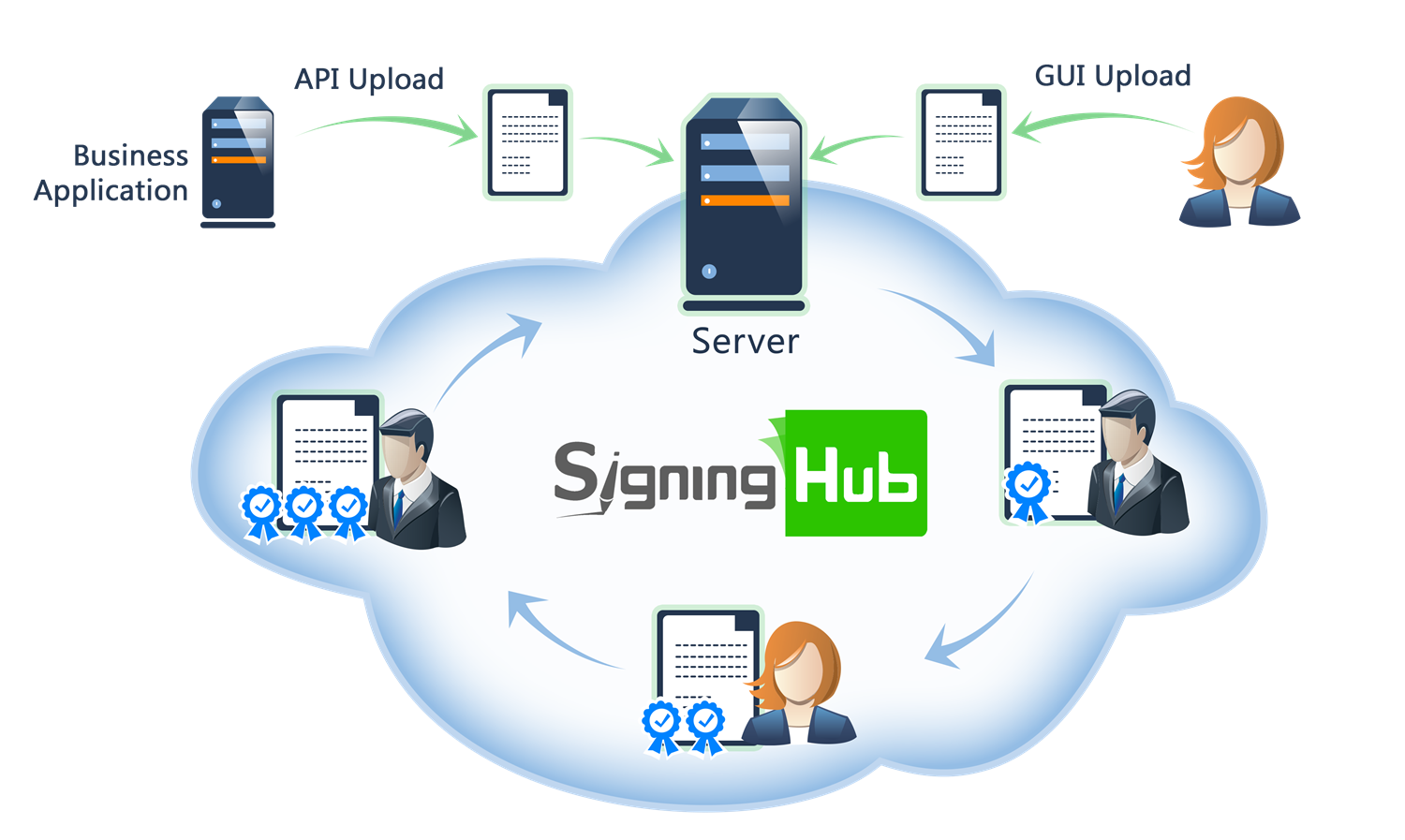
Browse through the API content by selecting the relevant pages from the left panel. To quickly find specific web service information, enter search criteria in the search box on top left.
 .
.More about SigningHub
To know more about SigningHub, explore the following links:
- Go to SigningHub Knowledge Base to view all the relevant information of SigningHub.
-
Visit the Ascertia Community Portal to find answers to contact SigningHub support staff through the
Live Chat provision
.
Our
support staff may be occupied with other priority tasks so live chat is offered on
an "as available" basis.
This guide is intended for developers who will integrate SigningHub into their respective web applications using the RESTful web services, and user interface offered by SigningHub. It is assumed that the reader has a basic knowledge of REST, Java, C#, HTML, JavaScript, HTTP and TLS/SSL. There is no Software Developers Kit (SDK) for the integration, instead the integration uses HTML Forms and JSON so that integration is simple from any language including .Net, Java, PHP etc.
| Main Tags | Most Popular Pages |
|---|---|
|
➤
Welcome
➤ Prerequisites ➤ Access Tokens ➤ Quick Integration ➤ Updates ➤ SignalR ➤ APIs Developer Guide ➤ Appendix |
➤
Authentication
➤ Account Management ➤ Add Package ➤ Upload Document ➤ Get Workflow Details ➤ Sign Document |
This section entails the web services for managing the settings of personal users i.e. Groups, Contact, Templates etc.
APIs for managing personal profile information, profile picture, locale settings, account preferences, and user configuration.
Get General Profile Information
Business applications can use this service API to get the general profile information of the current user. This API can also be used by the business application to perform action on behalf of the enterprise user via "Scope Authentication".
header Parameters
| Authorization required | string Default: Bearer {access_token} The access token obtained as a result of successful authentication via "Password" or "Scope". If "Scope Authentication" was used, then this service will be performed for the user on behalf of the business application. |
| Content-Type required | string Default: application/json |
| Accept required | string Default: application/json |
Responses
Response samples
- 200
- 403
- 500
{- "general": {
- "user_email": "string",
- "user_name": "string",
- "job_title": "string",
- "company_name": "string",
- "mobile_number": "string",
- "enterprise_role": "string",
- "ra_userid": "string",
- "user_national_id": "string",
- "user_csc_id": "string",
- "capricorn": {
- "user_ekycid": "string"
}
}, - "security": {
- "question": "string"
}, - "locale": {
- "country": "string",
- "timezone": "string",
- "language": "string"
}, - "enterprise": {
- "enterprise_id": 0,
- "enterprise_name": "string",
- "owner": "string",
- "owner_email": "string",
- "mobile_number": "string",
- "url": "string",
- "support_email": "string",
- "default": true
}
}Update General Profile Information
Business applications can use this service API to update general profile information of the current user. This means the enterprise administrator or the enterprise user if the "scope" variable was used in the authentication request.
header Parameters
| Authorization required | string Default: Bearer {access_token} The OAuth access token obtained as a result of successful authentication via the "password" grant type. |
| Content-Type required | string Default: application/json |
| Accept required | string Default: application/json |
Request Body schema:
| user_name required | string non-empty Name of the user whose information requires updating. This is a mandatory field and must match the user name for whom the access token was granted to. |
| job_title | string or null Job title of the user. |
| company_name | string or null Company name for the user. |
| mobile_number | string or null Mobile number of the user. Remember to include the international dialing and country codes. For example, UK numbers require 00 44 to proceed the actual mobile number. The leading zero must be dropped from the mobile number also, and replaced with the international and country dialing codes. |
| country | string or null Country name for the user. All values in the appendix - Country list are accepted. |
| time_zone | string or null Timezone name for the user. All values in the appendix - Timezone list are accepted. |
| language | string or null Language selected for the user. All values in the appendix - Language list are accepted. |
| user_national_id | string or null National identity number of the user. |
| user_csc_id | string or null Gets or sets the user's CSC ID. Assign a new value to update it, null to leave it unchanged, or an empty string to remove the current value. |
object (Models.CapricornAccountRequest) |
Responses
Request samples
- Payload
{- "user_name": "string",
- "job_title": "string",
- "company_name": "string",
- "mobile_number": "string",
- "country": "string",
- "time_zone": "string",
- "language": "string",
- "user_national_id": "string",
- "user_csc_id": "string",
- "capricorn": {
- "user_ekycid": "string"
}
}Response samples
- 400
- 403
- 500
{- "Message": "string"
}Get Profile Picture
Business applications can use this service API to get profile picture of the current user. This means the enterprise administrator or the enterprise user if the "scope" variable was used in the authentication request.
header Parameters
| Authorization required | string Default: Bearer {access_token} OAuth access token obtained as a result of "Client Credentials Authentication" |
| Content-Type required | string Default: application/json |
| Accept required | string Default: application/json |
Responses
Response samples
- 200
- 403
- 500
"string"Update Locale Settings
Business applications can use this service API to update locale profile information of the current user. This API can also be used by the business application to perform action on behalf of the enterprise user via "Scope Authentication".
header Parameters
| Authorization required | string Default: Bearer {access_token} The OAuth access token obtained as a result of successful authentication via the "password" grant type. |
| Content-Type required | string Default: application/json |
| Accept required | string Default: application/json |
Request Body schema:
| country | string or null Country name to be set for the user. All values in the appendix - Country List are accepted. If no value is provided, previous value will be retained. |
| timezone | string or null Standard string for timezone information. All values in the appendix - Timezone List are accepted. If no value is provided, previous value will be retained. |
| language | string or null Language selected for the user. All values in the appendix - Language list are accepted. If no value is provided, previous value will be retained. |
Responses
Request samples
- Payload
{- "country": "string",
- "timezone": "string",
- "language": "string"
}Response samples
- 403
- 500
{- "Message": "string"
}Get Profile Picture (Base64)
Business applications can use this service API to get profile picture of the current user. This API can also be used by the business application to perform action on behalf of the enterprise user via "Scope Authentication".
header Parameters
| Authorization required | string Default: Bearer {access_token} OAuth access token obtained as a result of "Client Credentials Authentication" |
| Content-Type required | string Default: application/json |
| Accept required | string Default: application/json |
Responses
Response samples
- 200
- 403
- 500
{- "photo": "string"
}Update Profile Picture
Business applications can use this service API to update profile picture of the current user. This API can also be used by the business application to perform action on behalf of the enterprise user via "Scope Authentication".
header Parameters
| Authorization required | string Default: Bearer {access_token} OAuth access token obtained as a result of "Client Credentials Authentication" |
| Content-Type required | string Default: application/json |
| Accept required | string Default: application/json |
Request Body schema:
| photo | string or null Base64 encoded string of image to be updated as profile picture. |
Responses
Request samples
- Payload
{- "photo": "string"
}Response samples
- 400
- 403
- 500
{- "Message": "string"
}Remove Account Request
Business applications can use this service API to request the deletion of an account. This API will trigger the account deletion confirmation email against the requested user. For an enterprise account, all the enterprise users, except the enterprise owner, with in the account must be deleted first.
header Parameters
| Authorization required | string Default: Bearer {access_token} The OAuth access token obtained as a result of successful authentication via the "password" grant type. |
| Content-Type required | string Default: application/json |
| Accept required | string Default: application/json |
| x-enterprise | string Example: true When set as "true" only enterprise templates list will be returned. In case of "false"only the user's templates list will be returned.If you do not set the header, then both enterprise and user's templates lists will be returned. |
Responses
Response samples
- 400
- 401
- 403
- 500
{- "Message": "string"
}Remove Account
Business applications can use this service API to delete an account against which a "Remove Account Request" service API was initiated, and the user authorized the account deletion.
header Parameters
| Authorization required | string Default: Bearer {access_token} OAuth access token obtained as a result of "Client Credentials Authentication" |
| Content-Type required | string Default: application/json |
| Accept required | string Default: application/json |
| x-multi-enterprise-user | string Example: true Return the true, if the user belongs to multiple enterprises. |
Request Body schema:
| q required | string non-empty |
Responses
Request samples
- Payload
{- "q": "string"
}Response samples
- 400
- 401
{- "Message": "string"
}Get User Certification Password
Business applications can use this service API to get system generated user certificate password of the current logged-in user.
query Parameters
| signing-capacity | string The signing capacity name is mandatory and must be configured in the service plan for individual users. For enterprise users, it should be configured in both the service plan and the enterprise role. Additionally, it is recommended to provide the signing capacity parameter in Base64 encoded format. |
header Parameters
| Authorization required | string Default: Bearer {access_token} The OAuth access token obtained as a result of successful authentication via the "password" grant type. |
| Content-Type required | string Default: application/json |
| Accept required | string Default: application/json |
Responses
Response samples
- 200
- 400
- 401
- 403
"string"Get User Advance Settings
Business applications can use this API to Get Advance Settings for current individual user.
header Parameters
| Authorization required | string Default: Bearer {access_token} The OAuth access token obtained as a result of successful authentication via the "password" grant type. |
| Content-Type required | string Default: application/json |
| Accept required | string Default: application/json |
Responses
Response samples
- 200
- 401
- 403
- 500
{- "documents": {
- "save_document_revision": {
- "enabled": true
}
}
}Update User Advance Settings
Business applications can use this API to Update Advance Settings for current individual user.
header Parameters
| Authorization required | string Default: Bearer {access_token} The OAuth access token obtained as a result of successful authentication via the "password" grant type. |
| Content-Type required | string Default: application/json |
| Accept required | string Default: application/json |
Request Body schema:
required | object (Models.UserDocumentSettingsRequestModal) UserDocumentSettingsRequestModal |
Responses
Request samples
- Payload
{- "documents": {
- "save_document_revision": {
- "enabled": true
}
}
}Response samples
- 401
- 403
- 500
{- "Message": "string"
}APIs for managing passwords, two-factor authentication, authorized devices, active sessions, and account security settings.
Update Security Settings
Business applications can use this service API to update profile’s security information of the current user. This means the enterprise administrator or the enterprise user if the "scope" variable was used in the authentication request.
header Parameters
| Authorization required | string Default: Bearer {access_token} The OAuth access token obtained as a result of successful authentication via the "password" grant type. |
| Content-Type required | string Default: application/json |
| Accept required | string Default: application/json |
Request Body schema:
| password required | string non-empty Password of the user used for the authentication. |
| question required | string [ 1 .. 255 ] characters New security question to be set for the user. |
| answer required | string [ 1 .. 255 ] characters New security answer to be set for the user. |
Responses
Request samples
- Payload
{- "password": "string",
- "question": "string",
- "answer": "string"
}Response samples
- 400
- 403
- 500
{- "Message": "string"
}Change Password
Business applications can use this service API to change the password of the current user. This means the enterprise administrator or the enterprise user if the "scope" variable was used in the authentication request.
header Parameters
| Authorization required | string Default: Bearer {access_token} The OAuth access token obtained as a result of successful authentication via the "password" grant type. |
| Content-Type required | string Default: application/json |
| Accept required | string Default: application/json |
| x-session-id | string x-session-id is a response header that contains the current authenticated user session ID. |
Request Body schema:
| user_old_password required | string non-empty Old password of the user. |
| user_new_password required | string non-empty New password of the user. |
Responses
Request samples
- Payload
{- "user_old_password": "string",
- "user_new_password": "string"
}Response samples
- 200
- 400
- 403
- 500
{- "access_token": "string",
- "token_type": "string",
- "expires_in": 0,
- "refresh_token": "string"
}Get Authorised Devices
Business applications can use this service API to get the list of all the authorized devices of the current user that are registered for RAS signing.
header Parameters
| Authorization required | string Default: Bearer {access_token} The OAuth access token obtained as a result of successful authentication via the "password" grant type. |
| Content-Type required | string Default: application/json |
| Accept required | string Default: application/json |
Responses
Response samples
- 200
- 400
- 403
- 500
[- {
- "device_name": "string",
- "device_id": "string",
- "secure_element_support": true,
- "biometric": true
}
]Update Two-Factor Authentication
Business applications can use this service API to enable the two-factor authentication configurations for the current user.
header Parameters
| Authorization required | string Default: Bearer {access_token} The OAuth access token obtained as a result of successful authentication via the "password" grant type. |
| Content-Type required | string Default: application/json |
| Accept required | string Default: application/json |
Request Body schema:
| totp required | string non-empty The TOTP value |
Responses
Request samples
- Payload
{- "totp": "string"
}Response samples
- 400
- 403
- 500
{- "Message": "string"
}Disable Two-Factor Authentication
Business applications can use this service API to disable the two-factor authentication for the current user.
header Parameters
| Authorization required | string Default: Bearer {access_token} The OAuth access token obtained as a result of successful authentication via the "password" grant type. |
| Content-Type required | string Default: application/json |
| Accept required | string Default: application/json |
Responses
Response samples
- 400
- 403
- 500
{- "Message": "string"
}Regenerate Recovery Codes Two-Factor Authentication
Business applications can use this service API to regenerate the recovery codes against the two-factor authentication for the current user.
header Parameters
| Authorization required | string Default: Bearer {access_token} The OAuth access token obtained as a result of successful authentication via the "password" grant type. |
| Content-Type required | string Default: application/json |
| Accept required | string Default: application/json |
Request Body schema:
| totp required | string non-empty The TOTP value |
Responses
Request samples
- Payload
{- "totp": "string"
}Response samples
- 200
- 400
- 403
- 500
[- "string"
]Get Active Sessions
Business applications can use this service API to get the list of all the active sessions of the current user.
path Parameters
| pageNo required | integer <int32> Default: 1 |
| recordsPerPage required | integer <int32> Default: 2147483647 |
header Parameters
| Authorization required | string Default: Bearer {access_token} The OAuth access token obtained as a result of successful authentication via the "password" grant type. |
| Content-Type required | string Default: application/json |
| Accept required | string Default: application/json |
Responses
Response samples
- 200
- 403
- 500
[- {
- "session_id": "string",
- "machine_name": "string",
- "client_name": "string",
- "agent": "string",
- "ip_address": "string",
- "active": true
}
]Revoke Active Sessions
Business applications can use this service API to revoke the current user's sessions. If revoke_all is set to true, all user sessions will be revoked and the ids parameter will be ignored. If revoke_all is set to false, only the sessions specified in the ids parameter will be revoked.
header Parameters
| Authorization required | string Default: Bearer {access_token} The OAuth access token obtained as a result of successful authentication via the "password" grant type. |
| Content-Type required | string Default: application/json |
| Accept required | string Default: application/json |
Request Body schema:
| revoke_all | boolean True, will revoke the all user session's. |
| ids | Array of strings or null The list of the session ids that are selected for revocation user session's. |
Responses
Request samples
- Payload
{- "revoke_all": true,
- "ids": [
- "string"
]
}Response samples
- 200
- 403
- 500
[- {
- "id": "string",
- "error_message": "string"
}
]APIs for managing personal and enterprise library documents, folders, and document organization.
Get Enterprise Library Documents
Business applications can use this service API to retrieve documents from both personal and enterprise libraries of the current user. This means the enterprise administrator or the enterprise user if the "scope" variable was used in the authentication request.
It is possible to search based upon the criteria supplied under the "x-search-text" header.
path Parameters
| recordPerPage required | integer <int32> Total number of records to be retrieved in a page. |
| pageNo required | integer <int32> Page number to be retrieved. |
query Parameters
| sort-by | string (Enumerations.LibrarySortBy) Enum: "CREATEDON" "NAME" "SIZE" "TEMPLATENAME" Sort the result by possible values are mentioned above. |
| asc | boolean Default: false Order the result set by ascending or descending. |
| id | Array of integers <int64> [ items <int64 > ] |
header Parameters
| Authorization required | string Default: Bearer {access_token} The OAuth access token obtained as a result of successful authentication via the "password" grant type. |
| Content-Type required | string Default: application/json |
| Accept required | string Default: application/json |
| x-search-text | string Example: c2FsZXMgY29udHJhY3QgMTA1 Search text if required. This is optional and without it the entire list is returned. |
| x-folder | string Example: SU5CT1g= Folder name from where the library documents are to be fetched, recommended value for x-folder parameter is in Base64 encoded format. |
| x-total-records | string Example: 10 The total number of records found with the provided search criteria. |
Responses
Response samples
- 200
- 401
- 403
- 500
[- {
- "library_id": 0,
- "document_name": "string",
- "template_name": "string",
- "folder": "string",
- "created_on": "string",
- "document_size": 0,
- "enterprise": true,
- "roles": [
- {
- "name": "string",
- "id": 0
}
]
}
]Get Library Documents
Business applications can use this service API to retieve documents from both personal and enterprise libraries for the current user. This API can also be used by the business application to perform action on behalf of the enterprise user via "Scope Authentication".
It is possible to search based upon the criteria supplied under the "x-search-text" header.Furthermore, it is possible to search a user's personal library or that of the enterprise to which the user belongs.
path Parameters
| recordPerPage required | integer <int32> Total number of records to be retrieved in a page. |
| pageNo required | integer <int32> Page number to be retrieved. |
query Parameters
| sort-by | string (Enumerations.LibrarySortBy) Enum: "CREATEDON" "NAME" "SIZE" "TEMPLATENAME" Sort by. [CREATEDON | NAME | SIZE | TEMPLATENAME] |
| asc | boolean Default: false Sort order. |
header Parameters
| Authorization required | string Default: Bearer {access_token} The OAuth access token obtained as a result of successful authentication via the "password" grant type. |
| Content-Type required | string Default: application/json |
| Accept required | string Default: application/json |
| x-search-text | string Example: c2FsZXMgY29udHJhY3QgMTA1 Search text if required. This is optional and without it the entire list is returned. |
| x-enterprise | string Example: true Set to "true" to search the entire enterprise library document list. Otherwise, "false" to search only the user's library document list. |
| x-folder | string Example: SU5CT1g= Folder name from where the library documents are to be fetched, recommended value for x-folder parameter is in Base64 encoded format. |
| x-total-records | string Example: 10 The total number of records found with the provided search criteria. |
Responses
Response samples
- 200
- 401
- 403
- 500
[- {
- "library_id": 0,
- "document_name": "string",
- "template_name": "string",
- "template_id": 0,
- "folder": "string",
- "created_on": "string",
- "document_size": 0,
- "enterprise": true
}
]Download Personal / Enterprise Library Document
Business applications can use this service API to download personal / enterprise library document bytes.
path Parameters
| id required | integer <int64> The id of personal/enterprise library document |
header Parameters
| Authorization required | string Default: Bearer {access_token} The OAuth access token obtained as a result of successful authentication via the "password" grant type. |
| Content-Type required | string Default: application/json |
| Accept required | string Default: application/json |
Responses
Response samples
- 200
- 401
- 403
- 404
- 500
"string"Download Personal / Enterprise Library Document (Base64)
Business applications can use this service API to download personal / enterprise library document base64.
path Parameters
| id required | integer <int64> The id of personal/enterprise library document |
header Parameters
| Authorization required | string Default: Bearer {access_token} The OAuth access token obtained as a result of successful authentication via the "password" grant type. |
| Content-Type required | string Default: application/json |
| Accept required | string Default: application/json |
Responses
Response samples
- 200
- 401
- 403
- 404
- 500
{- "base64": "string"
}Add To Library
Business applications can use this service API to add package document into library for the current user.
path Parameters
| packageId required | integer <int64> The ID of the document package. |
| documentId required | integer <int64> The ID of the document. |
header Parameters
| Authorization required | string Default: Bearer {access_token} The OAuth access token obtained as a result of successful authentication via the "password" grant type. |
| Content-Type required | string Default: application/json |
| Accept required | string Default: application/json |
| x-folder | string Example: SU5CT1g= Folder name where the library documents are to be added, recommended value for x-folder parameter is in Base64 encoded format. |
Responses
Response samples
- 400
- 401
- 403
- 404
- 500
{- "Message": "string"
}APIs for managing personal library documents, including creation, updates, deletion, retrieval, and document organization.
Get Personal Library Document by ID
Business applications can use this service API to get a personal library document of the current user.
path Parameters
| id required | integer <int64> The id of library document |
header Parameters
| Authorization required | string Default: Bearer {access_token} The OAuth access token obtained as a result of successful authentication via the "password" grant type. |
| Content-Type required | string Default: application/json |
| Accept required | string Default: application/json |
Responses
Response samples
- 200
- 401
- 403
- 404
- 500
{- "document_name": "string",
- "template_name": "string",
- "folder_name": "string",
- "created_on": "string",
- "document_size": 0
}Update Personal Library Document
Business applications can use this service API to update personal library document of the current user.
path Parameters
| id required | integer <int64> The id of library document |
header Parameters
| Authorization required | string Default: Bearer {access_token} The OAuth access token obtained as a result of successful authentication via the "password" grant type. |
| Content-Type required | string Default: application/json |
| Accept required | string Default: application/json |
Request Body schema:
| document_name required | string [ 1 .. 200 ] characters Name of the library document. |
| folder_name | string or null <= 255 characters Name of the folder in which library document has to be uploaded. |
| template_name | string or null <= 255 characters Name of the template, if one is applied on the document. If no template is applied, the value can be "null". |
Responses
Request samples
- Payload
{- "document_name": "string",
- "folder_name": "string",
- "template_name": "string"
}Response samples
- 400
- 401
- 403
- 404
- 500
{- "Message": "string"
}Delete Personal Library Document
Business applications can use this service API to delete a personal library document of the current user.
path Parameters
| id required | integer <int32> The id of library document |
header Parameters
| Authorization required | string Default: Bearer {access_token} The OAuth access token obtained as a result of successful authentication via the "password" grant type. |
| Content-Type required | string Default: application/json |
| Accept required | string Default: application/json |
Responses
Response samples
- 401
- 403
- 404
- 500
{- "Message": "string"
}Add Personal Library Document
Business applications can use this service API to add a personal library document for the current user.
header Parameters
| Authorization required | string Default: Bearer {access_token} The OAuth access token obtained as a result of successful authentication via the "password" grant type. |
| Content-Type required | string Default: application/json |
| Accept required | string Default: application/json |
| file (binary Stream) | string This is the document in the raw binary format, posting via form data. |
| folder_name | string parameter name in string format. |
| template_name | string parameter name in string format. |
| x-file-name required | string Example: File Name File name is required. This will be the name of the uploaded library file. Furthermore, the recommended value for the file name parameter is in Base64 encoded format. |
Responses
Response samples
- 201
- 400
- 401
- 403
- 404
- 500
{- "id": 0
}Bulk Delete Personal Library Documents
Business applications can use this service API to bulk delete personal library documents of the current user.
header Parameters
| Authorization required | string Default: Bearer {access_token} The OAuth access token obtained as a result of successful authentication via the "password" grant type. |
| Content-Type required | string Default: application/json |
| Accept required | string Default: application/json |
Request Body schema:
List of ids of library documents
Responses
Request samples
- Payload
[- 0
]Response samples
- 200
- 401
- 403
- 500
[- {
- "id": 0,
- "error_message": "string"
}
]Move Personal Library Documents
Business applications can use this service API to move personal library documents to library folder of the current user.
header Parameters
| Authorization required | string Default: Bearer {access_token} The OAuth access token obtained as a result of successful authentication via the "password" grant type. |
| Content-Type required | string Default: application/json |
| Accept required | string Default: application/json |
Request Body schema:
| ids required | Array of integers <int32> [ items <int32 > ] Ids of library documents. |
| folder_name required | string [ 1 .. 255 ] characters Name of the library document folder. |
Responses
Request samples
- Payload
{- "ids": [
- 0
], - "folder_name": "string"
}Response samples
- 200
- 400
- 401
- 403
- 404
- 500
[- {
- "id": 0,
- "error_message": "string"
}
]APIs for managing personal library folders, including creation, updates, deletion, retrieval, and folder organization.
Get Library Folders
applications can use this service API to get library folders of the current user.
path Parameters
| pageNo required | integer <int32> Default: 1 |
| recordsPerPage required | integer <int32> Default: 1000 |
query Parameters
| sort-by | string (Enumerations.LibraryFolderSortBy) Enum: "CREATEDON" "NAME" |
| asc | boolean Default: true |
header Parameters
| Authorization required | string Default: Bearer {access_token} The OAuth access token obtained as a result of successful authentication via the "password" grant type. |
| Content-Type required | string Default: application/json |
| Accept required | string Default: application/json |
| file (binary Stream) | string This is the document in the raw binary format, posting via form data. |
| x-search-text | string Example: folder Search text if required. This is optional and without it the entire list is returned. |
| x-total-records | string Example: 10 The total number of records found with the provided search criteria. |
| x-enterprise | string Example: true If "x-enterprise" is set to "true", we will retrieve only the allowed folders. Otherwise, we will retrieve only personal folders. |
Responses
Response samples
- 200
- 401
- 403
- 500
[- {
- "folder_id": 0,
- "folder_name": "string",
- "created_on": "string"
}
]Get Personal Library Folder by ID
Business applications can use this service API to get a personal library folder of the current user.
path Parameters
| id required | integer <int64> The id of library folder |
header Parameters
| Authorization required | string Default: Bearer {access_token} The OAuth access token obtained as a result of successful authentication via the "password" grant type. |
| Content-Type required | string Default: application/json |
| Accept required | string Default: application/json |
Responses
Response samples
- 200
- 401
- 403
- 404
- 500
{- "folder_name": "string",
- "created_on": "string"
}Update Personal Library Folder
Business applications can use this service API to personal update library folder of the current user.
path Parameters
| id required | integer <int64> The id of library folder |
header Parameters
| Authorization required | string Default: Bearer {access_token} The OAuth access token obtained as a result of successful authentication via the "password" grant type. |
| Content-Type required | string Default: application/json |
| Accept required | string Default: application/json |
Request Body schema:
| folder_name required | string [ 1 .. 255 ] characters Name of the library document folder. |
Responses
Request samples
- Payload
{- "folder_name": "string"
}Response samples
- 400
- 401
- 403
- 404
- 500
{- "Message": "string"
}Delete Personal Library Folder
Business applications can use this service API to delete a personal library folder of the current user.
path Parameters
| id required | integer <int32> The id of library folder |
header Parameters
| Authorization required | string Default: Bearer {access_token} The OAuth access token obtained as a result of successful authentication via the "password" grant type. |
| Content-Type required | string Default: application/json |
| Accept required | string Default: application/json |
Responses
Response samples
- 401
- 403
- 404
- 500
{- "Message": "string"
}Add Personal Library Folder
Business applications can use this service API to add a personal library folder for the current user.
header Parameters
| Authorization required | string Default: Bearer {access_token} The OAuth access token obtained as a result of successful authentication via the "password" grant type. |
| Content-Type required | string Default: application/json |
| Accept required | string Default: application/json |
Request Body schema:
| folder_name required | string [ 1 .. 255 ] characters Name of the library document folder. |
Responses
Request samples
- Payload
{- "folder_name": "string"
}Response samples
- 201
- 400
- 401
- 403
- 422
- 500
{- "id": 0
}Bulk Delete Personal Library Folders
Business applications can use this service API to bulk delete personal library folders of the current user.
header Parameters
| Authorization required | string Default: Bearer {access_token} The OAuth access token obtained as a result of successful authentication via the "password" grant type. |
| Content-Type required | string Default: application/json |
| Accept required | string Default: application/json |
Request Body schema:
List of ids of library folders
Responses
Request samples
- Payload
[- 0
]Response samples
- 200
- 401
- 403
- 500
[- {
- "id": 0,
- "error_message": "string"
}
]Get Legal Notices
Business applications can use this service API to get the list of legal notices for the current user. This means the enterprise administrator or the enterpriser user if the "scope" variable was used in the authentication request.
path Parameters
| recordPerPage required | integer <int32> Total number of records to be retrieved in a page. |
| pageNo required | integer <int32> Page number to be retrieved. |
query Parameters
| sort-by | string (Helper.LegalNoticesSortedBy) Enum: "CREATEDON" "TITLE" Sorting column name, possible values are TITLE | CREATEDON. Default value will be CREATEDON |
| asc | boolean Default: false Order the result set by ascending or descending. |
header Parameters
| x-search-text | string |
| x-enterprise | string |
| Authorization required | string Default: Bearer {access_token} The access token obtained as a result of successful authentication via "Password" or "Scope". If "Scope Authentication" was used, then this service will be performed for the user on behalf of the business application. |
| Content-Type required | string Default: application/json |
| Accept required | string Default: application/json |
| x-search-text | string Example: U2FsZXM= Search text if required. This is optional and without it the entire list is returned. |
| x-enterprise | string Example: true If set as "true" only enterprise legal notices list will be returned. In case of "false"only the user's legal notices list will be returned.If you do not set the header, then both enterprise and user's legal notices lists will be returned. |
| x-total-records | string Example: 10 The total number of records found with the provided search criteria. |
Responses
Response samples
- 200
- 403
- 500
[- {
- "id": 0,
- "title": "string",
- "content": "string",
- "enterprise": true,
- "created_on": "string"
}
]Get Personal Legal Notice
Business applications can use this service API to get a personal Legal Notice for Users. An admin who has permissions to manage Legal Notices in his role, can get legal notices. The role dictates things such as allowed Read legal notice available to the user.
path Parameters
| id required | integer <int32> The id of legal notice |
header Parameters
| Authorization required | string Default: Bearer {access_token} The access token obtained as a result of successful authentication via "Password" or "Scope". If "Scope Authentication" was used, then this service will be performed for the user on behalf of the business application. |
| Content-Type required | string Default: application/json |
| Accept required | string Default: application/json |
Responses
Response samples
- 200
- 401
- 403
- 404
- 500
{- "id": 0,
- "title": "string",
- "content": "string"
}Update Personal Legal Notice
Business applications can use this service API to edit a personal Legal Notice for Users. An admin who has permissions to manage Legal Notices in his role, can edit legal notices. The role dictates things such as allowed Edit legal notice available to the user.
path Parameters
| id required | integer <int32> The id of legal notice |
header Parameters
| Authorization required | string Default: Bearer {access_token} The access token obtained as a result of successful authentication via "Password" or "Scope". If "Scope Authentication" was used, then this service will be performed for the user on behalf of the business application. |
| Content-Type required | string Default: application/json |
| Accept required | string Default: application/json |
Request Body schema:
| title required | string [ 1 .. 255 ] characters Legal Notice Title |
| content required | string non-empty Legal Notice Content |
Responses
Request samples
- Payload
{- "title": "string",
- "content": "string"
}Response samples
- 400
- 401
- 403
- 404
- 500
{- "Message": "string"
}Delete Personal Legal Notice
Business applications can use this service API to delete a personal Legal Notice for Users. An admin who has permissions to manage Legal Notices in his role, can delete legal notices. The role dictates things such as allowed Delete legal notice available to the user.
path Parameters
| id required | integer <int32> The id of legal notice |
header Parameters
| Authorization required | string Default: Bearer {access_token} The access token obtained as a result of successful authentication via "Password" or "Scope". If "Scope Authentication" was used, then this service will be performed for the user on behalf of the business application. |
| Content-Type required | string Default: application/json |
| Accept required | string Default: application/json |
Responses
Response samples
- 401
- 403
- 404
- 500
{- "Message": "string"
}Add Personal Legal Notice
Business applications can use this service API to add a personal Legal Notice for Users. An admin who has permissions to manage Legal Notices in his role, can add new legal notices. The role dictates things such as allowed Add legal notice available to the user.
header Parameters
| Authorization required | string Default: Bearer {access_token} The access token obtained as a result of successful authentication via "Password" or "Scope". If "Scope Authentication" was used, then this service will be performed for the user on behalf of the business application. |
| Content-Type required | string Default: application/json |
| Accept required | string Default: application/json |
Request Body schema:
| title required | string [ 1 .. 255 ] characters Legal Notice Title |
| content required | string non-empty Legal Notice Content |
Responses
Request samples
- Payload
{- "title": "string",
- "content": "string"
}Response samples
- 201
- 400
- 401
- 403
- 500
{- "id": 0,
- "created_on": "2019-08-24T14:15:22Z"
}Bulk Delete Personal Legal Notice
Business applications can use this service API to delete personal Legal Notices for Users. An admin who has permissions to manage Legal Notices in his role, can delete legal notices. The role dictates things such as allowed Delete legal notice available to the user.
header Parameters
| Authorization required | string Default: Bearer {access_token} The OAuth access token obtained as a result of successful authentication via the "password" grant type. |
| Content-Type required | string Default: application/json |
| Accept required | string Default: application/json |
Request Body schema:
List of ids of legal notices
Responses
Request samples
- Payload
[- 0
]Response samples
- 200
- 401
- 403
- 404
- 500
[- {
- "id": 0,
- "error_message": "string"
}
]Get Contacts
Business applications can use this service API to retrieve contacts from both personal and enterprise contacts for the current user.
It is possible to search based upon the criterion supplied under the "x-search-text" header.Furthermore, it is possible to search a user's specific contacts or that of the enterprise to which the user belongs.
The search response information contains the user email address and respective user name.
path Parameters
| recordPerPage required | integer <int32> Total number of records to be retrieved in a page. |
| pageNo required | integer <int32> Page number to be retrieved. |
query Parameters
| sort-by | string (Enumerations.ContactSortBy) Enum: "CREATEDON" "NAME" "EMAIL" Sort the result by possible values are mentioned above. |
| asc | boolean Default: false Order the result set by ascending or descending. |
header Parameters
| x-search-text | string |
| x-enterprise | string |
| Authorization required | string Default: Bearer {access_token} The OAuth access token obtained as a result of successful authentication via the "password" grant type. |
| Content-Type required | string Default: application/json |
| Accept required | string Default: application/json |
| x-search-text | string Example: am9obg== A search keyword used to filter the contact list. If omitted, the full list will be returned. |
| x-total-records | string Example: 10 The total number of records found with the provided search criteria. |
| x-enterprise | string Example: true When set as "true" only enterprise contacts list will be returned. In case of "false"only the user's contacts list will be returned.If you do not set the header, then both enterprise and user's contacts lists will be returned. |
Responses
Response samples
- 200
- 403
- 500
[- {
- "id": 0,
- "user_name": "string",
- "user_email": "string",
- "mobile_number": "string",
- "enterprise": true,
- "user_national_id": "string",
- "created_on": "string"
}
]Add Personal Contact
Business applications can use this service API to add a contact for the current user.
A contact does not require a SigningHub account and is an easy way of managing document recipients.
header Parameters
| Authorization required | string Default: Bearer {access_token} The OAuth access token obtained as a result of successful authentication via the "password" grant type. |
| Content-Type required | string Default: application/json |
| Accept required | string Default: application/json |
Request Body schema:
| user_name required | string [ 1 .. 255 ] characters User name of the user to be added as a contact. |
| user_email required | string [ 1 .. 255 ] characters Email address of the user to be added as a contact. |
| mobile_number | string or null <= 15 characters Mobile Number |
Responses
Request samples
- Payload
{- "user_name": "string",
- "user_email": "string",
- "mobile_number": "string"
}Response samples
- 201
- 401
- 403
- 500
{- "id": 0,
- "created_on": "string"
}Delete Personal Contact
Business applications can use this service API to delete personal contact of the current user.
path Parameters
| id required | integer <int64> ID of the user contact. |
header Parameters
| Authorization required | string Default: Bearer {access_token} The OAuth access token obtained as a result of successful authentication via the "password" grant type. |
| Content-Type required | string Default: application/json |
| Accept required | string Default: application/json |
Responses
Response samples
- 401
- 403
- 404
- 500
{- "Message": "string"
}Get Personal Contact by ID
Business applications can use this service API to get personal contact of the current user.
path Parameters
| id required | integer <int64> ID of the user contact. |
header Parameters
| Authorization required | string Default: Bearer {access_token} The OAuth access token obtained as a result of successful authentication via the "password" grant type. |
| Content-Type required | string Default: application/json |
| Accept required | string Default: application/json |
Responses
Response samples
- 200
- 403
- 404
- 500
{- "user_name": "string",
- "user_email": "string",
- "user_national_id": "string",
- "mobile_number": "string"
}Update Personal Contact
Business applications can use this service API to update personal contact of the current user.
path Parameters
| id required | integer <int64> ID of the user contact. |
header Parameters
| Authorization required | string Default: Bearer {access_token} The OAuth access token obtained as a result of successful authentication via the "password" grant type. |
| Content-Type required | string Default: application/json |
| Accept required | string Default: application/json |
Request Body schema:
| user_name required | string [ 1 .. 255 ] characters User name of the user to be updated as of a contact. |
| mobile_number | string or null <= 15 characters Mobile number. If no value is provided, old value will be retained. |
Responses
Request samples
- Payload
{- "user_name": "string",
- "mobile_number": "string"
}Response samples
- 403
- 404
- 500
{- "Message": "string"
}Bulk Delete Personal Contact
Business applications can use this service API to bulk delete personal contacts of the current user.
header Parameters
| Authorization required | string Default: Bearer {access_token} The OAuth access token obtained as a result of successful authentication via the "password" grant type. |
| Content-Type required | string Default: application/json |
| Accept required | string Default: application/json |
Request Body schema:
IDs of the user contact.
Responses
Request samples
- Payload
[- 0
]Response samples
- 200
- 401
- 403
- 500
[- {
- "id": 0,
- "error_message": "string"
}
]Bulk Import Personal Contacts
Business applications can use this service API to import the bulk personal contacts of the current user
header Parameters
| Authorization required | string Default: Bearer {access_token} The OAuth access token obtained as a result of successful authentication via the "password" grant type. |
| Accept required | string Default: application/json |
| Content-Type required | string Default: multipart/form-data |
Request Body schema: multipart/form-data
Schema not providedResponses
Response samples
- 200
- 401
- 403
- 422
- 500
{- "success": [
- {
- "id": 0,
- "user_name": "string",
- "user_email": "string",
- "mobile_number": "string",
- "created_on": "string"
}
], - "failure": [
- {
- "user_name": "string",
- "user_email": "string",
- "error_message": "string"
}
]
}Download Import Personal Contact Template
Business applications can use this service API to retrieve an import template for personal contacts.
header Parameters
| Authorization required | string Default: Bearer {access_token} The access token obtained as a result of successful authentication via "Password" or "Scope". If "Scope Authentication" was used, then this service will be performed for the user on behalf of the business application. |
| Content-Type required | string Default: application/json |
| Accept required | string Default: application/json |
Responses
Response samples
- 200
- 401
- 403
- 500
"string"Get Groups
Business applications can use this service API to retrieve groups from both personal and enterprise groups for the current user.
It is possible to search based upon the criterion supplied under the "x-search-text" header.Furthermore, it is possible to search a user's personal groups or that of the enterprise to which the user belongs.
The response contains both the group name and the members thereof.Group member details returned are email address and user name.
path Parameters
| recordPerPage required | integer <int32> Total number of records to be retrieved in a page. |
| pageNo required | integer <int32> Page number to be retrieved. |
query Parameters
| sort-by | string (Enumerations.GroupSortBy) Enum: "CREATEDON" "NAME" "DESCRIPTION" Sort the result by possible values are mentioned above. |
| asc | boolean Default: false Order the result set by ascending or descending. |
header Parameters
| x-search-text | string |
| x-enterprise | string |
| Authorization required | string Default: Bearer {access_token} The OAuth access token obtained as a result of successful authentication via the "password" grant type. |
| Content-Type required | string Default: application/json |
| Accept required | string Default: application/json |
| x-search-text | string Example: U2FsZXM= Search text if required. This is optional and without it the entire list is returned. |
| x-enterprise | string Example: true If set as "true" only enterprise groups list will be returned. In case of "false"only the user's groups list will be returned.If you do not set the header, then both enterprise and user's groups lists will be returned. |
| x-total-records | string Example: 10 The total number of records found with the provided search criteria. |
Responses
Response samples
- 200
- 403
- 500
[- {
- "id": 0,
- "group_name": "string",
- "created_on": "string",
- "description": "string",
- "enterprise": true,
- "group_members": [
- {
- "user_email": "string",
- "user_name": "string"
}
]
}
]Add Personal Group
Business applications can use this service API to add a personal group for Users. A group admin who has permissions to manage groups in this role, can add new groups.
header Parameters
| Authorization required | string Default: Bearer {access_token} The OAuth access token obtained as a result of successful authentication via the "password" grant type. |
| Content-Type required | string Default: application/json |
| Accept required | string Default: application/json |
Request Body schema:
| name required | string [ 1 .. 255 ] characters Group Name |
| description | string or null Group Description |
required | Array of objects (Models.GroupMembers) |
Responses
Request samples
- Payload
{- "name": "string",
- "description": "string",
- "members": [
- {
- "user_email": "string",
- "user_name": "string"
}
]
}Response samples
- 201
- 400
- 401
- 403
- 422
- 500
{- "id": 0,
- "name": "string"
}Update Personal Group
Business applications can use this service API to update personal group of its users. A group Admin who has permissions to manage groups in this role, can update personal groups.
path Parameters
| id required | integer <int32> ID of the user group. |
header Parameters
| Authorization required | string Default: Bearer {access_token} The OAuth access token obtained as a result of successful authentication via the "password" grant type. |
| Content-Type required | string Default: application/json |
| Accept required | string Default: application/json |
Request Body schema:
| name required | string [ 1 .. 255 ] characters Group Name |
| description | string or null Group Description |
required | Array of objects (Models.GroupMembers) |
Responses
Request samples
- Payload
{- "name": "string",
- "description": "string",
- "members": [
- {
- "user_email": "string",
- "user_name": "string"
}
]
}Response samples
- 400
- 401
- 403
- 404
- 422
- 500
{- "Message": "string"
}Delete Personal Group
Business applications can use this service API to delete personal group of its users. A group admin who has permissions to manage groups in his role, can delete groups of user. The Role dictates things such as allowed delete groups available to the user.
path Parameters
| id required | integer <int32> ID of the user group. |
header Parameters
| Authorization required | string Default: Bearer {access_token} The OAuth access token obtained as a result of successful authentication via the "password" grant type. |
| Content-Type required | string Default: application/json |
| Accept required | string Default: application/json |
Responses
Response samples
- 401
- 403
- 404
- 500
{- "Message": "string"
}Get Personal Group by ID
Business applications can use this service API to get personal group of its users. A group admin who has permissions to manage groups in this role, can get personal groups of user.
path Parameters
| id required | integer <int32> ID of the user group. |
header Parameters
| Authorization required | string Default: Bearer {access_token} The OAuth access token obtained as a result of successful authentication via the "password" grant type. |
| Content-Type required | string Default: application/json |
| Accept required | string Default: application/json |
Responses
Response samples
- 200
- 403
- 404
- 500
{- "id": 0,
- "name": "string",
- "description": "string",
- "created_on": "string",
- "members": [
- {
- "user_email": "string",
- "user_name": "string"
}
]
}Bulk Delete Personal Group
Business applications can use this service API to bulk delete personal groups of its users. An enterprise Admin or an enterprise user who has permission to manage groups in this role, can bulk delete personal groups of its user. The role dictates whether it is allowed to delete groups available to the user.
header Parameters
| Authorization required | string Default: Bearer {access_token} The OAuth access token obtained as a result of successful authentication via the "password" grant type. |
| Content-Type required | string Default: application/json |
| Accept required | string Default: application/json |
Request Body schema:
IDs of the user group.
Responses
Request samples
- Payload
[- 0
]Response samples
- 200
- 401
- 403
- 500
[- {
- "id": 0,
- "error_message": "string"
}
]APIs for managing signature preferences, configuration settings, and signature-related metadata.
Get Signature Settings
Business applications can use this service API to get the signature settings for the current user. This means the enterprise administrator or the enterprise user if the "scope" variable was used in the authentication request.
header Parameters
| Authorization required | string Default: Bearer {access_token} The access token obtained as a result of successful authentication via "Password" or "Scope". If "Scope Authentication" was used, then this service will be performed for the user on behalf of the business application. |
| Content-Type required | string Default: application/json |
| Accept required | string Default: application/json |
| x-base64 | string Example: true True if response should have images in base64 format. False will only return the resource URLs in response. |
Responses
Response samples
- 200
- 401
- 403
- 500
{- "signature": {
- "signing_servers": [
- {
- "info": {
- "name": "string",
- "order": 0,
- "provider": "string",
- "key_location": "string",
- "logo": "string",
- "id": 0,
- "host_url": "string",
- "client_id": "string",
- "level_of_assurance": "string",
- "appearance_design_name": "string",
- "appearance_logo": "string",
- "auth_type": "string",
- "environment": "string",
- "port": "string"
}, - "capacity": {
- "electronic_seal": {
- "enabled": true,
- "selected": [
- {
- "id": 0,
- "name": "string",
- "custom": true,
- "default": true,
- "key_protection": "string",
- "level_of_assurance": "string"
}
], - "authentications": {
- "primary": {
- "id": 0,
- "name": "string",
- "app_id": "string",
- "tenant_id": "string",
- "authentication_mechanism": "string",
- "provider": "string",
- "url": "string",
- "scope": "string",
- "resource": "string",
- "oidc_advance_settings": {
- "pkce": true,
- "state": true,
- "nonce": true,
- "language": true,
- "display": true,
- "display_value": "string",
- "prompt": true,
- "prompt_value": "string",
- "max_age": true,
- "max_age_value": "string",
- "login_hint": true,
- "login_hint_value": "string",
- "acr": true,
- "acr_values": "string"
}
}, - "secondary": {
- "id": 0,
- "name": "string"
}
}
}, - "advanced_electronic_seal": {
- "enabled": true,
- "selected": [
- {
- "id": 0,
- "name": "string",
- "custom": true,
- "default": true,
- "key_protection": "string",
- "level_of_assurance": "string"
}
], - "authentications": {
- "primary": {
- "id": 0,
- "name": "string",
- "app_id": "string",
- "tenant_id": "string",
- "authentication_mechanism": "string",
- "provider": "string",
- "url": "string",
- "scope": "string",
- "resource": "string",
- "oidc_advance_settings": {
- "pkce": true,
- "state": true,
- "nonce": true,
- "language": true,
- "display": true,
- "display_value": "string",
- "prompt": true,
- "prompt_value": "string",
- "max_age": true,
- "max_age_value": "string",
- "login_hint": true,
- "login_hint_value": "string",
- "acr": true,
- "acr_values": "string"
}
}, - "secondary": {
- "id": 0,
- "name": "string"
}
}
}, - "qualified_electronic_seal": {
- "enabled": true,
- "selected": [
- {
- "id": 0,
- "name": "string",
- "custom": true,
- "default": true,
- "key_protection": "string",
- "level_of_assurance": "string"
}
], - "authentications": {
- "primary": {
- "id": 0,
- "name": "string",
- "app_id": "string",
- "tenant_id": "string",
- "authentication_mechanism": "string",
- "provider": "string",
- "url": "string",
- "scope": "string",
- "resource": "string",
- "oidc_advance_settings": {
- "pkce": true,
- "state": true,
- "nonce": true,
- "language": true,
- "display": true,
- "display_value": "string",
- "prompt": true,
- "prompt_value": "string",
- "max_age": true,
- "max_age_value": "string",
- "login_hint": true,
- "login_hint_value": "string",
- "acr": true,
- "acr_values": "string"
}
}, - "secondary": {
- "id": 0,
- "name": "string"
}
}
}, - "advanced_electronic_signature": {
- "enabled": true,
- "selected": [
- {
- "id": 0,
- "name": "string",
- "custom": true,
- "default": true,
- "key_protection": "string",
- "level_of_assurance": "string"
}
], - "authentications": {
- "primary": {
- "id": 0,
- "name": "string",
- "app_id": "string",
- "tenant_id": "string",
- "authentication_mechanism": "string",
- "provider": "string",
- "url": "string",
- "scope": "string",
- "resource": "string",
- "oidc_advance_settings": {
- "pkce": true,
- "state": true,
- "nonce": true,
- "language": true,
- "display": true,
- "display_value": "string",
- "prompt": true,
- "prompt_value": "string",
- "max_age": true,
- "max_age_value": "string",
- "login_hint": true,
- "login_hint_value": "string",
- "acr": true,
- "acr_values": "string"
}
}, - "secondary": {
- "id": 0,
- "name": "string"
}
}
}, - "high_trust_advanced": {
- "enabled": true,
- "selected": [
- {
- "id": 0,
- "name": "string",
- "custom": true,
- "default": true,
- "key_protection": "string",
- "level_of_assurance": "string"
}
], - "authentications": {
- "primary": {
- "id": 0,
- "name": "string",
- "app_id": "string",
- "tenant_id": "string",
- "authentication_mechanism": "string",
- "provider": "string",
- "url": "string",
- "scope": "string",
- "resource": "string",
- "oidc_advance_settings": {
- "pkce": true,
- "state": true,
- "nonce": true,
- "language": true,
- "display": true,
- "display_value": "string",
- "prompt": true,
- "prompt_value": "string",
- "max_age": true,
- "max_age_value": "string",
- "login_hint": true,
- "login_hint_value": "string",
- "acr": true,
- "acr_values": "string"
}
}, - "secondary": {
- "id": 0,
- "name": "string"
}
}
}, - "qualified_electronic_signature": {
- "enabled": true,
- "selected": [
- {
- "id": 0,
- "name": "string",
- "custom": true,
- "default": true,
- "key_protection": "string",
- "level_of_assurance": "string"
}
], - "authentications": {
- "primary": {
- "id": 0,
- "name": "string",
- "app_id": "string",
- "tenant_id": "string",
- "authentication_mechanism": "string",
- "provider": "string",
- "url": "string",
- "scope": "string",
- "resource": "string",
- "oidc_advance_settings": {
- "pkce": true,
- "state": true,
- "nonce": true,
- "language": true,
- "display": true,
- "display_value": "string",
- "prompt": true,
- "prompt_value": "string",
- "max_age": true,
- "max_age_value": "string",
- "login_hint": true,
- "login_hint_value": "string",
- "acr": true,
- "acr_values": "string"
}
}, - "secondary": {
- "id": 0,
- "name": "string"
}
}
}, - "default_capacity": {
- "id": 0,
- "name": "string",
- "custom": true,
- "default": true,
- "key_protection": "string",
- "level_of_assurance": "string"
}
}, - "authentications": {
- "no_password": {
- "primary": {
- "profile_name": "string",
- "id": 0,
- "app_id": "string",
- "tenant_id": "string",
- "authentication_mechanism": "string",
- "provider": "string",
- "url": "string",
- "scope": "string",
- "resource": "string",
- "oidc_advance_settings": {
- "pkce": true,
- "state": true,
- "nonce": true,
- "language": true,
- "display": true,
- "display_value": "string",
- "prompt": true,
- "prompt_value": "string",
- "max_age": true,
- "max_age_value": "string",
- "login_hint": true,
- "login_hint_value": "string",
- "acr": true,
- "acr_values": "string"
}
}, - "secondary": "string",
- "primary_mobile": {
- "profile_name": "string",
- "id": 0,
- "app_id": "string",
- "tenant_id": "string",
- "authentication_mechanism": "string",
- "provider": "string",
- "url": "string",
- "scope": "string",
- "resource": "string",
- "oidc_advance_settings": {
- "pkce": true,
- "state": true,
- "nonce": true,
- "language": true,
- "display": true,
- "display_value": "string",
- "prompt": true,
- "prompt_value": "string",
- "max_age": true,
- "max_age_value": "string",
- "login_hint": true,
- "login_hint_value": "string",
- "acr": true,
- "acr_values": "string"
}
}, - "secondary_mobile": "string"
}, - "user_password": {
- "primary": {
- "profile_name": "string",
- "id": 0,
- "app_id": "string",
- "tenant_id": "string",
- "authentication_mechanism": "string",
- "provider": "string",
- "url": "string",
- "scope": "string",
- "resource": "string",
- "oidc_advance_settings": {
- "pkce": true,
- "state": true,
- "nonce": true,
- "language": true,
- "display": true,
- "display_value": "string",
- "prompt": true,
- "prompt_value": "string",
- "max_age": true,
- "max_age_value": "string",
- "login_hint": true,
- "login_hint_value": "string",
- "acr": true,
- "acr_values": "string"
}
}, - "secondary": "string"
}, - "system_password": {
- "primary": {
- "profile_name": "string",
- "id": 0,
- "app_id": "string",
- "tenant_id": "string",
- "authentication_mechanism": "string",
- "provider": "string",
- "url": "string",
- "scope": "string",
- "resource": "string",
- "oidc_advance_settings": {
- "pkce": true,
- "state": true,
- "nonce": true,
- "language": true,
- "display": true,
- "display_value": "string",
- "prompt": true,
- "prompt_value": "string",
- "max_age": true,
- "max_age_value": "string",
- "login_hint": true,
- "login_hint_value": "string",
- "acr": true,
- "acr_values": "string"
}
}, - "secondary": "string",
- "primary_mobile": {
- "profile_name": "string",
- "id": 0,
- "app_id": "string",
- "tenant_id": "string",
- "authentication_mechanism": "string",
- "provider": "string",
- "url": "string",
- "scope": "string",
- "resource": "string",
- "oidc_advance_settings": {
- "pkce": true,
- "state": true,
- "nonce": true,
- "language": true,
- "display": true,
- "display_value": "string",
- "prompt": true,
- "prompt_value": "string",
- "max_age": true,
- "max_age_value": "string",
- "login_hint": true,
- "login_hint_value": "string",
- "acr": true,
- "acr_values": "string"
}
}, - "secondary_mobile": "string"
}, - "remote_authorization": {
- "primary": {
- "profile_name": "string",
- "id": 0,
- "app_id": "string",
- "tenant_id": "string",
- "authentication_mechanism": "string",
- "provider": "string",
- "url": "string",
- "scope": "string",
- "resource": "string",
- "oidc_advance_settings": {
- "pkce": true,
- "state": true,
- "nonce": true,
- "language": true,
- "display": true,
- "display_value": "string",
- "prompt": true,
- "prompt_value": "string",
- "max_age": true,
- "max_age_value": "string",
- "login_hint": true,
- "login_hint_value": "string",
- "acr": true,
- "acr_values": "string"
}
}, - "secondary": "string"
}
}
}
], - "metadata": {
- "signing_reason": true,
- "signing_location": true,
- "contact_information": true,
- "commitment_type": "string"
}, - "signing_reason": {
- "value": "string",
- "selection": "string",
- "custom": true,
- "list": [
- "string"
]
}, - "signing_location": "string",
- "contact_information": "string",
- "signing_dialog_visible": true
}, - "appearance": {
- "hand_signature": {
- "web_browser": {
- "allowed_method": [
- "string"
], - "default_method": "string",
- "upload_image": "string",
- "upload_image_url": "string",
- "draw_image": "string",
- "draw_image_url": "string",
- "text_value": "string",
- "text_image": "string",
- "text_image_url": "string",
- "disable_text_field": true
}, - "mobile": {
- "allowed_method": [
- "string"
], - "default_method": "string",
- "upload_image": "string",
- "upload_image_url": "string",
- "draw_image": "string",
- "draw_image_url": "string",
- "text_value": "string",
- "text_image": "string",
- "text_image_url": "string",
- "disable_text_field": true
}
}, - "initials": {
- "allowed_method": [
- "string"
], - "default_method": "string",
- "upload_image": "string",
- "upload_image_url": "string",
- "draw_image": "string",
- "draw_image_url": "string",
- "text_value": "string",
- "text_image": "string",
- "text_image_url": "string",
- "disable_text_field": true
}, - "appearance_design": {
- "all_design": [
- {
- "design_name": "string",
- "design_preview": "string",
- "design_preview_url": "string"
}
], - "allowed_design": [
- {
- "design_name": "string",
- "design_preview": "string",
- "design_preview_url": "string"
}
], - "default_design": {
- "design_name": "string",
- "design_preview": "string",
- "design_preview_url": "string"
}, - "signature_logo": "string"
}, - "simple_electronic_signature_appearance_design": true,
- "level_of_assurance": "string",
- "in_person_level_of_assurance": "string"
}, - "level_of_assurance": {
- "signature": [
- "string"
], - "in_person": [
- "string"
]
}
}Update Signature Settings
SigningHub gives you complete control over your signature configurations. You can customise the physical appearance of your signature, hand signature methods (i.e., draw, text and upload), and other important details that needs to be appended to your signatures. There are separate configurations available for web browsers and mobile apps. Customise these provisions as required and use a set of configurations to produce your signatures.
header Parameters
| Authorization required | string Default: Bearer {access_token} The OAuth access token obtained as a result of successful authentication via the "password" grant type. |
| Content-Type required | string Default: application/json |
| Accept required | string Default: application/json |
Request Body schema:
object (Models.SignatureLevelOfAssurances) SignatureLevelOfAssurances | |
required | object (Models.SignatureAppearanceSettings) SignatureAppearanceSettings |
Responses
Request samples
- Payload
{- "level_of_assurance": {
- "signature": [
- "string"
], - "in_person": [
- "string"
]
}, - "appearance": {
- "signature": {
- "web": {
- "default_method": "DRAW",
- "upload_image": "string",
- "draw_image": "string",
- "text_value": "string"
}, - "mobile": {
- "default_method": "DRAW",
- "upload_image": "string",
- "draw_image": "string",
- "text_value": "string"
}
}, - "initials": {
- "default_method": "DRAW",
- "upload_image": "string",
- "draw_image": "string",
- "text_value": "string"
}, - "appearance_design": {
- "name": "string",
- "logo": "string"
}
}
}Response samples
- 400
- 403
- 500
{- "Message": "string"
}Update Signature Settings Metadata
Business applications can use this service API to update signature settings metadata of the current user. The metadata comprises these fields, the "Signing Reason" field, the "Signing Location" field, the "Contact Information" field and the "Commitment Type Indication" field of the signer. All these are optional fields for visible signature appearance under the ETSI PAdES Signature Profile standards.
header Parameters
| Authorization required | string Default: Bearer {access_token} The OAuth access token obtained as a result of successful authentication via the "password" grant type. |
| Content-Type required | string Default: application/json |
| Accept required | string Default: application/json |
Request Body schema:
| signing_reason | string or null String value for signing reason to be updated. System will retain fixed value configured in Role -> Signature Settings -> Signing Reason -> Allow user to manage signing reason -> Fixed drop-down |
| contact_information | string or null String value for contact information to be updated. System will retain old value if Role -> Signature Settings -> Meta Information -> "Allow user to manage contact information" is disabled |
| signing_location | string or null String value for signing location to be updated. System will retain old value if Role -> Signature Settings -> Meta Information -> "Allow user to manage location" is disabled |
| commitment_type | string or null The specified information will become a permanent part of your signature, and can optionally be displayed in the signed document. While signing of XML document the "Commitment Type Indications" options will be displayed. It's an Optional parameter so to skip it's value pass null/empty value, otherwise to set it possible values are PROOF_OF_ORIGIN, PROOF_OF_RECEIPT, PROOF_OF_DELIVERY, PROOF_OF_SENDER, PROOF_OF_APPROVAL, PROOF_OF_CREATION |
Responses
Request samples
- Payload
{- "signing_reason": "string",
- "contact_information": "string",
- "signing_location": "string",
- "commitment_type": "string"
}Response samples
- 400
- 403
- 500
{- "Message": "string"
}APIs for managing the visual appearance of signatures and initials used during document signing.
Get Signature Appearance
Business application can get the hand signature preview image file using the following API endpoint.
path Parameters
| appearanceName required | string |
header Parameters
| Authorization required | string Default: Bearer {access_token} The OAuth access token obtained as a result of successful authentication via the "password" grant type. |
| Content-Type required | string Default: application/json |
| Accept required | string Default: application/json |
Responses
Response samples
- 200
- 403
- 404
- 500
"string"Update Signature Appearance Design
Business applications can use this service API to update signature appearance design for the current user. This API can also be used by the business application to perform action on behalf of the enterprise user via "Scope Authentication".
The signature appearance design defines the content of the visible signature appearance.Choices are hand signature only, hand signature with details, or hand signature with details and company logo/image.In this case "details" is defined as the "signed by", "signing time" and signing reason" fields.
header Parameters
| Authorization required | string Default: Bearer {access_token} The OAuth access token obtained as a result of successful authentication via the "password" grant type. |
| Content-Type required | string Default: application/json |
| Accept required | string Default: application/json |
Request Body schema:
| default_design | string or null New design name to be updated for the signature design appearance . |
Responses
Request samples
- Payload
{- "default_design": "string"
}Response samples
- 400
- 403
- 500
{- "Message": "string"
}APIs for managing handwritten signatures, including drawn, typed, and uploaded signature representations across supported platforms.
Get Hand Signature Text For Web
Business application can get the hand signature appearance used for upload option on web browsers.
header Parameters
| Authorization required | string Default: Bearer {access_token} The OAuth access token obtained as a result of successful authentication via the "password" grant type. |
| Content-Type required | string Default: application/json |
| Accept required | string Default: application/json |
Responses
Response samples
- 200
- 403
- 404
- 500
"string"Get Hand Signature Upload For Mobile
Business application can get the hand signature appearance used for upload option on mobile apps and browsers.
header Parameters
| Authorization required | string Default: Bearer {access_token} The OAuth access token obtained as a result of successful authentication via the "password" grant type. |
| Content-Type required | string Default: application/json |
| Accept required | string Default: application/json |
Responses
Response samples
- 200
- 403
- 404
- 500
"string"Get Hand Signature Upload For Web
Business application can get the hand signature appearance used for upload option on web browsers.
header Parameters
| Authorization required | string Default: Bearer {access_token} The OAuth access token obtained as a result of successful authentication via the "password" grant type. |
| Content-Type required | string Default: application/json |
| Accept required | string Default: application/json |
Responses
Response samples
- 200
- 403
- 404
- 500
"string"Get Hand Signature Text For Mobile
Business application can get the hand signature appearance used for text option on mobile apps and browsers.
header Parameters
| Authorization required | string Default: Bearer {access_token} The OAuth access token obtained as a result of successful authentication via the "password" grant type. |
| Content-Type required | string Default: application/json |
| Accept required | string Default: application/json |
Responses
Response samples
- 200
- 403
- 404
- 500
"string"Update Hand Signature (Browser)
Business applications can use this service API to update the signature appearance setting used in web browsers for the current user.
header Parameters
| Authorization required | string Default: Bearer {access_token} The OAuth access token obtained as a result of successful authentication via the "password" grant type. |
| Content-Type required | string Default: application/json |
| Accept required | string Default: application/json |
Request Body schema:
| default_method | string (Enumerations.HandSigntureMethods) Enum: "DRAW" "UPLOAD" "TEXT" "SIGNATURE_PAD" |
| upload_image | string or null Base64 encoded string of the image that contains the captured handwritten signature image. |
| draw_image | string or null Base64 encoded string of the image that contains the captured handwritten draw signature image. |
| text_value | string or null Text value to save against the new saved image under user settings. |
Responses
Request samples
- Payload
{- "default_method": "DRAW",
- "upload_image": "string",
- "draw_image": "string",
- "text_value": "string"
}Response samples
- 400
- 403
- 500
{- "Message": "string"
}Update Hand Signature (Mobile)
Business applications can use this service API to update the signature appearance setting used in mobile browsers for the current user.
header Parameters
| Authorization required | string Default: Bearer {access_token} The OAuth access token obtained as a result of successful authentication via the "password" grant type. |
| Content-Type required | string Default: application/json |
| Accept required | string Default: application/json |
Request Body schema:
| default_method | string (Enumerations.HandSigntureMethods) Enum: "DRAW" "UPLOAD" "TEXT" "SIGNATURE_PAD" |
| upload_image | string or null Base64 encoded string of the image that contains the captured handwritten signature image. |
| draw_image | string or null Base64 encoded string of the image that contains the captured handwritten draw signature image. |
| text_value | string or null Text value to save against the new saved image under user settings. |
Responses
Request samples
- Payload
{- "default_method": "DRAW",
- "upload_image": "string",
- "draw_image": "string",
- "text_value": "string"
}Response samples
- 400
- 403
- 500
{- "Message": "string"
}Get Hand Signature Draw For Web
Business application can get the hand signature appearance used for draw option on web browsers.
header Parameters
| Authorization required | string Default: Bearer {access_token} The OAuth access token obtained as a result of successful authentication via the "password" grant type. |
| Content-Type required | string Default: application/json |
| Accept required | string Default: application/json |
Responses
Response samples
- 200
- 403
- 404
- 500
"string"Get Hand Signature Draw For Mobile
Business application can get the hand signature appearance used for draw option on mobile apps and browsers.
header Parameters
| Authorization required | string Default: Bearer {access_token} The OAuth access token obtained as a result of successful authentication via the "password" grant type. |
| Content-Type required | string Default: application/json |
| Accept required | string Default: application/json |
Responses
Response samples
- 200
- 403
- 404
- 500
"string"Get Initials For Upload Option
Business application can get the initials appearance used for upload option.
header Parameters
| Authorization required | string Default: Bearer {access_token} The OAuth access token obtained as a result of successful authentication via the "password" grant type. |
| Content-Type required | string Default: application/json |
| Accept required | string Default: application/json |
Responses
Response samples
- 200
- 403
- 404
- 500
"string"Get Initials For Text Option
Business application can get the initials appearance used for text option.
header Parameters
| Authorization required | string Default: Bearer {access_token} The OAuth access token obtained as a result of successful authentication via the "password" grant type. |
| Content-Type required | string Default: application/json |
| Accept required | string Default: application/json |
Responses
Response samples
- 200
- 403
- 404
- 500
"string"Get Initials For Draw Option
Business application can get the initials appearance used for draw option.
header Parameters
| Authorization required | string Default: Bearer {access_token} The OAuth access token obtained as a result of successful authentication via the "password" grant type. |
| Content-Type required | string Default: application/json |
| Accept required | string Default: application/json |
Responses
Response samples
- 200
- 403
- 404
- 500
"string"Update Initial Appearance
Business applications can use this service API to update the signature appearance when initialing a document of the current user. This API can also be used by the business application to perform action on behalf of the enterprise user via "Scope Authentication".
header Parameters
| Authorization required | string Default: Bearer {access_token} The OAuth access token obtained as a result of successful authentication via the "password" grant type. |
| Content-Type required | string Default: application/json |
| Accept required | string Default: application/json |
Request Body schema:
| default_method | string (Enumerations.HandSigntureMethods) Enum: "DRAW" "UPLOAD" "TEXT" "SIGNATURE_PAD" |
| upload_image | string or null Base64 encoded string of the image that contains the captured handwritten signature image. |
| draw_image | string or null Base64 encoded string of the image that contains the captured handwritten draw signature image. |
| text_value | string or null Text value to save against the new saved image under user settings. |
Responses
Request samples
- Payload
{- "default_method": "DRAW",
- "upload_image": "string",
- "draw_image": "string",
- "text_value": "string"
}Response samples
- 400
- 403
- 500
{- "Message": "string"
}APIs for managing signature delegation settings and delegated signing permissions.
Get Signature Delegation Settings
Business applications can use this service API to get delegation settings of logged in user.
header Parameters
| Authorization required | string Default: Bearer {access_token} The OAuth access token obtained as a result of successful authentication via the "password" grant type. |
| Content-Type required | string Default: application/json |
| Accept required | string Default: application/json |
Responses
Response samples
- 200
- 403
- 500
{- "enabled": true,
- "delegate": [
- {
- "user_name": "string",
- "user_email": "string",
- "from": "string",
- "to": "string"
}
], - "gatekeeper_setting": {
- "enabled": true,
- "gatekeepers": [
- {
- "user_name": "string",
- "user_email": "string"
}
]
}
}Update Signature Delegation Settings
Business applications can use this service API to update delegation settings of logged in user.
Signature delegation allows a user to delegate any requested signing operation for them to another user. The API call requires not only the identifier and name of the individual to whom delegation is given but also the period via start and end date, when the delegation applies.
The designated user must have a SigningHub account.
header Parameters
| Authorization required | string Default: Bearer {access_token} The OAuth access token obtained as a result of successful authentication via the "password" grant type. |
| Content-Type required | string Default: application/json |
| Accept required | string Default: application/json |
Request Body schema:
| enabled | boolean Set to "true" to enable delegate signing to another user, or "false" to remove a previously set permission. If enabling delegated signing all other parameters are mandatory. |
Array of objects or null (Models.DelegateRequest) | |
object (Models.GateKeeperSettingUpdate) GateKeeperSettingUpdate |
Responses
Request samples
- Payload
{- "enabled": true,
- "delegate": [
- {
- "user_email": "string",
- "user_name": "string",
- "from": "2019-08-24T14:15:22Z",
- "to": "2019-08-24T14:15:22Z"
}
], - "gatekeeper_setting": {
- "enabled": true,
- "gatekeepers": [
- {
- "user_name": "string",
- "user_email": "string"
}
]
}
}Response samples
- 400
- 403
- 500
{- "Message": "string"
}Get Personal Stamps
Business applications can use this service API to retieve documents from both personal and enterprise stamps for the current user. This API can also be used by the business application to perform action on behalf of the enterprise user via "Scope Authentication".
It is possible to search based upon the criterion supplied under the "x-search-text" header.
path Parameters
| pageNo required | integer <int32> Page number to be retrieved. |
| recordPerPage required | integer <int32> Total number of records to be retrieved in a page. |
query Parameters
| sort-by | string (Enumerations.StampsSortBy) Enum: "CREATED_ON" "NAME" Sort the result by possible values are mentioned above. |
| asc | boolean Default: false Order the result set by ascending or descending. |
| id | Array of integers <int64> [ items <int64 > ] Search by stamp ids. |
header Parameters
| Authorization required | string Default: Bearer {access_token} The OAuth access token obtained as a result of successful authentication via the "password" grant type. |
| Content-Type required | string Default: application/json |
| Accept required | string Default: application/json |
| x-enterprise | string Example: true Set to "true" to search the allowed enterprise stamp list. Otherwise, "false" to search only the user's stamp list. If not provide header it will give both allowed enterprise stamps and all personal stamps |
| x-search-text | string Example: c2FsZXMgY29udHJhY3QgMTA1 Search text sent in headers for further filtration of the documents. Package id, name and document owner can be searched. |
| x-total-records | string Example: 10 The total number of records found with the provided search criteria. |
Responses
Response samples
- 200
- 401
- 403
- 500
[- {
- "id": 0,
- "name": "string",
- "size": 0,
- "height": 0,
- "stamp_image": "string",
- "created_on": "string",
- "enterprise": true
}
]Get Personal Stamp
Business applications can use this service API to get a personal stamp of the current user.
path Parameters
| id required | integer <int32> The id of personal stamp |
header Parameters
| Authorization required | string Default: Bearer {access_token} The OAuth access token obtained as a result of successful authentication via the "password" grant type. |
| Content-Type required | string Default: application/json |
| Accept required | string Default: application/json |
Responses
Response samples
- 200
- 401
- 403
- 500
{- "id": 0,
- "name": "string",
- "size": 0,
- "height": 0,
- "stamp_image": "string",
- "created_on": "string"
}Update Personal Stamp
Business applications can use this service API to update personal stamp.
path Parameters
| id required | integer <int64> |
header Parameters
| Authorization required | string Default: Bearer {access_token} The OAuth access token obtained as a result of successful authentication via the "password" grant type. |
| Content-Type required | string Default: application/json |
| Accept required | string Default: application/json |
Request Body schema:
| name required | string [ 1 .. 255 ] characters Name of the stamp |
| height | integer <int32> Height of the stamp in millimeter |
| stamp_image required | string non-empty Base64 image of the stamp |
Responses
Request samples
- Payload
{- "name": "string",
- "height": 0,
- "stamp_image": "string"
}Response samples
- 401
- 403
- 422
- 500
{- "Message": "string"
}Delete Personal Stamp
Business applications can use this service API to delete the personal stamp.
path Parameters
| id required | integer <int64> Id of personal stamp. |
header Parameters
| Authorization required | string Default: Bearer {access_token} The OAuth access token obtained as a result of successful authentication via the "password" grant type. |
| Content-Type required | string Default: application/json |
| Accept required | string Default: application/json |
Responses
Response samples
- 400
- 401
- 403
- 500
{- "Message": "string"
}Add Personal Stamp
Business applications can use this service API to add personal stamp.
header Parameters
| Authorization required | string Default: Bearer {access_token} The OAuth access token obtained as a result of successful authentication via the "password" grant type. |
| Content-Type required | string Default: application/json |
| Accept required | string Default: application/json |
Request Body schema:
| name required | string [ 1 .. 255 ] characters Name of the stamp |
| height | integer <int32> Height of the stamp in millimeter |
| stamp_image required | string non-empty Base64 image of the stamp |
Responses
Request samples
- Payload
{- "name": "string",
- "height": 0,
- "stamp_image": "string"
}Response samples
- 201
- 401
- 403
- 422
- 500
{- "id": 0,
- "created_on": "string"
}Bulk Delete Personal Stamps
Business applications can use this service API to bulk delete the personal stamps.
header Parameters
| Authorization required | string Default: Bearer {access_token} The OAuth access token obtained as a result of successful authentication via the "password" grant type. |
| Content-Type required | string Default: application/json |
| Accept required | string Default: application/json |
Request Body schema:
List of ids of personal stamps.
Responses
Request samples
- Payload
[- 0
]Response samples
- 200
- 400
- 401
- 403
- 500
[- {
- "id": 0,
- "error_message": "string"
}
]APIs for managing smart forms, form templates, validation, responses, and signing operations.
Get Smart Forms
Business applications can use this service API to get Smart forms
path Parameters
| pageNo required | integer <int32> Page number to be retrieved. |
| recordPerPage required | integer <int32> Total number of records to be retrieved in a page. |
query Parameters
| sort-by | string (Helper.SmartFormSortedBy) Enum: "CREATEDON" "NAME" Sort by |
| asc | boolean Default: false Ascending order |
| name | string Name |
| created-from | string <date-time> created from |
| created-to | string <date-time> created to |
| template-name | string Template name |
| active | boolean Status |
header Parameters
| Authorization required | string Default: Bearer {access_token} The OAuth access token obtained as a result of successful authentication via the "password" grant type. |
| Content-Type required | string Default: application/json |
| Accept required | string Default: application/json |
| x-search-text | string Example: c2FsZXMgY29udHJhY3QgMTA1 Search text sent in headers for further filtration of the documents. Package id, name and document owner can be searched. |
| x-total-records | string Example: 10 The total number of records found with the provided search criteria. |
Responses
Response samples
- 200
- 400
- 403
- 500
[- {
- "id": 0,
- "name": "string",
- "first_recipient_instruction": "string",
- "response_recieved": 0,
- "total_response_count": 0,
- "active": true,
- "url": "string",
- "created_on": "string",
- "template": {
- "id": 0,
- "name": "string"
}, - "advanced_settings": {
- "signers_message": "string",
- "usage_settings": {
- "total_responses": {
- "enabled": true,
- "count": 0
}, - "limit_time_responses": {
- "enabled": true,
- "count": 0,
- "duration": "string"
}
}
}
}
]Get Template Smart Forms
Business applications can use this service API to get template Smart forms
path Parameters
| id required | integer <int32> Template id |
| pageNo required | integer <int32> Page number to be retrieved. |
| recordPerPage required | integer <int32> Total number of records to be retrieved in a page. |
query Parameters
| sort-by | string (Helper.SmartFormSortedBy) Enum: "CREATEDON" "NAME" Sort by. |
| asc | boolean Default: false Ascending order |
header Parameters
| Authorization required | string Default: Bearer {access_token} The OAuth access token obtained as a result of successful authentication via the "password" grant type. |
| Content-Type required | string Default: application/json |
| Accept required | string Default: application/json |
| x-total-records | string Example: 10 The total number of records found with the provided search criteria. |
Responses
Response samples
- 200
- 400
- 403
- 500
[- {
- "id": 0,
- "name": "string",
- "created_on": "string"
}
]Smart Form Decrypt
Business applications can use this service API to get integration infos
query Parameters
| q | string |
header Parameters
| Authorization required | string Default: Bearer {access_token} The OAuth access token obtained as a result of successful authentication via the "password" grant type. |
| Content-Type required | string Default: application/json |
| Accept required | string Default: application/json |
Responses
Response samples
- 200
- 404
- 500
{- "id": 0,
- "client_id": "string",
- "allowed_domains": "string"
}Get Smart Form Url (Integration)
Business applications can use this service API to generate Smart form integration URL
path Parameters
| id required | integer <int64> |
header Parameters
| Authorization required | string Default: Bearer {access_token} The OAuth access token obtained as a result of successful authentication via the "password" grant type. |
| Content-Type required | string Default: application/json |
| Accept required | string Default: application/json |
Responses
Response samples
- 200
- 403
- 404
- 500
{- "url": "string"
}Get Smart Forms by ID
Business applications can use this service API to get Smart form by Id
path Parameters
| id required | integer <int64> smart form id |
header Parameters
| Authorization required | string Default: Bearer {access_token} The OAuth access token obtained as a result of successful authentication via the "password" grant type. |
| Content-Type required | string Default: application/json |
| Accept required | string Default: application/json |
Responses
Response samples
- 200
- 403
- 404
- 500
{- "id": 0,
- "name": "string",
- "first_recipient_instruction": "string",
- "response_recieved": 0,
- "total_response_count": 0,
- "active": true,
- "url": "string",
- "created_on": "string",
- "template": {
- "id": 0,
- "name": "string"
}, - "advanced_settings": {
- "signers_message": "string",
- "usage_settings": {
- "total_responses": {
- "enabled": true,
- "count": 0
}, - "limit_time_responses": {
- "enabled": true,
- "count": 0,
- "duration": "string"
}
}
}
}Update Smart Forms
Business applications can use this service API to update Smart form
path Parameters
| id required | integer <int64> Smart form id |
header Parameters
| Authorization required | string Default: Bearer {access_token} The OAuth access token obtained as a result of successful authentication via the "password" grant type. |
| Content-Type required | string Default: application/json |
| Accept required | string Default: application/json |
Request Body schema:
Update request
| name required | string non-empty Name |
| first_recipient_instruction | string or null First recipient instruction |
| active required | boolean Status |
required | object (Models.AddSmartFormTemplateRequestModal) AddSmartFormTemplateRequestModal |
required | object (Models.AddSmartFormAdvSettingRequestModal) AddSmartFormAdvSettingRequestModal |
Responses
Request samples
- Payload
{- "name": "string",
- "first_recipient_instruction": "string",
- "active": true,
- "template": {
- "id": 0
}, - "advanced_settings": {
- "signers_message": "string",
- "usage_settings": {
- "total_responses": {
- "enabled": true,
- "count": 0
}, - "limit_time_responses": {
- "enabled": true,
- "count": 0,
- "duration": "string"
}
}
}
}Response samples
- 400
- 403
- 404
- 422
- 500
{- "Message": "string"
}Delete Smart Forms
Business applications can use this service API to delete smart form
path Parameters
| id required | integer <int64> Smart form id |
header Parameters
| Authorization required | string Default: Bearer {access_token} The OAuth access token obtained as a result of successful authentication via the "password" grant type. |
| Content-Type required | string Default: application/json |
| Accept required | string Default: application/json |
Responses
Response samples
- 403
- 404
- 500
{- "Message": "string"
}Add Smart Forms
Business applications can use this service API to add Smart forms
header Parameters
| Authorization required | string Default: Bearer {access_token} The OAuth access token obtained as a result of successful authentication via the "password" grant type. |
| Content-Type required | string Default: application/json |
| Accept required | string Default: application/json |
Request Body schema:
Add request
| name required | string non-empty Name |
| first_recipient_instruction | string or null First recipient instruction |
| active required | boolean Status |
required | object (Models.AddSmartFormTemplateRequestModal) AddSmartFormTemplateRequestModal |
required | object (Models.AddSmartFormAdvSettingRequestModal) AddSmartFormAdvSettingRequestModal |
Responses
Request samples
- Payload
{- "name": "string",
- "first_recipient_instruction": "string",
- "active": true,
- "template": {
- "id": 0
}, - "advanced_settings": {
- "signers_message": "string",
- "usage_settings": {
- "total_responses": {
- "enabled": true,
- "count": 0
}, - "limit_time_responses": {
- "enabled": true,
- "count": 0,
- "duration": "string"
}
}
}
}Response samples
- 201
- 400
- 403
- 422
- 500
{- "id": 0,
- "url": "string",
- "created_on": "string"
}Delete Bulk Smart Forms
Business applications can use this service API to bulk delete Smart forms
header Parameters
| Authorization required | string Default: Bearer {access_token} The OAuth access token obtained as a result of successful authentication via the "password" grant type. |
| Content-Type required | string Default: application/json |
| Accept required | string Default: application/json |
Request Body schema:
Smart form ids
Responses
Request samples
- Payload
[- 0
]Response samples
- 200
- 403
- 500
[- {
- "id": 0,
- "error_message": "string"
}
]Validate Smart Form Rules
Business applications can use this service API to validate Smart forms rules
path Parameters
| id required | integer <int32> Template id |
header Parameters
| Authorization required | string Default: Bearer {access_token} The OAuth access token obtained as a result of successful authentication via the "password" grant type. |
| Content-Type required | string Default: application/json |
| Accept required | string Default: application/json |
Responses
Response samples
- 400
- 403
- 404
- 500
{- "Message": "string"
}Get Smart Form Details
Business applications can use this service API to get Smart forms details
query Parameters
| q | string Encrypted q |
header Parameters
| Authorization required | string Default: Bearer {access_token} OAuth access token obtained as a result of "Client Credentials Authentication" |
| Content-Type required | string Default: application/json |
| Accept required | string Default: application/json |
Responses
Response samples
- 200
- 400
- 403
- 500
{- "smart_form": {
- "first_recipient_instruction": "string",
- "locked_template": true,
- "recipients": [
- {
- "role": "string",
- "placeholder": "string",
- "user_name": "string",
- "group_name": "string",
- "user_email": "string",
- "mobile_number": "string",
- "electronic_seal": {
- "name": "string",
- "level_of_assurance": "string"
}, - "delivery_method": "string"
}
]
}, - "branding": {
- "logo": "string",
- "logo_url": "string",
- "favicon": "string",
- "favicon_url": "string",
- "signature_logo": "string",
- "signature_logo_url": "string",
- "email_logo": "string",
- "email_logo_url": "string",
- "background_image": {
- "web": {
- "image": "string",
- "image_url": "string"
}, - "mobile": {
- "image": "string",
- "image_url": "string"
}
}, - "colors": {
- "level_1": "string",
- "level_2": "string",
- "level_3": "string",
- "level_4": "string",
- "level_5": "string",
- "level_6": "string",
- "level_7": "string",
- "level_8": "string",
- "level_9": "string",
- "level_10": "string",
- "level_11": "string",
- "level_12": "string",
- "level_13": "string",
- "level_14": "string",
- "level_15": "string"
}, - "slider_items": [
- {
- "id": 0,
- "order": 1,
- "status": true,
- "web": {
- "image": "string",
- "image_url": "string"
}, - "translated_content": {
- "localizations": [
- {
- "locale": "string",
- "content": "string"
}
]
}
}
]
}
}Start Smart Form Signing
Business applications can use this service API to start smart form signing
header Parameters
| Authorization required | string Default: Bearer {access_token} OAuth access token obtained as a result of "Client Credentials Authentication" |
| Content-Type required | string Default: application/json |
| Accept required | string Default: application/json |
| x-verification-code | string Verification code in headers for OTP verification. |
| x-verification-token | string Verification token in headers for Captcha verification. |
Request Body schema:
Start smart form signing request
| q required | string non-empty Q |
required | Array of objects (Models.StartSmartFormSigningRecipientRequestModal) Recipients |
Responses
Request samples
- Payload
{- "q": "string",
- "recipients": [
- {
- "group_name": "string",
- "placeholder": "string",
- "user_name": "string",
- "user_email": "string",
- "electronic_seal": {
- "name": "string",
- "level_of_assurance": "string"
}, - "mobile_number": "string"
}
]
}Response samples
- 200
- 400
- 403
- 500
{- "package_id": 0,
- "access_token": "string",
- "user_status": 0,
- "expires_in": 0,
- "refresh_token": "string"
}Download Smart Forms Response
Business applications can use this service API to downalod Smart forms responses
path Parameters
| id required | integer <int64> Smart form id |
query Parameters
| format | string (Enumerations.SmartFormDownloadFormat) Enum: "CSV" "XML" "JSON" Download format |
| created-from | string <date-time> Created from |
| created-to | string <date-time> Created to |
header Parameters
| Authorization required | string Default: Bearer {access_token} The OAuth access token obtained as a result of successful authentication via the "password" grant type. |
| Content-Type required | string Default: application/json |
| Accept required | string Default: application/json |
Responses
Response samples
- 200
- 403
- 404
- 500
"string"Get Notification Settings
Business applications can use this service API to get the logged-in user notification settings.
header Parameters
| Authorization required | string Default: Bearer {access_token} The OAuth access token obtained as a result of successful authentication via the "password" grant type. |
| Content-Type required | string Default: application/json |
| Accept required | string Default: application/json |
Responses
Response samples
- 200
- 403
- 500
{- "notification_setting": {
- "templates_limit_reached": {
- "on_screen": {
- "enabled": true,
- "editable": true
}, - "email": {
- "enabled": true,
- "editable": true
}, - "push": {
- "enabled": true,
- "editable": true
}
}, - "signature_limit_reached": {
- "on_screen": {
- "enabled": true,
- "editable": true
}, - "email": {
- "enabled": true,
- "editable": true
}, - "push": {
- "enabled": true,
- "editable": true
}
}, - "workflow_limit_reached": {
- "on_screen": {
- "enabled": true,
- "editable": true
}, - "email": {
- "enabled": true,
- "editable": true
}, - "push": {
- "enabled": true,
- "editable": true
}
}, - "simple_electronic_signature_limit_reached": {
- "on_screen": {
- "enabled": true,
- "editable": true
}, - "email": {
- "enabled": true,
- "editable": true
}, - "push": {
- "enabled": true,
- "editable": true
}
}, - "artificial_intelligence_tokens_limit_reached": {
- "on_screen": {
- "enabled": true,
- "editable": true
}, - "email": {
- "enabled": true,
- "editable": true
}, - "push": {
- "enabled": true,
- "editable": true
}
}, - "serviceplan_reset": {
- "on_screen": {
- "enabled": true,
- "editable": true
}, - "email": {
- "enabled": true,
- "editable": true
}, - "push": {
- "enabled": true,
- "editable": true
}
}, - "serviceplan_change": {
- "on_screen": {
- "enabled": true,
- "editable": true
}, - "email": {
- "enabled": true,
- "editable": true
}, - "push": {
- "enabled": true,
- "editable": true
}
}, - "online_payment": {
- "on_screen": {
- "enabled": true,
- "editable": true
}, - "email": {
- "enabled": true,
- "editable": true
}, - "push": {
- "enabled": true,
- "editable": true
}
}, - "forgot_password": {
- "on_screen": {
- "enabled": true,
- "editable": true
}, - "email": {
- "enabled": true,
- "editable": true
}, - "push": {
- "enabled": true,
- "editable": true
}
}, - "password_changed": {
- "on_screen": {
- "enabled": true,
- "editable": true
}, - "email": {
- "enabled": true,
- "editable": true
}, - "push": {
- "enabled": true,
- "editable": true
}
}, - "login_failed": {
- "on_screen": {
- "enabled": true,
- "editable": true
}, - "email": {
- "enabled": true,
- "editable": true
}, - "push": {
- "enabled": true,
- "editable": true
}
}, - "document_processed_by_others": {
- "on_screen": {
- "enabled": true,
- "editable": true
}, - "email": {
- "enabled": true,
- "editable": true
}, - "push": {
- "enabled": true,
- "editable": true
}
}, - "document_completed": {
- "on_screen": {
- "enabled": true,
- "editable": true
}, - "email": {
- "enabled": true,
- "editable": true
}, - "push": {
- "enabled": true,
- "editable": true
}
}, - "daily_summary": {
- "on_screen": {
- "enabled": true,
- "editable": true
}, - "email": {
- "enabled": true,
- "editable": true
}, - "push": {
- "enabled": true,
- "editable": true
}
}, - "document_subsequent_changes": {
- "on_screen": {
- "enabled": true,
- "editable": true
}, - "email": {
- "enabled": true,
- "editable": true
}, - "push": {
- "enabled": true,
- "editable": true
}
}, - "process_document": {
- "on_screen": {
- "enabled": true,
- "editable": true
}, - "email": {
- "enabled": true,
- "editable": true
}, - "push": {
- "enabled": true,
- "editable": true
}
}, - "recall_document": {
- "recipients": "string",
- "on_screen": {
- "enabled": true,
- "editable": true
}, - "email": {
- "enabled": true,
- "editable": true
}, - "push": {
- "enabled": true,
- "editable": true
}
}, - "share_document": {
- "on_screen": {
- "enabled": true,
- "editable": true
}, - "email": {
- "enabled": true,
- "editable": true
}, - "push": {
- "enabled": true,
- "editable": true
}
}
}
}Update Notifications Settings
Business applications can use this service API to update the logged-in user notification settings. The notification settings for Signatures, Simple Electronic Signatures, Workflows, and Templates can only be updated, as per the service plan configuration.
header Parameters
| Authorization required | string Default: Bearer {access_token} The OAuth access token obtained as a result of successful authentication via the "password" grant type. |
| Content-Type required | string Default: application/json |
| Accept required | string Default: application/json |
Request Body schema:
object (Models.UpdatePersonalNotificationRequest) UpdatePersonalNotificationRequest |
Responses
Request samples
- Payload
{- "notification_setting": {
- "templates_limit_reached": {
- "on_screen": {
- "enabled": true
}, - "email": {
- "enabled": true
}
}, - "signature_limit_reached": {
- "on_screen": {
- "enabled": true
}, - "email": {
- "enabled": true
}
}, - "workflow_limit_reached": {
- "on_screen": {
- "enabled": true
}, - "email": {
- "enabled": true
}
}, - "simple_electronic_signature_limit_reached": {
- "on_screen": {
- "enabled": true
}, - "email": {
- "enabled": true
}
}, - "artificial_intelligence_tokens_limit_reached": {
- "on_screen": {
- "enabled": true
}, - "email": {
- "enabled": true
}
}, - "serviceplan_reset": {
- "on_screen": {
- "enabled": true
}
}, - "serviceplan_change": {
- "on_screen": {
- "enabled": true
}
}, - "online_payment": {
- "on_screen": {
- "enabled": true
}
}, - "forgot_password": {
- "on_screen": {
- "enabled": true
}
}, - "password_changed": {
- "on_screen": {
- "enabled": true
}, - "email": {
- "enabled": true
}
}, - "login_failed": {
- "on_screen": {
- "enabled": true
}
}, - "document_processed_by_others": {
- "on_screen": {
- "enabled": true
}, - "email": {
- "enabled": true
}, - "push": {
- "enabled": true
}
}, - "document_completed": {
- "on_screen": {
- "enabled": true
}, - "email": {
- "enabled": true
}, - "push": {
- "enabled": true
}
}, - "daily_summary": {
- "email": {
- "enabled": true
}
}, - "document_subsequent_changes": {
- "on_screen": {
- "enabled": true
}, - "email": {
- "enabled": true
}, - "push": {
- "enabled": true
}
}, - "process_document": {
- "email": {
- "enabled": true
}
}, - "recall_document": {
- "recipients": "string",
- "on_screen": {
- "enabled": true
}, - "email": {
- "enabled": true
}
}, - "share_document": {
- "on_screen": {
- "enabled": true
}, - "email": {
- "enabled": true
}, - "push": {
- "enabled": true
}
}
}
}Response samples
- 400
- 403
- 500
{- "Message": "string"
}APIs for managing email preferences, email templates, and email notification settings.
Get Email Settings
Business applications can use this service API to get the email settings of the logged-in user.
header Parameters
| Authorization required | string Default: Bearer {access_token} The OAuth access token obtained as a result of successful authentication via the "password" grant type. |
| Content-Type required | string Default: application/json |
| Accept required | string Default: application/json |
Responses
Response samples
- 200
- 403
- 500
[- {
- "type": "string",
- "subject": "string",
- "body": "string"
}
]Update Email Settings
Business applications can use this service API to update the email settings of the logged-in user. The user can update the subject and the body of the emails but can not update the email type. For these email settings, go to Web Manuals > Configure Personal Settings > Configure your notifications > Configure your email content.
header Parameters
| Authorization required | string Default: Bearer {access_token} The OAuth access token obtained as a result of successful authentication via the "password" grant type. |
| Content-Type required | string Default: application/json |
| Accept required | string Default: application/json |
Request Body schema:
| type required | string (Enumerations.EmailType) Enum: "WORKFLOW_SHARED" "WORKFLOW_PROCESSED_REVIEWED" "WORKFLOW_COMPLETED" "WORKFLOW_RECALLED" "WORKFLOW_SHARED_REMINDER" "WORKFLOW_POST_PROCESS" "WORKFLOW_SIGNED" "WORKFLOW_PROCESSED_DECLINED" "WORKFLOW_PROCESSED_EDITED" "SEND_A_COPY_SENT" "WORKFLOW_PROCESSED_BY_OTHERS" "WORKFLOW_PROCESSED_BY_ME" "ENTERPRISE_INVITATION" "PUBLISH_WORKFLOW_HISTORY_ON_COMPLETE" "WORKFLOW_ADD_COMMENT" "ACCOUNT_REGISTERED" "ACCOUNT_ACTIVATION_COMPLETION" "ENTERPRISE_USER_REGISTRATION" "ENTERPRISE_RESET_PASSWORD" "ENTERPRISE_PASSWORD_RESET_COMPLETION" "WORKSPACE_SHARED" |
| subject required | string non-empty The subject of the email. |
| body required | string non-empty The body of the email. |
Responses
Request samples
- Payload
{- "type": "WORKFLOW_SHARED",
- "subject": "string",
- "body": "string"
}Response samples
- 400
- 403
- 404
- 500
{- "Message": "string"
}Reset User Emails To Default
Business applications can use this service API to reset the logged-in user email settings to default.
header Parameters
| Authorization required | string Default: Bearer {access_token} The OAuth access token obtained as a result of successful authentication via the "password" grant type. |
| Content-Type required | string Default: application/json |
| Accept required | string Default: application/json |
Responses
Response samples
- 400
- 403
- 500
{- "Message": "string"
}Reset User Email To Default
Business applications can use this service API to reset the logged-in user email setting to default.
path Parameters
| type required | string (Enumerations.PersonalEmailTypes) Enum: "SEND_A_COPY_SENT" "WORKFLOW_ADD_COMMENT" "WORKFLOW_COMPLETED" "WORKFLOW_POST_PROCESS" "WORKFLOW_PROCESSED_BY_ME" "WORKFLOW_PROCESSED_BY_OTHERS" "WORKFLOW_PROCESSED_DECLINED" "WORKFLOW_PROCESSED_EDITED" "WORKFLOW_PROCESSED_REVIEWED" "WORKFLOW_RECALLED" "WORKFLOW_SHARED" "WORKFLOW_SHARED_REMINDER" "WORKFLOW_SIGNED" "WORKSPACE_SHARED" |
header Parameters
| Authorization required | string Default: Bearer {access_token} The OAuth access token obtained as a result of successful authentication via the "password" grant type. |
| Content-Type required | string Default: application/json |
| Accept required | string Default: application/json |
Responses
Response samples
- 200
- 400
- 403
- 500
{- "type": "string",
- "subject": "string",
- "body": "string"
}Get Cloud Drives Settings
Business applications can use this service API to Get the cloud drive settings of the current user.
header Parameters
| Authorization required | string Default: Bearer {access_token} The OAuth access token obtained as a result of successful authentication via the "password" grant type. |
| Content-Type required | string Default: application/json |
| Accept required | string Default: application/json |
Responses
Response samples
- 200
- 401
- 403
- 500
[- {
- "type": "string",
- "enabled": true
}
]Enable Cloud Drives Settings
Business applications can use this service API to enable the cloud drive settings of the current user.
header Parameters
| Authorization required | string Default: Bearer {access_token} The OAuth access token obtained as a result of successful authentication via the "password" grant type. |
| Content-Type required | string Default: application/json |
| Accept required | string Default: application/json |
Request Body schema:
| redirect_uri | string or null value of redirect URL, if it was provided at time of Authorization request. |
| code required | string non-empty Authorization code. |
| type required | string non-empty Type of cloud drive, possible values could be DROPBOX | ONEDRIVE | GOOGLE_DRIVE. |
Responses
Request samples
- Payload
{- "redirect_uri": "string",
- "code": "string",
- "type": "string"
}Response samples
- 400
- 401
- 403
- 500
{- "Message": "string"
}Disable Cloud Drives Settings
Business applications can use this service API to disable the cloud drive settings of the current user.
path Parameters
| type required | string (Helper.CloudDriveType) Enum: "DROPBOX" "ONEDRIVE" "GOOGLE_DRIVE" type of cloud drive, possible values could be DROPBOX | ONEDRIVE | GOOGLE_DRIVE. |
header Parameters
| Authorization required | string Default: Bearer {access_token} The OAuth access token obtained as a result of successful authentication via the "password" grant type. |
| Content-Type required | string Default: application/json |
| Accept required | string Default: application/json |
Responses
Response samples
- 400
- 401
- 403
- 500
{- "Message": "string"
}Get Account Enterprises
Business applications can use this service API to get the enterprises of a logged in user.
path Parameters
| pageNo required | integer <int32> |
| recordPerPage required | integer <int32> |
query Parameters
| sort-by | string (Helper.UserEnterpriseSortedBy) Enum: "CREATEDON" "NAME" |
| asc | boolean Default: false |
header Parameters
| Authorization required | string Default: Bearer {access_token} The OAuth access token obtained as a result of successful authentication via the "password" grant type. |
| Content-Type required | string Default: application/json |
| Accept required | string Default: application/json |
| x-search-text | string Example: c2FsZXMgY29udHJhY3QgMTA1 Search text sent in headers for further filtration of the Enterprise name or url owner name or emailaddress. |
| x-total-records | string Example: 10 The total number of records found with the provided search criteria. |
Responses
Response samples
- 200
- 400
- 401
- 403
- 500
[- {
- "enterprise_id": 0,
- "enterprise_name": "string",
- "enterprise_url": "string",
- "owner_name": "string",
- "owner_email": "string",
- "mobile_number": "string",
- "support_email": "string",
- "default": true,
- "created_on": "string"
}
]Update Account Enterprise
Business applications can use this service API to update the enterprise of a logged in user.
path Parameters
| enterprise_id required | integer <int32> |
header Parameters
| Authorization required | string Default: Bearer {access_token} The OAuth access token obtained as a result of successful authentication via the "password" grant type. |
| Content-Type required | string Default: application/json |
| Accept required | string Default: application/json |
Request Body schema:
| default | boolean Enterprise default |
Responses
Request samples
- Payload
{- "default": true
}Response samples
- 400
- 401
- 403
- 500
{- "Message": "string"
}Get Templates
Business applications can use this service API to get list of templates for the current user.
It is possible to search based upon the criterion supplied under the "x-search-text" header.Furthermore, it is possible to search a user's personal templates or the enterprise templates as allowed against their user role by their enterprise admin.
path Parameters
| recordPerPage required | integer <int32> Total number of records to be retrieved in a page. |
| pageNo required | integer <int32> Page number to be retrieved. |
query Parameters
| sort-by | string (Enumerations.TemplateSortBy) Enum: "CREATED_ON" "NAME" "DESCRIPTION" "READ_ONLY" "IS_PUBLIC" Sort by column. Possible Values are CREATED_ON and NAME. Default is sort by CREATED_ON |
| asc | boolean Default: false The resulting list order. Default resulting list will be descending |
header Parameters
| x-search-text | string |
| x-enterprise | string |
| Authorization required | string Default: Bearer {access_token} The OAuth access token obtained as a result of successful authentication via the "password" grant type. |
| Content-Type required | string Default: application/json |
| Accept required | string Default: application/json |
| x-search-text | string Example: TXkgdGVtcGxhdGU= Search text if required. This is optional and without it the entire list is returned. |
| x-enterprise | string Example: true When set as "true" only enterprise templates list will be returned. In case of "false"only the user's templates list will be returned.If you do not set the header, then both enterprise and user's templates lists will be returned. |
| x-total-records | string Example: 10 The total number of records found with the provided search criteria. |
Responses
Response samples
- 200
- 400
- 401
- 403
- 500
[- {
- "template_id": 0,
- "template_name": "string",
- "template_public": true,
- "read_only": true,
- "created_on": "string",
- "description": "string",
- "enterprise": true,
- "documents": [
- {
- "id": 0,
- "name": "string"
}
], - "smart_form": {
- "active_count": 0,
- "total_count": 0
}
}
]