
Step 5 - Using the Service Manager
After completing the previous steps, adding the DVCA Server, creating the Inspection System client, configuring CVCA/DVCA in the Trust Manager, and generating the Inspection System key and certificate, the next step is to restart the Inspection System Service using the Service Manager.
Restarting the service is important to apply all the recent changes. The Service Manager module allows you to start, stop, or restart the service, as well as manage basic service settings.
Once the service is restarted, all configurations become active, and the Inspection System Service is ready to work with the updated setup for secure communication, certificate handling, and trust validation.
Navigate to Inspection System Service 🡪 Service Manager, it displays the following screen:
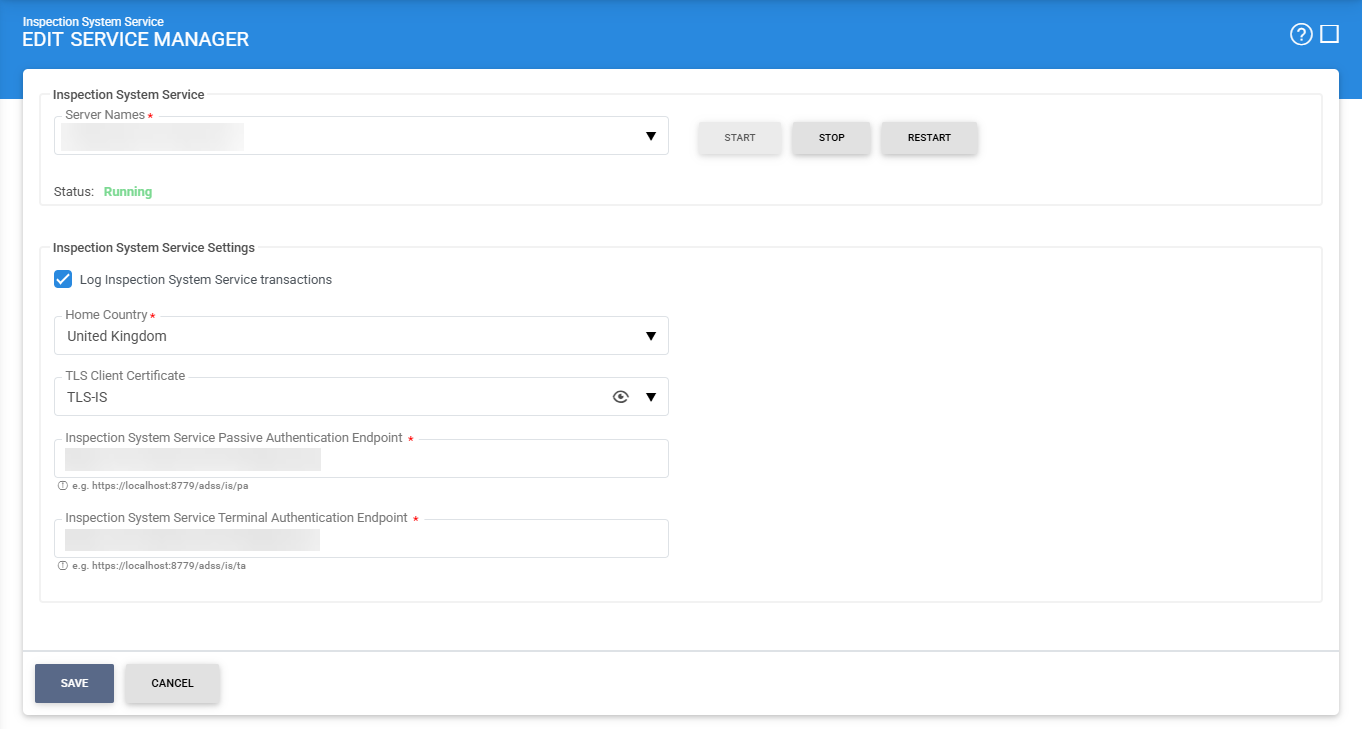
The configuration items are as follows:
|
Items |
Description |
|
Service Address |
Specifies the address of the Inspection System Service managed through this module. Ensure the URL is correct, especially in load-balanced environments where multiple service instances are running. By default, this is set to the local machine.. |
|
Start |
Start the service. Status will change to “Running” after a successful start |
|
Stop |
Stop the service. Status will change to “Stopped” after the service is stopped. |
|
Restart |
Stop and then start the service in one go, Status will change to “Running” after a successful restart. |
|
Log Inspection System Service transactions |
Enable this option to record all Inspection System Service requests and responses. These logs can be used for monitoring, troubleshooting, and audit purposes. |
|
Home Country |
Select the country to which this Inspection System Service belongs. This is used in certificate validation and trust decisions during ePassport processing. |
|
TLS Client Certificate |
Select a Inspection Systems key that, which pre-exists in the Key Manager, will be used by Inspection System Service to establish secure (mTLS) communication with external systems and terminal readers. |
|
Inspection System Service Passive Authentication Endpoint |
This is the service URL used by the border management system to send Passive Authentication (BAC) requests, such as retrieving Master Lists or validating document signer certificates. |
|
Inspection System Service Terminal Authentication Endpoint |
This is the service URL used by the border management system to perform Terminal Authentication (EAC) operations, such as requesting certificate chains or generating signatures for chip authentication. |
|
|
Make sure to save all changes by clicking the Save button, and then restart the service so that the updated settings take effect. |

See also
Step 1 - Configure DVCA as an External CA
Step 2 - Create Client Manager for Inspection Systems
Step 3 - Configure the External DVCA in the Trust Manager
Step 4 - Create Inspection System Certificate via Key Manager
Step 5 - Using the Service Manager
Step 6 - Creating the Inspection System Profile
Step 7 - Registering Business Application