
Step 1 - Using the Service Manager
Before the ADSS SPOC Service can be used, the Service Manager must be configured. The Service Manager enables administrators and operators to manage the operational state of the SPOC Service, including starting, stopping, and restarting the service. It also provides access to service-specific configuration settings.
To access the Service Manager, click the Service Manager button. The following screen is displayed:
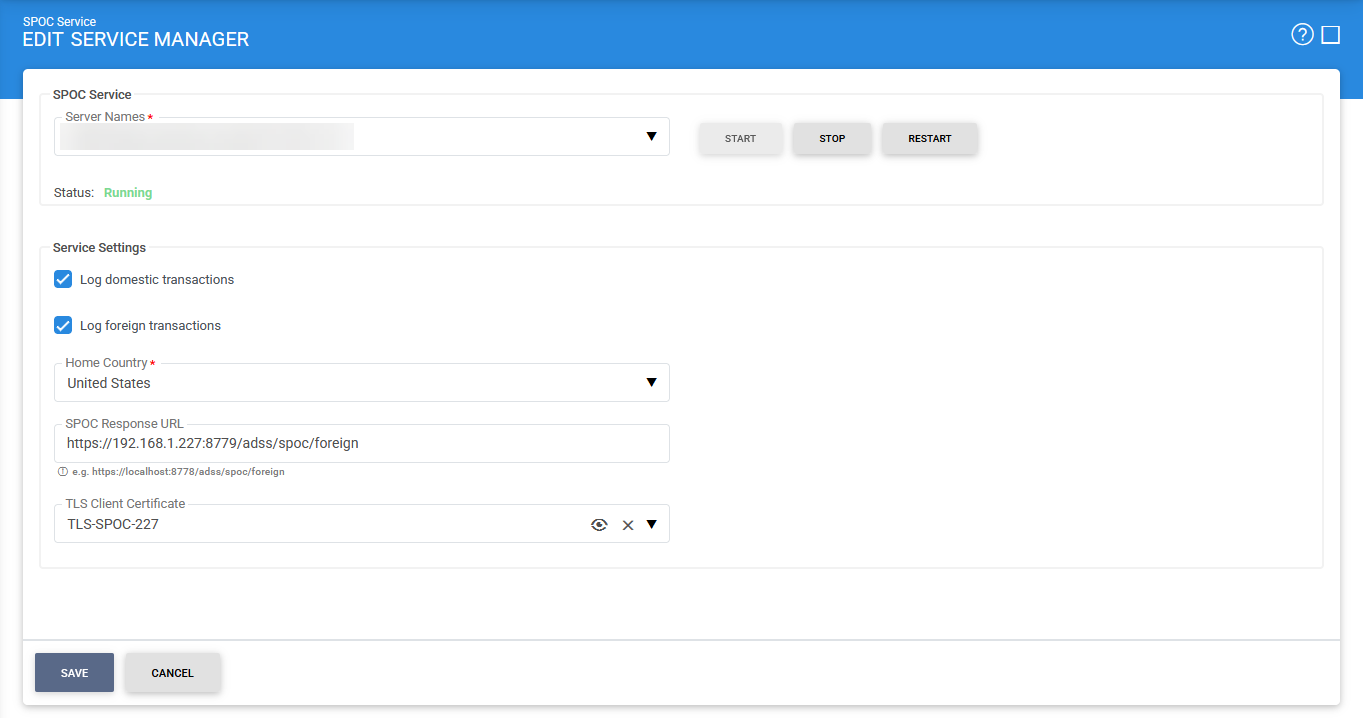
The following configuration options are available:
|
Items |
Description |
|
Server Names |
Specifies the address of the SPOC Service instance being managed through the Service Manager. Ensure that the address points to the correct service URL. In load-balanced or multi-server deployments, verify that the selected server corresponds to the specific SPOC Service instance that you intend to start, stop, or restart. By default, the local server is selected. |
|
Start |
Starts the SPOC Service. Upon successful startup, the service status changes to Running. |
|
Stop |
Stops the SPOC Service. Once the service has been stopped successfully, the status changes to Stopped. |
|
Restart |
Stops and then restarts the SPOC Service in a single operation. After a successful restart, the service status changes to Running. |
|
Log Domestic Transactions |
Enables logging of all domestic SPOC transactions. These include certificate requests received by the SPOC Service from domestic DVCAs. |
|
Log Foreign Transactions |
Enables logging of all foreign SPOC transactions, including certificate requests received from foreign SPOCs for the issuance of foreign DVCA certificates. |
|
Home Country |
Specifies the country in which the SPOC Service is operating. This value is included in communications with foreign SPOCs to identify the requesting country. |
|
SPOC Response URL |
Specifies the callback URL of the SPOC Service. This URL is included in requests sent to the national CVCA. When the national CVCA operates in asynchronous mode, it may return a pending response instead of an immediate certificate. After the certificate request has been reviewed and approved, the national CVCA sends the issued certificate to this response URL. |
|
SPOC TLS Client Certificate |
Selects the TLS client certificate used by the SPOC Service for secure communications. The certificate must already exist in the Key Manager and is used when establishing TLS connections with foreign SPOCs and national DVCAs. |
|
|
After configuring the required settings, save the changes and ensure that the SPOC Service is running before proceeding with the remaining SPOC configuration tasks, by clicking on the 'Save' button. |

See also
Step 1 - Using the Service Manager
Step 2 - Configure CVCA
Step 3 - Configure Foreign SPOC
Step 4 - Configuring SPOC Profile