
Terminal Authentication Settings
The Terminal Authentication Settings define how the Inspection System Service performs Terminal Authentication (EAC) for ePassports. This section is available only when the EPASSPORT_EAC feature is enabled. Terminal Authentication is used to securely access sensitive biometric data stored on the ePassport chip by allowing the Inspection System to authenticate itself to the chip using a valid certificate and private key.
In this process, the Inspection System Service uses its configured signing certificate and private key to generate a signature required by the ePassport chip. Depending on the configuration, either the terminal reader or the Inspection System Service computes the data to be signed. These settings ensure secure and flexible handling of authentication requests, while complying with EAC standards and supporting different reader capabilities.
Navigate to Inspection System Service 🡪 Inspection System Profiles 🡪 Terminal Authentication Settings, it displays the following screen:
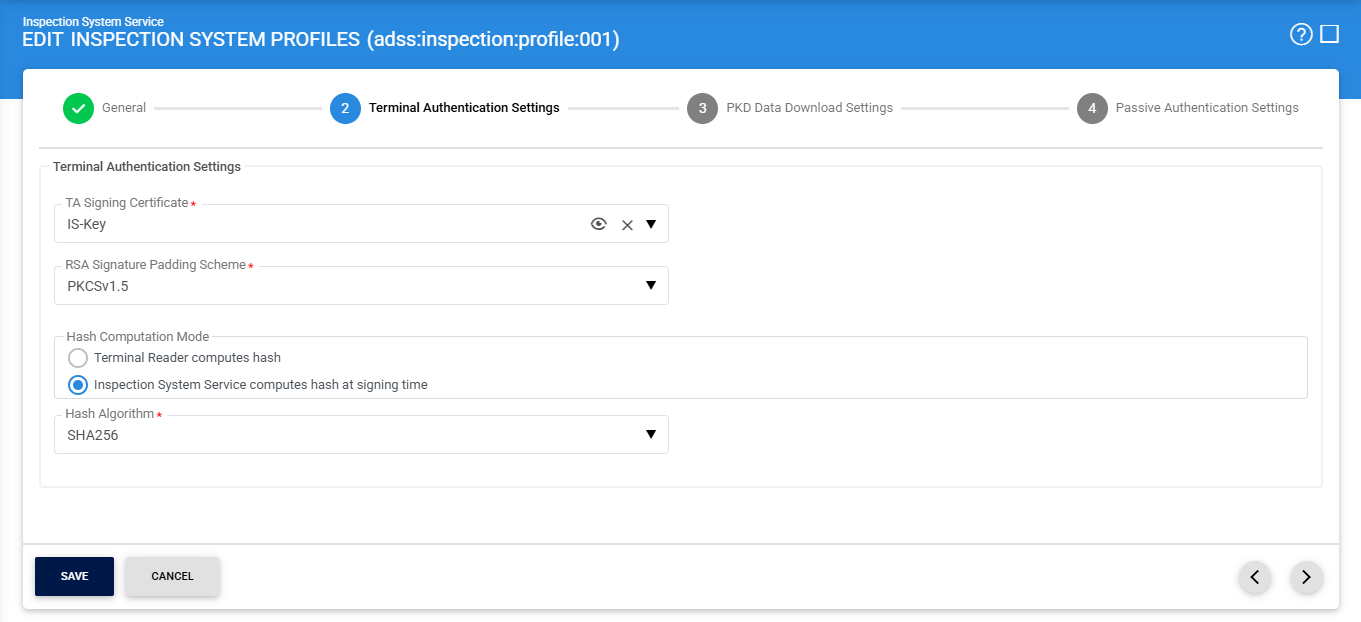
The configuration items are as follows:
|
Items |
Description |
||
|
TA Signing Certificate |
Select the Inspection System certificate that will be used to sign Terminal Authentication requests. This certificate must be created with the Inspection System purpose. |
||
|
RSA Signature Padding Scheme |
Specifies the padding scheme to be used for RSA-based signatures. Available options include PKCS#1 v1.5 and PSS, depending on security and compatibility.
|
||
|
Hash Computation Mode |
Defines how the data to be signed is prepared.
|

Once the required configurations are completed, click on the (>) to navigate to the PKD Data Downloading Settings page.
See also
General Settings
Terminal Authentication Settings
PKD Data Downloading Settings
Passive Authentication Settings