
Passive Authentication Settings
The Passive Authentication Settings define how the Inspection System Service validates the authenticity of ePassports using Basic Access Control (BAC). This section is available only when the EPASSPORT_BAC feature is enabled. Passive Authentication ensures that the data stored in the ePassport has not been altered by verifying the Document Signer (DS) certificate against trusted CSCA certificates.
In this section, administrators can configure how trust is established for DS certificates by selecting the appropriate trust source. The system supports multiple trust models, including Trust Manager, Master List, and Countries from Master Lists. Additionally, administrators can choose whether to perform revocation checks using CRLs to ensure that the DS certificate has not been revoked. These settings provide flexibility in defining how trust validation is performed based on deployment requirements.
Trust Manager
The Trust Manager option allows the Inspection System Service to validate Document Signer certificates using CSCA certificates that are already configured in the Trust Manager module. This approach is useful when the system relies on a controlled and pre-configured set of trusted certificates.
When you navigate to the Passive Authentication Settings section and enable the Trust Manager checkbox, the following screen is displayed:
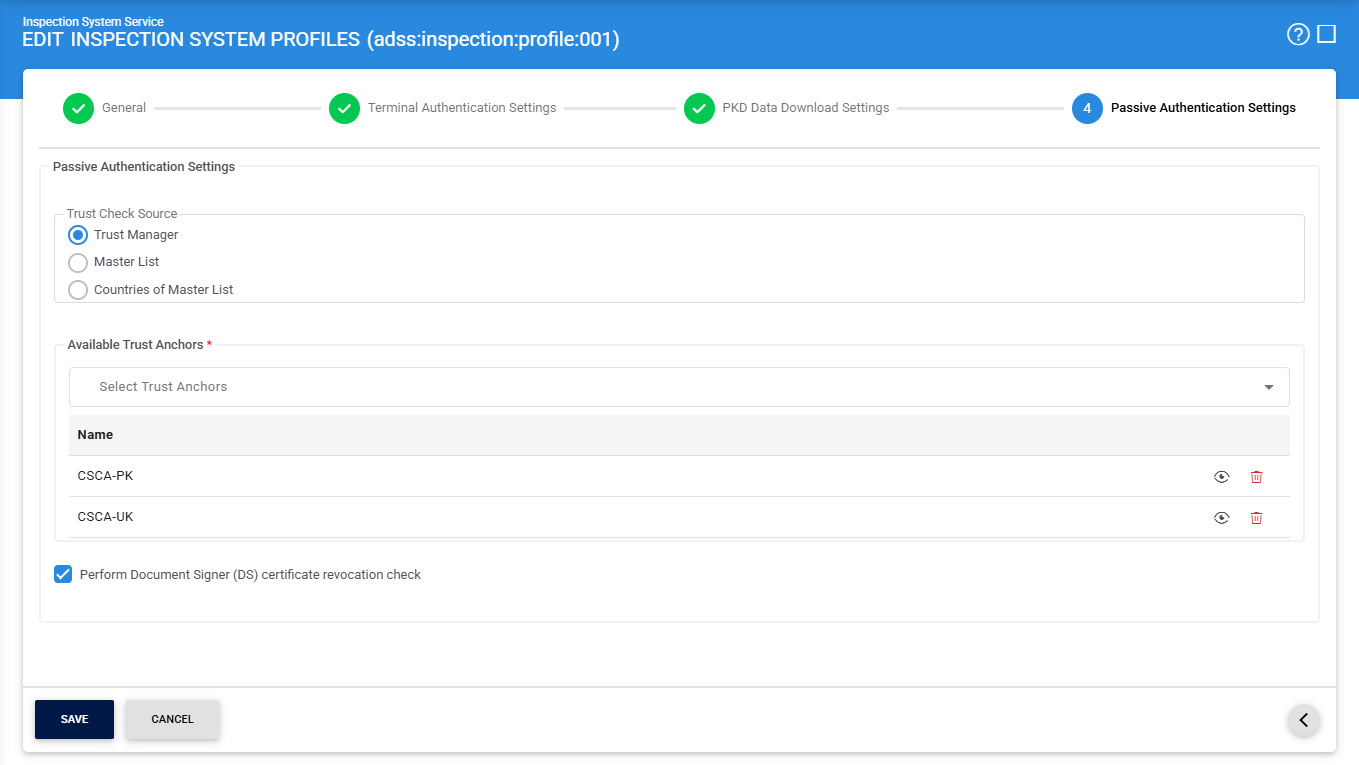
The configuration items are as follows:
|
Items |
Description |
|
Trust Manager |
Select this option to use CSCA certificates configured in the Trust Manager as the trust source for validation. |
|
Available Trust Anchors |
Displays a list of CSCA certificates (with Country Signing CA purpose) available in the Trust Manager. Select the required certificates to use for trust validation. |
|
Perform Document Signer (DS) certificate revocation check |
Enable this option to check the revocation status of the DS certificate using CRLs. If disabled, only trust validation will be performed. |
Master List
The Master List option allows the Inspection System Service to validate Document Signer certificates using CSCA certificates included in imported or downloaded Master Lists. This method is useful when trust needs to be based on officially published Master Lists.
When you navigate to the Passive Authentication Settings section and enable the Master List checkbox, the following screen is displayed:
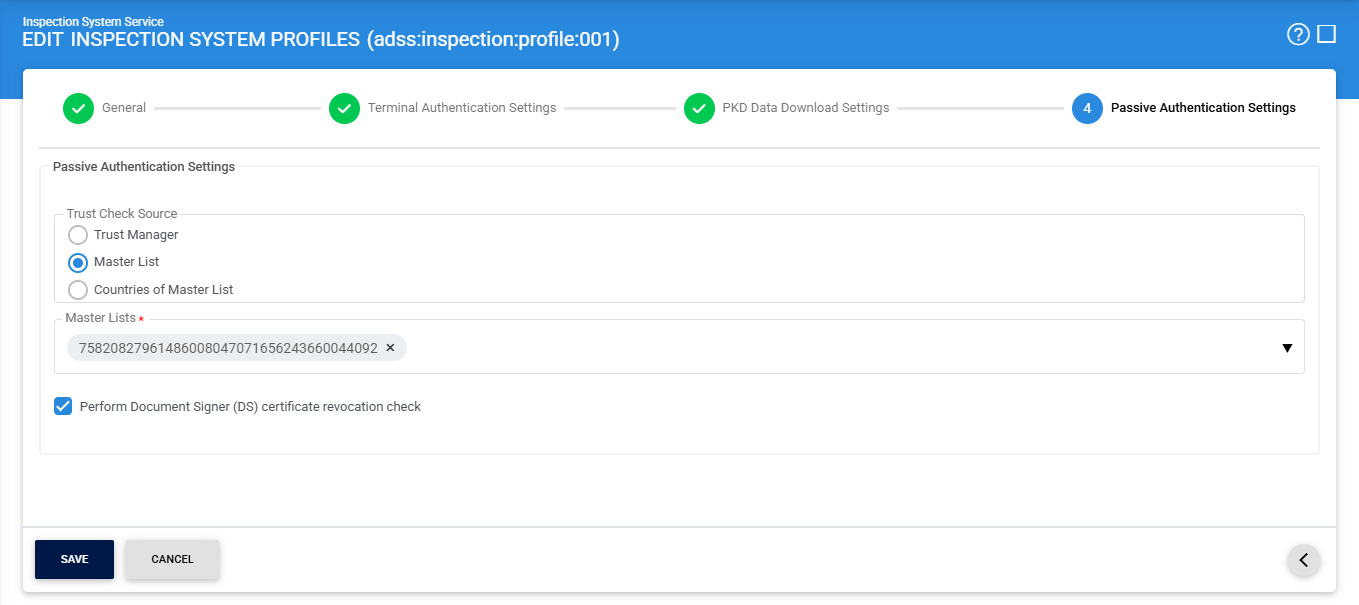
The configuration items are as follows:
|
Items |
Description |
|
Master List |
Select this option to use CSCA certificates from configured Master Lists as the trust source. |
|
Master Lists |
Displays a list of available Master Lists configured in the Manage Master List module. Select one or more lists for trust validation. |
|
Perform Document Signer (DS) certificate revocation check |
Enable this option to check the revocation status of the DS certificate using CRLs. If disabled, only trust validation will be performed. |
Countries of Master List
The Countries of Master List option allows the Inspection System Service to validate Document Signer certificates based on specific countries included in the Master Lists. This approach provides more granular control by limiting trust to selected countries.
When you navigate to the Passive Authentication Settings section and enable the Countries of Master List checkbox, the following screen is displayed:
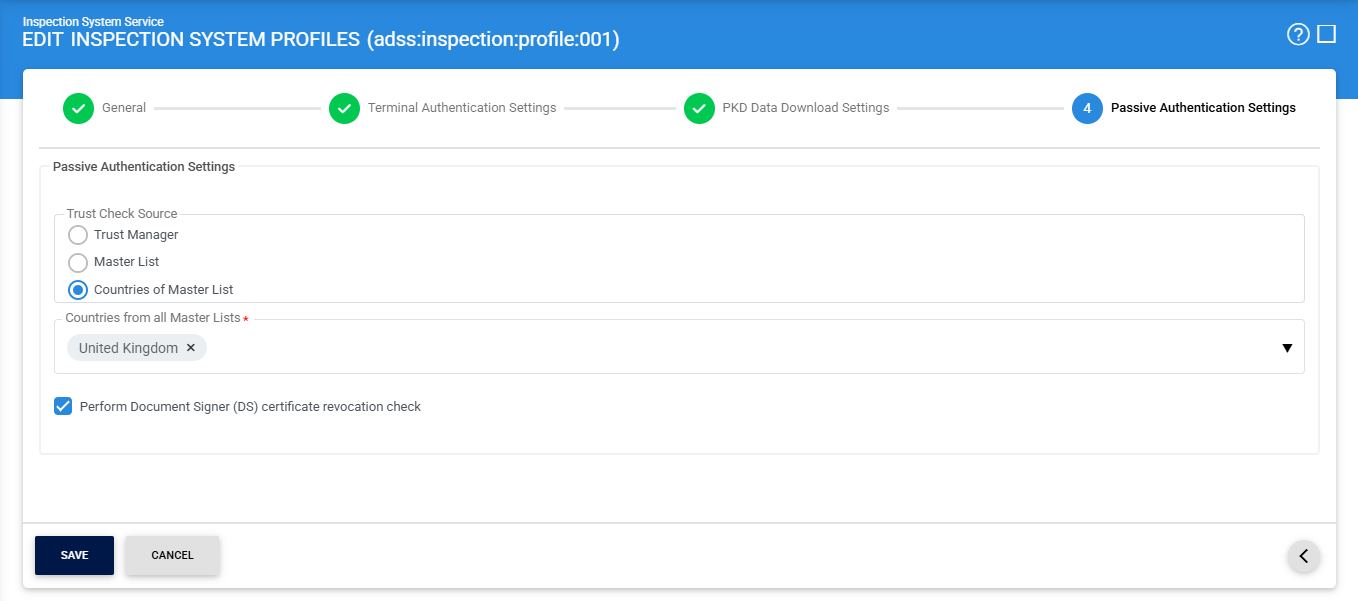
The configuration items are as follows:
|
Items |
Description |
|
Countries of Master List |
Select this option to build trust based on CSCA certificates associated with selected countries from Master Lists. |
|
Countries from all Master Lists |
Displays a list of country codes derived from all configured Master Lists. Select the required countries to use their CSCA certificates for validation. |
|
Perform Document Signer (DS) certificate revocation check |
Enable this option to check the revocation status of the DS certificate using CRLs. If disabled, only trust validation will be performed. |
See also
General Settings
Terminal Authentication Settings
PKD Data Downloading Settings
Passive Authentication Settings