
PKD Data Downloading Settings
The PKD Data Download Settings allow administrators to configure how the Inspection System Service retrieves trust data such as CSCA Master Lists and CRLs from external systems. This section is available only when the PKD_POLLING feature is enabled in the license. The trust data is obtained from the NPKD Service via the configured DVCA Server and is essential for performing Passive Authentication (BAC) during ePassport validation.
Administrators can choose to manually download trust data when required or enable automated polling to keep the system up to date. In manual mode, the system allows downloading the default Master List and CRLs on demand. In automated mode, the Inspection System Service periodically connects to the DVCA Server to fetch the latest data based on configured intervals and retry settings. Additional options are available to control polling behaviour, such as stopping polling on asynchronous responses and automatically updating the Trust Manager with newly retrieved certificates and CRLs. These settings ensure that the Inspection System Service always has access to the latest trusted data for secure and accurate validation.
Navigate to Inspection System Service 🡪 Inspection System Profiles 🡪 PKD Data Download Settings, it displays the following screen:
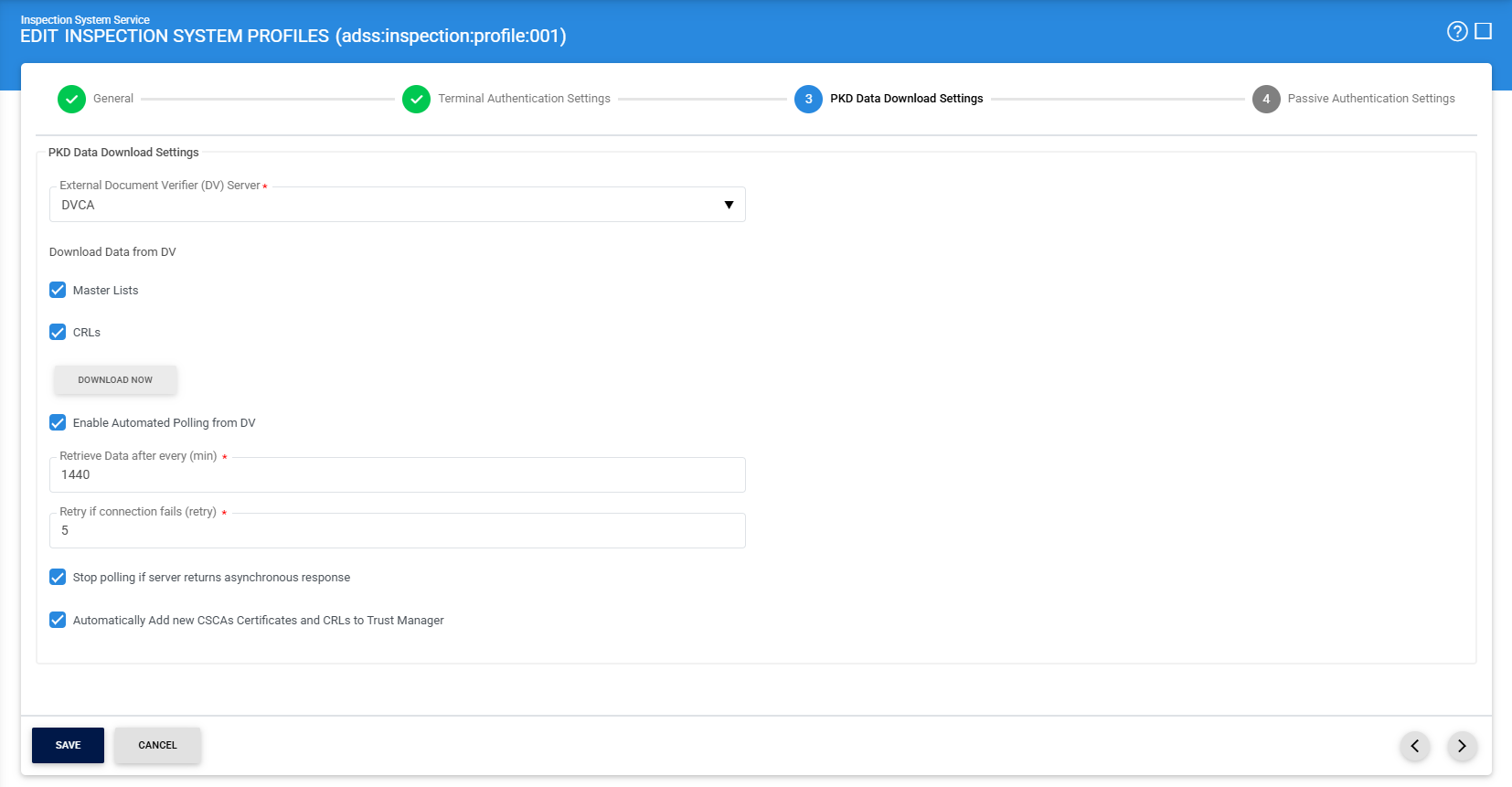
The configuration items are as follows:
|
Items |
Description |
|
External Document Verifier (DV) Server |
Select the DVCA Server (configured as an External CA) from which the Master Lists and CRLs will be retrieved.. |
|
Master Lists |
Allows the Master Lists to be downloaded manually from the DVCA Server. |
|
CRLs |
Allows the CRLs to be downloaded manually from the DVCA Server. |
|
Download Now |
Click this button to immediately download the selected data (Master List and/or CRLs) from the DVCA Server. |
|
Enable Automated Polling DV |
Enable this option to automatically retrieve trust data from the DVCA Server at regular intervals. |
|
Retry if connection fails |
Specifies the number of retry attempts if the connection to the DVCA Server fails during polling. |
|
Retrieve Data after every (min) |
Defines the time interval (in minutes) after which the system will automatically poll the DVCA Server for updated data. This field is visible only when automated polling is enabled. |
|
Stop polling if server returns asynchronous response |
If enabled, polling will stop when the DVCA Server responds asynchronously, preventing unnecessary repeated requests. |
|
Automatically Add new CSCAs Certificates and CRLs to Trust Manager |
If enabled, newly downloaded CSCA certificates and CRLs will be automatically added to the Trust Manager for immediate use in validation. |
Once the required configurations are completed, click on the (>) to navigate to the Passive Authentication Settings page.
See also
General Settings
Terminal Authentication Settings
PKD Data Downloading Settings
Passive Authentication Settings