
PKD Data Polling Monitor
The PKD Data Polling Monitor module provides visibility and control over the automated polling process used by the Inspection System Service to retrieve trust data from external DVCA services. This includes important data such as CSCA Master Lists and CRLs, which are required for validating ePassports during Passive Authentication.
When polling is enabled in an Inspection System Profile, the service periodically connects to the configured Document Verifier (DV) Server to fetch the latest trust data. This process is typically handled by the primary instance in a high availability setup to avoid duplicate operations. The PKD Data Polling Monitor allows administrators to track the status of these polling activities, view the current state of each configured profile, and perform actions such as starting, stopping, or restarting the polling process if required.
This module helps ensure that the Inspection System Service always has up-to-date trust information and provides clear visibility into the polling life-cycle for better monitoring and troubleshooting.
|
|
PKD data polling is performed only for active profiles. If a profile is inactive, polling will not be executed for that profile. |

Navigate to Inspection System Service 🡪 PKD Data Polling Monitor, it displays the following screen:
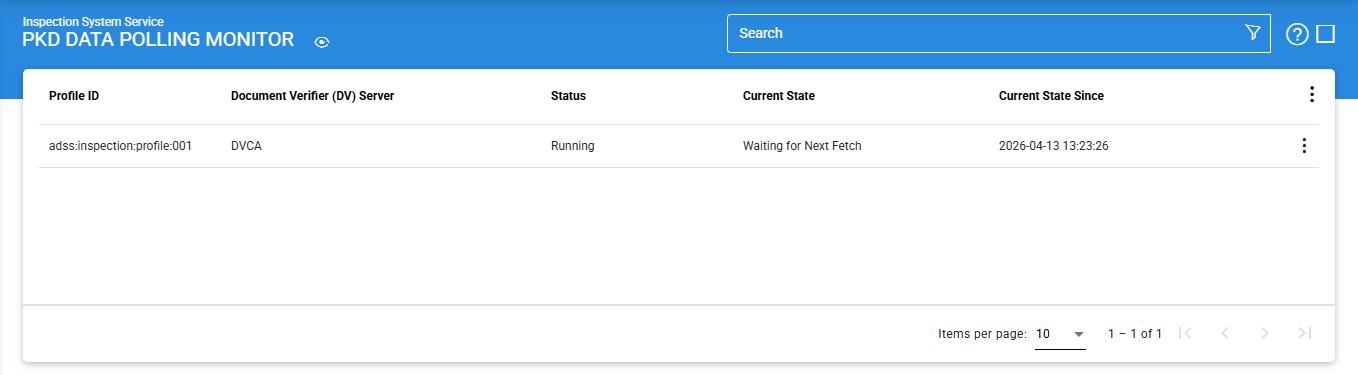
The configuration items are as follows:
|
Items |
Description |
|
Profile ID |
Displays the unique identifier of the Inspection System Profile for which polling is configured. |
|
Document Verifier (DV) Server |
Shows the name of the DVCA Server from which trust data (such as Master Lists and CRLs) is being retrieved. |
|
Status |
Indicates the current status of the polling process, such as Running or Stopped. |
|
Current State |
Displays the current activity of the polling process, such as waiting for the next fetch or actively retrieving data. |
|
Current State Since |
Shows the date and time since the polling process has been in its current state. |
To manage a profile that is currently running, click the vertical ellipsis (⋮) at the end of its row and select either Stop or Restart, as required.
Clicking on the Advanced Search icon on the main page displays the following screen:
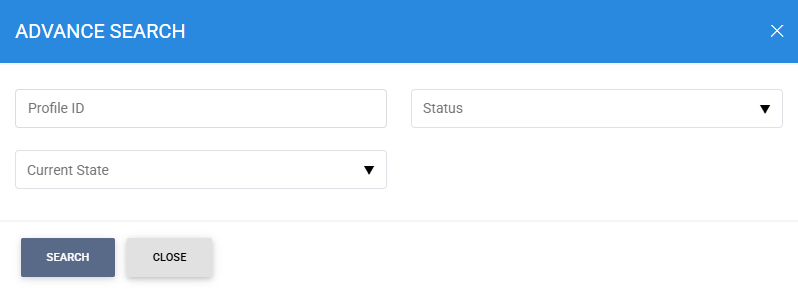
Enter the search criteria based on Profile ID, Status, and Current State.
See also
Configuring the Inspection System Service
Manage Master Lists
HA Configuration
Manage CRLs
PKD Data Polling Monitor
Transaction Logs
Logs Archiving
Alerts