
Manage CRLs
The Inspection System Service uses Certificate Revocation Lists (CRLs) to check the revocation status of Document Signer (DS) certificates during ePassport validation. These CRLs are required to ensure that only valid and trusted certificates are accepted during Passive Authentication. CRLs can be obtained either by downloading them from the DVCA services (manually or through automated polling) or by importing them into the system. This module provides options to view and manage all available CRLs, ensuring that the Inspection System Service always uses up-to-date revocation information for secure and accurate validation.
Navigate to Inspection System Service 🡪 Manage CRLs, it displays the following screen:
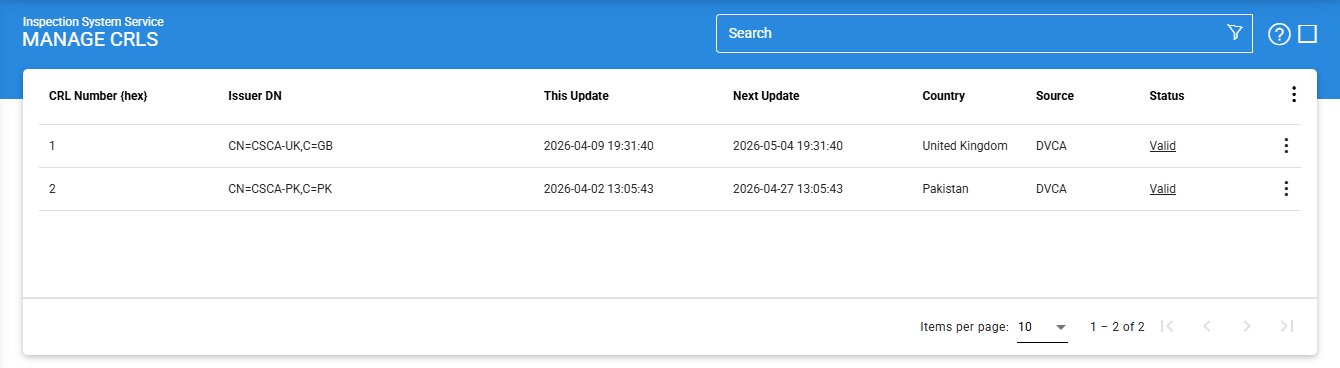
The configuration items are as follows:
|
Items |
Description |
|
CRL Number {hex} |
Displays the unique CRL Number for the selected CRL, used to identify the specific revocation list. |
|
Issuer DN |
Displays the Distinguished Name (DN) of the authority that issued the CRL |
|
This Update |
Shows the date and time when the CRL was last updated by the issuing authority. |
|
Next Update |
Indicates the date and time when the next update of the CRL is expected. |
|
Country |
Represents the country associated with the CRL issuer. |
|
Source |
Indicates how the CRL was added to the Inspection System Service. Possible sources include:
|
|
Status |
Displays the current validation status of the CRL, such as Valid or Invalid, based on integrity and format checks. |
The user can Export, Delete or View Details of the selected CRL.
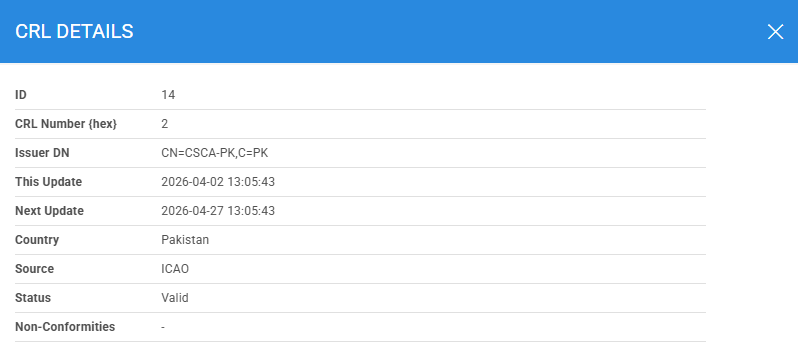
Click on the vertical ellipsis (⋮) at the end of the row for the selected CRL, and then select the 'View Details' option, it displays the following screen:
Clicking on the Advanced Search icon on the main page displays the following screen:
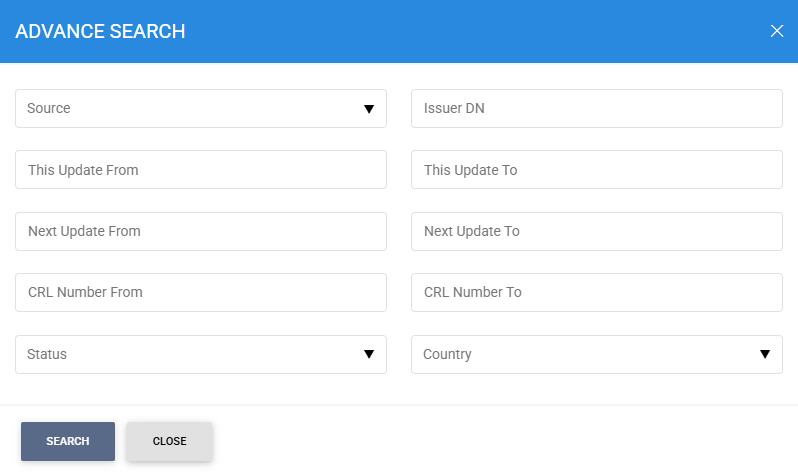
Enter the search criteria based on Source, Issuer DN, This Update From, This Update To, Next Update From, Next Update To, CRL Number From, CRL Number To, Status and Country.
See also
Configuring the Inspection System Service
Manage Master Lists
HA Configuration
Manage CRLs
PKD Data Polling Monitor
Transaction Logs
Logs Archiving
Alerts