
Other TSL Pointers
After the LOTL validation is completed in the previous step, the ADSS Server displays all the TSL Pointers identified in the configured LOTL.
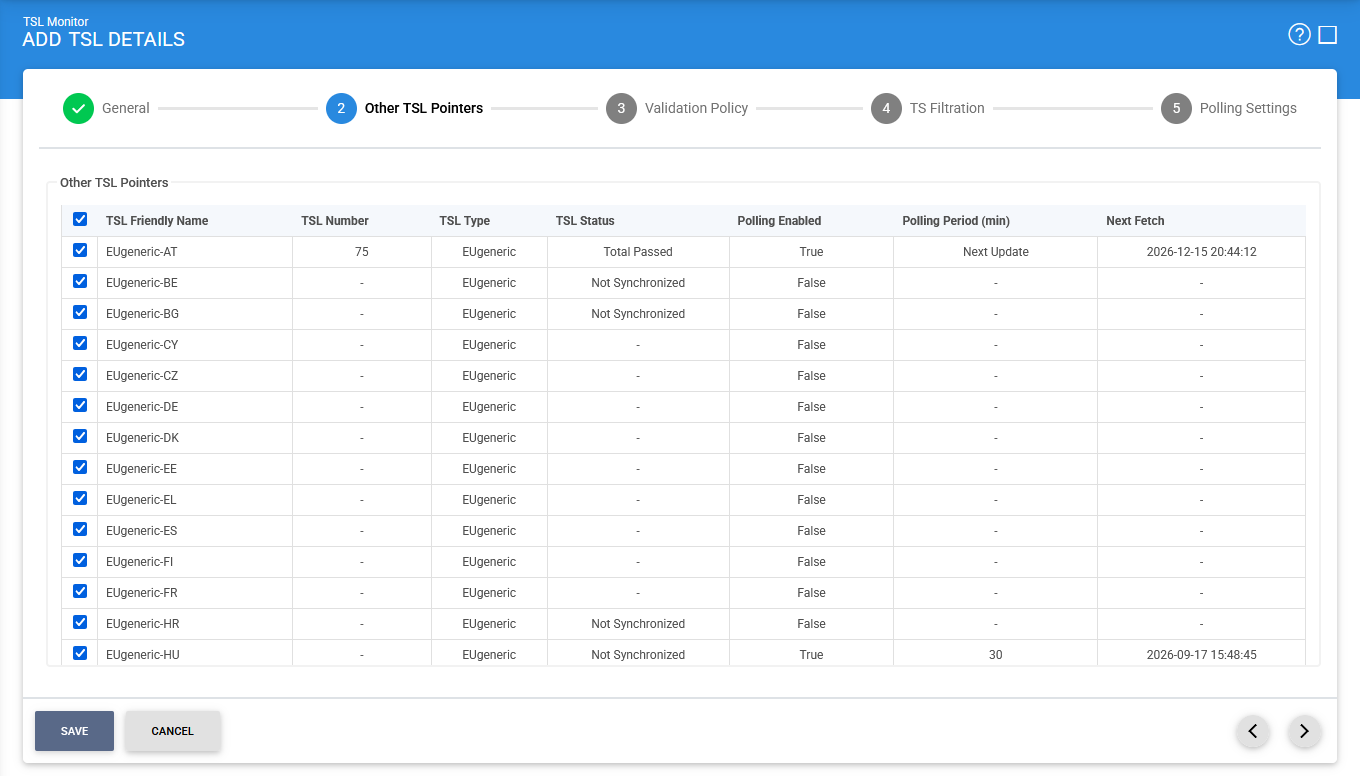
Select the TSLs that you want to include in the configuration. Clear the checkboxes for any TSLs that you do not want to include.
The column descriptions are given below:
|
Items |
Description |
|
TSL Friendly Name |
Displays the user-defined friendly name of the TSL, which helps administrators identify the TSL within TSL Monitor. |
|
TSL Number |
Displays the unique identification number assigned to the TSL as defined in the TSL XML data. |
|
TSL Type |
Displays the type of the Trusted List, such as a Member State Trusted List (MS TL) or another supported TSL type. |
|
TSL Status |
Displays the current processing status of the TSL, indicating whether the TSL has been successfully validated and synchronized, is being processed, or has encountered an error. |
|
Polling Enabled |
Indicates whether automated polling is enabled for the TSL. When enabled, TSL Monitor periodically checks the configured location for updates to the TSL. |
|
Polling Period (min) |
Displays the interval, in minutes, at which TSL Monitor polls the configured TSL location for updates. |
|
Next Fetch |
Displays the scheduled date and time when TSL Monitor will next retrieve the TSL based on the configured polling period. |
After making the required selections, click Next (>) to continue.
|
|
Important: If all TSL checkboxes are selected, any new TSL discovered during a subsequent LOTL fetch is automatically added to the configuration. |

See also