
Step 2 - Configuring LTANS Profile
An LTANS Profile defines how an archive object is created and processed when the profile is specified in an LTANS request submitted by a client application.
The profile determines key aspects of archive processing, including Evidence Record Syntax (ERS), archive retention, publishing, deletion, export, verification, and signing settings.
To view the existing LTANS Profiles, select the LTANS Profiles tab in the LTANS Service:
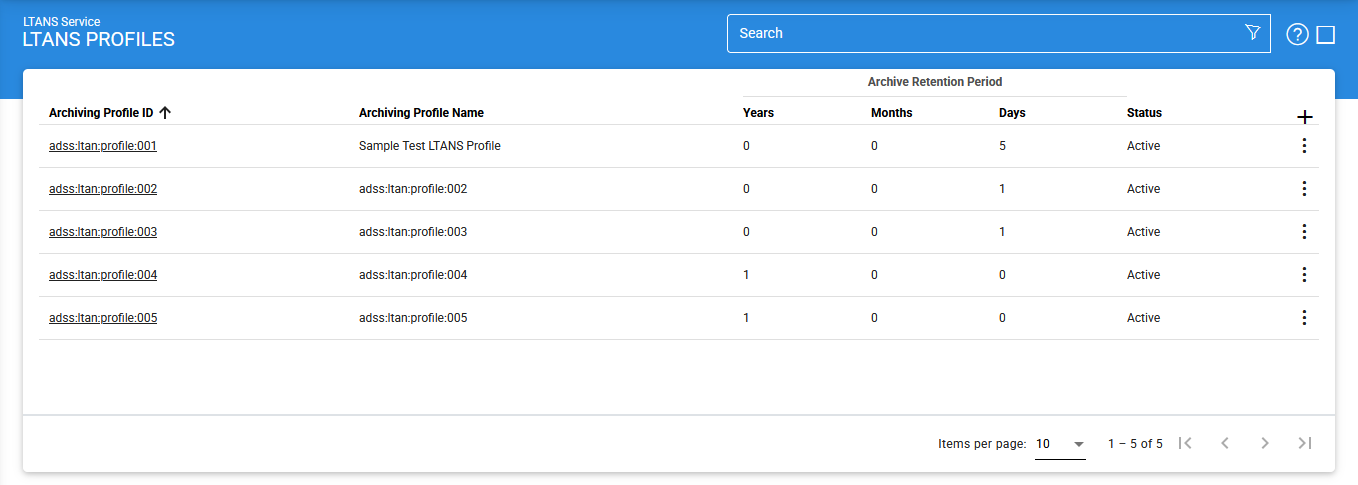
LTNS profiles can be sorted in either Ascending or Descending order according to the criteria: Archiving Profile ID, Archiving Profile Name, Created At and Status.
Select an LTANS Profile from the list to open its Identification screen.
Identification
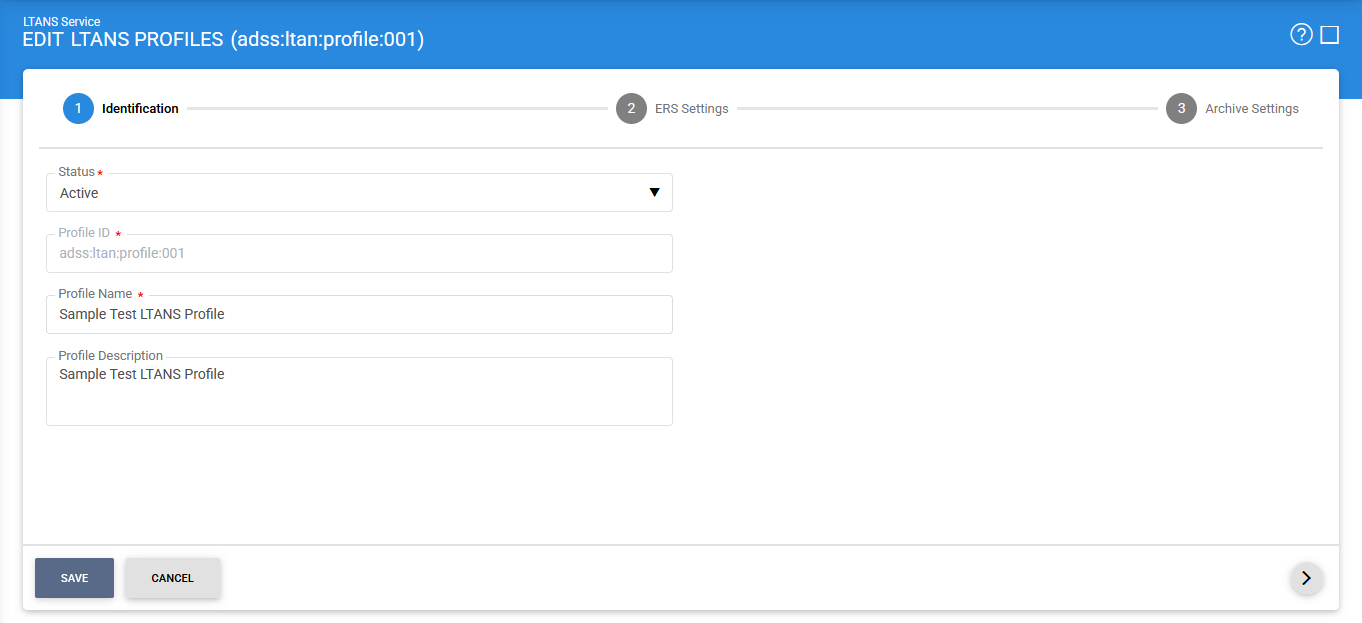
The following configuration items are available:
|
Items |
Description |
|
Status |
Specifies whether the profile is Active or Inactive. An inactive profile is not used to process requests submitted by client applications. |
|
Profile ID |
A system-defined unique identifier for the profile. The Profile ID can be specified in an LTANS request to identify the profile. Alternatively, the Profile Name can be used. |
|
Profile Name |
A mandatory, unique name defined by the ADSS Server Administrator to easily identify the profile in the ADSS Operator Console. |
|
Profile Description |
Provides additional information about the profile, such as the circumstances or use cases for which the profile is intended. This field is for informational purposes only. |
|
Archive Retention Period |
Specifies how long an archive object is retained by the LTANS Service. The retention period can be configured in years, months, or days. Once the retention period expires, the archive is marked as inactive by the ADSS LTANS Service. An inactive archive does not support EXPORT or VERIFY operations; however, LISTIDS, STATUS, and DELETE operations remain supported. |
After configuring the identification settings, click the > icon to proceed to the ERS Settings screen.
ERS Settings
The ERS Settings screen defines how the Evidence Record Syntax (ERS) is generated and renewed for archived data.
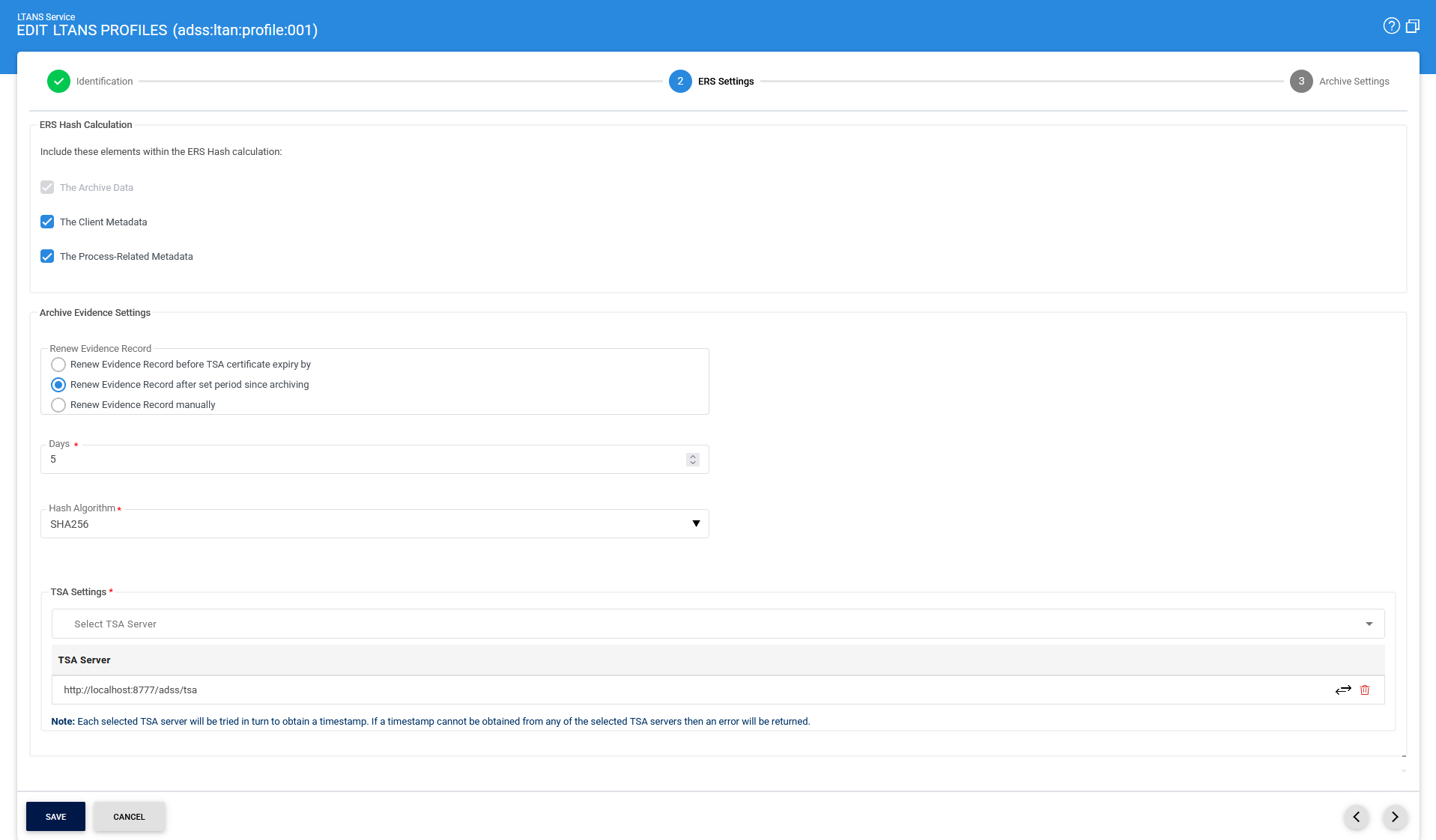
The following configuration items are available:
|
Items |
Description |
|
Archive Data |
This option is always enabled. It indicates that the Archive Data is included in the ERS hash calculation. |
|
Client Metadata |
Select this option to include Client Metadata in the ERS hash calculation. If this option is not selected, Client Metadata is excluded from the ERS hash calculation, even if it is provided in the archive request. |
|
Process-Related Metadata |
Select this option to include Process-Related Metadata in the ERS hash calculation. If this option is not selected, Process-Related Metadata is excluded from the ERS hash calculation. |
|
Renew Evidence Record before TSA certificate expiry |
Select this option to automatically renew the Evidence Record a configured number of days before the Timestamping Authority (TSA) certificate expires. |
|
Renew Evidence Record after set period since archiving |
Select this option to automatically renew the Evidence Record after a configured number of days from the time the archive was created. |
|
Renew Evidence Record manually |
Select this option when Evidence Records should be renewed manually rather than automatically. |
|
Hash Algorithm |
Specifies the hashing algorithm used to generate a unique fingerprint of the archive object before timestamping. The available algorithms are SHA1, SHA224, SHA256, SHA384, SHA512, SHA3-224, SHA3-256, SHA3-384, SHA3-512, RipeMD128, and RipeMD160. |
|
TSA Settings |
Specifies the Timestamping Authorities (TSAs) to be used to generate timestamps for the ERS. The available TSAs are those registered under Global Settings > Timestamping. |
|
|
Important: If Archive Publishing Settings is configured with Do not store the Archive Data or Publish to URL, the Hash Algorithm becomes disabled and cannot be changed. |

After configuring the ERS settings, click the > icon to proceed to the Archive Settings screen.
Archive Settings
The Archive Settings screen defines how archive data is retained, stored, published, deleted, exported, verified, and signed.
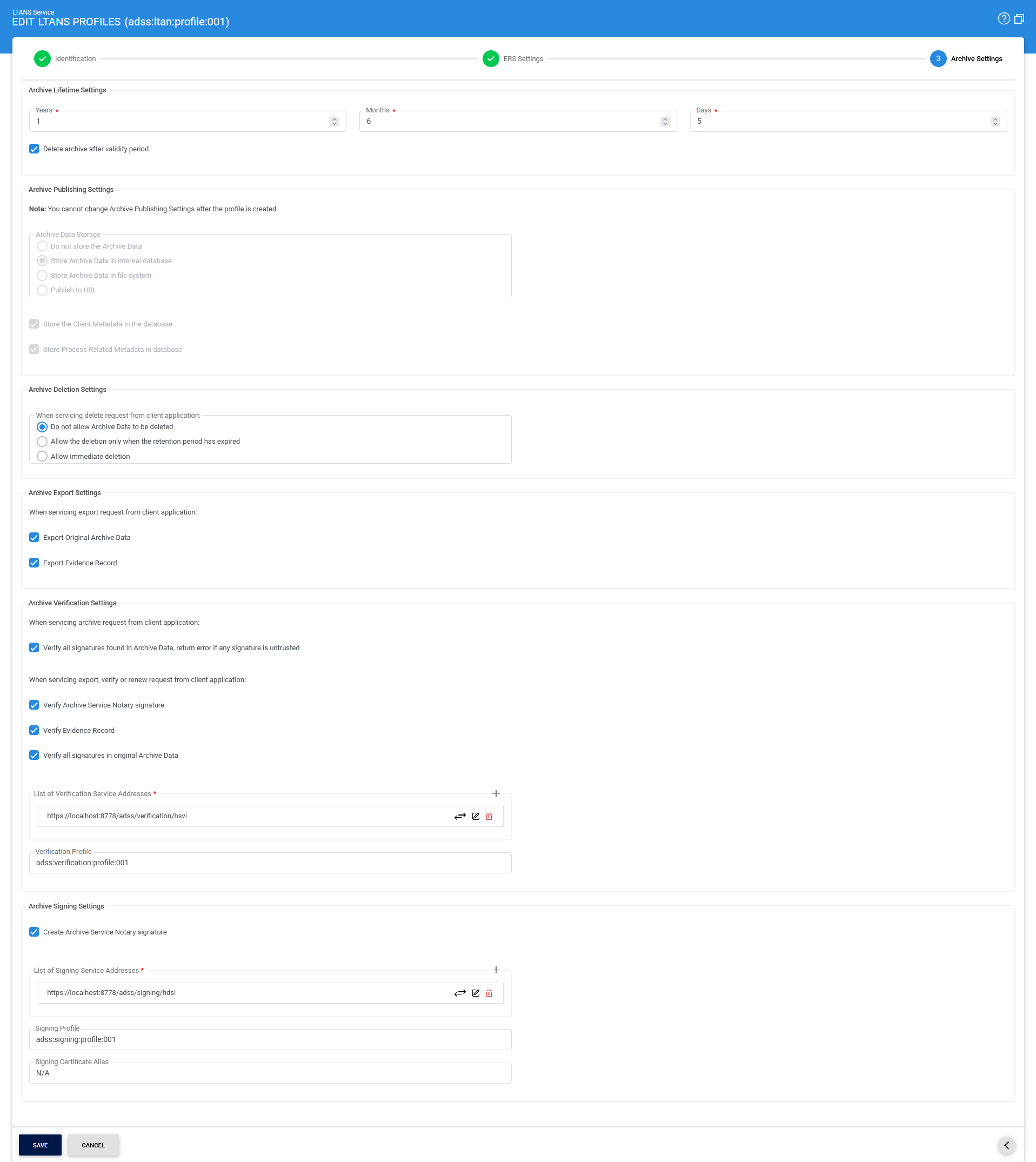
The following configuration items are available:
|
Items |
Description |
||||
|
Archive Lifetime Period |
Specifies how long an archive object is retained by the LTANS Service. The retention period can be configured in years, months, or days. Once the retention period expires, the ADSS LTANS Service marks the archive as inactive. An inactive archive does not support EXPORT or VERIFY operations; however, LISTIDS, STATUS, and DELETE operations remain available. |
||||
|
Delete archive after validity period |
Select this option to delete archives automatically after their validity period expires.
|
||||
|
Archive Publishing Settings |
The Archive Publishing Settings group defines how and where the original Archive Data is stored or published. |
||||
|
Do not store the Archive Data |
Select this option if the original Archive Data should not be stored. The hash of the Archive Data is retained as part of the Evidence Record. The Hash Algorithm cannot be changed after this option is saved. |
||||
|
Store Archive Data in internal database |
Select this option to store the Archive Data in the configured ADSS Server database. |
||||
|
Store Archive Data in file system |
Select this option to store the Archive Data on a physical drive, either on the local machine or at a network location. |
||||
|
Publish to URL |
Select this option to publish the Archive Data to an HTTP URL. Only the ARCHIVE operation is supported when this option is configured. The Hash Algorithm cannot be changed after this option is saved.
|
||||
|
Store the Client Metadata in the database |
Select this option to store Client Metadata in the ADSS Server database. If Client Metadata is included in the ERS hash calculation but is not stored in the database, the client application must provide the Client Metadata again in the VERIFY request. Otherwise, the LTANS Service cannot verify the ERS and returns an appropriate error. |
||||
|
Store Process-Related Metadata in database |
This option is always enabled because Process-Related Metadata is always stored in the database. The following information is stored as Process-Related Metadata:
|
||||
|
Archive Deletion Settings |
The Archive Deletion Settings group defines whether archived data can be deleted through a DELETE service request and under which conditions. |
||||
|
Do not allow Archived Data to be deleted |
Select this option to prevent Archive Data from being deleted through a DELETE service request. If a DELETE request is received, the LTANS Service returns an appropriate error to the client application. |
||||
|
Allow the deletion only when the retention period has expired |
Select this option to allow Archive Data to be deleted only after its retention period has expired. If a DELETE request is received for an active archive, an appropriate error is returned. |
||||
|
Allow immediate deletion |
Select this option to allow Archive Data to be deleted at any time when processing a DELETE request from a client application. |
||||
|
Archive Export Settings |
The Archive Export Settings group defines which archive components can be returned when processing an EXPORT request. |
||||
|
Export original Archive Data |
Select this option to allow the original Archive Data to be exported when processing an EXPORT request. |
||||
|
Export Evidence Record |
Select this option to allow the Evidence Record to be exported when processing an EXPORT request.
|
||||
|
Archive Verification Settings |
The Archive Verification Settings group defines how the LTANS Service verifies signatures, Evidence Records, and signed Archive Data. |
||||
|
Verify all signatures found in Archive Data, return error if any signature is untrusted |
Select this option to verify signatures contained in the Archive Data before the data is archived. If a signature is untrusted or corrupted, the archive request fails with an appropriate error. If this option is enabled but the Archive Data contains no signatures, the data is archived normally. |
||||
|
Verify Archive Service Notary signature |
Select this option to verify the signed Archive Data when processing EXPORT or VERIFY requests. If this option is enabled and the client application submits a VERIFY request for unsigned Archive Data, an appropriate error is returned. |
||||
|
Verify Evidence Record |
Select this option to verify the Evidence Record when processing EXPORT or VERIFY requests. |
||||
|
Verify all signatures in original Archive Data |
Select this option to verify signatures in the original Archive Data when processing EXPORT or VERIFY requests. If this option is enabled and the client application submits a VERIFY request for unsigned data, an appropriate error is returned. |
||||
|
Verification Service Address |
Specifies the address of the Verification Service used to verify Notary signatures or signatures contained in the original Archive Data. Only the HTTP interface is supported. |
||||
|
Verification Profile |
Specifies the Verification Profile name or ID to be used for signature verification. If this field is left empty, the default Verification Profile configured in Client Manager is used.
|
||||
|
Archive Signing Settings |
The Archive Signing Settings group defines whether the generated archive is digitally signed and specifies the signing service and signing credentials to use. |
||||
|
Create Archive Service Notary signature |
Select this option to sign the generated archive using an LTANS Notary Signing or Document Signing key that is pre-generated in the Key Manager module. |
||||
|
Signing Service Address |
Specifies the address of the Signing Service used to generate the signature. Only the HTTP interface is supported. |
||||
|
Signing Profile |
Specifies the Signing Profile name used to generate the signature. If this field is left empty, the default Signing Profile configured in Client Manager is used. |
||||
|
Signing Certificate Alias |
Specifies the certificate alias containing a certificate with either LTANS Notary Signing or Document Signing usage. If this field is left empty, the certificate configured in the selected Signing Profile is used to generate the Notary Signature.
|
Searching for LTANS Profiles
The Advanced Search feature allows administrators to find specific LTANS Profiles using predefined search criteria.
Click the Advanced Search icon to open the LTANS Profile search page.
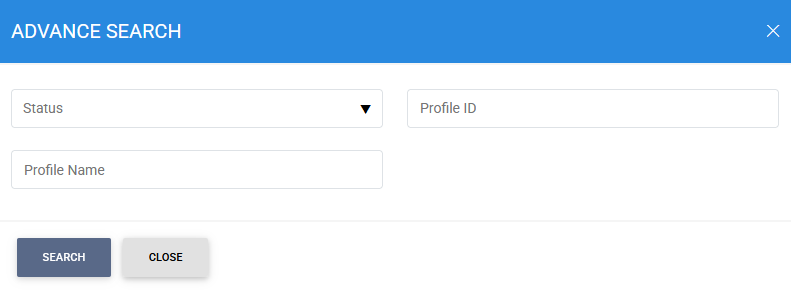
Enter one or more of the following search criteria:
- Status
- Profile ID
- Profile Name
The LTANS Service displays the profiles that match the specified search criteria.
See also
Step 1 - Registering Timestamping Authorities
Step 2 - Configuring LTANS Profile
Step 3 - Registering Business Applications
Step 4 - Using LTANS Service Manager