
SPOC Service
After a client application has been registered in the Client Manager, the appropriate permissions must be configured before the client can access the ADSS SPOC Service.
The following SPOC Service-related configurations can be managed within the Client Manager:
- Allow the client to access the ADSS SPOC Service.
- Assign a default SPOC Profile to the client.
To configure SPOC Service permissions:
- Open the required client in the Client Manager.
- Edit the client configuration.
- Click the SPOC Service link at the top of the page.
The following screen is displayed:
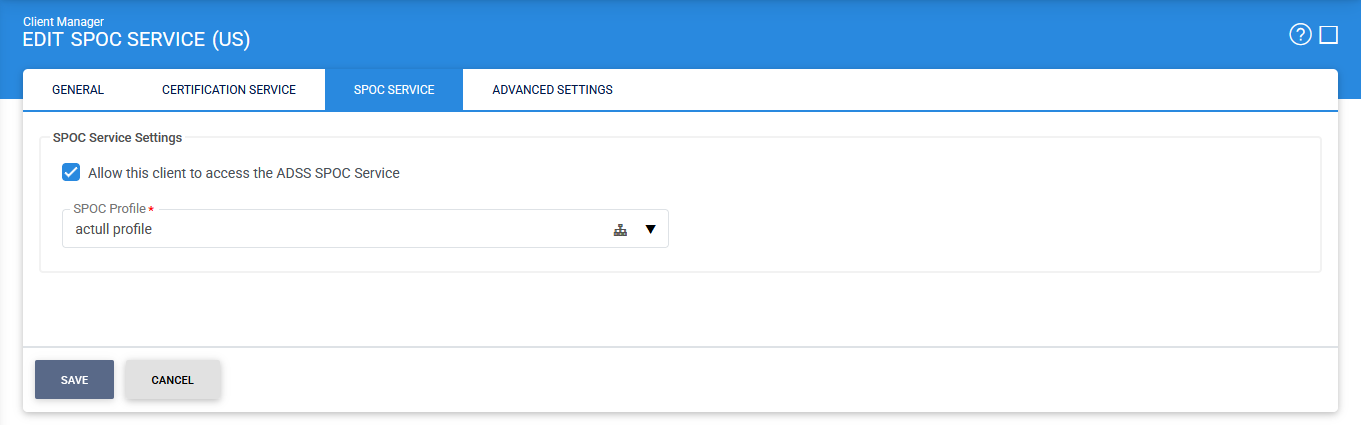
The configuration items are as follows:
|
Items |
Description |
|
Allow this client to access the ADSS SPOC Service |
Grants the client application permission to access and submit requests to the ADSS SPOC Service. This option must be enabled before the client can communicate with the service. |
|
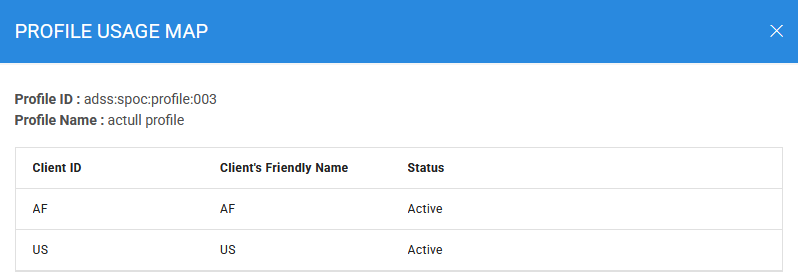
Profile Usage Map |
Displays an overview of SPOC Profile assignments, showing which profiles are currently associated with registered clients. This helps administrators review and manage profile usage across the system. |
|
SPOC Profile |
Specifies the default SPOC Profile to be used when processing requests from this client. If a request does not explicitly reference a SPOC Profile, the profile configured here will be applied automatically. Only one SPOC Profile can be assigned to a client at any given time. |
Clicking on the Profile Usage Map icon inside the selected SPOC Profile field displays the following screen:
After configuring the required permissions and profile settings, click Save to apply and store the changes.
Once saved, the client will be authorised to access the ADSS SPOC Service according to the configured permissions and profile assignment.
See also
Certification Service
Verification Service