
LTANS Service
The LTANS Service settings in Client Manager allow administrators to control which LTANS Service features and profiles a client application can access.
For each registered client, you can configure the following:
- Allow or deny access to the ADSS LTANS Service
- Specify the LTANS Profiles available to the client.
- Configure a default LTANS Profile for the client.
- Specify the LTANS operations that the client is authorised to perform.
Configuring LTANS Service Permissions
After registering a client, you can configure its LTANS Service permissions by editing the client and selecting LTANS Service from the links at the top of the edit page.
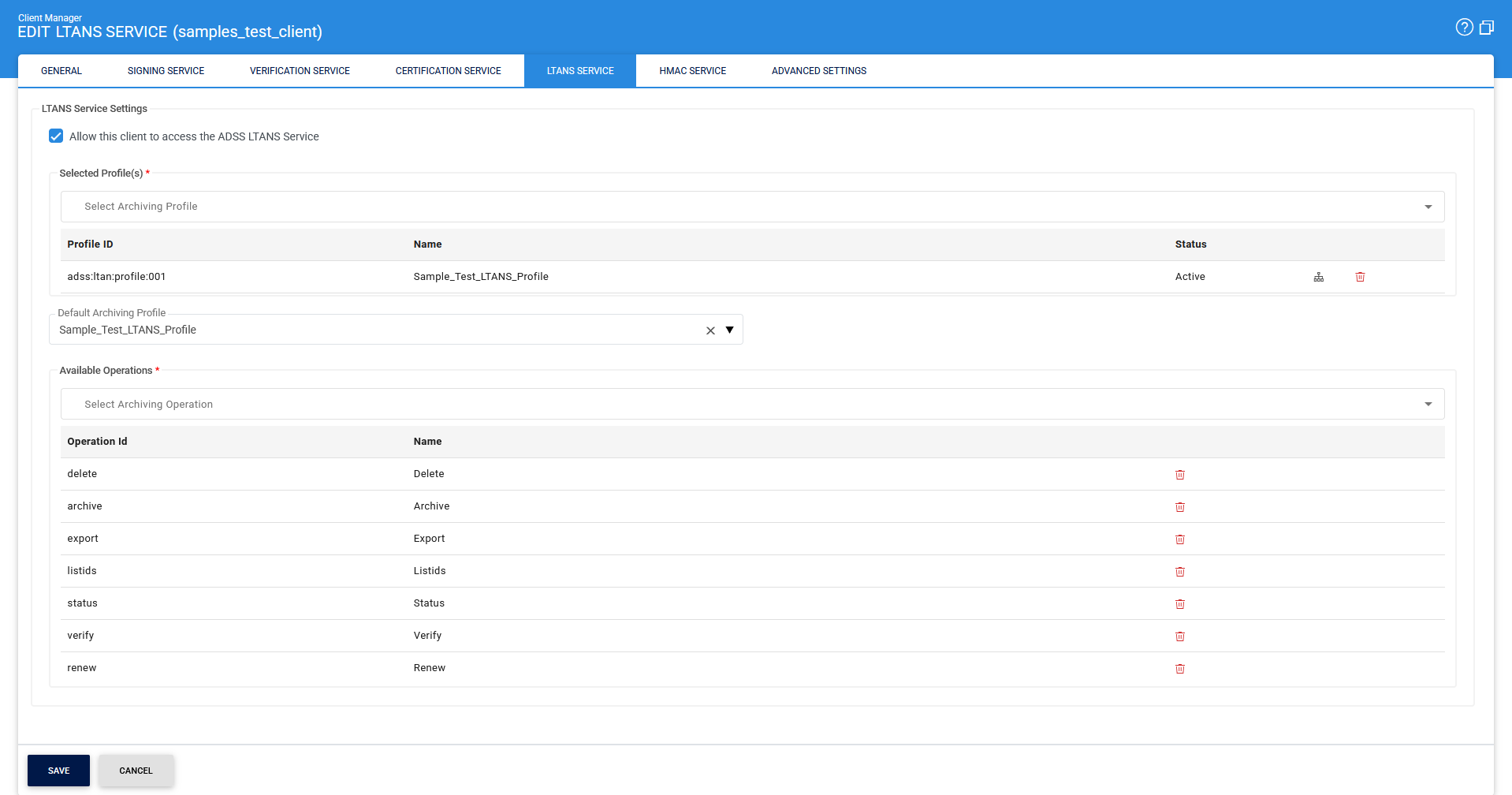
Allowing LTANS Service Access
Select the Allow this client to access the ADSS LTANS Service checkbox to allow the client application to submit requests to the ADSS LTANS Service.
If the client application also needs to access other ADSS Server services, such as verifying signed documents or generating and certifying user signing keys, configure the required permissions separately under the corresponding service settings, such as Verification Service and Certification Service.
Assigning LTANS Profiles
The LTANS Profiles section controls which LTANS profiles the client can use.
An LTANS Profile contains the server-side configuration that defines how an archive is created and processed by the ADSS LTANS Service.
By default, all existing LTANS profiles are available to a newly registered client. You can restrict access by assigning only the profiles required by the client.
To assign LTANS profiles:
- In the Available LTANS Profiles list, select the required profile.
- Click >> to move it to the Selected LTANS Profiles list.
- Repeat the process for each profile that the client should be allowed to use.
The client can reference only the profiles listed under Selected LTANS Profiles.
To remove a profile from the client's access list, select it under Selected LTANS Profiles and click << to move it back to Available LTANS Profiles.
|
|
Note: Use the Profile Usage Map button to view which clients are currently using the available LTANS profiles. |

Configuring the Default LTANS Profile
The Default LTANS Profile specifies the profile that the LTANS Service uses when a request from the client does not specify an LTANS Profile.
Make sure the selected default profile is also included in the client's Selected LTANS Profiles.
Configuring LTANS Operations
The LTANS Operations section controls which operations the client application is authorised to perform.
By default, a client can access all seven LTANS operations:
|
Operations |
Description |
|
ARCHIVE |
Submits data to the LTANS Service for archiving. |
|
DELETE |
Deletes previously archived data from the LTANS Service. |
|
EXPORT |
Exports previously archived data from the LTANS Service. |
|
LISTIDS |
Retrieves the list of Reference IDs associated with archives created by the client. |
|
RENEW |
Renews the Evidence Record associated with archived data. |
|
STATUS |
Retrieves the status of a specified archive. |
|
VERIFY |
Verifies the integrity and validity of specified archived data. |
To restrict access to an operation, move it from the Selected operations list to the Available operations list.
Saving the Configuration
After configuring the required permissions, click Save to save the changes.
|
|
Important: Restart the LTANS Service after updating these settings. The changes take effect only after the service is restarted. |
See also
Certification Service
Verification Service