
Signing Settings
The NPKD Service communicates with the Signing Service to digitally sign Domestic Master Lists. Before a Domestic Master List can be signed, the required communication and signing parameters must be configured in the Signing Settings module.
To configure the Signing Settings, navigate to the following screen in the ADSS Server console:
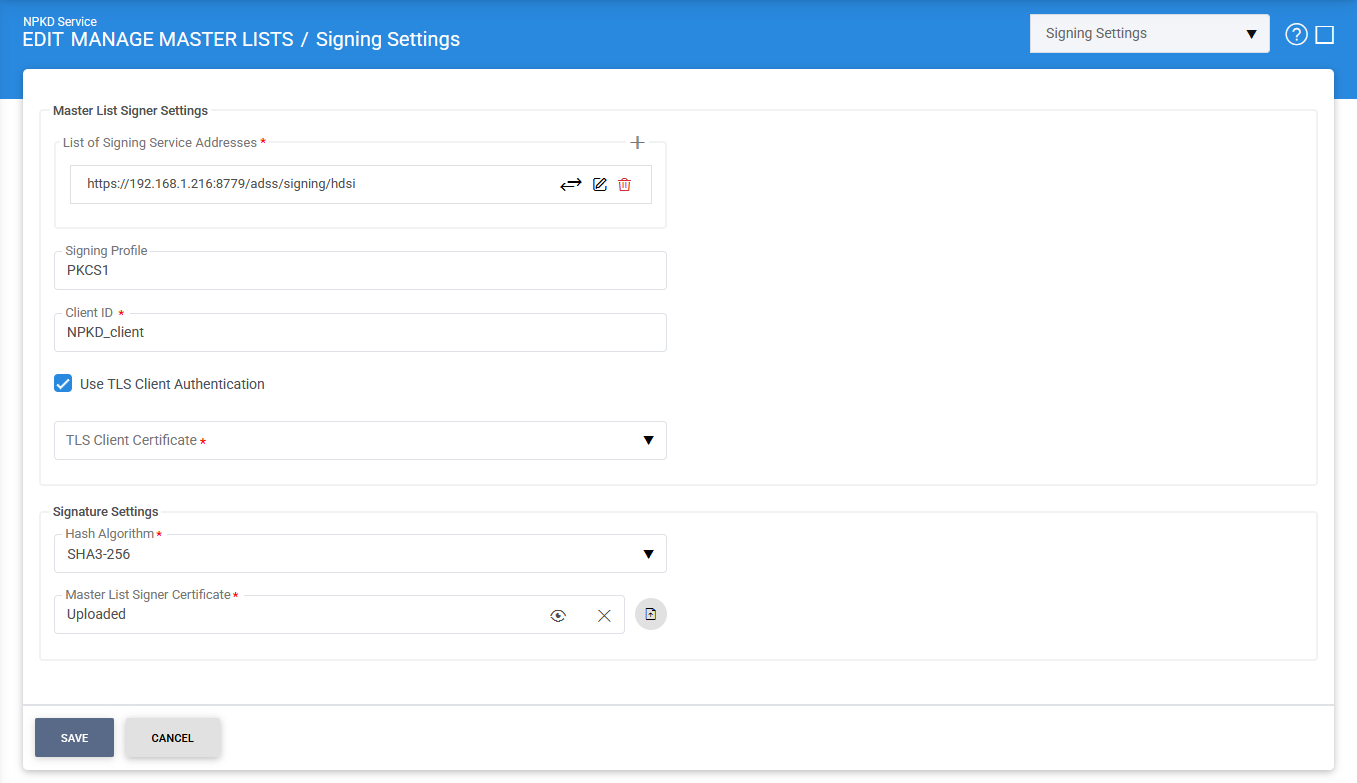
The configuration items are as follows:
|
Items |
Description |
||
|
Signing Service Address |
Specifies the network address of the Signing Service with which the NPKD Service communicates to sign Domestic Master Lists. |
||
|
List of Signing Service Addresses |
Displays the list of configured Signing Service addresses. Click Add to add one or more Signing Service addresses. |
||
|
Signing Profile |
Specifies the Signing Service profile that will be used to digitally sign Domestic Master Lists. |
||
|
Client ID |
Specifies the Client ID registered in the Client Manager of the Signing Service. This Client ID is used by the NPKD Service to authenticate when requesting signing operations. |
||
|
TLS Communication |
When enabled, communication between the NPKD Service and the Signing Service is secured using TLS client authentication. |
||
|
Certificate |
Specifies the TLS client certificate used by the NPKD Service to authenticate with the Signing Service when TLS Communication is enabled. The certificate must be available in the ADSS Server and selected from the list of configured certificates. |
||
|
Hash Algorithm |
Specifies the hash algorithm used to generate the digest of the Master List before it is sent to the Signing Service for signing. Only the computed hash is transmitted to the Signing Service. The supported hash algorithms are:
|
||
|
Master List Signer Certificate |
Specifies the Master List Signer certificate associated with the Signing Service. This certificate is embedded in the digital signature applied to the Master List and is used by receiving parties to verify the authenticity and integrity of the signed Master List. The certificate can be imported from the local file system.
|

After configuring the required settings, click Save to store the configuration.
Once the configuration has been saved successfully, the NPKD Service is ready to communicate with the Signing Service to digitally sign Domestic Master Lists.
See also