
Step 2 - Configuring ICAO PKD Download Settings
The ICAO PKD Download Settings are used to retrieve Document Signer (DS) certificates, Master Lists (containing foreign CSCA certificates), and Certificate Revocation Lists (CRLs) from the ICAO Public Key Directory (PKD). Once downloaded, this data is stored locally by the ADSS NPKD Service and can be provided to Inspection Systems (IS) upon request.
This configuration section also allows administrators to define polling intervals for automatically retrieving updated data from the ICAO PKD.
To configure ICAO PKD Download Settings, navigate to the following screen in the ADSS Server console:
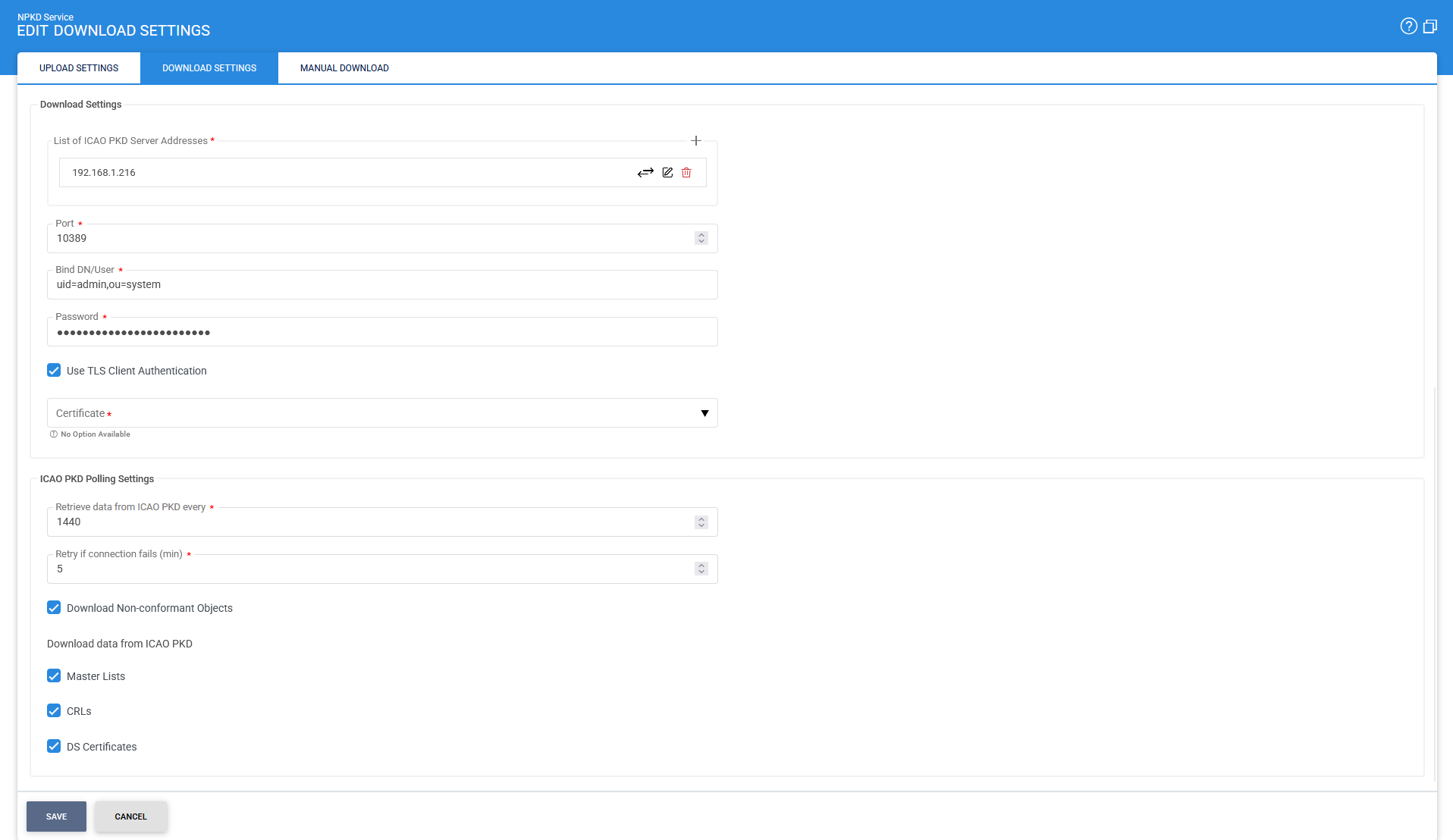
The configuration parameters are described below:
|
Items |
Description |
|
ICAO PKD Server Address |
Specifies the LDAP server address of the ICAO PKD from which data will be downloaded. |
|
List of ICAO PKD Server Address |
Allows multiple ICAO PKD server addresses to be configured. Click Add to add one or more server addresses. The configured addresses are displayed in this field. |
|
Port |
Specifies the LDAP server port used for communication. The default port is 10636. |
|
Bind DN/User |
Specifies the distinguished name (DN) or user ID used to bind to the LDAP server. |
|
Password |
The password associated with the Bind DN/User for authentication. |
|
Use TLS Client Authentication |
When enabled, the NPKD Service communicates with the ICAO LDAP server using TLS client authentication. Select the required TLS client certificate from the Key Manager. The certificate can be selected from the available list using the drop-down menu displayed when this option is enabled. Note: The Issuer CA of the selected TLS client authentication certificate must be registered in the Trust Manager with the appropriate CA purpose to validate TLS client certificates. |
|
Retrieve Data from ICAO PKD |
Specifies the polling interval, in minutes, at which the NPKD Service automatically retrieves data from the ICAO PKD. |
|
Retry if Connection Fails |
Specifies the interval, in minutes, after which the NPKD Service attempts to reconnect and retrieve data if communication with the ICAO PKD fails. |
|
Download Non-conformant Objects |
Enables the download of non-conformant objects that do not fully comply with ICAO standards. |
|
Download Data from ICAO PKD |
Enables the download of selected object types from the ICAO PKD. The available object types include:
|
Ensure that all configuration settings are saved by clicking the Save button.
After completing the above configurations, the LDAP base path must be defined to enable data retrieval from the ICAO PKD. To configure the base path, click here.
See also
Step 1 - Configuring ICAO PKD Upload Settings
Step 2 - Configuring ICAO PKD Download Settings
Step 3 - Registering Business Application
Step 4 - Using the Service Manager