
Manual Download
The Manual Download tab is used to manually retrieve objects from the ICAO Public Key Directory (PKD). Before performing a manual download, the ICAO PKD Download Settings must be properly configured, and the required base paths must be defined under the Advanced Settings of the NPKD Service.
To manually download data from the ICAO PKD, navigate to the following screen in the ADSS Server console:
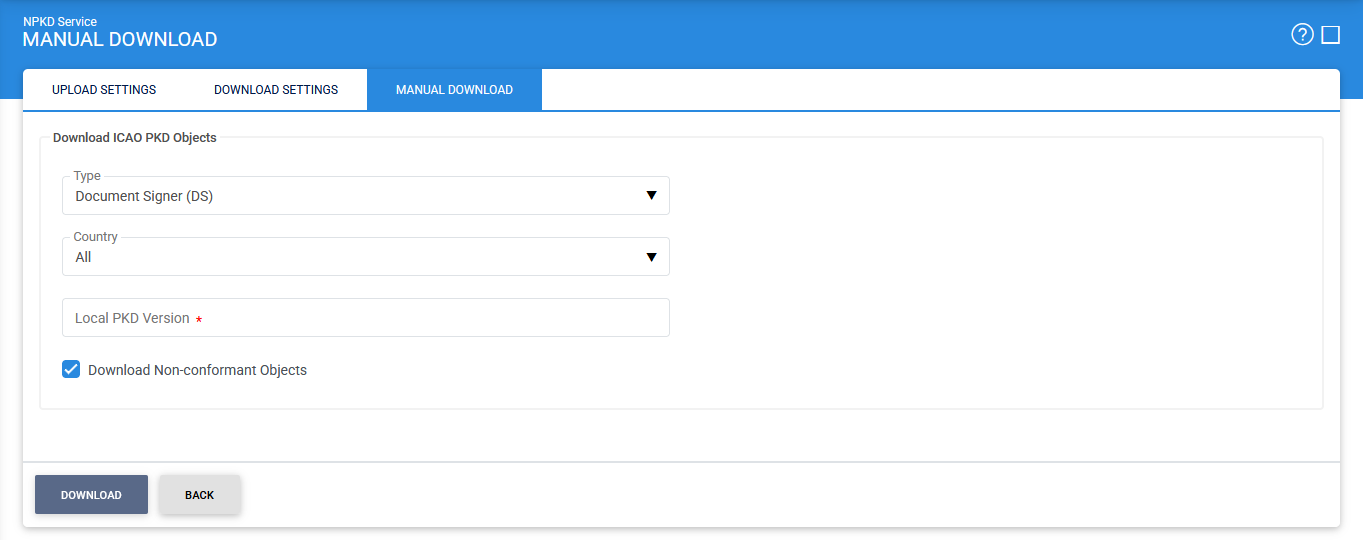
The configuration items are described below:
|
Items |
Description |
|
Server Name |
Specifies the address of the NPKD Service instance managed by this Service Manager. Ensure that the address points to the correct service URL. In a load-balanced deployment with multiple service instances, verify that the selected server corresponds to the specific instance that you want to start, stop, or restart. By default, the local server is selected. |
|
Start |
Starts the NPKD Service. After the service starts successfully, the status changes to Running. |
|
Stop |
Stops the NPKD Service. After the service is stopped successfully, the status changes to Stopped. |
|
Restart |
Stops and then starts the NPKD Service in a single operation. After a successful restart, the status changes to Running. |
|
Log NPKD Service Transactions |
When enabled, all NPKD Service transactions, except low-level operations, are recorded in the ADSS NPKD database. When disabled, transaction records are not stored in the database. Disabling transaction logging can improve system performance in high-throughput environments where logging overhead is not required. |
|
Home Country |
Specifies the country associated with the NPKD Service deployment. The service uploads only those Master Lists, CRLs, and Document Signer (DS) certificates that belong to the selected home country to the ICAO PKD. |
See also
Configuring the NPKD Service
Manual Download
Manage Certificates