
Step 3 - Using the Service Manager
After making any configuration changes in the HMAC Service, the service must be restarted for the changes to take effect. The HMAC Service Manager module allows operators to start, stop, or restart the service, as well as manage service-related configurations. To access these options, click the “Service Manager” button to open the configuration screen:
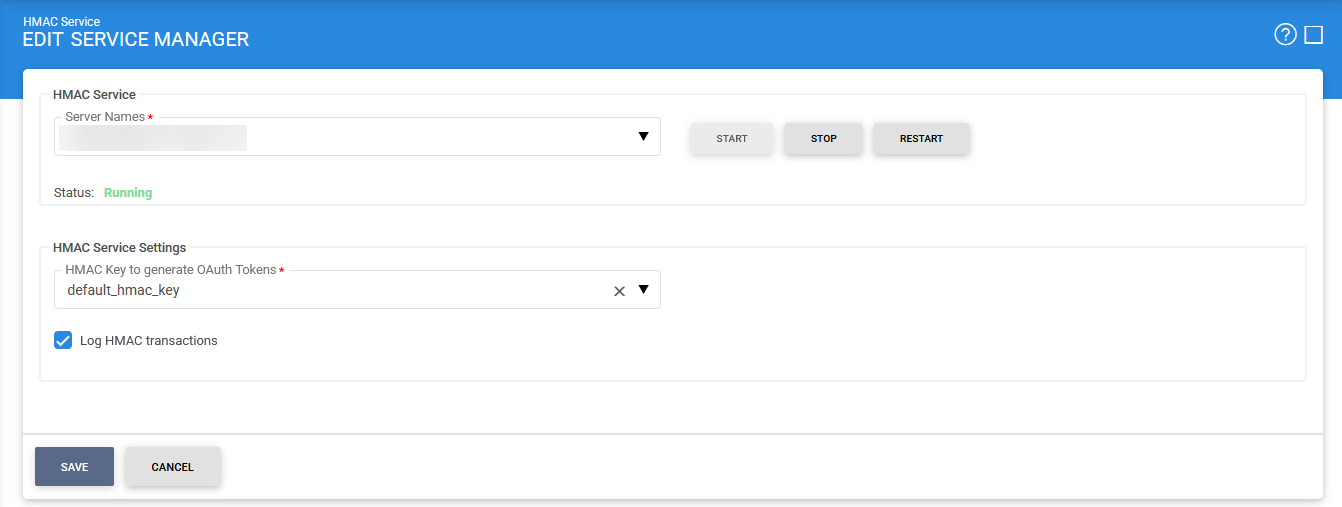
The available configuration options are described below:
|
Items |
Description |
|
Service Address |
Specifies the address of the HMAC Service managed through this module. Ensure the URL is correct, especially in load-balanced environments where multiple service instances are running. By default, this is set to the local machine. |
|
Start |
Start the service. Status will change to “Running” after a successful start. |
|
Stop |
Stop the service. Status will change to “Stopped” after the service is stopped. |
|
Restart |
Stop and then start the service in one go, Status will change to “Running” after a successful restart. |
|
Log HMAC Transactions |
When enabled, all HMAC transactions are recorded in the ADSS Server database. When disabled, transactions are not logged. Disabling logging can improve performance in high-throughput environments where logging may introduce overhead. |
|
HMAC key to Generate OAuth Tokens |
Select an HMAC key (configured in the Key Manager) to generate OAuth tokens. A default key is included with the ADSS Server installation; however, it is recommended to replace it with a custom key. This key can be stored in software (database) or on a PKCS#11 device, such as an HSM. |
|
|
Ensure all the changes are saved by clicking the Save button and restart the service to take changes effect. |

See also
Step 1 - Generating HMAC Keys
Step 2 - Configuring HMAC Profile
Step 3 - Using the Service Manager