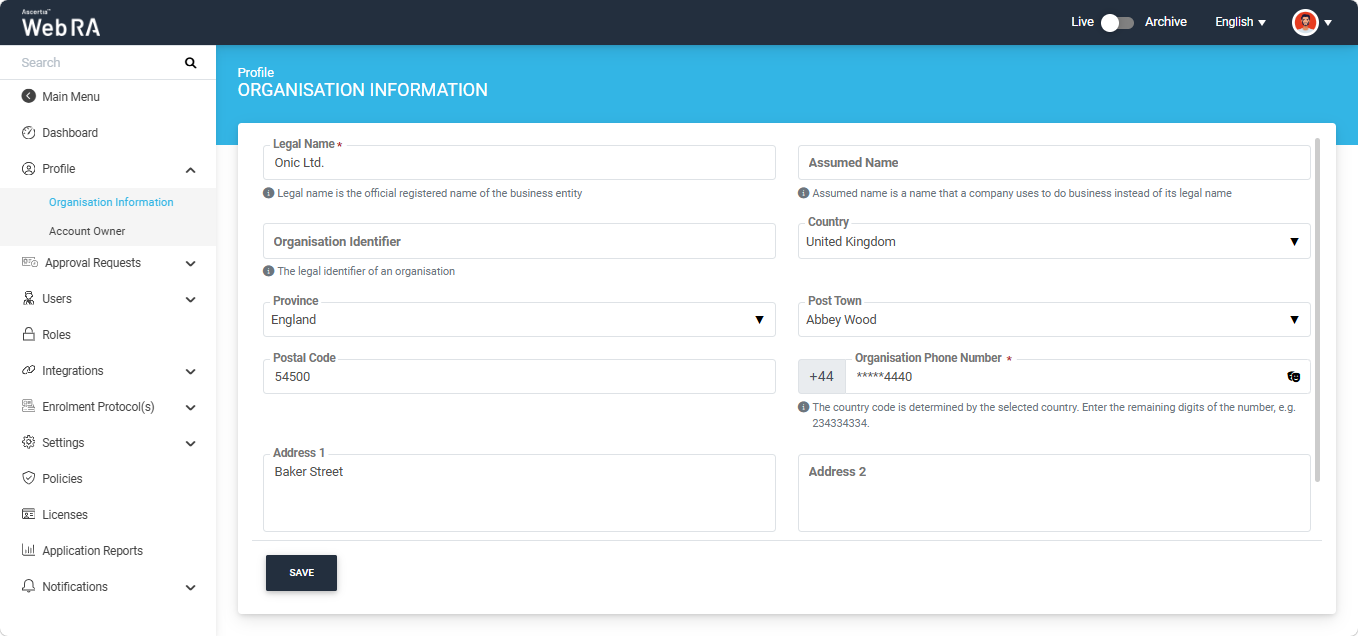
This section entails all the necessary information related to an enterprise/organisation. The screen appears as follows:
|
Field
|
Description
|
|
Legal Name
|
It is mandatory to enter the official registered name of the business entity.
|
|
Assumed Name
|
Enter the name that a company uses to perform its business.
|
|
Organisation Identifier
|
Enter the organisation's legal identifier, such as its registration number.
|
|
Country
|
Select the country in which the organisation is registered. The list displays only the countries allowed by the administrator. If you change the selected country, the State and City fields are cleared, and the phone country code is updated accordingly.
|
|
Province / State
|
Select the state or province from the list. Only the states or provinces associated with the selected country are displayed. The field name changes according to the selected country; for example, it is displayed as Province for Canada and State for United States of America.
|
|
City / Post Town
|
Select a city or post town from the list. This field is editable only after a state or province has been selected and displays only the cities/post towns associated with that state or province. The field name changes according to the selected country; for example, it is displayed as City for France and Post Town for United Kingdom.
|
|
Postal Code Zip Code
|
Enter the postal code in the format required by the selected country. If the entered postal code does not match the required format, an error message is displayed. The field name changes according to the selected country; for example, it is displayed as Postal Code for United Kingdom and Zip Code for United States of America.
|
|
Organisation Phone Number
|
Enter the organisation's phone number without the country code. The country code is automatically updated based on the selected country and displayed before the field (for example, +1). The entered number is partially masked; click the eye icon to view the complete number. This is a mandatory field.
|
|
Address 1
|
Enter the current address of the organisation. This is a mandatory field.
|
|
Address 2
|
You can add another address of the organisation. This is an optional field
|
|
Service Plan
|
You can select/change a service plan for the enterprise or organisation as required.
|
|
Status
|
Select a status for the enterprise or organisation from the following:
- Active - An enterprise will be activated to perform all operations configured in its service plan
- Suspended - An enterprise will be allowed to perform limited operations after login
- Blocked - An enterprise will not be allowed to access the application.
- Deactivated - A deactivated enterprise cannot be activated again.
|
Note: The country selected here is used as the default country for this enterprise's users. For example, when you invite a user to this enterprise, the Country field is already populated with the country selected on this screen.
Click 'Save' after making any changes to the information in the displayed fields.
