
Account Owner
This section allows the Enterprise Owner to update their account information, as shown in the screenshot below.
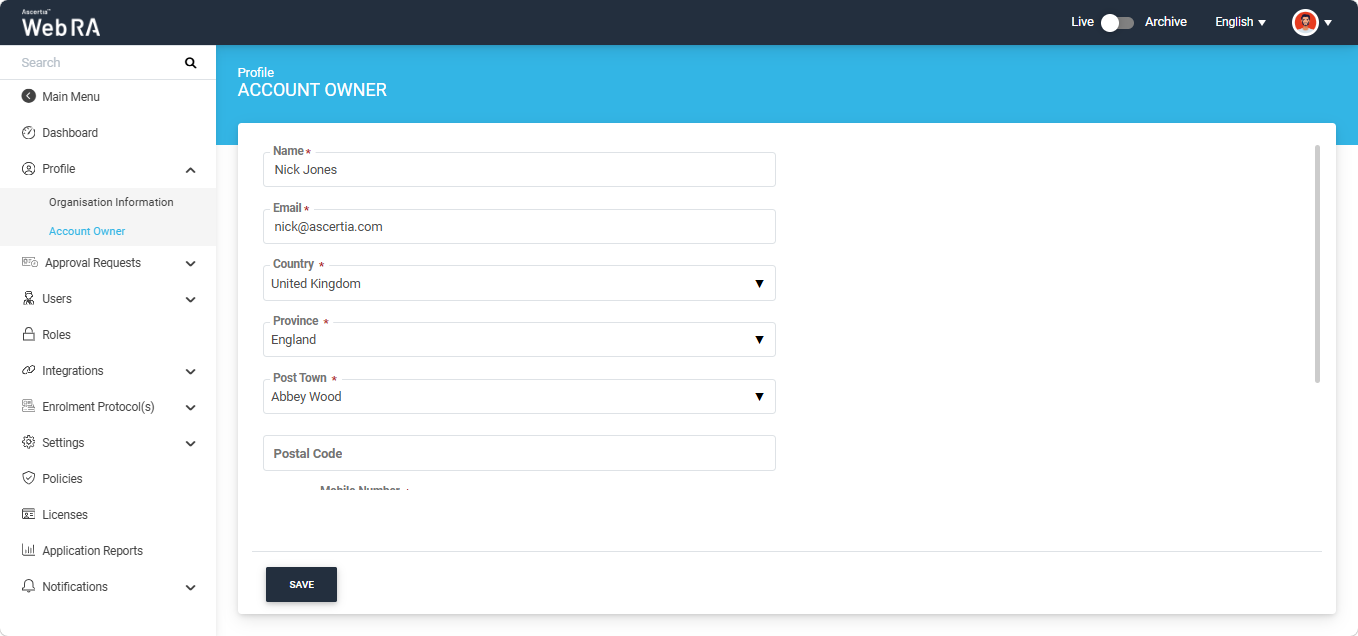
|
Field |
Description |
|
Name |
Enter the name of the account owner. |
|
|
Enter the email of the account owner. |
|
Country |
Select the country in which the organisation is registered. The list displays only the countries allowed by the administrator. If you change the selected country, the State and City fields are cleared, and the phone country code is updated accordingly. |
|
Province |
Select the state or province from the list. Only the states or provinces associated with the selected country are displayed. The field name changes according to the selected country; for example, it is displayed as Province for Canada and State for United States of America. |
|
City / Post Town |
Select a city or post town from the list. This field is available only after a state or province has been selected and displays only the cities/post towns associated with that state or province. The field name changes according to the selected country; for example, it is displayed as City for France and Post Town for United Kingdom. |
|
Postal Code / Zip Code |
Enter the postal code in the format required by the selected country. If the entered postal code does not match the required format, an error message is displayed. The field name changes according to the selected country; for example, it is displayed as Postal Code for United Kingdom and Zip Code for United States of America. |
|
Mobile Number |
Enter the mobile number without the country code. The country code is automatically updated based on the selected country and displayed before the field (for example, +1). The entered number is partially masked; click the eye icon to view the complete number. This is a mandatory field. |
|
Job Title |
Enter the job title of the account owner. |
There is only one account owner of an enterprise. The account owner is responsible for registering and managing the users of an enterprise.