
Logs Archiving
Transaction logs are essential for maintaining a secure and trustworthy system because they provide a historical record that can be used for auditing and investigation, particularly when reviewing or resolving disputes related to actions performed through ADSS Server.
The Logs Archiving feature helps manage the size and performance of the ADSS Server database by periodically moving older transaction log records from the database to archived files. This reduces the amount of historical data that needs to be maintained in the active database and helps prevent the database from becoming unnecessarily large and inefficient.
By default, log archiving is configured to:
- Auto-archive every: 30 days
- Archive records older than: 90 days
Each transaction record can occupy several kilobytes of database storage. For systems with relatively low transaction throughput, the Archive records older than value can be increased to 120 or 180 days, depending on the organisation's retention requirements and available database capacity.
Log Archiving Options
The Logs Archiving configuration allows operators to:
- Enable or disable automatic log archiving.
- Specify how frequently logs are archived.
- Specify the age of logs that should be archived.
- Specify the time at which automatic archiving is performed.
- Manually archive all available transaction logs.
- Optionally delete archived records from the database.
When automatic archiving is enabled, eligible transaction records are periodically moved from the database to a ZIP file containing CSV data.
Archived transaction logs can later be imported into ADSS Server when historical records are required for auditing or investigation. For more information, see Transaction Logs.
|
|
Important: Log archiving is a resource-intensive operation and can temporarily affect system performance. It is recommended to schedule automatic archiving during off-peak hours, when transaction volumes are low. |

|
|
Note: For environments with high transaction volumes, consider deploying a dedicated, load-balanced ADSS Server instance for housekeeping operations. This can be achieved by deploying the ADSS Server Core and Service instances on separate machines. |
The integrity of archived logs can also be preserved by signing the archived log file using a Log Signing key, this configuration is available within the Global Settings > System Certificates module:
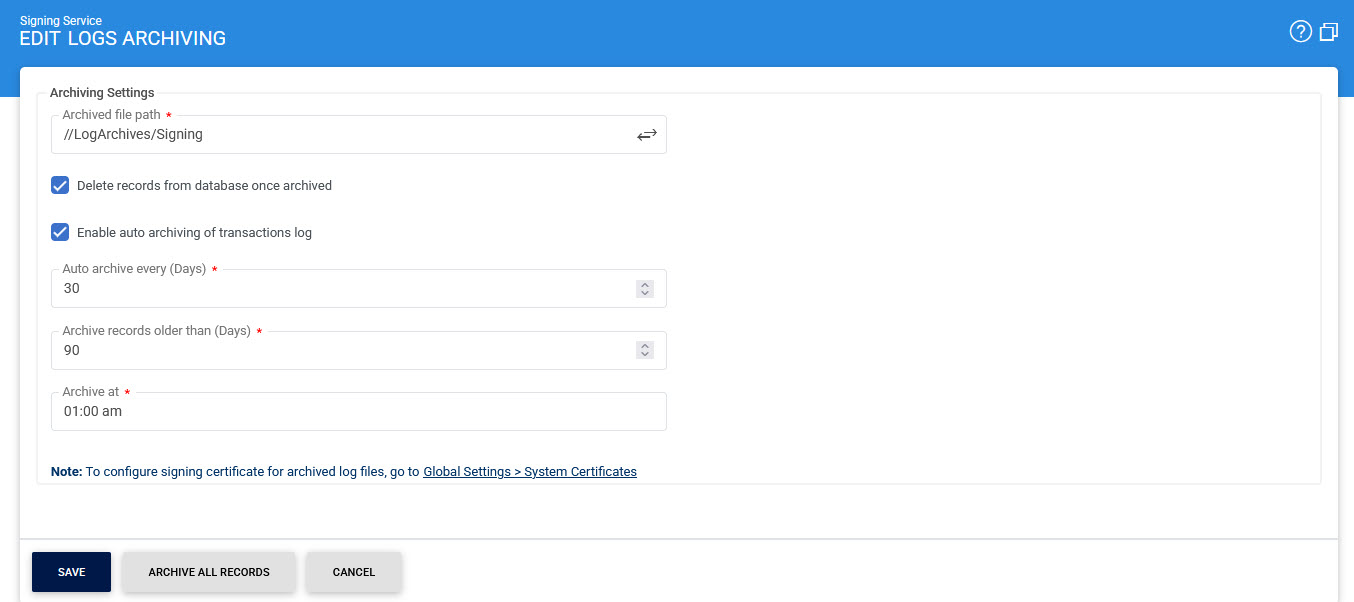
The items in screenshot are described below:
|
Items |
Description |
|
Archived file path |
Specifies the location where archived transaction logs are stored. The archived logs are saved as ZIP files containing CSV data. |
|
Delete records from database once archived |
Specifies whether transaction records should be deleted from the database after they have been successfully archived. If this option is not selected, the archived records remain in the database. In this case, archiving provides a backup of the records but does not reduce the database size. Select this option carefully based on the organisation's data-retention and archiving requirements. |
|
Enable auto-archiving |
Enables automatic archiving of transaction logs based on the configured archiving schedule. |
|
Auto-archive every |
Specifies the frequency, in days, at which ADSS Server performs automatic log archiving. |
|
Archive records older than |
Specifies the age, in days, of transaction records that are eligible for automatic archiving. Records older than the configured value are archived when the scheduled archiving operation runs. |
|
Archive at |
Specifies the time of day when automatic archiving is performed. Configure this time during off-peak hours to minimise the potential impact on system performance. |
|
Archive All Records |
Immediately archives all available transaction logs to the configured Archived file path, regardless of their age. |
Click Save to apply the configuration changes.
Archived Log File Handling
Archived log files contain transaction data that may be required for future auditing or investigation. To preserve the integrity of these files, they should not be modified after they have been archived.
|
|
Do not open archived log files in Microsoft Excel. Excel may modify the contents of the file when it is opened, which can invalidate the log integrity information. As a result, the integrity of the records may no longer be verifiable when the archived logs are imported into ADSS Server. |
If you need to inspect the contents of an archived file without modifying it, you can open it using a plain-text editor such as Notepad.
For detailed viewing and analysis of archived transaction or authentication logs, import the files into the Transaction Logs viewer in ADSS Server. This allows ADSS Server to process the archived records while preserving the information required for log integrity verification.
See also
Configuring the Signing Service
Alerts
Signing Service Interface URLs
Optimising ADSS Signing Server Performance