
Alerts
The service can be configured to generate email, SMS and/or SNMP alerts when the following events occur:
- Failed to sign verification response messages
- An Internal error occurred (Reasons include database or space not available, etc.)
- If the service is unable to use log signing key at auto-archiving time
- When archiving is successfully completed
The system operators that will receive these can be defined within the service GUI.
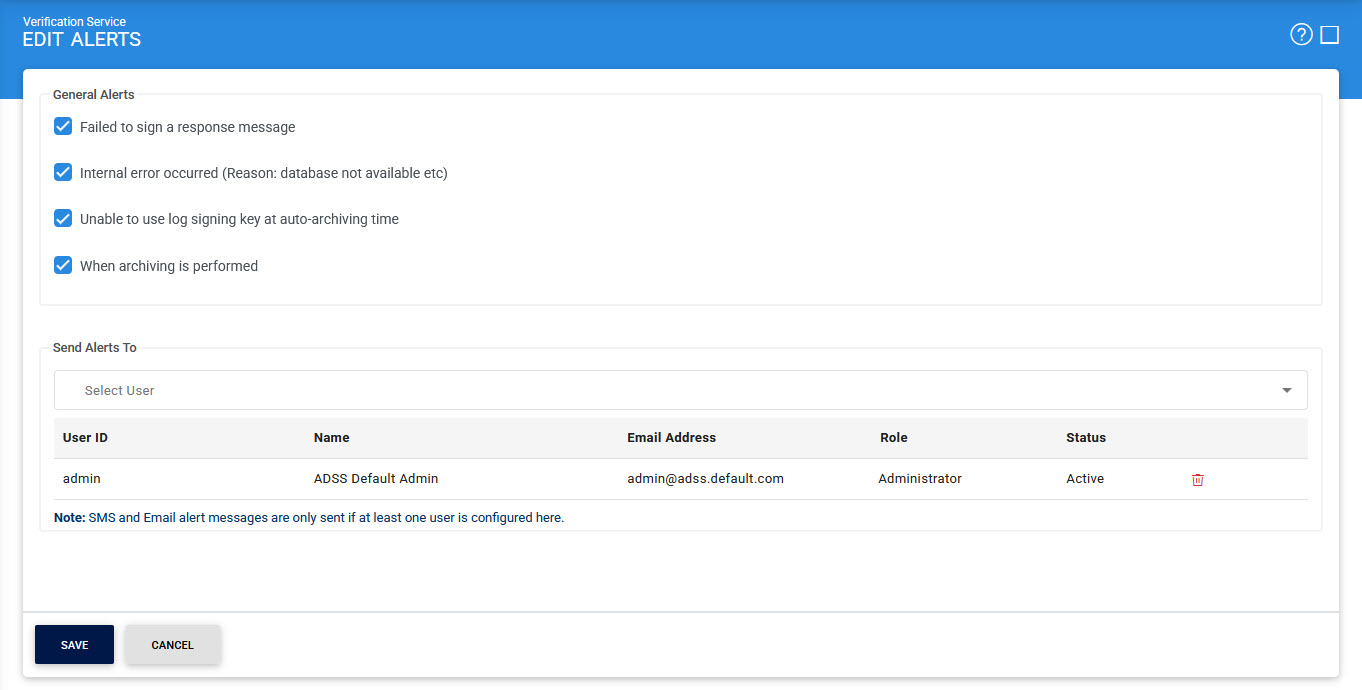
The configuration items are as follows:
|
Items |
Description |
|
Failed to sign a response message |
When enabled, an email alert is sent to selected system operators whenever verification response signing fails for online requests. |
|
Internal error occurred |
When enabled, an alert is sent whenever an internal error has occurred during the request processing (e.g. database was not accessible). |
|
Unable to use log signing Key at auto-archiving time |
When enabled, an alert is sent whenever system is unable to use the Log Signing Key at auto-archiving time. Note: The Log Signing Key is configured in Global Settings > System Certificates module. |
|
When archiving is performed |
When enabled, service will send an alert whenever auto-archiving is performed. |
|
Select User |
This drop-down enables the user to select who will receive the alerts. Once the user is selected, its details, including user ID, name, email address, role, and status, will be displayed in a tabular format.. |
Click Save button for the changes to take effect.
See also
Configuring the Verification Service