
Locale
This section in the web portal is used to specify regional information, so that your account configurations can be customised according to your geographical location. Once specified, ADSS Web RA will start manipulating your transactions according to your time zone, and will change the entire interface based on your selected language.
See the following steps to specify your locale information:
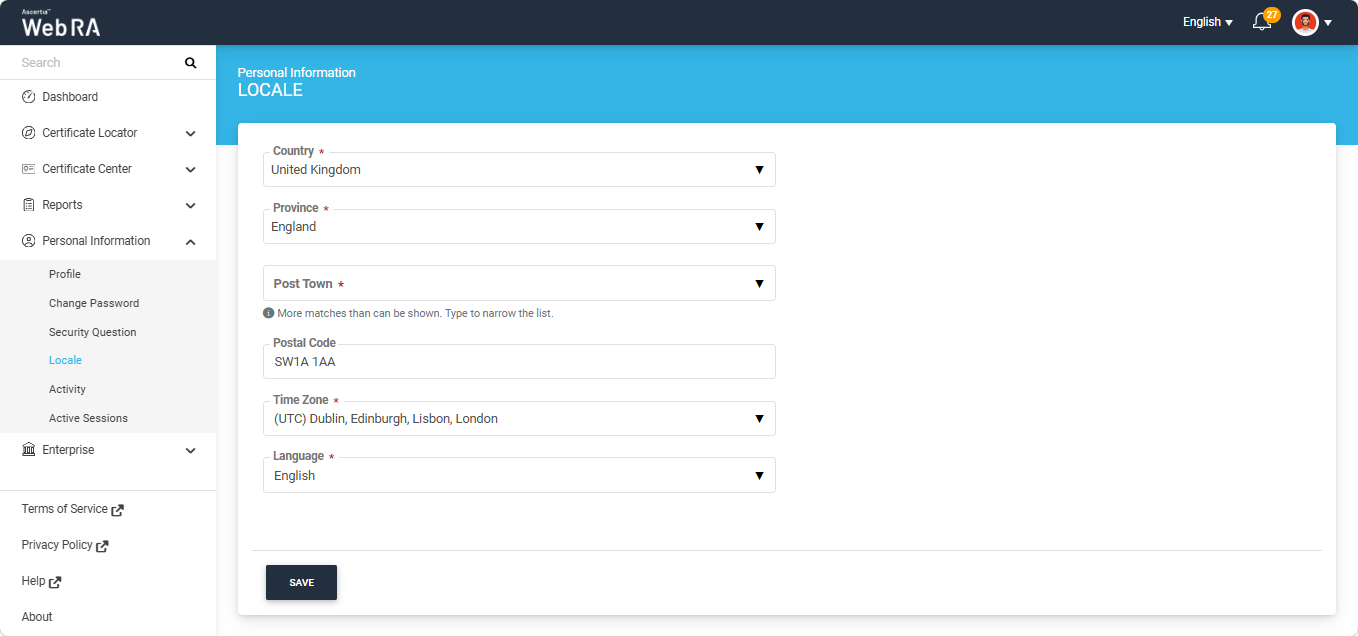
Expand Personal Information > Locale from the left menu in the Web Portal. The fields appearing on this screen are explained in the table below:
|
Field |
Description |
|
Country |
Select your country. You can change the selected country only if your administrator has allowed country changes. |
|
Province / State |
Select your province or state from the list. The field name changes according to the selected country; for example, it is displayed as State for the United States of America. |
|
City / Post Town |
Select your city from the list. This field is available only after a province or state has been selected. The field name changes according to the selected country; for example, it is displayed as Post Town for the United Kingdom. |
|
Postal Code |
Enter your postal code in the format required by the selected country. The field name changes according to the selected country; for example, it is displayed as Postal Code for the United Kingdom and ZIP Code for the United States of America. |
|
Time Zone |
Select your time zone. All dates and times displayed in the application are based on the selected time zone. |
|
Language |
Select the language used to display the application screens. Currently, ADSS Web RA supports the following languages, which enable the global users to use the application in their native language.
|
Note: If you change your country, the Province and City are cleared. Select them again before you click Save.
|
|
All these locale settings are controllable from ADSS Web RA Admin portal, see Default Settings for details. |