
Miscellaneous Settings
Some additional advanced settings are defined in the following screen:
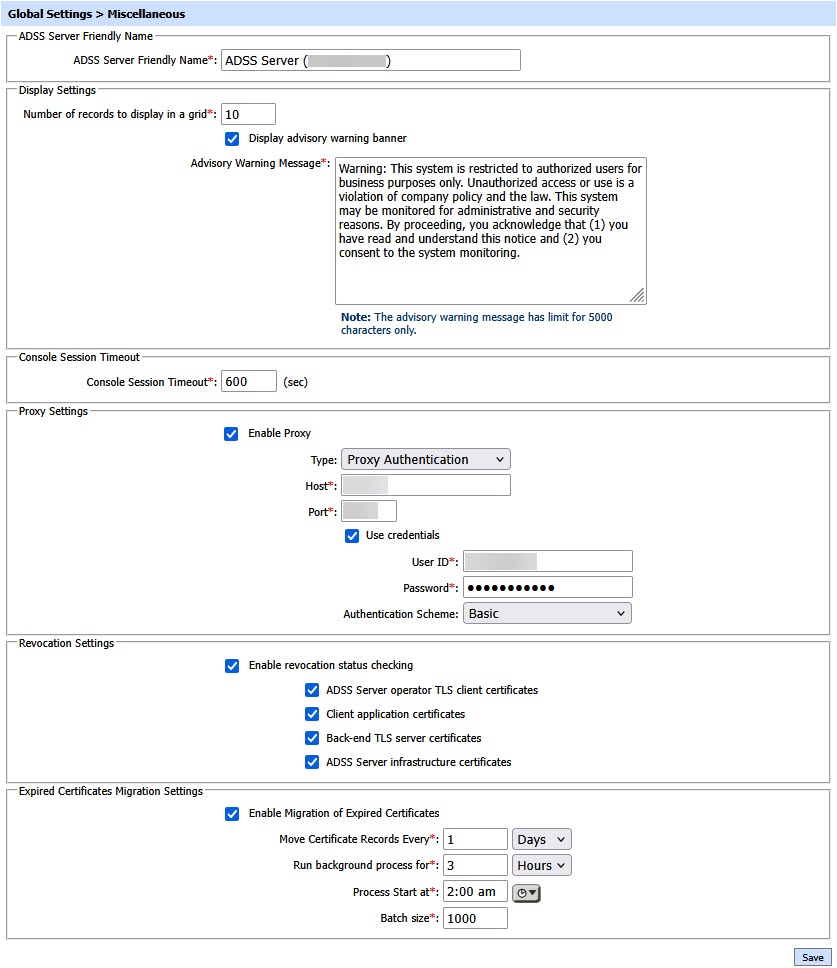
The configuration items are as follows:
|
Item |
Description |
||||
|
ADSS Friendly Name |
Defines a unique name for easier recognition of this ADSS Server instance.
|
||||
|
Number of records to display in each grid |
Defines how many records to show within the tabular ‘grid’ output layout within the ADSS Server GUI screens. |
||||
|
Display Advisory Warning Banner |
If this checkbox is enabled, an advisory warning message will be displayed to the operator before login. The warning message may contain an advisory regarding the legal bindings for the usage of the system. The operator can modify the content of the warning message by using the Advisory Warning Message field. Note: Maximum character limit for Advisory Warning Message field is 5000 characters. |
||||
|
Console Session Timeout |
Session timeout can be configured by specifying the time in this field. |
||||
|
Proxy Settings |
When enabled, this check box allows the configuration of the proxy settings. Select the type of authentication required, i.e. proxy or web server authentication.Then it is possible to configure authentication based on user ID and password. The use of proxy digest authentication can also be enabled (if required). Note: Digest authentication and NTLM v1 and v2 authentication are supported. |
||||
|
Revocation Checking |
If this option is enabled, revocation status checking for the following can be individually set:ADSS operator's TLS client certificates, client application's TLS and other certificates, Back-end TLS server certificates and ADSS infrastructure certificates (includes certificates used by Signing, Verification, Certification, TSA, OCSP, XKMS, LTANS etc.) Note: This additional check will impact service performance. |
||||
|
Enable Migration of Expired Certificates |
When enabled, the system automatically moves expired certificates to the Expired Certificates section based on the configured schedule. Enabling this option activates the related migration settings listed below.
|
||||
|
Move Certificate Records Every |
Specifies how frequently the system should run the process to identify and move expired certificates. The migration process will execute after the configured number of days. |
||||
|
Run Background Process for |
Defines the duration for which the background migration process will run each time it starts. It is recommended to configure this during off-peak hours to minimize impact on system performance. |
||||
|
Process Start At |
Specifies the time at which the expired certificate migration process should begin. This allows the operators to schedule the process at a convenient time, such as during low system usage periods.
|
||||
|
Batch Size |
Defines the number of certificate records processed in a single batch during the migration. Adjusting the batch size helps balance migration speed and system performance, especially in environments with a large number of certificates.
|

Click the Save button to complete the settings.
See also
NTP Time Monitoring
Timestamping
Connectors
Real Time Revocation
Notification Settings
System Alerts
High Availability
System Security
Authentication Profiles
Authorisation Profiles
Import/Export Settings
License Manager
Advanced Settings